
"Install" button greyed out??

MrRedman

New member
Local time
6:27 PM
Messages
9
Location
London
Hey forum,

I've been having a problem installing San Andreas Multiplayer on my system. The problem is I don't have an option to install the program as the "Install" button is greyed out. Even when choosing various different directories, the result is still the same:
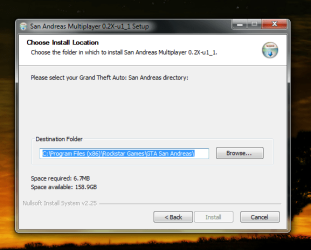
Install problem.png

Notes:

- I am the system administrator
- The program is free, there is no use of keygens or serials
- I have McAfee temporarily disabled but still no luck


Any help is greatly appreciated :thumbsup:
 

My Computer

Computer Manufacturer/Model Number
Dell Inspiron 1545
OS
Windows 7 Home Premium x64
CPU
Intel Celeron 900 @ 2.20 Ghz
Motherboard
Dell
Memory
250 GB - 3 GB RAM
Graphics Card(s)
Intel GMA 4500MHD Dynamic Video Memory Technology 5.0
Sound Card
High Defnition Audio Device
Monitor(s) Displays
Standard laptop 15.6" and Philips 190CW 19" Monitor
Screen Resolution
1366 x 788 (laptop) and 1440 x 900 (monitor)
Hard Drives
ST9250315AS and WD Elements 320 GB external.
PSU
N/A
Case
Glossy surface with cherry red cover.
Cooling
Fan
Keyboard
Microsoft Wireless Keyboard 6000 V3
Mouse
Microsoft Wireless Laser Mousee 6000 V2
Other Info
Nothing too fancy XD
Try in safe mode
 

My Computer

Computer type
PC/Desktop
Computer Manufacturer/Model Number
Dell XPS 420
OS
Windows 10, Home Clean Install
CPU
Intel Core2 processsor Q8200(2.33Ghz 1333FSB) Quad Core Tech
Motherboard
Dell
Memory
6 gb
Graphics Card(s)
ATI Radeon 256MB HD3650
Sound Card
Intergrated 7.1 Channel Audio
Monitor(s) Displays
Dell SP2009W 20"
Hard Drives
640 GB Serial ATA Hard drive
Cooling
Fan
Keyboard
Dell USB Keyboard
Mouse
Dell Premium Optical USB
Internet Speed
DSL 2.85
If this is an older game, you may need to both Install and possibly also Run in Compatibiliity Mode with Vista or XP. Rightclick the .exe file, look on Properties tabs.

I would replace MucAfee with lightweight free MS Security Essentials which is as effective but totally invisible.
 
I've seen that with Half-life mods as well that use NSIS for their installer - if the installer doesn't detect the game in that location (not if it's not there, mind you, but the installer doesn't *think* it's there), the install button would be grayed out no matter where you set the directory to. You might want to contact the group that wrote the package to see if that's what is happening, because that's what it looks like is happening.
 

My Computer

Computer type
PC/Desktop
Computer Manufacturer/Model Number
Custom
OS
Windows 10 Pro x64
CPU
Intel Core i7 4790K @ 4.5GHz
Motherboard
Asus Maximus Hero VII
Memory
32GB DDR3
Graphics Card(s)
Nvidia GeForce GTX970
Sound Card
Realtek HD Audio
Screen Resolution
1920x1200
Hard Drives
1x Samsung 250GB SSD
4x WD RE 2TB (RAIDZ)
PSU
Corsair AX760i
Case
Fractal Design Define R4
Cooling
Noctua NH-D15
Try in safe mode

If this is an older game, you may need to both Install and possibly also Run in Compatibiliity Mode with Vista or XP. Rightclick the .exe file, look on Properties tabs.

I would replace MucAfee with lightweight free MS Security Essentials which is as effective but totally invisible.

Unfortunately there was no luck with Safe Mode.

As for the Compatibility Mode suggestion, I've tried that in the past with other programs but unfortunately it didn't work THIS time.
 

My Computer

Computer Manufacturer/Model Number
Dell Inspiron 1545
OS
Windows 7 Home Premium x64
CPU
Intel Celeron 900 @ 2.20 Ghz
Motherboard
Dell
Memory
250 GB - 3 GB RAM
Graphics Card(s)
Intel GMA 4500MHD Dynamic Video Memory Technology 5.0
Sound Card
High Defnition Audio Device
Monitor(s) Displays
Standard laptop 15.6" and Philips 190CW 19" Monitor
Screen Resolution
1366 x 788 (laptop) and 1440 x 900 (monitor)
Hard Drives
ST9250315AS and WD Elements 320 GB external.
PSU
N/A
Case
Glossy surface with cherry red cover.
Cooling
Fan
Keyboard
Microsoft Wireless Keyboard 6000 V3
Mouse
Microsoft Wireless Laser Mousee 6000 V2
Other Info
Nothing too fancy XD
I've seen that with Half-life mods as well that use NSIS for their installer - if the installer doesn't detect the game in that location (not if it's not there, mind you, but the installer doesn't *think* it's there), the install button would be grayed out no matter where you set the directory to. You might want to contact the group that wrote the package to see if that's what is happening, because that's what it looks like is happening.


Will do... In the mean time, any other suggestions or potential solutions will be greatly appreciated.

Thanks richc46, gregrocker and cluberti :geek:
 

My Computer

Computer Manufacturer/Model Number
Dell Inspiron 1545
OS
Windows 7 Home Premium x64
CPU
Intel Celeron 900 @ 2.20 Ghz
Motherboard
Dell
Memory
250 GB - 3 GB RAM
Graphics Card(s)
Intel GMA 4500MHD Dynamic Video Memory Technology 5.0
Sound Card
High Defnition Audio Device
Monitor(s) Displays
Standard laptop 15.6" and Philips 190CW 19" Monitor
Screen Resolution
1366 x 788 (laptop) and 1440 x 900 (monitor)
Hard Drives
ST9250315AS and WD Elements 320 GB external.
PSU
N/A
Case
Glossy surface with cherry red cover.
Cooling
Fan
Keyboard
Microsoft Wireless Keyboard 6000 V3
Mouse
Microsoft Wireless Laser Mousee 6000 V2
Other Info
Nothing too fancy XD
One problem with McAfee is that it thinks it knows more than you do. When you "disable" it, it is still running in the background. The only effective way of turning it off, is to uninstall it using the McAfee removal tool (the built in uninstaller sucks, and even McAfee recommends using a third party uninstaller). A link to the download below.

http://download.mcafee.com/products/licensed/cust_support_patches/MCPR.exe
 

My Computer

Computer type
Laptop
Computer Manufacturer/Model Number
Toshiba P775-S7100
OS
Windows 7 Professional SP1 64-bit
CPU
Intel Core i5-2450M @2.5 GHz
Memory
6 GB DDR3 1333MHz
Graphics Card(s)
Intel HD 3000
Monitor(s) Displays
Built-in 17.3" LED; 22" Insignia NS-L22Q-10A
Screen Resolution
1600x900; 1360x768
Hard Drives
750 GB Hitachi
1TB Seagate FreeAgent External
Internet Speed
Verizon DSL Speed(Down/Up): 3360 Kbps / 800 Kbps
Antivirus
MSE and MBAM Pro
Browser
IE10
Back
Top