Solved install new ssd but keep other HDD installed

My Computer My Computer

At a glance

Vista, Windows7, Mint Mate, Zorin, Windows 8from 1.6GHz Duo to i7
Computer Manufacturer/Model Number
HP, Dell, Gateway, Toshiba - 4 laptops and 2 desktops
OS
Vista, Windows7, Mint Mate, Zorin, Windows 8
CPU
from 1.6GHz Duo to i7
Monitor(s) Displays
2x HP w2207
Hard Drives
5x HDD, 7x SSD, 12x Externals
Keyboard
with trackball - no mices
Mouse
Trackball mice
Internet Speed
DSL 6000
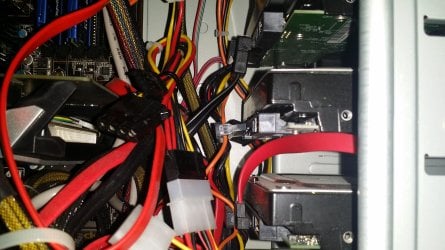
There is a big problem of hardware issue.as you can see on pic all sata power cables are near each other approx 1 inch of distance,which means I can not fit there ssd.I would need longer cable but all of the conectors are on one cable each measuring round 1 inch distance.I would need a cage or 2.5 to 3.5. converter,which I can not find in here..
The disk which olds system is one on the middle,plugged out.
 

Attachments

  • 20140913_102033.jpg
    20140913_102033.jpg
    787.7 KB · Views: 2

My Computer My Computer

At a glance

Windows 7 Ultimate 32bitamd athlon 64 3600+ X2Ati Radeon 3650 HD
OS
Windows 7 Ultimate 32bit
CPU
amd athlon 64 3600+ X2
Motherboard
Biostar NF520-TE
Graphics Card(s)
Ati Radeon 3650 HD
Monitor(s) Displays
Philips 227EL
You can put the SSD anywhere - even on the bottom of the case. I fix mine with Velcro dots - never use the 3.5" to 2.5" adaptors.
 

My Computer My Computer

At a glance

Vista, Windows7, Mint Mate, Zorin, Windows 8from 1.6GHz Duo to i7
Computer Manufacturer/Model Number
HP, Dell, Gateway, Toshiba - 4 laptops and 2 desktops
OS
Vista, Windows7, Mint Mate, Zorin, Windows 8
CPU
from 1.6GHz Duo to i7
Monitor(s) Displays
2x HP w2207
Hard Drives
5x HDD, 7x SSD, 12x Externals
Keyboard
with trackball - no mices
Mouse
Trackball mice
Internet Speed
DSL 6000
Yep there is a slot for ssd at the bottom,local service told me...I installed ssd on sata1 and installed windows 7 on it.very fast boot now.I unplugged all the HDD before that.I put storage config to ahci.what step should I do now?Put back sata mode or keep ahci and plug one HDD at the time...or I can simply plug back all other 3 hdd immediatly?
 
Last edited:

My Computer My Computer

At a glance

Windows 7 Ultimate 32bitamd athlon 64 3600+ X2Ati Radeon 3650 HD
OS
Windows 7 Ultimate 32bit
CPU
amd athlon 64 3600+ X2
Motherboard
Biostar NF520-TE
Graphics Card(s)
Ati Radeon 3650 HD
Monitor(s) Displays
Philips 227EL
You can plug all the hard drives back in now.

Make sure the ssd is set to boot first in the bios.

All the sata ports on the motherboard are labeled, so you should have no problem finding Sata port 0 or Sata port 1, but as mentioned, connect it to a Sata 3 - 6 Gbps port
 
Last edited:

My Computer My Computer

At a glance

Windows 10 Pro x64Intel Core i7 6700KGSkill TridentZ RGB 16GB 3600 16-16-16-36EVGA GTX 980 Ti SC x2
Computer type
PC/Desktop
Computer Manufacturer/Model Number
Skylake Special #666
OS
Windows 10 Pro x64
CPU
Intel Core i7 6700K
Motherboard
Asus Sabertooth Z170 Mark 1
Memory
GSkill TridentZ RGB 16GB 3600 16-16-16-36
Graphics Card(s)
EVGA GTX 980 Ti SC x2
Sound Card
Realtek High Definition
Monitor(s) Displays
AOC G2460PG
Screen Resolution
1920 x 1080 144Hz
Hard Drives
Samsung 860 Pro 256GB, Seagate Barracuda 4TB x2
PSU
EVGA 1000 P2, EVGA White Custom Braided Cables
Case
Corsair Vengeance C70 Gunmetal Black
Cooling
Corsair H100i v2, Corsair ML120 x2, Thermal Grizzly Kryonaut
Keyboard
Logitech G910 Orion Spectrum
Mouse
Logitech G700s
Internet Speed
Verizon Fios Quantum Gateway 75/75
Antivirus
Windows Defender, Malwarebytes Free 3.8.3
Browser
Chrome
Other Info
Corsair SP120 x4, LG Blu-ray Drive, Durabrand HT-395 100 Watt Dolby Digital Amp, Corsair H2100 Wireless 7.1 Headset

My Computer My Computer

At a glance

Vista, Windows7, Mint Mate, Zorin, Windows 8from 1.6GHz Duo to i7
Computer Manufacturer/Model Number
HP, Dell, Gateway, Toshiba - 4 laptops and 2 desktops
OS
Vista, Windows7, Mint Mate, Zorin, Windows 8
CPU
from 1.6GHz Duo to i7
Monitor(s) Displays
2x HP w2207
Hard Drives
5x HDD, 7x SSD, 12x Externals
Keyboard
with trackball - no mices
Mouse
Trackball mice
Internet Speed
DSL 6000
Luckly all of my sata ports are sata3,I checked MB guide.I did as you tole me you guys.I put SSD as first boot device and on sata1.Now I am at job but will continue tommorow
btw what would happen if I plug back the HDD which has previous installation of Windows 7.Can I choose then from which HDD to boot up system?
 

My Computer My Computer

At a glance

Windows 7 Ultimate 32bitamd athlon 64 3600+ X2Ati Radeon 3650 HD
OS
Windows 7 Ultimate 32bit
CPU
amd athlon 64 3600+ X2
Motherboard
Biostar NF520-TE
Graphics Card(s)
Ati Radeon 3650 HD
Monitor(s) Displays
Philips 227EL
Did you read this post? Why do you keep asking questions that were already answered repeatedly before?

I thought I couldn't be more clear when I said to unplug all other drives to install to SSD. Then afterwards plug the others back in making sure SSD remains set first to boot in BIOS. I even said that if you want to boot the HD to use the BIOS boot menu key.

Can you please explain what is unclear about this, requiring you to ask back on every single point as though I had not even written it so clearly?

If this dual boot method isn't to your liking you can install EasyBCD to the SSD to add the HD Win7 to a Windows Dual Boot screen. This will not defeat the purpose of unplugging to keep each OS drive independently bootable.

You're welcome.
 
ups greg.I miss that answer.if I understood you correctly,I just choose which device to boot from?
Thank you for patience guys,will report you with result tommorow.
 

My Computer My Computer

At a glance

Windows 7 Ultimate 32bitamd athlon 64 3600+ X2Ati Radeon 3650 HD
OS
Windows 7 Ultimate 32bit
CPU
amd athlon 64 3600+ X2
Motherboard
Biostar NF520-TE
Graphics Card(s)
Ati Radeon 3650 HD
Monitor(s) Displays
Philips 227EL
so far everything is working fine.When I booted up windows it didn't recognize my dynamic disk,it was ! mark next to it.I had to enable it over disk managment right clicking on it.I hope that was normal.
I lost a link for optimization of a ssd here,can anyone post it, and do I get any benefits from it?
 

My Computer My Computer

At a glance

Windows 7 Ultimate 32bitamd athlon 64 3600+ X2Ati Radeon 3650 HD
OS
Windows 7 Ultimate 32bit
CPU
amd athlon 64 3600+ X2
Motherboard
Biostar NF520-TE
Graphics Card(s)
Ati Radeon 3650 HD
Monitor(s) Displays
Philips 227EL
I wouldn't get overly concerned about SSD optimization.

I'd do this:

Confirm that defragmentation is turned off for the SSD.

Confirm that it's properly aligned.

If you are concerned about running out of space on it, you can adjust the page file or hibernation to gain back the space those 2 items use.

Familiarize yourself with the software Samsung may have included (Magician). I hear varying opinions about some of its features.

You can treat the thing pretty much like any hard drive, using ordinary best practices other than defragmentation. You could use something like CCleaner to keep the junk level minimized.

You'll hear varying opinions about Superfetch. I don't know what the default is with Samsung, but Intel SSDs have it turned off by default.

You can disable indexing for the C drive if you want. As far as I know, it's useful mostly if you want to search file contents--something I never do.
 

My Computer My Computer

At a glance

Windows 7 Home Premium SP1, 64-bitIntel Skylake i5-6600K, not overclocked8 GB HyperX DDR4-2666 (2 x 4 GB)none; graphics are integrated on CPU
Computer type
PC/Desktop
Computer Manufacturer/Model Number
Ignatz Special; 4 speed manual gearbox; factory air conditioning; one of one
OS
Windows 7 Home Premium SP1, 64-bit
CPU
Intel Skylake i5-6600K, not overclocked
Motherboard
AsRock Z170M Extreme 4, micro ATX
Memory
8 GB HyperX DDR4-2666 (2 x 4 GB)
Graphics Card(s)
none; graphics are integrated on CPU
Sound Card
onboard: Realtek ALC1150; external: USB Behringer UF0-202
Monitor(s) Displays
Dell S2340M 23 inch IPS
Screen Resolution
1600 x 900
Hard Drives
System: Crucial MX100 series SSD, 128 GB;
Data: Samsung Spinpoint 103SJ, 1 TB;
Backup: WD Caviar Green WD30EZRX-00D8PB0, 3 TB
PSU
Rosewill SilentNight 500 watt fanless, semi-modular
Case
Antec Solo II
Cooling
Noctua NH-U12S; Noctua F12 intake, Noctua S12A exhaust
Keyboard
Microsoft 200 6JH-00001 USB
Mouse
Dell or Microsoft optical wired; USB
Antivirus
Microsoft Security Essentials and Malwarebytes Premium
Browser
Pale Moon
Other Info
All fans PWM; speeds at idle: CPU circa 500 rpm; intake circa 600 rpm; exhaust circa 600 rpm; CPU temps 27 idle and 47 C load in a warm room (27 C/81 F) when running Intel Extreme Tuning Utility stress test.
Did you convert the Dynamic disk to Basic following the steps I wrote out for you? If so it should not have prompted you to initialize the drive when you plugged it back in. It was expecting multiple drives comprising a dynamic array which you never had in the first Place. Now the data is lost if it initialized.

Why would you ask for help here and then blithely ignore critical steps as though I'd not even spent almost an hour writing them out?
 
Did you convert the Dynamic disk to Basic following the steps I wrote out for you? If so it should not have prompted you to initialize the drive when you plugged it back in. It was expecting multiple drives comprising a dynamic array which you never had in the first Place. Now the data is lost if it initialized.

Why would you ask for help here and then blithely ignore critical steps as though I'd not even spent almost an hour writing them out?

I need to save some data on that drive.Then I'll do what you told me to.Thank you for your answers.
 

My Computer My Computer

At a glance

Windows 7 Ultimate 32bitamd athlon 64 3600+ X2Ati Radeon 3650 HD
OS
Windows 7 Ultimate 32bit
CPU
amd athlon 64 3600+ X2
Motherboard
Biostar NF520-TE
Graphics Card(s)
Ati Radeon 3650 HD
Monitor(s) Displays
Philips 227EL
That's exactly why I gave you the link to download PW 4.2, the last version which offers conversion to Basic as a free feature, along with the steps to do this. Any other method including initialzing the drive when plugged into Disk Mgmt without having been converted first, will destroy the data.

If you have not already done anything then move the data off the drive now. Data should always be backed up anyway because a drive can fail at any time without notice.
 
well let me tell you so far my review:
everything works OK,but I noticed that with some programs I can not install them on this SSD,I got access denied error on 2 of them,with red X warning icon.
I still haven't installed samsung magician,so what do you suggest?
 

My Computer My Computer

At a glance

Windows 7 Ultimate 32bitamd athlon 64 3600+ X2Ati Radeon 3650 HD
OS
Windows 7 Ultimate 32bit
CPU
amd athlon 64 3600+ X2
Motherboard
Biostar NF520-TE
Graphics Card(s)
Ati Radeon 3650 HD
Monitor(s) Displays
Philips 227EL

My Computer My Computer

At a glance

Windows 7 Ultimate 32bitamd athlon 64 3600+ X2Ati Radeon 3650 HD
OS
Windows 7 Ultimate 32bit
CPU
amd athlon 64 3600+ X2
Motherboard
Biostar NF520-TE
Graphics Card(s)
Ati Radeon 3650 HD
Monitor(s) Displays
Philips 227EL
Back
Top
