Solved install ssd and keep all programs without a reinstall of windows

@gregrocker, Thanks, I get what your saying, still trying to sort the library things out. Way in the beginning of my posts, I said need step by step directions. Appreciate what your saying but, will literally be dead by then. What I need is 1st..........
2nd...., 3rd..........,4th,,,,,,. Not lazy, I like this stuff. Just don't have time to sort through all the good links you have given me. I know it's going to be a lot of trouble for you and the others. Just get my machine set up as you would.
 

My Computer My Computer

At a glance

Windows 7, 64 bit, Home Premium
Computer type
PC/Desktop
Computer Manufacturer/Model Number
HP
OS
Windows 7, 64 bit, Home Premium
Hard Drives
ssd and hdd
Antivirus
avg
Browser
IE 1
What your asking I don't know. I want a nice clean SSD, for quick boot. That was why I wanted it to begin with. And, everything should go to HDD where I have lots of room. That's it. Maybe it's wrong, maybe it can't be done, that's why I came here.
That can be done. It is standard procedure.

And in this one you are right. Sorry that I did not read the whole thread before posting.

And If I did I wouldn't learn anything.
 

My Computer My Computer

At a glance

Vista, Windows7, Mint Mate, Zorin, Windows 8from 1.6GHz Duo to i7
Computer Manufacturer/Model Number
HP, Dell, Gateway, Toshiba - 4 laptops and 2 desktops
OS
Vista, Windows7, Mint Mate, Zorin, Windows 8
CPU
from 1.6GHz Duo to i7
Monitor(s) Displays
2x HP w2207
Hard Drives
5x HDD, 7x SSD, 12x Externals
Keyboard
with trackball - no mices
Mouse
Trackball mice
Internet Speed
DSL 6000
I think I can wipe the HDD, machine now running off SSD now. because of you. Didn't know it wasn't. until you told me.
 

My Computer My Computer

At a glance

Windows 7, 64 bit, Home Premium
Computer type
PC/Desktop
Computer Manufacturer/Model Number
HP
OS
Windows 7, 64 bit, Home Premium
Hard Drives
ssd and hdd
Antivirus
avg
Browser
IE 1
As the final test unplug the hard drive's data cable to confirm SSD will boot on its own. All the flags can be correct (as they are) but there's still that technical test to be sure and have no surprises.

Then look over your options, read more about the ones that interest you, and let us know what you want to do and we will give you the steps to do it.

You have so much space to play with you can really take as long as you want to decide.
 
@whs, read many of your tutorials, your great. No need to apologize to me.
 

My Computer My Computer

At a glance

Windows 7, 64 bit, Home Premium
Computer type
PC/Desktop
Computer Manufacturer/Model Number
HP
OS
Windows 7, 64 bit, Home Premium
Hard Drives
ssd and hdd
Antivirus
avg
Browser
IE 1
He did that awhile ago Greg.

All he needs to do is delete the hard drive down to un allocated space and create 1 or 2 partitions out of it and then And add that 3.05 GB of un allocated space on the ssd to C
 

My Computer My Computer

At a glance

Windows 10 Pro x64Intel Core i7 6700KGSkill TridentZ RGB 16GB 3600 16-16-16-36EVGA GTX 980 Ti SC x2
Computer type
PC/Desktop
Computer Manufacturer/Model Number
Skylake Special #666
OS
Windows 10 Pro x64
CPU
Intel Core i7 6700K
Motherboard
Asus Sabertooth Z170 Mark 1
Memory
GSkill TridentZ RGB 16GB 3600 16-16-16-36
Graphics Card(s)
EVGA GTX 980 Ti SC x2
Sound Card
Realtek High Definition
Monitor(s) Displays
AOC G2460PG
Screen Resolution
1920 x 1080 144Hz
Hard Drives
Samsung 860 Pro 256GB, Seagate Barracuda 4TB x2
PSU
EVGA 1000 P2, EVGA White Custom Braided Cables
Case
Corsair Vengeance C70 Gunmetal Black
Cooling
Corsair H100i v2, Corsair ML120 x2, Thermal Grizzly Kryonaut
Keyboard
Logitech G910 Orion Spectrum
Mouse
Logitech G700s
Internet Speed
Verizon Fios Quantum Gateway 75/75
Antivirus
Windows Defender, Malwarebytes Free 3.8.3
Browser
Chrome
Other Info
Corsair SP120 x4, LG Blu-ray Drive, Durabrand HT-395 100 Watt Dolby Digital Amp, Corsair H2100 Wireless 7.1 Headset
What you would do if it was yours? Give me a step by step, I'll follow the directions not (links) and that would be great.
 

My Computer My Computer

At a glance

Windows 7, 64 bit, Home Premium
Computer type
PC/Desktop
Computer Manufacturer/Model Number
HP
OS
Windows 7, 64 bit, Home Premium
Hard Drives
ssd and hdd
Antivirus
avg
Browser
IE 1
I see where you suggested he unplug HD to test, Brian, but I don't see where it was done. This might also improve boot times. Did you test this?
 
Frompost #42

Okay, here is where I am. Took me awhile to get bios set up, but is ok now, CD 1st boot, SSD next. Disconnected HDD, Disconnected External drive. Started computer, and it boots fine, all works.

SSD is a Silicon Power S80, SATAlll, 240GB.

Motherboard I have no clue.
 

My Computer My Computer

At a glance

Windows 10 Pro x64Intel Core i7 6700KGSkill TridentZ RGB 16GB 3600 16-16-16-36EVGA GTX 980 Ti SC x2
Computer type
PC/Desktop
Computer Manufacturer/Model Number
Skylake Special #666
OS
Windows 10 Pro x64
CPU
Intel Core i7 6700K
Motherboard
Asus Sabertooth Z170 Mark 1
Memory
GSkill TridentZ RGB 16GB 3600 16-16-16-36
Graphics Card(s)
EVGA GTX 980 Ti SC x2
Sound Card
Realtek High Definition
Monitor(s) Displays
AOC G2460PG
Screen Resolution
1920 x 1080 144Hz
Hard Drives
Samsung 860 Pro 256GB, Seagate Barracuda 4TB x2
PSU
EVGA 1000 P2, EVGA White Custom Braided Cables
Case
Corsair Vengeance C70 Gunmetal Black
Cooling
Corsair H100i v2, Corsair ML120 x2, Thermal Grizzly Kryonaut
Keyboard
Logitech G910 Orion Spectrum
Mouse
Logitech G700s
Internet Speed
Verizon Fios Quantum Gateway 75/75
Antivirus
Windows Defender, Malwarebytes Free 3.8.3
Browser
Chrome
Other Info
Corsair SP120 x4, LG Blu-ray Drive, Durabrand HT-395 100 Watt Dolby Digital Amp, Corsair H2100 Wireless 7.1 Headset
But, but ..... he`s all done, he`s just working on the hard drive, no need to spend any money.
I guess I should have read the whole sage, LOL.


Maybe everything is okay as is then. Just want to put anything new onto the HDD. instead of my new SSD. that's good enough for me. But, I think the libraries, which I din't get at all are the problem.
 

My Computer My Computer

At a glance

Windows 7, 64 bit, Home Premium
Computer type
PC/Desktop
Computer Manufacturer/Model Number
HP
OS
Windows 7, 64 bit, Home Premium
Hard Drives
ssd and hdd
Antivirus
avg
Browser
IE 1
@whs, read many of your tutorials, your great. No need to apologize to me.
Thanks, Let me take a shot at the 'Library' situation. Here is what I always do.

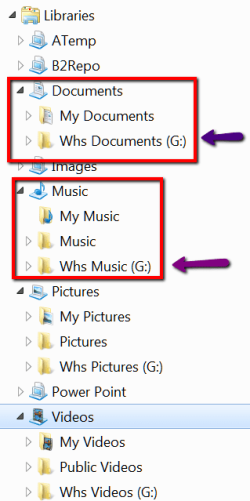
Instead of relocating the user folders (documents, pictures, videos, music) from the C partition on the SSD to the HDD via the location tab in Properties, I make new folders on the HDD. I call them Whs Documents, Whs Pictures, etc.. You can of course take any appendix. It is only there to be easily identifiable. Then I right click on those folders and INCLUDE them into the corresponding library (see pic below).

After that I move MY data folders from the C partition to those folders on the HDD - but not folders that were generated by the system or by a program. These stay on the SSD and the SSD folders remain the default folders for the system and programs. Since that is only very little data, they are not in the way but I thus have a clean separation of my stuff and the system stuff.

Note: I have a few libraries that I created myself. I hope that is not too confusing. The ATemp is really a handy one. If you are interested, I will be glad to explain.
 

Attachments

  • 2015-01-16_2019.png
    2015-01-16_2019.png
    13.7 KB · Views: 15

My Computer My Computer

At a glance

Vista, Windows7, Mint Mate, Zorin, Windows 8from 1.6GHz Duo to i7
Computer Manufacturer/Model Number
HP, Dell, Gateway, Toshiba - 4 laptops and 2 desktops
OS
Vista, Windows7, Mint Mate, Zorin, Windows 8
CPU
from 1.6GHz Duo to i7
Monitor(s) Displays
2x HP w2207
Hard Drives
5x HDD, 7x SSD, 12x Externals
Keyboard
with trackball - no mices
Mouse
Trackball mice
Internet Speed
DSL 6000
What you would do if it was yours? Give me a step by step, I'll follow the directions not (links) and that would be great.

I told you what I would do, delete the hard drive down to un allocated space then create 2 partitions out of it, using Partition Wizard.

And I would extend C into that 3.05 of un allocated space on the ssd. (That`s valuable real estate on an ssd)

Then you`re done. I don`t even mess with changing Libraries, I don`t think there is any reason to, just store your data where you want. ( Not somethng a novice should even be attempting )

Example of my setup.
 
Last edited:

My Computer My Computer

At a glance

Windows 10 Pro x64Intel Core i7 6700KGSkill TridentZ RGB 16GB 3600 16-16-16-36EVGA GTX 980 Ti SC x2
Computer type
PC/Desktop
Computer Manufacturer/Model Number
Skylake Special #666
OS
Windows 10 Pro x64
CPU
Intel Core i7 6700K
Motherboard
Asus Sabertooth Z170 Mark 1
Memory
GSkill TridentZ RGB 16GB 3600 16-16-16-36
Graphics Card(s)
EVGA GTX 980 Ti SC x2
Sound Card
Realtek High Definition
Monitor(s) Displays
AOC G2460PG
Screen Resolution
1920 x 1080 144Hz
Hard Drives
Samsung 860 Pro 256GB, Seagate Barracuda 4TB x2
PSU
EVGA 1000 P2, EVGA White Custom Braided Cables
Case
Corsair Vengeance C70 Gunmetal Black
Cooling
Corsair H100i v2, Corsair ML120 x2, Thermal Grizzly Kryonaut
Keyboard
Logitech G910 Orion Spectrum
Mouse
Logitech G700s
Internet Speed
Verizon Fios Quantum Gateway 75/75
Antivirus
Windows Defender, Malwarebytes Free 3.8.3
Browser
Chrome
Other Info
Corsair SP120 x4, LG Blu-ray Drive, Durabrand HT-395 100 Watt Dolby Digital Amp, Corsair H2100 Wireless 7.1 Headset
Okay, thank you. Will try that tomorrow. Sounds like what I wanted to do.
 

My Computer My Computer

At a glance

Windows 7, 64 bit, Home Premium
Computer type
PC/Desktop
Computer Manufacturer/Model Number
HP
OS
Windows 7, 64 bit, Home Premium
Hard Drives
ssd and hdd
Antivirus
avg
Browser
IE 1
Good, thanks Brian.

Did your boot times improve or are they still slow? Did you have the chance to compare boot times with the hard drive unplugged?
 
What you would do if it was yours? Give me a step by step, I'll follow the directions not (links) and that would be great.

I told you what I would do, delete the hard drive down to un allocated space then create 2 partitions out of it, using Partition Wizard.

And I would extend C into that 3.05 of un allocated space on the ssd.

Then you`re done.
Sorry but, your not getting it. It's like teaching a class of newbies that knows nothing. Step by step. Example, first click on libraries, 2nd click on a file then do this......... etc. Sorry but that's me.

Just saw your latest post, yes they have improved.
 

My Computer My Computer

At a glance

Windows 7, 64 bit, Home Premium
Computer type
PC/Desktop
Computer Manufacturer/Model Number
HP
OS
Windows 7, 64 bit, Home Premium
Hard Drives
ssd and hdd
Antivirus
avg
Browser
IE 1
I'm really not stupid here, I know it might look that way. I did get this far on my own without any training at all. Anyway, not stupid, just not informed. Thanks you guys.
 

My Computer My Computer

At a glance

Windows 7, 64 bit, Home Premium
Computer type
PC/Desktop
Computer Manufacturer/Model Number
HP
OS
Windows 7, 64 bit, Home Premium
Hard Drives
ssd and hdd
Antivirus
avg
Browser
IE 1

My Computer My Computer

At a glance

Windows 10 Pro x64Intel Core i7 6700KGSkill TridentZ RGB 16GB 3600 16-16-16-36EVGA GTX 980 Ti SC x2
Computer type
PC/Desktop
Computer Manufacturer/Model Number
Skylake Special #666
OS
Windows 10 Pro x64
CPU
Intel Core i7 6700K
Motherboard
Asus Sabertooth Z170 Mark 1
Memory
GSkill TridentZ RGB 16GB 3600 16-16-16-36
Graphics Card(s)
EVGA GTX 980 Ti SC x2
Sound Card
Realtek High Definition
Monitor(s) Displays
AOC G2460PG
Screen Resolution
1920 x 1080 144Hz
Hard Drives
Samsung 860 Pro 256GB, Seagate Barracuda 4TB x2
PSU
EVGA 1000 P2, EVGA White Custom Braided Cables
Case
Corsair Vengeance C70 Gunmetal Black
Cooling
Corsair H100i v2, Corsair ML120 x2, Thermal Grizzly Kryonaut
Keyboard
Logitech G910 Orion Spectrum
Mouse
Logitech G700s
Internet Speed
Verizon Fios Quantum Gateway 75/75
Antivirus
Windows Defender, Malwarebytes Free 3.8.3
Browser
Chrome
Other Info
Corsair SP120 x4, LG Blu-ray Drive, Durabrand HT-395 100 Watt Dolby Digital Amp, Corsair H2100 Wireless 7.1 Headset
@AddRAM, last post for me tonight. yes, your set up looks great. I see what you would do. Step by step, why does no one get it. I understand what your posting but don't know how to do it. I have a problem following all the links, I get confused.
 

My Computer My Computer

At a glance

Windows 7, 64 bit, Home Premium
Computer type
PC/Desktop
Computer Manufacturer/Model Number
HP
OS
Windows 7, 64 bit, Home Premium
Hard Drives
ssd and hdd
Antivirus
avg
Browser
IE 1
Okay, yes I do.
 

My Computer My Computer

At a glance

Windows 7, 64 bit, Home Premium
Computer type
PC/Desktop
Computer Manufacturer/Model Number
HP
OS
Windows 7, 64 bit, Home Premium
Hard Drives
ssd and hdd
Antivirus
avg
Browser
IE 1
Nobody thinks you're stupid, far from it. You cloned your hard drive using Macrium before even coming here.

You're just getting a lot of different views, so the best way to deal with that is to take a step back and do some reading. Take as much time as you want to decide what you want to do, ask back any questions or for detailed steps once you decide.

I would not wipe the hard drive until you've double checked that everything is backed up, and that the SSD is running to your satisfaction. Are you happy with the boot times now?
 
Back
Top