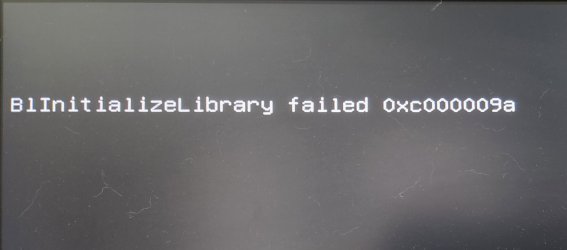
I posted a topic a few months ago https://www.sevenforums.com/installation-setup/427549-win7-install-issue.html but never resolved that one. It's not important so I put it away and try again off and on. Anyway I am attempting again with multiple motherboards and seem to be running into the same issues no matter what I try.
I actually have a B450 motherboard that is the one I am wanting to set up for a dual boot Win7/Win10 system.
So let me start by asking some basic problem questions. 1st I have created a bootable flash drive using the instructions here: https://www.sevenforums.com/installation-setup/415754-update-your-win-7-installation-media.html Creation is easily done with no errors. But for this B450 motherboard(Gigabyte B450 Aorus Pro Wifi) I cannot get the installer flash drive to boot successfully. I can however take the same flash drive in plug it in to older systems and it will boot to the Win7 installer fine. So that tells me I need to include the correct drivers in the DRIVERS\Bootx64 and DRIVERS\Installx64 folders. Depending on which motherboard I am actually using.
One thing I am seeing however is when booting to the Boot Menu using the hot key(F8, F12, etc) I am seeing 2 UEFI partitions to select to boot to. I have tried booting to either one but each one gives a different error shown on the screen. So my question is why am I seeing 2 UEFI partitions to select? When I boot using the same flash drive on older hardware I only see ONE UEFI partition to select which of course boots fine to the Win7 installer.
And please clarify......Win7 needs CSM Enabled or Not?
I actually have a B450 motherboard that is the one I am wanting to set up for a dual boot Win7/Win10 system.
So let me start by asking some basic problem questions. 1st I have created a bootable flash drive using the instructions here: https://www.sevenforums.com/installation-setup/415754-update-your-win-7-installation-media.html Creation is easily done with no errors. But for this B450 motherboard(Gigabyte B450 Aorus Pro Wifi) I cannot get the installer flash drive to boot successfully. I can however take the same flash drive in plug it in to older systems and it will boot to the Win7 installer fine. So that tells me I need to include the correct drivers in the DRIVERS\Bootx64 and DRIVERS\Installx64 folders. Depending on which motherboard I am actually using.
One thing I am seeing however is when booting to the Boot Menu using the hot key(F8, F12, etc) I am seeing 2 UEFI partitions to select to boot to. I have tried booting to either one but each one gives a different error shown on the screen. So my question is why am I seeing 2 UEFI partitions to select? When I boot using the same flash drive on older hardware I only see ONE UEFI partition to select which of course boots fine to the Win7 installer.
And please clarify......Win7 needs CSM Enabled or Not?
My Computer
At a glance
Win7 Pro 64/Win10 Pro 64Various
- Computer type
- PC/Desktop
- Computer Manufacturer/Model Number
- Custom Build
- OS
- Win7 Pro 64/Win10 Pro 64
- CPU
- Various
- Motherboard
- Various