Installation problem using bootable flash drive(usb)

BamaInArk

New member
Member
Local time
5:58 PM
Messages
41
I posted a topic a few months ago https://www.sevenforums.com/installation-setup/427549-win7-install-issue.html but never resolved that one. It's not important so I put it away and try again off and on. Anyway I am attempting again with multiple motherboards and seem to be running into the same issues no matter what I try.
I actually have a B450 motherboard that is the one I am wanting to set up for a dual boot Win7/Win10 system.

So let me start by asking some basic problem questions. 1st I have created a bootable flash drive using the instructions here: https://www.sevenforums.com/installation-setup/415754-update-your-win-7-installation-media.html Creation is easily done with no errors. But for this B450 motherboard(Gigabyte B450 Aorus Pro Wifi) I cannot get the installer flash drive to boot successfully. I can however take the same flash drive in plug it in to older systems and it will boot to the Win7 installer fine. So that tells me I need to include the correct drivers in the DRIVERS\Bootx64 and DRIVERS\Installx64 folders. Depending on which motherboard I am actually using.

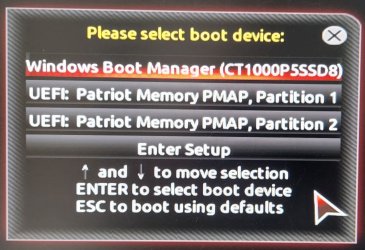
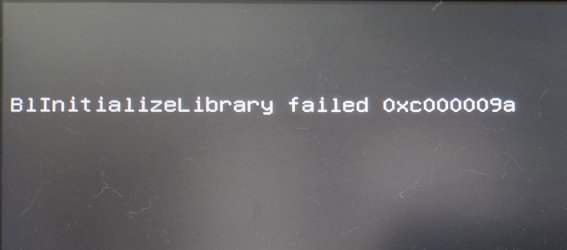
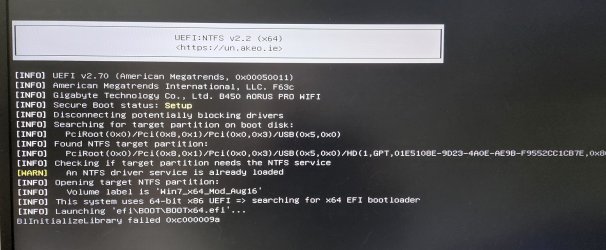
One thing I am seeing however is when booting to the Boot Menu using the hot key(F8, F12, etc) I am seeing 2 UEFI partitions to select to boot to. I have tried booting to either one but each one gives a different error shown on the screen. So my question is why am I seeing 2 UEFI partitions to select? When I boot using the same flash drive on older hardware I only see ONE UEFI partition to select which of course boots fine to the Win7 installer.

And please clarify......Win7 needs CSM Enabled or Not?
 

My Computer

Computer type
PC/Desktop
Computer Manufacturer/Model Number
Custom Build
OS
Win7 Pro 64/Win10 Pro 64
CPU
Various
Motherboard
Various
I burn the ISO using Rufus....currently v 3.20p. Settings: GPT/UEFI Gonna try and post some images.(never tried on this site before)

Below is the image I see when I boot to the Boot Menu. Notice 2 UEFI partitions.
Boot Menu.jpg

If I select the top one this is the screen that comes up.
UEFI 1.jpg

If I select the 2nd boot UEFI boot option this is what comes up and stops.
UEFI 2.jpg

Like I said I can take this freshly created bootable Win7 flash drive and put in an older system and it boots right up to the Win7 installer just fine. I can run the installer up to selecting the drive. So at this point I'm not sure if the installer if borked due to newer hardware and not finding the correct motherboard/USB/Chipset drivers. I have tried this using both USB 3 ports and USB 2.

On the B450 system I am attempting to install(well just getting it to boot at this point) to an NVMe drive. But I have used Updatepack to add the USB3 and NVME drivers plus adding the Enhanced Menu option.

And btw the system is currently using a 1 TB NVMe loaded with Win11 that I will format if I can get that far into the install process. So it currently has an installed OS.
 

My Computer

Computer type
PC/Desktop
Computer Manufacturer/Model Number
Custom Build
OS
Win7 Pro 64/Win10 Pro 64
CPU
Various
Motherboard
Various
I'll have to read through your MOBO manual, but in the mean time, check CSM and any USB settings.
 

My Computer

Computer type
PC/Desktop
OS
Windows 7 Ultimate x64
Dang....gonna have to take a step back again. So frustrating. Found out the USB Flash Drive I just created tonight is bad somehow. Talking about chasing your tail. I literally deleted the previous 7Up folder I had been working with and started from scratch. 7UPv64i.zip, Simplex Update pack, .Net, etc. Rebuilt all from scratch only to discover that freshly created boot USB is the issue. I pulled out another USB flash drive I had created a few days ago and it is working fine on older systems.

I have multiple older Dell Optiplexes with Intel CPUs I can test with. I'm trying to narrow this down to a difference between Intel and AMD motherboards or something else.
 

My Computer

Computer type
PC/Desktop
Computer Manufacturer/Model Number
Custom Build
OS
Win7 Pro 64/Win10 Pro 64
CPU
Various
Motherboard
Various

My Computer

Computer type
PC/Desktop
Computer Manufacturer/Model Number
medionl/Aspire 6930G/acer x55a
OS
W7 home premium 32bit/W7HP 64bit/w10 tp insider ring
CPU
E5300 dual core
Motherboard
medion MS7366
Memory
3gb
Graphics Card(s)
Nvidia Geforce 7100 Nforce 630i
Monitor(s) Displays
avixc
Internet Speed
n (isp resticted to 72)
Antivirus
mse/pands
Browser
palemoon
Other Info
Belkin Fd7050 n USB using Railink RT2870 drivers, more upto date
Hi
please note W7 will likely need to be installed BEFORE W11
(W7 hates being in second place)
please read this tutorial, then use the other you referenced to create the installer
UEFI (Unified Extensible Firmware Interface) - Install Windows 7 with
Oh I understand that. Been running dual boot Windows for many years now. The OS currently installed(Win11) will be overwritten completely during Win7 install via deleting the current partitions as part of the install process.

I'll check out the link you posted.
 

My Computer

Computer type
PC/Desktop
Computer Manufacturer/Model Number
Custom Build
OS
Win7 Pro 64/Win10 Pro 64
CPU
Various
Motherboard
Various
please note W7 will likely need to be installed BEFORE W11

I guess this is bad news if you happen to have Windows 11 already. Because "after" needs to be turned into "before" what way?
 

My Computer

Computer type
PC/Desktop
OS
Windows 7 Home Premium
How big is your \sources\install.wim? If less than 4G don't use Rufus.
Open a CMD window as administrator and type:

diskpart
list disk (it will list all drives. Identify the USB drive number)
select disk n (replace n by the USB drive number obtained with list disk)
clean
convert mbr
create part primary
select part 1
format fs=fat32 quick
assign
active
exit (to exit diskpart)

If you have a Win 7 installation iso file
On Win 7 use 7Zip to extract all files and folders from the Win 7 iso file to the USB drive.
On Win 10, mount the iso file and copy all files and folders to the USB drive.

If you have Win 7 install files and folders (it should be on folder used to add the drivers using SIW2 script) just copy them to the USB drive.

Select OS mode = UEFI or Select OS mode = other + UEFI (depends on BIOS) or even CSM + UEFI.
Disable fast boot and secure boot.

Windows can be installed in two ways: Legacy-MBR or UEFI-GPT
To install as Legacy-MBR you must boot the installation drive as Legacy
To install as UEFI-GPT you must boot the installation drive as UEFI.

As you have a UEFI BIOS, you should install as UEFI-GPT
Detach any other drives (SATA or Power cable) from the MB.

During POST, press F12(?) to launch the boot menu. You will see two options for the USB drive. USB UEFI (Name) and USB (Name). Select USB UEFI (Name).
Go to install and delete ALL partitions on the main drive till you have one and only one unallocated space and then proceed.
 

My Computers

System One System Two

  • Computer type
    PC/Desktop
    Computer Manufacturer/Model Number
    custom build
    OS
    Windows 7 HP 64
    CPU
    i5 6600K - 800MHz to 4200MHz
    Motherboard
    GA-Z170-HD3P
    Memory
    4+4G GSkill DDR4 3000
    Graphics Card(s)
    IG - Intel 530
    Monitor(s) Displays
    Samsung 226BW
    Screen Resolution
    1680x1050
    Hard Drives
    (1) -1 SM951 – 128GB M.2 AHCI PCIe SSD drive for Windows 7 and Lubuntu
    (2) -1 WD SATA 3 - 1T for Data
    (3) -1 WD SATA 3 - 1T for backup
    PSU
    Thermaltake 450W TR2 gold
    Keyboard
    Old and good Chicony mechanical keyboard
    Mouse
    Logitech mX performance - 9 buttons (had to disable some)
    Internet Speed
    500Mb/s
    Browser
    Firefox 64
    Other Info
    TinyWall firewall
  • Computer type
    Laptop
    System Manufacturer/Model Number
    Asus Q550LF
    OS
    Windows 7 Pro
    CPU
    i7-4500U 800MHz to 3.0GHz
    Motherboard
    Asus Q550LF
    Memory
    (4+4)G DDR3 1600
    Graphics Card(s)
    IG intel 4400 + NVIDIA GeForce GT 745M
    Sound Card
    Realtek
    Monitor(s) Displays
    LG Display LP156WF4-SPH1
    Screen Resolution
    1920 x 1080
    Hard Drives
    BX500 120G SSD for Windows and programs +
    1T HDD for data
    Internet Speed
    500 Mb/s
    Browser
    Firefox
    Other Info
    TinyWall firewall
i need to do a re-install on a dell laptop but no disk as i got laptop 2nd i dont no how or what im doing as it woz why i got a 2nd to learn , if a shop dos it wot kind of cost am i looking at it as windows 7 on but needs clean windows reset/reinstall so prob not to hard or take long for somebody who no’s how , just dont want to over pay ….Thank you hope woz ok put this here still getting to no my way round this site
 

My Computers

System One System Two

  • Computer type
    Laptop
    Computer Manufacturer/Model Number
    Dell
    OS
    32
    Other Info
    Alot unsure as 2nd hand
  • Computer type
    PC/Desktop
How big is your \sources\install.wim? If less than 4G don't use Rufus.
Open a CMD window as administrator and type:

diskpart
list disk (it will list all drives. Identify the USB drive number)
select disk n (replace n by the USB drive number obtained with list disk)
clean
convert mbr
create part primary
select part 1
format fs=fat32 quick
assign
active
exit (to exit diskpart)

Finally getting back to this after being out of town. Can I ask "why format the USB flash drive to Fat32 if the contents will be more than 5 GBs?" Doesn't it have to use NTFS for anything over something like 4.4 GBs? My Install.wim is like 5.9 GBs.
 

My Computer

Computer type
PC/Desktop
Computer Manufacturer/Model Number
Custom Build
OS
Win7 Pro 64/Win10 Pro 64
CPU
Various
Motherboard
Various
Can I ask "why format the USB flash drive to Fat32

Many bios will only look for a fat32 partition if using efi boot.
 

My Computers

System One System Two

  • Computer type
    PC/Desktop
    OS
    7 X64
    CPU
    i5 8400
    Motherboard
    gigabyte b365m ds3h
    Memory
    2x8gb 3200mhz
    Hard Drives
    various
    PSU
    pure power 11 400w cm
    Case
    Coolermaster
    Cooling
    cryorig m9i
  • Computer type
    PC/Desktop
    OS
    7x64
    CPU
    g5400
    Motherboard
    ga b365m ds3h
    Memory
    8gb ddr4 2400
    PSU
    xfx pro 450w

My Computers

System One System Two

  • Computer type
    PC/Desktop
    Computer Manufacturer/Model Number
    custom build
    OS
    Windows 7 HP 64
    CPU
    i5 6600K - 800MHz to 4200MHz
    Motherboard
    GA-Z170-HD3P
    Memory
    4+4G GSkill DDR4 3000
    Graphics Card(s)
    IG - Intel 530
    Monitor(s) Displays
    Samsung 226BW
    Screen Resolution
    1680x1050
    Hard Drives
    (1) -1 SM951 – 128GB M.2 AHCI PCIe SSD drive for Windows 7 and Lubuntu
    (2) -1 WD SATA 3 - 1T for Data
    (3) -1 WD SATA 3 - 1T for backup
    PSU
    Thermaltake 450W TR2 gold
    Keyboard
    Old and good Chicony mechanical keyboard
    Mouse
    Logitech mX performance - 9 buttons (had to disable some)
    Internet Speed
    500Mb/s
    Browser
    Firefox 64
    Other Info
    TinyWall firewall
  • Computer type
    Laptop
    System Manufacturer/Model Number
    Asus Q550LF
    OS
    Windows 7 Pro
    CPU
    i7-4500U 800MHz to 3.0GHz
    Motherboard
    Asus Q550LF
    Memory
    (4+4)G DDR3 1600
    Graphics Card(s)
    IG intel 4400 + NVIDIA GeForce GT 745M
    Sound Card
    Realtek
    Monitor(s) Displays
    LG Display LP156WF4-SPH1
    Screen Resolution
    1920 x 1080
    Hard Drives
    BX500 120G SSD for Windows and programs +
    1T HDD for data
    Internet Speed
    500 Mb/s
    Browser
    Firefox
    Other Info
    TinyWall firewall
Split install.wim into smaller Install.swm files.
DISM - Split install.wim file | Tutorials

That might be a reason I am having such an issue booting to a bootable flash drive. I did try the split wim but burned 2 DVDs rather than trying with a flash drive again. There didn't seem to be enough instructions on using the split wim and how to actually write to a device so I was just experimenting at the time.
What makes this more confusing however is the same flash drive(formatted NTFS) that fails on one motherboard works perfectly on another one.

- - - Updated - - -

Those instructions seem a little complex and outdated if using a more modern software such as Rufus to create the flash drive. What is the proper procedure? I have just created a new Installer/WIM and used the Wim-split.cmd to split the WIM into smaller files. So do you now use ISO-Create.cmd to create the ISO and point to both WIM files?
 

My Computer

Computer type
PC/Desktop
Computer Manufacturer/Model Number
Custom Build
OS
Win7 Pro 64/Win10 Pro 64
CPU
Various
Motherboard
Various
What did you think SPLIT-WIM-TO-2-ISOS.cmd was for?
 

My Computers

System One System Two

  • Computer type
    PC/Desktop
    OS
    7 X64
    CPU
    i5 8400
    Motherboard
    gigabyte b365m ds3h
    Memory
    2x8gb 3200mhz
    Hard Drives
    various
    PSU
    pure power 11 400w cm
    Case
    Coolermaster
    Cooling
    cryorig m9i
  • Computer type
    PC/Desktop
    OS
    7x64
    CPU
    g5400
    Motherboard
    ga b365m ds3h
    Memory
    8gb ddr4 2400
    PSU
    xfx pro 450w
What did you think SPLIT-WIM-TO-2-ISOS.cmd was for?
Sorry if I seem dense. lol I'm honestly a power user. A few weeks ago I actually used Split-wim-to-2-ISOs to create the installer on 2 DVDs. I'm just trying to wrap my head about the 2 options Split-WIM vs Split-wim-to-2-isos.
And reading a little further into creating a Fat32 flash drive installer.
 

My Computer

Computer type
PC/Desktop
Computer Manufacturer/Model Number
Custom Build
OS
Win7 Pro 64/Win10 Pro 64
CPU
Various
Motherboard
Various
Windows can be installed in two ways: Legacy-MBR or UEFI-GPT
To install as Legacy-MBR you must boot the installation drive as Legacy
To install as UEFI-GPT you must boot the installation drive as UEFI.

If you have a UEFI BIOS, you should install as UEFI-GPT.

To boot as UEFI, the boot manager must be on a Fat32 partition (to be universal) as BIOS will look a boot manager on a Fat32 partition to transfer the boot sequence. As Fat32 has a file size limit of 4G, bigger Install.wim must be split ed into smaller swm files or the Install.wim placed on a separated NTFS partition (done by Rufus).
The problem is that all windows prior to Win 10 only recognize one partition on removable flash drives.
In other words, a boot able USB Win 7 installation drive must be formatted as Fat32 (to be able to boot as Legacy or UEFI) and big Install.wim must be split ed into smaller swm files.
 

My Computers

System One System Two

  • Computer type
    PC/Desktop
    Computer Manufacturer/Model Number
    custom build
    OS
    Windows 7 HP 64
    CPU
    i5 6600K - 800MHz to 4200MHz
    Motherboard
    GA-Z170-HD3P
    Memory
    4+4G GSkill DDR4 3000
    Graphics Card(s)
    IG - Intel 530
    Monitor(s) Displays
    Samsung 226BW
    Screen Resolution
    1680x1050
    Hard Drives
    (1) -1 SM951 – 128GB M.2 AHCI PCIe SSD drive for Windows 7 and Lubuntu
    (2) -1 WD SATA 3 - 1T for Data
    (3) -1 WD SATA 3 - 1T for backup
    PSU
    Thermaltake 450W TR2 gold
    Keyboard
    Old and good Chicony mechanical keyboard
    Mouse
    Logitech mX performance - 9 buttons (had to disable some)
    Internet Speed
    500Mb/s
    Browser
    Firefox 64
    Other Info
    TinyWall firewall
  • Computer type
    Laptop
    System Manufacturer/Model Number
    Asus Q550LF
    OS
    Windows 7 Pro
    CPU
    i7-4500U 800MHz to 3.0GHz
    Motherboard
    Asus Q550LF
    Memory
    (4+4)G DDR3 1600
    Graphics Card(s)
    IG intel 4400 + NVIDIA GeForce GT 745M
    Sound Card
    Realtek
    Monitor(s) Displays
    LG Display LP156WF4-SPH1
    Screen Resolution
    1920 x 1080
    Hard Drives
    BX500 120G SSD for Windows and programs +
    1T HDD for data
    Internet Speed
    500 Mb/s
    Browser
    Firefox
    Other Info
    TinyWall firewall
So I kinda gave up on creating a bootable flash drive that worked and just used the created ISO burned to a DL DVD. There was no option for UEFI using the DVD but went along with the boot option that was there. Win7 installed fine however upon the initial reboot to finish the installation the USB mouse/keyboard no longer worked so couldn't add any info like user name, etc. I tried using both USB 3 and USB 2 ports. This motherboard has no USB 2.0 ports on the backplane i/o.

And another thing during the install the NVMe drives did not show up to install to. I had already connected a SATA SSD to install to so that worked. My intent here was to simply install to the SATA drive then Clone the SATA drive to an onboard NVMe drive.
 

My Computer

Computer type
PC/Desktop
Computer Manufacturer/Model Number
Custom Build
OS
Win7 Pro 64/Win10 Pro 64
CPU
Various
Motherboard
Various
Back
Top