
You are using an out of date browser. It may not display this or other websites correctly.
You should upgrade or use an alternative browser.
You should upgrade or use an alternative browser.
Solved Installed a NVMe SSD, but Win7 doesn't detect it.
- Thread starter Blake81
- Start date
Thanks for this, the whole process was driving me bananas, flushed my BIOS and still nothing until I found this. Once I installed the 2 files and after restart, the drive was recognised.
My Computer
At a glance
Win 7 64bit, Win 10 ProManyManyMany
- Computer type
- PC/Desktop
- Computer Manufacturer/Model Number
- Custom
- OS
- Win 7 64bit, Win 10 Pro
- CPU
- Many
- Motherboard
- Many
- Memory
- Many
- Graphics Card(s)
- Many
- Hard Drives
- Many
- Antivirus
- McaFee
- Browser
- Firefox, Opera, Edge

- Local time
- 8:00 PM
- Messages
- 16,790

My Computers
-
At a glance
7 X64i5 84002x8gb 3200mhz- Computer type
- PC/Desktop
- OS
- 7 X64
- CPU
- i5 8400
- Motherboard
- gigabyte b365m ds3h
- Memory
- 2x8gb 3200mhz
- Hard Drives
- various
- PSU
- pure power 11 400w cm
- Case
- Coolermaster
- Cooling
- cryorig m9i
-
At a glance
7x64g54008gb ddr4 2400- Computer type
- PC/Desktop
- OS
- 7x64
- CPU
- g5400
- Motherboard
- ga b365m ds3h
- Memory
- 8gb ddr4 2400
- PSU
- xfx pro 450w
[FONT="] Install both KB2990941-v3 and KB3087873-v2
NVME-UPDATES-WIN7x64.ZIP
NVME-UPDATES-WIN7x86.ZIP[/FONT]
Thanks for this, the whole process was driving me bananas, flushed my BIOS to latest version and still nothing until I found this. Once I installed the 2 Windows updates and after restart, the drive was recognised. You won't believe the amount of posts I read on many sites and forums inc (MSI), lots of opinions without any resolution.
I re-flushed to old BIOS as my OC settings got lost but have kept the new BIOS as a backup just in case.
Worth mentioning I have a X99S SLI PLUS Motherboard on BIOS V1.4. Secondary BIOS is now on 7885v1E, I may end up using it once I get Win 10 installed and do screenshots to transfer settings.
My Computer
At a glance
Win 7 64bit, Win 10 ProManyManyMany
- Computer type
- PC/Desktop
- Computer Manufacturer/Model Number
- Custom
- OS
- Win 7 64bit, Win 10 Pro
- CPU
- Many
- Motherboard
- Many
- Memory
- Many
- Graphics Card(s)
- Many
- Hard Drives
- Many
- Antivirus
- McaFee
- Browser
- Firefox, Opera, Edge
problematique
New member
- Local time
- 2:00 PM
- Messages
- 1
yoooo thank you for those files. I've been working on this issue for 2 days straight!
I was getting ready to throw in the towel and just bite the bullet and upgrade to windows 10

My buddy has been pressuring me to go to 10 because it's "faster and better". Even if he's correct I HATE navigating through it. He did say I can customize it to "act / look" like windows 7 but that sounds like a whole lot of work I ain't trying to do.

My Computer
At a glance
win 7 64bit
- Computer type
- PC/Desktop
- OS
- win 7 64bit
I just wanted to post a note here saying that I just finished the installation of a "WD Blue SN550 NvMe SSD - 2Tb" into a PC Tower with a X99-Deluxe Motherboard. I'm now booting up and running my Windows 7 Pro OS from this new "Drive" location. The drive is mounted vertically about 2mm in front of a large Processor cooling fan. (Of course I have yet to locate that metal vertical mounting bracket, as there wasn't one in my motherboard box when I bought it .. What could possibly go wrong?)
The path to this install was painful, but everything fell into place when I found this sevenforums.com site, and a copy of your "NVME-UPDATES-WIN7x64.ZIP" package containing Microsoft's Hotfixs. (Note to Microsoft: It is very bad form to develop a Hotfix before pulling Win7 support - and then pulling the software patch - but keeping all the document posted on your download site explaining what you have done).
Some Key Install points:
1. Asus BIOS update was all that was needed to have MB recognize the new NvMe SSD stick drive.
2. Running the auto "UPDATES" routine supplied in this blog allowed Win7Pro-64 to then recognize the new drive. (A few reboots needed to sort everything out first)
3. Western Digital does not provide any attempt at specifically supplying or talking about a driver, but all is working when Win7 installs it's "Standard NVM Express Controller".
I am now a VERY VERY Happy camper, BIG THANKS to all the folks running and contributing to this website.
... Buddyb
The path to this install was painful, but everything fell into place when I found this sevenforums.com site, and a copy of your "NVME-UPDATES-WIN7x64.ZIP" package containing Microsoft's Hotfixs. (Note to Microsoft: It is very bad form to develop a Hotfix before pulling Win7 support - and then pulling the software patch - but keeping all the document posted on your download site explaining what you have done).
Some Key Install points:
1. Asus BIOS update was all that was needed to have MB recognize the new NvMe SSD stick drive.
2. Running the auto "UPDATES" routine supplied in this blog allowed Win7Pro-64 to then recognize the new drive. (A few reboots needed to sort everything out first)
3. Western Digital does not provide any attempt at specifically supplying or talking about a driver, but all is working when Win7 installs it's "Standard NVM Express Controller".
I am now a VERY VERY Happy camper, BIG THANKS to all the folks running and contributing to this website.
... Buddyb
My Computer
At a glance
Windows 7 Pro - 64 bitIntel i7-5930K
- Computer type
- PC/Desktop
- OS
- Windows 7 Pro - 64 bit
- CPU
- Intel i7-5930K
- Motherboard
- Asus X99 Deluxe
Spritepark
New member
- Local time
- 2:00 PM
- Messages
- 1
WD nvme 250Gb
Thanks so much for your swift advice for this just-installed device.
The updates worked a treat! Ready to go
Thanks so much for your swift advice for this just-installed device.
The updates worked a treat! Ready to go
My Computer
At a glance
Windows 7 ultimate x648Gb
- Computer type
- PC/Desktop
- Computer Manufacturer/Model Number
- Custom
- OS
- Windows 7 ultimate x64
- Motherboard
- Gigabyte
- Memory
- 8Gb
- Hard Drives
- 250Gb ssd samsung evo
- Browser
- Opera
- Local time
- 8:00 PM
- Messages
- 16,790
My Computers
-
At a glance
7 X64i5 84002x8gb 3200mhz- Computer type
- PC/Desktop
- OS
- 7 X64
- CPU
- i5 8400
- Motherboard
- gigabyte b365m ds3h
- Memory
- 2x8gb 3200mhz
- Hard Drives
- various
- PSU
- pure power 11 400w cm
- Case
- Coolermaster
- Cooling
- cryorig m9i
-
At a glance
7x64g54008gb ddr4 2400- Computer type
- PC/Desktop
- OS
- 7x64
- CPU
- g5400
- Motherboard
- ga b365m ds3h
- Memory
- 8gb ddr4 2400
- PSU
- xfx pro 450w
waynehonig
New member
- Local time
- 2:00 PM
- Messages
- 1
Thanks so much for these zip files. installed WDsn550 blue 500 gb on my gigabyte p55-ud3 mobo and it works perfect for a scratch drive. Don't think i can boot from it but my kingston ssd works great for boot. protools 12.5 seems to like the sn550. I am very happy with performance so far !!!
My Computers
-
At a glance
windows 7 x64xeon x347016 gig Gskill sniper 1866 ddr3XFX radeon RX 580 8 gig- Computer type
- PC/Desktop
- Computer Manufacturer/Model Number
- gigabyte P55a-ud3
- OS
- windows 7 x64
- CPU
- xeon x3470
- Motherboard
- gigabyte p55a-ud3
- Memory
- 16 gig Gskill sniper 1866 ddr3
- Graphics Card(s)
- XFX radeon RX 580 8 gig
- Hard Drives
- kingston sa400 480 gig ssd
WD SN550 500 GIG nvme in pcie adapter
- Antivirus
- avast
- Browser
- firefox
-
- Computer type
- PC/Desktop
- Local time
- 8:00 PM
- Messages
- 16,790
My Computers
-
At a glance
7 X64i5 84002x8gb 3200mhz- Computer type
- PC/Desktop
- OS
- 7 X64
- CPU
- i5 8400
- Motherboard
- gigabyte b365m ds3h
- Memory
- 2x8gb 3200mhz
- Hard Drives
- various
- PSU
- pure power 11 400w cm
- Case
- Coolermaster
- Cooling
- cryorig m9i
-
At a glance
7x64g54008gb ddr4 2400- Computer type
- PC/Desktop
- OS
- 7x64
- CPU
- g5400
- Motherboard
- ga b365m ds3h
- Memory
- 8gb ddr4 2400
- PSU
- xfx pro 450w
Thanks so much for the 2 zip files. This is my first NVME drive (SN850 1TB). I am putting it in a new build and am wearing down trying to get Windows 7 install to see the drive. Like many posting here I have literally spent days (and nights) trying to get past this. I just can't seem to get it over the finish line.
I took the 2 zip files and unzipped the 2 cab files. I figured that the cab files were not what it was looking for but presented them anyway and Win 7 install didn't like them. Then, I found the process of extracting the folders from within the cab files and ended up with hundreds of files split across 2 subfolders. I removed the files/folders with references to x86 which left me with ones that referenced amd64 or had no specific reference. I pointed Win 7 install to the 2 sub folders underneath a higher level folder and it didn't like that either.
I feel like I'm close but just am not getting there. I can't even tell you how many browser tabs I have open but I'm definitely missing something. Any helpful hints to get me the rest of the way there?
I created a bootable WinPE flash drive several years ago that I continue to use for my Win 7 backups (and love it) but this stuff is a little beyond my knowledge base.
Thanks,
Bob
Thanks so much for the 2 zip files
I took the 2 zip files and unzipped the 2 cab files. I figured that the cab files were not what it was looking for but presented them anyway and Win 7 install didn't like them. Then, I found the process of extracting the folders from within the cab files and ended up with hundreds of files split across 2 subfolders. I removed the files/folders with references to x86 which left me with ones that referenced amd64 or had no specific reference. I pointed Win 7 install to the 2 sub folders underneath a higher level folder and it didn't like that either.
I feel like I'm close but just am not getting there. I can't even tell you how many browser tabs I have open but I'm definitely missing something. Any helpful hints to get me the rest of the way there?
I created a bootable WinPE flash drive several years ago that I continue to use for my Win 7 backups (and love it) but this stuff is a little beyond my knowledge base.
Thanks,
Bob
Thanks so much for the 2 zip files
My Computer
At a glance
Windows Server 2008 R2 Standard x64Intel Core i7-92012 GB Samsung 1600 (PC3 12800) 240-Pin DDR3 S...HIS iCooler Radeon HD 7770 GHz Edition
- Computer type
- PC/Desktop
- Computer Manufacturer/Model Number
- custom build (ASUS MB)
- OS
- Windows Server 2008 R2 Standard x64
- CPU
- Intel Core i7-920
- Motherboard
- ASUS Rampage II GENE, Socket 1366
- Memory
- 12 GB Samsung 1600 (PC3 12800) 240-Pin DDR3 SDRAM
- Graphics Card(s)
- HIS iCooler Radeon HD 7770 GHz Edition
- Sound Card
- integrated in MB
- Monitor(s) Displays
- ASUS VE-247H; NEC EA261WM
- Screen Resolution
- 1920 x 1080; 1920 x 1200
- Hard Drives
- Kingston (Intel) SSDSA2MH160G1GC
Seagate 2TB ST1000DM003-9YN162
- PSU
- 650Watt CORSAIR TX Series CMPSU-650TX 650W SLI 80 PLUS
- Case
- Cooler Master Elite 330 ATX Mid Tower Case
- Cooling
- 2 Case Fans and Cooler Master Hyper 212 CPU Cooler
- Keyboard
- Logitech illuminated keyboard (P/N 820-001268)
- Mouse
- IBM 19K2002 Optical Navigator Mouse
- Internet Speed
- 55.92 Mbps Download, 6.60 Mbps Upload
- Browser
- Firefox 28.0
- Local time
- 8:00 PM
- Messages
- 16,790
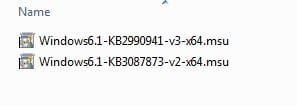
They should be .msu files ( microsoft stand alone updates). Dble clicking on them should install.
My Computers
-
At a glance
7 X64i5 84002x8gb 3200mhz- Computer type
- PC/Desktop
- OS
- 7 X64
- CPU
- i5 8400
- Motherboard
- gigabyte b365m ds3h
- Memory
- 2x8gb 3200mhz
- Hard Drives
- various
- PSU
- pure power 11 400w cm
- Case
- Coolermaster
- Cooling
- cryorig m9i
-
At a glance
7x64g54008gb ddr4 2400- Computer type
- PC/Desktop
- OS
- 7x64
- CPU
- g5400
- Motherboard
- ga b365m ds3h
- Memory
- 8gb ddr4 2400
- PSU
- xfx pro 450w
Thanks - That may be the missing link! There's just 1 thing that I'm not clear on. You mention to double click to install. It seems that this is a catch 22 situation. Since I'm at the point where I'm not able to install Windows (because the Windows installation doesn't see the NVME drive) I'm confused about how the files/drivers would be installed by double clicking them since I don't yet have an installed operating system. It looks like I may not be understanding something.
I'll take a look to see what files are inside the MSU files that can be extracted to provide to the Windows installation program.
Thanks much,
Bob
- - - Updated - - -
I see now that the MSU files are the top level files within the zipped files. I tried supplying those 2 MSU files to the Windows installation program and it is still telling me that "No signed device drivers were found". I'm currently at step 2 of the windows installation (step 1 is Collecting information and step 2 is Installing Windows). I'm just not clear on what I need to do to supply the needed files/drivers to the windows installation program so that it can begin the actual installation.
Thanks again,
Bob
- - - Updated - - -
I probably should have mentioned that I'm attempting to install windows 7 using the Windows 7 installation DVD and I'm trying to point the Windows installation program to the MSU files on a USB flash drive.
There's just 1 thing that I'm not clear on. You mention to double click to install. It seems that this is a catch 22 situation. Since I'm at the point where I'm not able to install Windows (because the Windows installation doesn't see the NVME drive) I'm confused about how the files/drivers would be installed by double clicking them since I don't yet have an installed operating system. It looks like I may not be understanding something.I'll take a look to see what files are inside the MSU files that can be extracted to provide to the Windows installation program.
Thanks much,
Bob
- - - Updated - - -
I see now that the MSU files are the top level files within the zipped files. I tried supplying those 2 MSU files to the Windows installation program and it is still telling me that "No signed device drivers were found". I'm currently at step 2 of the windows installation (step 1 is Collecting information and step 2 is Installing Windows). I'm just not clear on what I need to do to supply the needed files/drivers to the windows installation program so that it can begin the actual installation.
Thanks again,
Bob
- - - Updated - - -
I probably should have mentioned that I'm attempting to install windows 7 using the Windows 7 installation DVD and I'm trying to point the Windows installation program to the MSU files on a USB flash drive.
My Computer
At a glance
Windows Server 2008 R2 Standard x64Intel Core i7-92012 GB Samsung 1600 (PC3 12800) 240-Pin DDR3 S...HIS iCooler Radeon HD 7770 GHz Edition
- Computer type
- PC/Desktop
- Computer Manufacturer/Model Number
- custom build (ASUS MB)
- OS
- Windows Server 2008 R2 Standard x64
- CPU
- Intel Core i7-920
- Motherboard
- ASUS Rampage II GENE, Socket 1366
- Memory
- 12 GB Samsung 1600 (PC3 12800) 240-Pin DDR3 SDRAM
- Graphics Card(s)
- HIS iCooler Radeon HD 7770 GHz Edition
- Sound Card
- integrated in MB
- Monitor(s) Displays
- ASUS VE-247H; NEC EA261WM
- Screen Resolution
- 1920 x 1080; 1920 x 1200
- Hard Drives
- Kingston (Intel) SSDSA2MH160G1GC
Seagate 2TB ST1000DM003-9YN162
- PSU
- 650Watt CORSAIR TX Series CMPSU-650TX 650W SLI 80 PLUS
- Case
- Cooler Master Elite 330 ATX Mid Tower Case
- Cooling
- 2 Case Fans and Cooler Master Hyper 212 CPU Cooler
- Keyboard
- Logitech illuminated keyboard (P/N 820-001268)
- Mouse
- IBM 19K2002 Optical Navigator Mouse
- Internet Speed
- 55.92 Mbps Download, 6.60 Mbps Upload
- Browser
- Firefox 28.0
- Local time
- 8:00 PM
- Messages
- 16,790
msu files are updates.
To integrate to installation media you could use this:
Update your Win 7 installation media
To integrate to installation media you could use this:
Update your Win 7 installation media
My Computers
-
At a glance
7 X64i5 84002x8gb 3200mhz- Computer type
- PC/Desktop
- OS
- 7 X64
- CPU
- i5 8400
- Motherboard
- gigabyte b365m ds3h
- Memory
- 2x8gb 3200mhz
- Hard Drives
- various
- PSU
- pure power 11 400w cm
- Case
- Coolermaster
- Cooling
- cryorig m9i
-
At a glance
7x64g54008gb ddr4 2400- Computer type
- PC/Desktop
- OS
- 7x64
- CPU
- g5400
- Motherboard
- ga b365m ds3h
- Memory
- 8gb ddr4 2400
- PSU
- xfx pro 450w
Well, I gave it a try and maybe I left something out because during the same step during install it says that it doesn't see a drive and offers to allow me to add drivers. Here are the steps that I performed:
1. I created a C:\7UPv64a folder and extracted the 7UPv64a.zip to it.
2. Did not include the optional simplix update pack.
3. Used ISO-EXTRACT.cmd to extract my windows 7 SP1 iso file into its own folder on hard drive (C:\7SP1_ISO_Extract)
4. Right clicked 7UPDATERv64a.cmd and Ran as administrator.
5. It had me identify the folder that my installation files were in (C:\7SP1_ISO_Extract).
6. It then ran and provided the following information:
path to Install.wim is "C:\7SP1_ISO_Extract\EXTRACTED-ISO"\sources\Install.wim
path to BOOT.wim is "C:\7SP1_ISO_Extract\EXTRACTED-ISO"\sources\BOOT.wim
path to DISM is"amd64\DISM\DISM.EXE"
press any key...
C:\7SP1_ISO_Extract\EXTRACTED-ISO\sources\Install.wim
press any key...
FINISHED
press any key to exit
In looking at my extracted ISO folder I noticed that the install.wim and boot.wim files in the sources folder were still showing the original file date of 4/12/2011 but I did see that the date of the sources folder itself was displaying today's date.
I then used IMGBURN to burn to a new DVD. The new installation DVD booted up like it did before but 1 thing that it did differently was allow me to choose which 64 bit version of Windows 7 that I was installing (I don't recall that it asked for a choice the previous times). After I chose Windows 7 Professional it went to the next screen where no drive is listed in the box.
Hopefully you can let me know if there is something that I should have done differently.
Thanks for your help.
Bob
- - - Updated - - -
On a side note, if I just had the NVME drivers that it is looking for I am thinking that would do it.
- - - Updated - - -
Also, if it matters, I never saw any messages regarding mounting or unmounting. Also, I was never given a choice of whether or not to add the drivers that are already in Drivers folder to boot.wim. I saw these references on various other pages in this blog but am not sure if they would apply here.
1. I created a C:\7UPv64a folder and extracted the 7UPv64a.zip to it.
2. Did not include the optional simplix update pack.
3. Used ISO-EXTRACT.cmd to extract my windows 7 SP1 iso file into its own folder on hard drive (C:\7SP1_ISO_Extract)
4. Right clicked 7UPDATERv64a.cmd and Ran as administrator.
5. It had me identify the folder that my installation files were in (C:\7SP1_ISO_Extract).
6. It then ran and provided the following information:
path to Install.wim is "C:\7SP1_ISO_Extract\EXTRACTED-ISO"\sources\Install.wim
path to BOOT.wim is "C:\7SP1_ISO_Extract\EXTRACTED-ISO"\sources\BOOT.wim
path to DISM is"amd64\DISM\DISM.EXE"
press any key...
C:\7SP1_ISO_Extract\EXTRACTED-ISO\sources\Install.wim
press any key...
FINISHED
press any key to exit
In looking at my extracted ISO folder I noticed that the install.wim and boot.wim files in the sources folder were still showing the original file date of 4/12/2011 but I did see that the date of the sources folder itself was displaying today's date.
I then used IMGBURN to burn to a new DVD. The new installation DVD booted up like it did before but 1 thing that it did differently was allow me to choose which 64 bit version of Windows 7 that I was installing (I don't recall that it asked for a choice the previous times). After I chose Windows 7 Professional it went to the next screen where no drive is listed in the box.
Hopefully you can let me know if there is something that I should have done differently.
Thanks for your help.
Bob
- - - Updated - - -
On a side note, if I just had the NVME drivers that it is looking for I am thinking that would do it.
- - - Updated - - -
Also, if it matters, I never saw any messages regarding mounting or unmounting. Also, I was never given a choice of whether or not to add the drivers that are already in Drivers folder to boot.wim. I saw these references on various other pages in this blog but am not sure if they would apply here.
My Computer
At a glance
Windows Server 2008 R2 Standard x64Intel Core i7-92012 GB Samsung 1600 (PC3 12800) 240-Pin DDR3 S...HIS iCooler Radeon HD 7770 GHz Edition
- Computer type
- PC/Desktop
- Computer Manufacturer/Model Number
- custom build (ASUS MB)
- OS
- Windows Server 2008 R2 Standard x64
- CPU
- Intel Core i7-920
- Motherboard
- ASUS Rampage II GENE, Socket 1366
- Memory
- 12 GB Samsung 1600 (PC3 12800) 240-Pin DDR3 SDRAM
- Graphics Card(s)
- HIS iCooler Radeon HD 7770 GHz Edition
- Sound Card
- integrated in MB
- Monitor(s) Displays
- ASUS VE-247H; NEC EA261WM
- Screen Resolution
- 1920 x 1080; 1920 x 1200
- Hard Drives
- Kingston (Intel) SSDSA2MH160G1GC
Seagate 2TB ST1000DM003-9YN162
- PSU
- 650Watt CORSAIR TX Series CMPSU-650TX 650W SLI 80 PLUS
- Case
- Cooler Master Elite 330 ATX Mid Tower Case
- Cooling
- 2 Case Fans and Cooler Master Hyper 212 CPU Cooler
- Keyboard
- Logitech illuminated keyboard (P/N 820-001268)
- Mouse
- IBM 19K2002 Optical Navigator Mouse
- Internet Speed
- 55.92 Mbps Download, 6.60 Mbps Upload
- Browser
- Firefox 28.0
- Local time
- 8:00 PM
- Messages
- 16,790
My Computers
-
At a glance
7 X64i5 84002x8gb 3200mhz- Computer type
- PC/Desktop
- OS
- 7 X64
- CPU
- i5 8400
- Motherboard
- gigabyte b365m ds3h
- Memory
- 2x8gb 3200mhz
- Hard Drives
- various
- PSU
- pure power 11 400w cm
- Case
- Coolermaster
- Cooling
- cryorig m9i
-
At a glance
7x64g54008gb ddr4 2400- Computer type
- PC/Desktop
- OS
- 7x64
- CPU
- g5400
- Motherboard
- ga b365m ds3h
- Memory
- 8gb ddr4 2400
- PSU
- xfx pro 450w
Thanks for the modification. This time I was asked about mounting and unmounting and this time I also see that the resulting boot.wim & install.wim files do reflect today's date (boot, efi, sources, support, and update top level folders also reflect today's date).
Unfortunately, the end result is the same (the Windows 7 installation program doesn't recognize the NVME drive). One thing that I noticed is that in the 7UPv64a folder, both after running 7UPDATERv64a.cmd earlier and 7UPDATERv64b.cmd just now there is a "DRIVERS" folder that contains several resulting driver subfolders. I see that there are 6 NVME manufacturers (Intel, Micron, OCZ, Phison, Plextor, Samsung) referenced in the driver subfolders but Western Digital/Sandisk is not referenced at all. Should I be seeing Western Digital/Sandisk drivers here? My NVME drive is a Western Digital SN850 1TB.
One other thing that I noticed as the mounting/unmounting processes were proceeding errors would periodically pass by. I believe references were being made to partial unmounting occurring. One of the errors that I was able to jot down was 0xc142011d. I have attached the DISM log from this evening's session in case this might be an issue.
View attachment DISM.zip
Thanks again for your efforts!
Unfortunately, the end result is the same (the Windows 7 installation program doesn't recognize the NVME drive). One thing that I noticed is that in the 7UPv64a folder, both after running 7UPDATERv64a.cmd earlier and 7UPDATERv64b.cmd just now there is a "DRIVERS" folder that contains several resulting driver subfolders. I see that there are 6 NVME manufacturers (Intel, Micron, OCZ, Phison, Plextor, Samsung) referenced in the driver subfolders but Western Digital/Sandisk is not referenced at all. Should I be seeing Western Digital/Sandisk drivers here? My NVME drive is a Western Digital SN850 1TB.
One other thing that I noticed as the mounting/unmounting processes were proceeding errors would periodically pass by. I believe references were being made to partial unmounting occurring. One of the errors that I was able to jot down was 0xc142011d. I have attached the DISM log from this evening's session in case this might be an issue.
View attachment DISM.zip
Thanks again for your efforts!
Last edited:
My Computer
At a glance
Windows Server 2008 R2 Standard x64Intel Core i7-92012 GB Samsung 1600 (PC3 12800) 240-Pin DDR3 S...HIS iCooler Radeon HD 7770 GHz Edition
- Computer type
- PC/Desktop
- Computer Manufacturer/Model Number
- custom build (ASUS MB)
- OS
- Windows Server 2008 R2 Standard x64
- CPU
- Intel Core i7-920
- Motherboard
- ASUS Rampage II GENE, Socket 1366
- Memory
- 12 GB Samsung 1600 (PC3 12800) 240-Pin DDR3 SDRAM
- Graphics Card(s)
- HIS iCooler Radeon HD 7770 GHz Edition
- Sound Card
- integrated in MB
- Monitor(s) Displays
- ASUS VE-247H; NEC EA261WM
- Screen Resolution
- 1920 x 1080; 1920 x 1200
- Hard Drives
- Kingston (Intel) SSDSA2MH160G1GC
Seagate 2TB ST1000DM003-9YN162
- PSU
- 650Watt CORSAIR TX Series CMPSU-650TX 650W SLI 80 PLUS
- Case
- Cooler Master Elite 330 ATX Mid Tower Case
- Cooling
- 2 Case Fans and Cooler Master Hyper 212 CPU Cooler
- Keyboard
- Logitech illuminated keyboard (P/N 820-001268)
- Mouse
- IBM 19K2002 Optical Navigator Mouse
- Internet Speed
- 55.92 Mbps Download, 6.60 Mbps Upload
- Browser
- Firefox 28.0
- Local time
- 8:00 PM
- Messages
- 16,790
You shouldnt be getting errors. I just tested and it worked perfectly. Something wrong at your end.
Run dism++ and if there are any mounts showing, unmount them. Click on the mounted image in the top pane to highlight it in blue. Then Click File>Unmount image.
Dism++ is in 7UPv64b\BIN\x64\tools
You shouldnt need oem nvme drivers. Some oems provide them as they believe they get slightly better results. There are none for WD consumer nvme that I know of. The MS nvme updates should do the job.
Run dism++ and if there are any mounts showing, unmount them. Click on the mounted image in the top pane to highlight it in blue. Then Click File>Unmount image.
Dism++ is in 7UPv64b\BIN\x64\tools
You shouldnt need oem nvme drivers. Some oems provide them as they believe they get slightly better results. There are none for WD consumer nvme that I know of. The MS nvme updates should do the job.
My Computers
-
At a glance
7 X64i5 84002x8gb 3200mhz- Computer type
- PC/Desktop
- OS
- 7 X64
- CPU
- i5 8400
- Motherboard
- gigabyte b365m ds3h
- Memory
- 2x8gb 3200mhz
- Hard Drives
- various
- PSU
- pure power 11 400w cm
- Case
- Coolermaster
- Cooling
- cryorig m9i
-
At a glance
7x64g54008gb ddr4 2400- Computer type
- PC/Desktop
- OS
- 7x64
- CPU
- g5400
- Motherboard
- ga b365m ds3h
- Memory
- 8gb ddr4 2400
- PSU
- xfx pro 450w
There was a mount showing. It was from that last run. I'm not sure what happened there. I was able to unmount it and verified by looking in the registry. I rebooted the PC to start out fresh. I also used brand new cleaned out folders just to be sure. I watched very closely as it ran and the image making went perfectly with no issues or errors.
When I ran the new Windows 7 install DVD it still does not recognize the drive. I don't know if it is a Windows 7 thing but the drive is recognized in BIOS every single time.
Do you have any thoughts for anything additional?
I do appreciate your help. Thank You
- - - Updated - - -
I think that I'm probably at the end of the road with this issue. My guess is that there are probably no remaining options to get the WD Black SN850 working on an X570 motherboard. The technology gap is apparently widening away from Windows 7. For now, I went ahead and installed a SATA SSD to get things up and running. Things are now working on Windows 7 (although the SN850 is still lying there dormant). Now that things are up and running I'm quite startled at how many companies I am seeing no longer making various drivers available for Windows 7.
It looks like I'll need to move to Windows 10 here very soon to obtain full potential of my new PC (and I so strongly dislike Windows 10).
Thanks for taking the time to attempt to help me through it. If anyone could have done it it would have been you. Again, the toolset that you've put together is quite impressive.
Bob
When I ran the new Windows 7 install DVD it still does not recognize the drive. I don't know if it is a Windows 7 thing but the drive is recognized in BIOS every single time.
Do you have any thoughts for anything additional?
I do appreciate your help. Thank You
- - - Updated - - -
I think that I'm probably at the end of the road with this issue. My guess is that there are probably no remaining options to get the WD Black SN850 working on an X570 motherboard. The technology gap is apparently widening away from Windows 7. For now, I went ahead and installed a SATA SSD to get things up and running. Things are now working on Windows 7 (although the SN850 is still lying there dormant). Now that things are up and running I'm quite startled at how many companies I am seeing no longer making various drivers available for Windows 7.
It looks like I'll need to move to Windows 10 here very soon to obtain full potential of my new PC (and I so strongly dislike Windows 10).
Thanks for taking the time to attempt to help me through it. If anyone could have done it it would have been you. Again, the toolset that you've put together is quite impressive.
Bob
My Computer
At a glance
Windows Server 2008 R2 Standard x64Intel Core i7-92012 GB Samsung 1600 (PC3 12800) 240-Pin DDR3 S...HIS iCooler Radeon HD 7770 GHz Edition
- Computer type
- PC/Desktop
- Computer Manufacturer/Model Number
- custom build (ASUS MB)
- OS
- Windows Server 2008 R2 Standard x64
- CPU
- Intel Core i7-920
- Motherboard
- ASUS Rampage II GENE, Socket 1366
- Memory
- 12 GB Samsung 1600 (PC3 12800) 240-Pin DDR3 SDRAM
- Graphics Card(s)
- HIS iCooler Radeon HD 7770 GHz Edition
- Sound Card
- integrated in MB
- Monitor(s) Displays
- ASUS VE-247H; NEC EA261WM
- Screen Resolution
- 1920 x 1080; 1920 x 1200
- Hard Drives
- Kingston (Intel) SSDSA2MH160G1GC
Seagate 2TB ST1000DM003-9YN162
- PSU
- 650Watt CORSAIR TX Series CMPSU-650TX 650W SLI 80 PLUS
- Case
- Cooler Master Elite 330 ATX Mid Tower Case
- Cooling
- 2 Case Fans and Cooler Master Hyper 212 CPU Cooler
- Keyboard
- Logitech illuminated keyboard (P/N 820-001268)
- Mouse
- IBM 19K2002 Optical Navigator Mouse
- Internet Speed
- 55.92 Mbps Download, 6.60 Mbps Upload
- Browser
- Firefox 28.0
- Local time
- 8:00 PM
- Messages
- 16,790
There arent any oem drivers for the wd SN850 for any os.
Can you see the wd SN850 from your now installed win7? Does it show in disk management ?
Can you see the wd SN850 from your now installed win7? Does it show in disk management ?
My Computers
-
At a glance
7 X64i5 84002x8gb 3200mhz- Computer type
- PC/Desktop
- OS
- 7 X64
- CPU
- i5 8400
- Motherboard
- gigabyte b365m ds3h
- Memory
- 2x8gb 3200mhz
- Hard Drives
- various
- PSU
- pure power 11 400w cm
- Case
- Coolermaster
- Cooling
- cryorig m9i
-
At a glance
7x64g54008gb ddr4 2400- Computer type
- PC/Desktop
- OS
- 7x64
- CPU
- g5400
- Motherboard
- ga b365m ds3h
- Memory
- 8gb ddr4 2400
- PSU
- xfx pro 450w
Similar threads
- Replies
- 28
- Views
- 5K


- Replies
- 4
- Views
- 8K
- Replies
- 2
- Views
- 2K
