Installed vs Usable Ram

tcat7

New member
Local time
8:08 PM
Messages
46
I've got a new Dell XPS 8100, i5-750. Shows:

Installed Ram: 6 gb (2.96 gb usable)
System: 64 bit

System managed paging, which shows a page size of 3 gb. I have a GTS 240 1 gb card. Shouldn't all my Ram be usable? Suggestions?
 

My Computer

Computer Manufacturer/Model Number
Dell XPS 8100
OS
Windows 7 64 bit
CPU
i5-750
Memory
6gb
Graphics Card(s)
GTS 240
Monitor(s) Displays
Dell U2311
Screen Resolution
1920 x 1080
Hard Drives
Seagate ST3250318AS
Samsung HD103SJ 1T
Two things to try, 1st:

http://www.sevenforums.com/tutorials/66482-memory-set-maximum-amount-used-windows-7-a.html

1) Start> In search box type msconfig.exe Click on msconfig.exe

2) On System Configuration dialog box select the Boot tab

3) Click Advanced Options

4) Uncheck the Maximum Memory option

5) OK your way out

6) Reboot

If that doesn't fix it, sometimes rearranging the physical Ram sticks can fix this. Move them to different slots.

A Guy
 
Last edited by a moderator:

My Computer

Computer type
PC/Desktop
OS
Windows 10 Home x64
CPU
INTEL Core i5-750 Quad-Core 3.37GHz
Motherboard
ASUS P7P55D
Memory
HyperX Fury Black Series 8GB (2 x 4GB) 1866Mhz
Graphics Card(s)
EVGA GeForce GTX 750 Superclocked 1GB 128-Bit GDDR5
Monitor(s) Displays
LG 32MA68HY 32" IPS
Screen Resolution
1920 x 1080
Hard Drives
Samsung 840 Evo 120GB, SEAGATE 500GB Barracuda® 7200.12, SATA 3 Gb/s, 7200 RPM, 16MB cache
PSU
ANTEC TruePower New TP-550, 80 PLUS, 550W
Case
ANTEC Three Hundred Illusion
Cooling
COOLER MASTER Hyper 212 Plus, 4 x 120mm 1 x 140mm Noctua's
Internet Speed
85 + Mbps
Antivirus
Avast
Browser
Vivaldi
Did that, no change. I reseated the RAM and swapped the two 2 GB sticks with each other. Now I get 6 gb ram (4.96 gb usable) 3.75 available. I've read other posts that this is usually a MB problem. I'm going to try 1 stick at a time moving it from socket to socket to see if there's a dead socket.... then I guess it's a long call to Dell support.

edit: My bad, I "did that" before I moved the ram around. I just did the msconfig thing, unchecking the max ram bot, and now I show 6 gb! Thank you much.
 
Last edited:

My Computer

Computer Manufacturer/Model Number
Dell XPS 8100
OS
Windows 7 64 bit
CPU
i5-750
Memory
6gb
Graphics Card(s)
GTS 240
Monitor(s) Displays
Dell U2311
Screen Resolution
1920 x 1080
Hard Drives
Seagate ST3250318AS
Samsung HD103SJ 1T
Hey great. Sometimes it's the easy things. Bet Dell would have had you reformat, etc. You'd still be screaming, lol. A Guy
 

My Computer

Computer type
PC/Desktop
OS
Windows 10 Home x64
CPU
INTEL Core i5-750 Quad-Core 3.37GHz
Motherboard
ASUS P7P55D
Memory
HyperX Fury Black Series 8GB (2 x 4GB) 1866Mhz
Graphics Card(s)
EVGA GeForce GTX 750 Superclocked 1GB 128-Bit GDDR5
Monitor(s) Displays
LG 32MA68HY 32" IPS
Screen Resolution
1920 x 1080
Hard Drives
Samsung 840 Evo 120GB, SEAGATE 500GB Barracuda® 7200.12, SATA 3 Gb/s, 7200 RPM, 16MB cache
PSU
ANTEC TruePower New TP-550, 80 PLUS, 550W
Case
ANTEC Three Hundred Illusion
Cooling
COOLER MASTER Hyper 212 Plus, 4 x 120mm 1 x 140mm Noctua's
Internet Speed
85 + Mbps
Antivirus
Avast
Browser
Vivaldi
Thanks 4 the info, I upgraded from 4 to 8GB on my Win7 x64 and now all 8GB are usable.:D
 

My Computer

Computer Manufacturer/Model Number
custom built
OS
win7
CPU
i7-860
Motherboard
Asus P7P55D-E Deluxe
Memory
G.Skill 4GB PC3-10700
Graphics Card(s)
ATI HD 5870
Sound Card
Built in
Monitor(s) Displays
Hyundai W240D.v2
Hard Drives
Kingston SSD V series 64GB - Hitachi 2TB x 2
PSU
Corsair HX650W
Case
CoolerMaster CM690
Cooling
12 front - 12 Rear - Stock CPU & VGA Coolers
Mouse
Logitech MX Revolution
window 7 64bit ultimate ram issue

my system configuration is Processor Intel i5 750 motherboard ASUS P7H55-V graphic card gefoece Nvidia 9800GTX+ ram 6GB so my window 7 64bit show usable ram 4GB how can i solve this error plz help me out??????
i use (msconfig.exe) five time and change the (boot tab advance option) and also five time restart the system and taskmeneger show me again in again usable ram 4GB Installed 6GB Ram plz help me out this troubleshooting:cry::cry::cry:
 

My Computer

OS
Window 7 Ultimate x64
CPU
Intel 2nd Generation i5-750 2.67Ghz
Motherboard
ASUS ASUS P7H55-V
Memory
6GB Corsair DDR3-1333Bus Speed
Graphics Card(s)
XFX GEFORCE NVIDIA 9800GTX+
Sound Card
Realtec HD Audio
Monitor(s) Displays
ASUS MS228H 22'' LED
Screen Resolution
1920x1080
Hard Drives
Western Digital ATA 500GB 64MB CATCH
PSU
COOLER MASTER 600
Case
COOLER MASTER
Cooling
Normal
Keyboard
WOLF KING GAMING USB
Mouse
Normal
Internet Speed
512KB
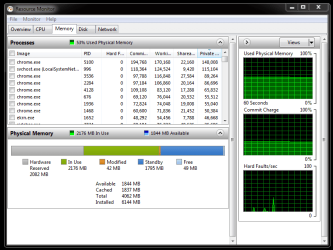
Go to the performance tab of Task Manager.

Choose Resource Monitor. Then choose the memory tab. Post a screenshot of that tab.
 

My Computer

Computer type
PC/Desktop
Computer Manufacturer/Model Number
Ignatz Special; 4 speed manual gearbox; factory air conditioning; one of one
OS
Windows 7 Home Premium SP1, 64-bit
CPU
Intel Skylake i5-6600K, not overclocked
Motherboard
AsRock Z170M Extreme 4, micro ATX
Memory
8 GB HyperX DDR4-2666 (2 x 4 GB)
Graphics Card(s)
none; graphics are integrated on CPU
Sound Card
onboard: Realtek ALC1150; external: USB Behringer UF0-202
Monitor(s) Displays
Dell S2340M 23 inch IPS
Screen Resolution
1600 x 900
Hard Drives
System: Crucial MX100 series SSD, 128 GB;
Data: Samsung Spinpoint 103SJ, 1 TB;
Backup: WD Caviar Green WD30EZRX-00D8PB0, 3 TB
PSU
Rosewill SilentNight 500 watt fanless, semi-modular
Case
Antec Solo II
Cooling
Noctua NH-U12S; Noctua F12 intake, Noctua S12A exhaust
Keyboard
Microsoft 200 6JH-00001 USB
Mouse
Dell or Microsoft optical wired; USB
Antivirus
Microsoft Security Essentials and Malwarebytes Premium
Browser
Pale Moon
Other Info
All fans PWM; speeds at idle: CPU circa 500 rpm; intake circa 600 rpm; exhaust circa 600 rpm; CPU temps 27 idle and 47 C load in a warm room (27 C/81 F) when running Intel Extreme Tuning Utility stress test.
Windows 7 64bit Ultimate Ram Issue

ok sir thats my computer task manager screenshot..........
 

Attachments

  • Capture 01.PNG
    Capture 01.PNG
    22.7 KB · Views: 82

My Computer

OS
Window 7 Ultimate x64
CPU
Intel 2nd Generation i5-750 2.67Ghz
Motherboard
ASUS ASUS P7H55-V
Memory
6GB Corsair DDR3-1333Bus Speed
Graphics Card(s)
XFX GEFORCE NVIDIA 9800GTX+
Sound Card
Realtec HD Audio
Monitor(s) Displays
ASUS MS228H 22'' LED
Screen Resolution
1920x1080
Hard Drives
Western Digital ATA 500GB 64MB CATCH
PSU
COOLER MASTER 600
Case
COOLER MASTER
Cooling
Normal
Keyboard
WOLF KING GAMING USB
Mouse
Normal
Internet Speed
512KB
Windows 7 64bit Ultimate Ram Issue

Go to the performance tab of Task Manager.

Choose Resource Monitor. Then choose the memory tab. Post a screenshot of that tab.

ok sir thats my computer task manager screenshot..........
Capture 01.PNG
 

My Computer

OS
Window 7 Ultimate x64
CPU
Intel 2nd Generation i5-750 2.67Ghz
Motherboard
ASUS ASUS P7H55-V
Memory
6GB Corsair DDR3-1333Bus Speed
Graphics Card(s)
XFX GEFORCE NVIDIA 9800GTX+
Sound Card
Realtec HD Audio
Monitor(s) Displays
ASUS MS228H 22'' LED
Screen Resolution
1920x1080
Hard Drives
Western Digital ATA 500GB 64MB CATCH
PSU
COOLER MASTER 600
Case
COOLER MASTER
Cooling
Normal
Keyboard
WOLF KING GAMING USB
Mouse
Normal
Internet Speed
512KB
Hello, I have checked the QVL from Asus for your board. Have you set the Bios correctly ? I don't see any mention of triple channel, what is the Corsair part number?
 

My Computer

Computer Manufacturer/Model Number
DIY
OS
Windows 7 home premium x64
CPU
AMD FX-4100 AM3+ 3.6GHz 12MB Black Edition
Motherboard
Asus M5A97 Pro
Memory
Crsair vengeance 12Gb DDR3 1600MHz CL9
Graphics Card(s)
Asus GTX 560 1GB
Sound Card
Realtek onboard
Monitor(s) Displays
Hanns G 1680x1050 native
Hard Drives
OCZ 128Gb Petrol ssd
2x500 Gb Samsung
PSU
OCZ StealthXstream II 500W
Internet Speed
8Mb or better
The Resource monitor shows you have 2gb RAM reserved for hardware, probably your video card. That makes up the difference.
 
Back
Top