

bhaveshnande
New member
- Local time
- 9:00 AM
- Messages
- 8
Hello,
I have 2GB RAM on my Windows 7 Ultimate 32-bit. I would like to buy additional 2GB RAM making a total of 4GB. I know that 32bit Windows 7 will not detect 4GB of RAM so ill be installing 64Bit version. I have a AMD athlon x2 dual core 5000+ 64Bit processor at 2.60GHz. I just opened up my chases to find out what type of RAM I have and also did a "Crucial Scan" which tells me I have a DDR2 PC2-6400, DDR2 PC2-5300 type of memory. I read somewhere that I need same type of RAM for better performance. My RAM card's label says it is a 2GB 2Rx8 PC2-6400U-666.
I need to know if I should install the same PC2-6400U-666 RAM in another slot or I can even use PC2-5300? which one is better? My RAM card labels does not show the RAM speed.
Also the Crucial Scan says that I can install a maximum of 4GB RAM. But is it 4GB per slot of the manufacturers maximum is 4GB?
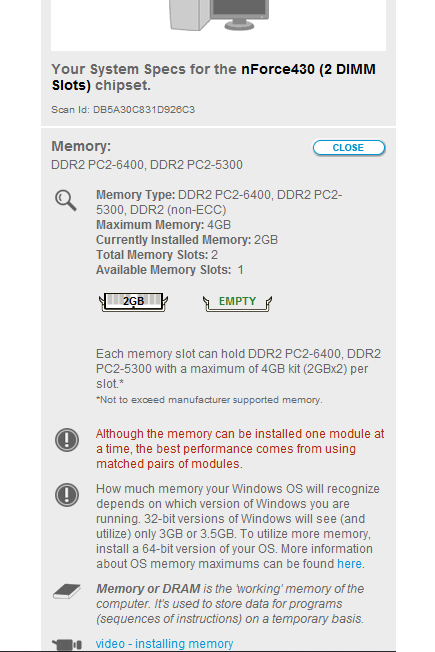
My Crucial Scan:
Edit:
You can get all information you want about your RAM with a little tool called CPUZ even without opening your CPU case,
(Just for people who will have same problems in future)
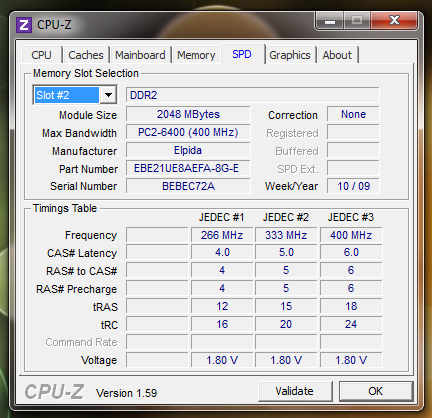
My RAM details:
I have 2GB RAM on my Windows 7 Ultimate 32-bit. I would like to buy additional 2GB RAM making a total of 4GB. I know that 32bit Windows 7 will not detect 4GB of RAM so ill be installing 64Bit version. I have a AMD athlon x2 dual core 5000+ 64Bit processor at 2.60GHz. I just opened up my chases to find out what type of RAM I have and also did a "Crucial Scan" which tells me I have a DDR2 PC2-6400, DDR2 PC2-5300 type of memory. I read somewhere that I need same type of RAM for better performance. My RAM card's label says it is a 2GB 2Rx8 PC2-6400U-666.
I need to know if I should install the same PC2-6400U-666 RAM in another slot or I can even use PC2-5300? which one is better? My RAM card labels does not show the RAM speed.
Also the Crucial Scan says that I can install a maximum of 4GB RAM. But is it 4GB per slot of the manufacturers maximum is 4GB?
My Crucial Scan:
Edit:
You can get all information you want about your RAM with a little tool called CPUZ even without opening your CPU case,
(Just for people who will have same problems in future)
My RAM details:
Last edited:
My Computer
- Computer Manufacturer/Model Number
- HP Compaq
- OS
- Windows 7 Ultimate 32Bit
- CPU
- AMD Athlon(tm) 64 X2 Dual Core Processor 5000+ 2.60GHz
- Motherboard
- Pegatron corporation
- Memory
- DDR2 PC2-6400 400MHz (2GB)
- Graphics Card(s)
- NVIDIA GeForce 6150SE nForce 430
- Sound Card
- RealTek High Definition Audio
- Monitor(s) Displays
- HP 1859 Series Wide LCD Monitor
- Screen Resolution
- 1366x768
- Hard Drives
- ST332081 3AS SCSI Disk Device
- Keyboard
- Standard PS/2 Keyboard
- Mouse
- PS/2 Compatible Mouse
- Internet Speed
- ~750Kbps


