Installing Anti-Virus Programs Problem

Robert11

New member
Power User
Local time
12:53 PM
Messages
542
Hello,

Thanks for all the previous help.
Greatly appreciated.

I was infected by this CTB Blocker trojan, but have re-installed most everything from backups.

Am very afraid of it happening again, obviously.

Even though Avast did not stop it, I thought it would be a good idea to re-install it anyway.
Also thought I'd install avira.

Both apparently downloaded to the desktop fine, but would not install.
Avast comes back with a message that: "Group Policy prohibits..." Huh ?

Avira just has the installing circle arrow going around and around, forever.

From what I've read up on CTB Blocker, it "only" encrypts your text files, and video files, etc.

Nothing about it preventing virus software from installing (and running).

So, I'm wondering if the problem with Avast and Avira is something else in my system
that I have to correct ?

What do you think ?
If so, what should I check and correct ?

Or, is it most likely CTB Blocker that is preventing the new installation of both of these programs ?
Any cure ?

Would like to ask also if when I get my new PC once W10 is out, is it O.K. to normally
have several anti virus programs like Hitman, MalwareBytes, etc. all installed and running ?
Do they (tend to) interfere with each other ?

Thanks,
Bob
 

My Computer

OS
Windows 7 64bit
Bob
It is not wise to have more than one anti virus. There are certain exceptions. Malwarebytes will run fine with other anti virus. Hitman, used only to scan would be fine also.
Regarding your inability to install, I would try to go back before the problem with system restore and then try.
Virus, do not infect previously made restore points.
 

My Computer

Computer type
PC/Desktop
Computer Manufacturer/Model Number
Dell XPS 420
OS
Windows 10, Home Clean Install
CPU
Intel Core2 processsor Q8200(2.33Ghz 1333FSB) Quad Core Tech
Motherboard
Dell
Memory
6 gb
Graphics Card(s)
ATI Radeon 256MB HD3650
Sound Card
Intergrated 7.1 Channel Audio
Monitor(s) Displays
Dell SP2009W 20"
Hard Drives
640 GB Serial ATA Hard drive
Cooling
Fan
Keyboard
Dell USB Keyboard
Mouse
Dell Premium Optical USB
Internet Speed
DSL 2.85
Malwarebytes Anti-Malware (MBAM) is not now, and never has been, an anti-virus application. It is an adjunct/supplement to an installed full-time anti-virus application and will work well with them.

Some uninstalled/portable "second opinion" anti-virus applications will work quite well as on-demand scanners though.

HTH :)
 

My Computer

Computer type
PC/Desktop
OS
W7
1. The only ways that I know of to reinstall Avast successfully are:

Repair install using the original setup file that you downloaded (for the version of Avast that you are using)

or

Run the Avast Removal Tool (available from Avast) in safe mode then reboot and fresh install Avast.

2. Avira doesn't allow installation of conflicting security products and will ask you to remove Avast and anything else it doesn't like before Avira will install correctly.

Sounds like you've got other problems though. Maybe you need to reset Group Policies to default settings.
 
Last edited:

My Computer

Computer type
Laptop
Computer Manufacturer/Model Number
ASUS
OS
Microsoft Windows 7 Home Premium 64-bit 7601 Multiprocessor Free Service Pack 1
CPU
AMD C-60 APU with Radeon(tm) HD Graphics
Motherboard
ASUSTeK COMPUTER INC. X501U
Memory
4.00 GB
Graphics Card(s)
AMD Radeon HD 6290 Graphics
Sound Card
(1) AMD High Definition Audio Device (2) Realtek High Defi
Screen Resolution
1366 x 768 x 32 bits (4294967296 colors) @ 60 Hz
Hard Drives
Hitachi HTS545050A7E380 SATA Disk Device
Antivirus
Comodo CIS & FW, SecureAplus App Whitelisting, Threatfire
Browser
Cyberfox 64bit, Opera 64bit, Airfox
Other Info
Spy-The-Spy, HitmanPro.Alert, Norton Connect Safe, MJRegWatcher, BitDefender TrafficLight, Voodoo Shield, Zemana AntiMalware
Hello Callender, et al

Thanks so much for the help and information.
Will try.

BTW: What is this Group Policy that you referred to.
Have never heard of it, or played with it.
I'm just a poor home style user, and frankly not too sharp with this.

Could you, please, tell me "exactly" what i should do ? I'm running W7 the 64 bit version.
How do I do the "Reset to Default" that you suggest ?

Thanks again,
Bob
 

My Computer

OS
Windows 7 64bit
Well Group Policy can be used to restrict lots of things. See some examples here:

Group Policy

According to what I've read malware can also change Group Policy settings.

What you can try - and it might not work:

Download and install UVK:

There's a fix available to reset group policy to defaults but it might be better to run a script to attempt to fix things. I will post instructions soon.

In the meantime just install UVK and also:

Start> Run

then type:

netplwiz

Press Enter.

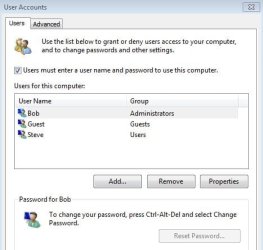
Post a screenshot.

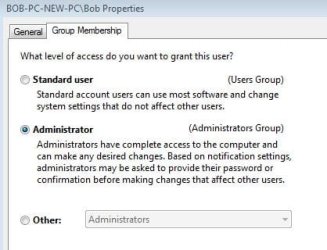
Then highlight your username and click "Proerties" then "Group Membership" and post another screenshot please.
 

My Computer

Computer type
Laptop
Computer Manufacturer/Model Number
ASUS
OS
Microsoft Windows 7 Home Premium 64-bit 7601 Multiprocessor Free Service Pack 1
CPU
AMD C-60 APU with Radeon(tm) HD Graphics
Motherboard
ASUSTeK COMPUTER INC. X501U
Memory
4.00 GB
Graphics Card(s)
AMD Radeon HD 6290 Graphics
Sound Card
(1) AMD High Definition Audio Device (2) Realtek High Defi
Screen Resolution
1366 x 768 x 32 bits (4294967296 colors) @ 60 Hz
Hard Drives
Hitachi HTS545050A7E380 SATA Disk Device
Antivirus
Comodo CIS & FW, SecureAplus App Whitelisting, Threatfire
Browser
Cyberfox 64bit, Opera 64bit, Airfox
Other Info
Spy-The-Spy, HitmanPro.Alert, Norton Connect Safe, MJRegWatcher, BitDefender TrafficLight, Voodoo Shield, Zemana AntiMalware
Script

Instructions:

Download the attached file to your desktop:

View attachment UVK Script.txt

File contents:

Code:
<UVKCommandsScript>

<Comment>

Please save all your work before continuing.

<CreateRestorePoint>
<CleanAllUsersTemp>

<KillNonSystemProcesses>
<StopNonMsServices>

<FixGroupAccess>
<FixInstallProblems>
<ResetSecuritySettings>
<ResetGroupPolicy>

<CreateRestorePoint>
<Reboot>

Rename the downloaded UVK Script.txt file to UVK Script.uvk - change the file extension from .txt to .uvk

Disable any security software. Usually you can right click icons in the system tray to disable protection.

Right click on UVK desktop icon and choose "Run as administrator"

On the welcome screen choose "Run Scripts" then "Import Commands From File"

In the window that opens browse to the UVK Script.uvk file on your desktop and open it.

Choose "Run / Fix Listed"

Allow the script to complete. When your computer reboots make sure that any security software that you disabled has been re-enabled.
 

My Computer

Computer type
Laptop
Computer Manufacturer/Model Number
ASUS
OS
Microsoft Windows 7 Home Premium 64-bit 7601 Multiprocessor Free Service Pack 1
CPU
AMD C-60 APU with Radeon(tm) HD Graphics
Motherboard
ASUSTeK COMPUTER INC. X501U
Memory
4.00 GB
Graphics Card(s)
AMD Radeon HD 6290 Graphics
Sound Card
(1) AMD High Definition Audio Device (2) Realtek High Defi
Screen Resolution
1366 x 768 x 32 bits (4294967296 colors) @ 60 Hz
Hard Drives
Hitachi HTS545050A7E380 SATA Disk Device
Antivirus
Comodo CIS & FW, SecureAplus App Whitelisting, Threatfire
Browser
Cyberfox 64bit, Opera 64bit, Airfox
Other Info
Spy-The-Spy, HitmanPro.Alert, Norton Connect Safe, MJRegWatcher, BitDefender TrafficLight, Voodoo Shield, Zemana AntiMalware
Hi, Robert11:

I'll leave the driving to Callender and the other more expert forum members...

However, it was pointed out in one of your other, recent threads that you might not have Service Pack 1 installed on your Win7/64 system?
See here: http://www.sevenforums.com/software/368630-net-4-installation-problem.html

Is that true?
If so, many of the seemingly problems and issues you have been reporting over the past several weeks/months in multiple threads might be at least indirectly related to this.
Moreover, running without SP1 constitutes, in and of itself, a security (and stability) risk.

If your system does not have SP1 installed, it would be a very good idea to attend to that right away.
(I'm sure the forum experts here could walk you through that process.)
If you do have SP1 installed, then please feel free to disregard this post, of course.

Just a humble suggestion from another auto-didact home user,
 

My Computer

Computer type
PC/Desktop
Computer Manufacturer/Model Number
Dell Studio XPS 8500
OS
OEM Windows 7 Ult (x64) SP1
CPU
Intel Core-i7 3770 @ 3.4 GHz
Motherboard
"Dell" branded
Memory
16 GB DDR3 SDRAM @ 1333 MHz
Graphics Card(s)
NVidia GeForce GT620 1 GB
Sound Card
THX TruStudio PC
Monitor(s) Displays
Dell U2410 Full HD
Hard Drives
2.0 TB SATA2 @ 7200 RPM
PSU
350W
Keyboard
MS 4000 Ergon - Wired
Mouse
Logitech Anywhere MX
Internet Speed
Cable HSI w/Turbo (router)
Antivirus
KIS-MBAM Premium-MBAE Premium
Browser
Fx (current version); IE
Other Info
And a Win7/64 Pro laptop; And a Win10/64 Pro desktop.
Hi Callender

Here are the 2 screenshots you asked for.

Have the Log from UVK, and am trying to understand it a bit, before trying the log
name change/ext. change name you suggested.

BTW: used the Avast removal tool, and Avast now presumably totally removed from system.
But Avira still hangs up on install. Funny.

Thanks and regards,
Bob
 

Attachments

  • Capture 1.JPG
    Capture 1.JPG
    39.9 KB · Views: 9
  • Capture 2.JPG
    Capture 2.JPG
    39.5 KB · Views: 9

My Computer

OS
Windows 7 64bit
Suggestion

Okay so your account is an Administrator account so that rules out user permission issues.

Avast removal tool: If you ran it in Safe Mode as described then it should have removed Avast.

Re: Install problems. I think you should try running the UVK Script. It will create a system restore point before repairs are attempted.

What you need to know:

In case of any problems after repairs you need to know how to restore your system from Safe Mode With Command Prompt.

If you experience problems after running the script then tap F8 repeatedly on boot until you see boot options.

Select "Safe Mode With Command Prompt"

If you don't see that option listed highlight "Windows Seven" in the list and press F8 once more and you should be able to select "Safe Mode With Command Prompt"

When command prompt mode window opens enter the following line:

cd restore

press ENTER.

Next type:

rstrui.exe

Press Enter.

Click Next then choose the first UVK restore point that's listed.

   Note
The system restore instructions only apply if you experience problems - otherwise you can ignore them.
 

My Computer

Computer type
Laptop
Computer Manufacturer/Model Number
ASUS
OS
Microsoft Windows 7 Home Premium 64-bit 7601 Multiprocessor Free Service Pack 1
CPU
AMD C-60 APU with Radeon(tm) HD Graphics
Motherboard
ASUSTeK COMPUTER INC. X501U
Memory
4.00 GB
Graphics Card(s)
AMD Radeon HD 6290 Graphics
Sound Card
(1) AMD High Definition Audio Device (2) Realtek High Defi
Screen Resolution
1366 x 768 x 32 bits (4294967296 colors) @ 60 Hz
Hard Drives
Hitachi HTS545050A7E380 SATA Disk Device
Antivirus
Comodo CIS & FW, SecureAplus App Whitelisting, Threatfire
Browser
Cyberfox 64bit, Opera 64bit, Airfox
Other Info
Spy-The-Spy, HitmanPro.Alert, Norton Connect Safe, MJRegWatcher, BitDefender TrafficLight, Voodoo Shield, Zemana AntiMalware
Re: Net Framework installation and SP1. I'm not really able to offer much help but have you tried running Belarc Advisor to get a list of missing updates along with links to the installers?
 

My Computer

Computer type
Laptop
Computer Manufacturer/Model Number
ASUS
OS
Microsoft Windows 7 Home Premium 64-bit 7601 Multiprocessor Free Service Pack 1
CPU
AMD C-60 APU with Radeon(tm) HD Graphics
Motherboard
ASUSTeK COMPUTER INC. X501U
Memory
4.00 GB
Graphics Card(s)
AMD Radeon HD 6290 Graphics
Sound Card
(1) AMD High Definition Audio Device (2) Realtek High Defi
Screen Resolution
1366 x 768 x 32 bits (4294967296 colors) @ 60 Hz
Hard Drives
Hitachi HTS545050A7E380 SATA Disk Device
Antivirus
Comodo CIS & FW, SecureAplus App Whitelisting, Threatfire
Browser
Cyberfox 64bit, Opera 64bit, Airfox
Other Info
Spy-The-Spy, HitmanPro.Alert, Norton Connect Safe, MJRegWatcher, BitDefender TrafficLight, Voodoo Shield, Zemana AntiMalware
Back
Top