
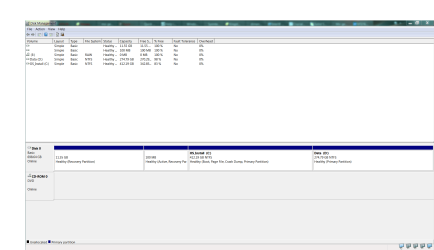
I'm thinking of installing a mSATA SSD as the boot drive on my MSI GE60 0NC-498US. I'm reasonably confident that it has the capability to install a SSD (It has a PCIe Slot labeled SSD and is about the right side for one). I'm planning to clone my HDD (Current hard drive) onto it and use it as the boot drive, but looking through the disk manager gives me 2 "mysterious" boot manager/configuration partition stubs (Or I think that's what they are?).
I'm wondering:
1) Will Macrium Reflect Free(Or any other disk cloning tool? I have Macrium installed.) will copy them over (I can't select the stubs?)
2) Will this cause any issues?
3) If possible, any tips or a guide on how to set up the SSD as my boot drive, etc.
4) Any alternatives ? Preferably with as little loss of data as possible, and not having to reinstall windows? I'm not sure if I can even reinstall windows properly, being an OEM and all.
Attached is a screenshot of the disk manager. My guess is that the smaller one is the boot config partition stub thing and the larger one is some sort of windows recovery partition? (I had a data partition instead of what seems to be the standard D:\ recovery partition from OEMs?
I'm wondering:
1) Will Macrium Reflect Free(Or any other disk cloning tool? I have Macrium installed.) will copy them over (I can't select the stubs?)
2) Will this cause any issues?
3) If possible, any tips or a guide on how to set up the SSD as my boot drive, etc.
4) Any alternatives ? Preferably with as little loss of data as possible, and not having to reinstall windows? I'm not sure if I can even reinstall windows properly, being an OEM and all.
Attached is a screenshot of the disk manager. My guess is that the smaller one is the boot config partition stub thing and the larger one is some sort of windows recovery partition? (I had a data partition instead of what seems to be the standard D:\ recovery partition from OEMs?
Attachments
My Computer
- Computer type
- Laptop
- Computer Manufacturer/Model Number
- MSI
- OS
- Windows 7 Home Premium x64
- CPU
- Intel Core i-5-3230M
- Motherboard
- Micro-Star International Co., Ltd. MS-16GA
- Memory
- 8.00GB Dual-Channel DDR3 @ 798MHz
- Graphics Card(s)
- 2048MB GeForce GT 650M (MSI)
- Hard Drives
- 699GB Western Digital WDC WD7500BPVT-22HXZT3 (SATA)
- Case
- SIEPR Summit 2013 Case
- Mouse
- Logitech MX Anywhere
- Antivirus
- Avast!, Malwarebytes
- Browser
- Firefox, Opera, Chrome, Palemoon


