Installing Win-7 32 and 64 bit Upgrades

dustymars

Banned
Local time
10:07 AM
Messages
58
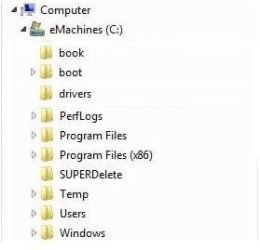
After upgrading my Dell 1545 laptop from Vista 32-bit to Windows 7 Home Premium then realized I should have installed the 64-bit version. Reading comments here and elsewhere I see it would require a Clean Install for the 64-bit.SO I see that my eMachine desktop is a 64-bit Win-7 and the drive is setup like this:

Computer
eMachines (C: )
Program Files
Program Files (x86)

My dumb question is; if I save my stuff and do a clean install of 64-bit, Win-7 on my laptop will my x86 stuff go back on with two Program Files folders? It appears that two partitions would be required, but my nimble brain cannot assimilate this idea :o


Attachments

  • Libraries.jpg
    Libraries.jpg
    8.3 KB · Views: 22
Last edited:

My Computer

Computer type
PC/Desktop
Computer Manufacturer/Model Number
eMachines EL 1333G-01W
OS
Microsoft Windows 7 Home Premium 64-bit 7601 Multiprocessor Free Service Pack 1
CPU
AMD Athlon(tm) Processor 2850e
Motherboard
eMachines WMCP61M
Memory
4.00 GB
Graphics Card(s)
NVIDIA GeForce 6150SE nForce 430
Sound Card
Realtek High Definition Audio
Monitor(s) Displays
Samsung 730B
Screen Resolution
1280 x 1024 x 32 bits (4294967296 colors) @ 60 Hz
Hard Drives
(1) ST332041 8AS SCSI Disk Device (2) Generic- Compact Flash USB Device (3) Multiple Flash Reader USB Device
Hum, Maybe if I do a clean install of the 64-bit, then make the Program Files (x86) folder and transfer all my x86 stuff there then accommodate the desktop and menus with that stuff it will work like my eMachine PC was setup.... Huh?
 

My Computer

Computer type
PC/Desktop
Computer Manufacturer/Model Number
eMachines EL 1333G-01W
OS
Microsoft Windows 7 Home Premium 64-bit 7601 Multiprocessor Free Service Pack 1
CPU
AMD Athlon(tm) Processor 2850e
Motherboard
eMachines WMCP61M
Memory
4.00 GB
Graphics Card(s)
NVIDIA GeForce 6150SE nForce 430
Sound Card
Realtek High Definition Audio
Monitor(s) Displays
Samsung 730B
Screen Resolution
1280 x 1024 x 32 bits (4294967296 colors) @ 60 Hz
Hard Drives
(1) ST332041 8AS SCSI Disk Device (2) Generic- Compact Flash USB Device (3) Multiple Flash Reader USB Device
If you do a clean installation of Windows 7 x64, it will create Program Files and Program File (x86) folders. No additional partitions will be needed, However, you must reinstall all of your programs.
You can not copy anything into the Program Files (x86) folder from your old installation and expect it to function.

You should backup your data files, music, etc. and they can be copied to the new installation.
 

My Computer

Computer type
PC/Desktop
Computer Manufacturer/Model Number
Custom Built
OS
Windows 10 Pro x64, Windows 8.1 Pro x64, Windows 7 Ultimate x64 SP1,
CPU
INTEL i9-7920X LGA 2066
Motherboard
Gigabyte X299-WU8 F3
Memory
64 GB (4 X 16 GB) G-Skill V Series DDR4 3200 Quad Channel
Graphics Card(s)
EVGA GTX 1060 SC 3 GB
Sound Card
Realtek Onboard ALC1220
Monitor(s) Displays
2 x Samsung S27E310
Screen Resolution
1920x1080
Hard Drives
Samsung 2 x 970 EVO Plus 500 GB NVMe
1 x 6TB WD 6003FZBX SATA
1 x 6TB WD 60EFRX SATA
12 x 3TB WD 30EFRX SATA
PSU
Seasonic X-1050
Case
Thermaltake Armor+
Cooling
Corsair H80i V2 Liquid AOI Cooler
Keyboard
Logitech G510s
Mouse
Logitech MX Master 2S
Internet Speed
200 Mb/s
Antivirus
ESET NOD32 13.1
Browser
EDGE (Dev, Canary, Beta), Chrome
Other Info
ASUS RT-AC68U router
Malwarebytes 4.0.4
Afraid not.

Some programs run as executables, without needing to be installed, they are portable. 7 zip is an example.

Most are not portable, during the installation process they will write entries to the windows database ( the registry), they may install drivers, and distribute files in various places.

You will need to reinstall those.
 

My Computers

System One System Two

  • Computer type
    PC/Desktop
    OS
    7 X64
    CPU
    i5 8400
    Motherboard
    gigabyte b365m ds3h
    Memory
    2x8gb 3200mhz
    Hard Drives
    various
    PSU
    pure power 11 400w cm
    Case
    Coolermaster
    Cooling
    cryorig m9i
  • Computer type
    PC/Desktop
    OS
    7x64
    CPU
    g5400
    Motherboard
    ga b365m ds3h
    Memory
    8gb ddr4 2400
    PSU
    xfx pro 450w
Thanks guys; I think leaving well enough alone will be the operative words. 32-bit works just fine on my laptop for what it is used for.
 

My Computer

Computer type
PC/Desktop
Computer Manufacturer/Model Number
eMachines EL 1333G-01W
OS
Microsoft Windows 7 Home Premium 64-bit 7601 Multiprocessor Free Service Pack 1
CPU
AMD Athlon(tm) Processor 2850e
Motherboard
eMachines WMCP61M
Memory
4.00 GB
Graphics Card(s)
NVIDIA GeForce 6150SE nForce 430
Sound Card
Realtek High Definition Audio
Monitor(s) Displays
Samsung 730B
Screen Resolution
1280 x 1024 x 32 bits (4294967296 colors) @ 60 Hz
Hard Drives
(1) ST332041 8AS SCSI Disk Device (2) Generic- Compact Flash USB Device (3) Multiple Flash Reader USB Device
Back
Top