installing win 7 ultimate x64 very slow

threezero

New member
Local time
7:48 PM
Messages
4
Location
philippines
hi guys,

good day!

a little help please.

i'm trying to install a win 7 on my hdd from a usb stick then it slows down very badly during the start till expanding files which stuck at 0% for 10mins, 1% for 10mins and so on. i takes forever to install.

my current specs
cpu: amd a8 5600k 3.6ghz
mobo: asus f2a85-v pro
ram: 8gb (4x2) corsair vengeance
gpu: gigabyte gtx 560 1gb 256bit
hdd:WD 500gb
odd: samsung DVDR


thank you in advance for your help on this matter. :(
 

My Computer My Computer

At a glance

Windows 7 Ultimate x64A8 5600k4GB x 2 CORSAIR VENGEANCEGIGABYTE GTX 560
Computer type
PC/Desktop
Computer Manufacturer/Model Number
CUSTOM
OS
Windows 7 Ultimate x64
CPU
A8 5600k
Motherboard
ASUS F2A85-V PRO
Memory
4GB x 2 CORSAIR VENGEANCE
Graphics Card(s)
GIGABYTE GTX 560
Hard Drives
WD 500 GB
Hi, Welcome to Seven forums.

Try a different USB stick or DVD to install. It might be that the USB you are using is bad.
 

My Computer My Computer

At a glance

Windows 11 x64i5 2500K @ 3.3 GHz16 GB DDR 3 @ 1600MhzMSI 1050TI 4GB OC version
Computer type
PC/Desktop
Computer Manufacturer/Model Number
Custom Bulid/Self made
OS
Windows 11 x64
CPU
i5 2500K @ 3.3 GHz
Motherboard
ASUS P8 Z77 V pro
Memory
16 GB DDR 3 @ 1600Mhz
Graphics Card(s)
MSI 1050TI 4GB OC version
Sound Card
On Board (Realtek HD audio)
Monitor(s) Displays
Samsung 22" LCD
Screen Resolution
1920*1080
Hard Drives
Seagate 1 TB, WD 1TB, Seagate 2 TB ( I use a lot of space)
PSU
coolermaster 750 W
Case
Coolermaster HAF912
Cooling
Coolermaster hyper 212 EVO
Keyboard
Samsung
Mouse
Dell Wireless
Internet Speed
Wireless 50 Mbps
Antivirus
AVG 2016 Internet Security
Browser
Google Chrome
Hi, thanks for accepting me in the seven forums.
i did what you said but to no avail still very slow i have encountered this problem last night from 5pm to 2am very slooooooooow installation.
i have disconnected my gpu and dvdrom. the noly connect devices are hdd and the bootable usb.
 

My Computer My Computer

At a glance

Windows 7 Ultimate x64A8 5600k4GB x 2 CORSAIR VENGEANCEGIGABYTE GTX 560
Computer type
PC/Desktop
Computer Manufacturer/Model Number
CUSTOM
OS
Windows 7 Ultimate x64
CPU
A8 5600k
Motherboard
ASUS F2A85-V PRO
Memory
4GB x 2 CORSAIR VENGEANCE
Graphics Card(s)
GIGABYTE GTX 560
Hard Drives
WD 500 GB
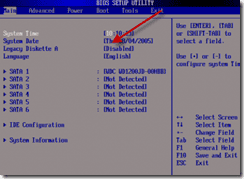
Go to your BIOS settings, check for if the option for a 1.44mb 3.5” Floppy Disk Drive is turned on or not (even if your PC have or does not have FDD).

Turn the option off and then check. check the screenshot.
 

Attachments

  • image_thumb3.png
    image_thumb3.png
    16.5 KB · Views: 17

My Computer My Computer

At a glance

Windows 11 x64i5 2500K @ 3.3 GHz16 GB DDR 3 @ 1600MhzMSI 1050TI 4GB OC version
Computer type
PC/Desktop
Computer Manufacturer/Model Number
Custom Bulid/Self made
OS
Windows 11 x64
CPU
i5 2500K @ 3.3 GHz
Motherboard
ASUS P8 Z77 V pro
Memory
16 GB DDR 3 @ 1600Mhz
Graphics Card(s)
MSI 1050TI 4GB OC version
Sound Card
On Board (Realtek HD audio)
Monitor(s) Displays
Samsung 22" LCD
Screen Resolution
1920*1080
Hard Drives
Seagate 1 TB, WD 1TB, Seagate 2 TB ( I use a lot of space)
PSU
coolermaster 750 W
Case
Coolermaster HAF912
Cooling
Coolermaster hyper 212 EVO
Keyboard
Samsung
Mouse
Dell Wireless
Internet Speed
Wireless 50 Mbps
Antivirus
AVG 2016 Internet Security
Browser
Google Chrome
hi,
good day!
thanks for the quick reply.
i already checked my bios for a floppy option but there is no option for it.
my mobo "ASUS f2a85-v pro" don't have it.
is there another name for it?
my bios is on EZ mode. even in advanced mode no floppy option.
 

My Computer My Computer

At a glance

Windows 7 Ultimate x64A8 5600k4GB x 2 CORSAIR VENGEANCEGIGABYTE GTX 560
Computer type
PC/Desktop
Computer Manufacturer/Model Number
CUSTOM
OS
Windows 7 Ultimate x64
CPU
A8 5600k
Motherboard
ASUS F2A85-V PRO
Memory
4GB x 2 CORSAIR VENGEANCE
Graphics Card(s)
GIGABYTE GTX 560
Hard Drives
WD 500 GB
Unplug all other HD's and peripherals,

Boot into BIOS setup, reset to defaults, save changes. If an EFI BIOS you'll need to decide if you want UEFI BIOS vs. Legacy BIOS. If UEFI follow these special steps for Install, otherwise enable Legacy BIOS or Compatibility Support Module to proceed with normal install:

Set DVD drive first to boot, HD second, set SATA controller to AHCI, Save changes and Exit.

Then boot into Windows 7 installer DVD or flash stick burned or written using tool and latest ISO for your licensed OS version here. I would use a fresh ISO written with tool in Step 2 as yours is in question.

At first installer screen Press Shift + F10, or enter System Recovery Options to open a Command Box, type:

DISKPART
LIST DISK
SELECT DISK 0 (after confirming Windows 7 target HD #)
CLEAN
CREATE PARTITION PRIMARY
FORMAT FS=NTFS LABEL="WINDOWS 7"
ACTIVE
EXIT
EXIT

Next click Install Now, then Custom install to Clean Install Windows 7 to the partition you created. If it fails then report back at which step and the verbatim error message.

In addition read over these steps to understand the tools and methods which work best to get and maintain a perfect Clean Reinstall - Factory OEM Windows 7. The steps are the same for retail.

After install you can adjust partition size or Create new partitions for data, etc. in Disk Mgmt. You are creating the partition here for the purpose of wiping the HD and marking Active which overcomes certain install failures.
 
hi, good day!
thak you for this will try this when i get home im currently at work right now.
will give you feedback on whats gonna happen.
thnx!
 

My Computer My Computer

At a glance

Windows 7 Ultimate x64A8 5600k4GB x 2 CORSAIR VENGEANCEGIGABYTE GTX 560
Computer type
PC/Desktop
Computer Manufacturer/Model Number
CUSTOM
OS
Windows 7 Ultimate x64
CPU
A8 5600k
Motherboard
ASUS F2A85-V PRO
Memory
4GB x 2 CORSAIR VENGEANCE
Graphics Card(s)
GIGABYTE GTX 560
Hard Drives
WD 500 GB
Back
Top