Installing Windows 7 on Sandisk eMMC chip

sluggerb

New member
Power User
VIP
Local time
12:47 PM
Messages
79
I have a little Braswell N3060 device and I want to install Windows 7 on it. I can make a bootable USB stick and get it to boot up, but when you get to the part to pick a disk, nothing shows up.

I opened the machine up and found the storage chip, it's a Sandisk eMMC chip (SDINBDA4 printed on it). So I am assuming if I had a driver to load on install for this chip I could load it at install time and that would let me choose the drive.

I've been googling but haven't found one yet, anyone know where it can be found/if it exists?
 

My Computer My Computer

Computer type
PC/Desktop
OS
Windows 7 Pro 32 & 64 bit

My Computers My Computers

System One System Two

  • Computer type
    PC/Desktop
    OS
    7 X64
    CPU
    i5 8400
    Motherboard
    gigabyte b365m ds3h
    Memory
    2x8gb 3200mhz
    Hard Drives
    various
    PSU
    pure power 11 400w cm
    Case
    Coolermaster
    Cooling
    cryorig m9i
  • Computer type
    PC/Desktop
    OS
    7x64
    CPU
    g5400
    Motherboard
    ga b365m ds3h
    Memory
    8gb ddr4 2400
    PSU
    xfx pro 450w


Unfortunately none of those worked. I don't have the ability to run the last one, I used an unpacker to unpack the x64 msi file, but that didn't work either.

The closest I got was with the Braswell x64 driver, the Installer saw the Driver, and it attempts to install but give an error message and still does not see the drive.

I did see the last link (the BayTrail one) has .msi's there, so I need to try and slipstream them into the ISO?

Edit: I read the PDF it looks like for x64 installs (which I was trying) there are additional steps but x32 bit installs are easier and the machine only has 4 gb of ram so 32 bit would work fine. I am making up a 32 bit Win7 ISO with USB 3 drivers as we speaks. We'll see how it goes


Edit2: 32 bit Windows 7 install also did not see the drive.
 
Last edited:

My Computer My Computer

Computer type
PC/Desktop
OS
Windows 7 Pro 32 & 64 bit

My Computer My Computer

Computer type
PC/Desktop
OS
Windows 7 Pro 32 & 64 bit
I am making up a 32 bit Win7 ISO with USB 3 drivers as we speaks. We'll see how it goes


Edit2: 32 bit Windows 7 install also did not see the drive.


It sounds like the Braswell x86 is most likely. How did you try to install it?

I would try using dism++ to install it into boot.wim image 2, and also into whatever install.wim image you are using.

Dism++

Some screenshots showing how to use dism++

post3476526


post3476527
 

My Computers My Computers

System One System Two

  • Computer type
    PC/Desktop
    OS
    7 X64
    CPU
    i5 8400
    Motherboard
    gigabyte b365m ds3h
    Memory
    2x8gb 3200mhz
    Hard Drives
    various
    PSU
    pure power 11 400w cm
    Case
    Coolermaster
    Cooling
    cryorig m9i
  • Computer type
    PC/Desktop
    OS
    7x64
    CPU
    g5400
    Motherboard
    ga b365m ds3h
    Memory
    8gb ddr4 2400
    PSU
    xfx pro 450w
It sounds like the Braswell x86 is most likely. How did you try to install it?

I added the USB 3.0 drivers to the ISO using the MSI smart Tool, made a bootable USB stick, booted off the USB stick, when I get to the part to select a drive I put in another USB stick with the drivers in it, I clicked "Load Driver", navigated to the driver on the second USB stick, selected the eMMC driver that was displayed, Windows sowed a progress bar, and then it goes back to the drive selection screen with no drive showing. I repeated this for every driver and every selection for every driver

Is there any reason adding the driver via dism would work if the drivers would not load manually?

I tried both x86 and x64 with both flavors of Windows and nothing ever worked.
 

My Computer My Computer

Computer type
PC/Desktop
OS
Windows 7 Pro 32 & 64 bit
Is there any reason adding the driver via dism would work if the drivers would not load manually?

I suggested dism++, not dism.

The only way to find out is to try
 

My Computers My Computers

System One System Two

  • Computer type
    PC/Desktop
    OS
    7 X64
    CPU
    i5 8400
    Motherboard
    gigabyte b365m ds3h
    Memory
    2x8gb 3200mhz
    Hard Drives
    various
    PSU
    pure power 11 400w cm
    Case
    Coolermaster
    Cooling
    cryorig m9i
  • Computer type
    PC/Desktop
    OS
    7x64
    CPU
    g5400
    Motherboard
    ga b365m ds3h
    Memory
    8gb ddr4 2400
    PSU
    xfx pro 450w
my 1st install try failed.

I followed the procedure below to re-create Win7 Pro 32-bit install media, using SIW2's tool 7UPv64F.zip
Update your Win 7 installation media

added eMMC driver from here. Only two files added (x84. no need of x64)
Braswell_EMMC_driver_x86.zip
fujitsu-eMMC-driversx86.zip

When re-create completed, copied it into a 16 GB USB drive.
boot my machine on a USB port.


  1. USB3 working. boot smooth. and keyboard and mouse both functional (USB3 works)
  2. when boot done, select to "start to install". but there wasn't any storage to install. I did search drives I could see. C:drive and X:drive. no eMMC drivers found.

my 1st question, is the tool working for 32-bit? (gigabyte web has a utility, can do similar re-create job. but only working on 64-bit. I did try several times. and 64-bit working but 32-bit failed. I did re-create on different machine. still install 32-bit failed).

2nd, any suggestion? I have seen USB3 driver working. This hints, folder path is ok. are Braswell_EMMC_driver_x86/fujitsu-eMMC-driversx86 right drivers? Anyone got it working and got Win7 install successfully?

Do I need to add
BayTrail_Windows7_Intel_Atom_Processor_Win7_IO_Drivers_MR3_v6_0.zip

per this post (four files listed)
Installing Windows 7 on Sandisk eMMC chip


Thanks,
 

My Computers My Computers

System One System Two

  • Computer type
    PC/Desktop
    Computer Manufacturer/Model Number
    HP Elite 800 G5
    OS
    Windows 7 Pro 64-bit
    CPU
    I7-9700
    Memory
    32 GB
  • Computer type
    Laptop
    System Manufacturer/Model Number
    ASUS UX305C
    OS
    Windows 7 Pro 64-bit
Here is my update.

my laptop is Lenovo IdeaPad with eMMC 32GB. At final, I got win10 32-bit OS installed on it. MBR/NTFS (eMMC SanDisk DF4032 is ok to go MBR/NTFS)

Likely Lenovo BIOS has a "whitelist" (please google wiki). Windows 7 is NOT on the list (Only OS with "Windows Boot Manager" ok to go). Hence none got successful. I read posts, Win7 running on HP eMMC 32GB, on Fujitsu eMMC 32GB. but none on Lenovo.

Within 32-bit OS, some 13-15 GB size spare.
(Under 64-bit OS, eMMC 32GB daily warning, low-vol. couldn't do any update, running slow)
 
Last edited:

My Computers My Computers

System One System Two

  • Computer type
    PC/Desktop
    Computer Manufacturer/Model Number
    HP Elite 800 G5
    OS
    Windows 7 Pro 64-bit
    CPU
    I7-9700
    Memory
    32 GB
  • Computer type
    Laptop
    System Manufacturer/Model Number
    ASUS UX305C
    OS
    Windows 7 Pro 64-bit
Another Perspective on Your On-Board chip Problem

Hi siliconbeaver,

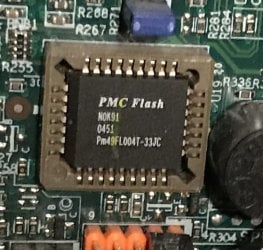
I ran into a similar situation on my eMachine. When photographing the MOBO I saw a PMC Flash chip :PMC Flash.jpg

I had never seen it on the Device Manager or operating anywhere in the Administration tools. Here is a fast thing to try. Go to the Device Manager, First look to see if there is any problem device shown: make a note of it. Go up to View and click Show Hidden Devices. In the Non-Plug and Play Drivers look for something including DiskOnChip. Click on it and see what it has to say. The driver for almost all of these type of chips is integrated into all major OSs. I had to play around with the resources before I got it to work. I wasn't even thinking about when I saw boot on startup. I am going to include a pdf file that will render me an enemy for life...View attachment MD2200(02,03)-D.pdf

I need to give credit to Programmable Microelectronics Corp. for learning most of this.

Good Evening and Best Wishes,

Phredtx
 

My Computers My Computers

System One System Two

  • Computer type
    PC/Desktop
    Computer Manufacturer/Model Number
    Gateway SX2803
    OS
    Windows 7 Home Premium 64 bit Service Pack 1
    CPU
    Pentium Dual-Core E5800 @ 3.20GHz 3.20GHz
    Memory
    6.00 GB
    Graphics Card(s)
    Intel G45/G43 Express Chipset
    Monitor(s) Displays
    Dell E207WFP
    Internet Speed
    1.0 GB
  • Computer type
    PC/Desktop
    System Manufacturer/Model Number
    eMachine T3095
    OS
    XP SP3
    CPU
    AMD Athlon Clock Rate 1191MHz
    Motherboard
    C255346807
    Memory
    704 MB
    Graphics Card(s)
    NVIDIA GeoForce4 MX In GPU VMem 65344KB
    Sound Card
    nForce 6-Channel/Audio
    Monitor(s) Displays
    DELL 174FPC
    Screen Resolution
    1024 by 768
    Hard Drives
    Disk C: NTFS 70.7 GB
    Disk D: NTFS 37.25 GB
Back
Top