
Integrated GPU detected after Internal Card Installed
Hey sevenforums.
I upgraded my CPU and motherboard to :
ARK | Intel® Core? i5-4460 Processor (6M Cache, up to 3.40 GHz)
GIGABYTE - Motherboard - Socket 1150 - GA-H81M-S2PV (rev. 2.0)
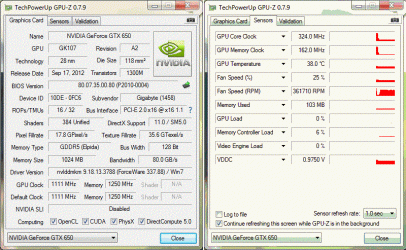
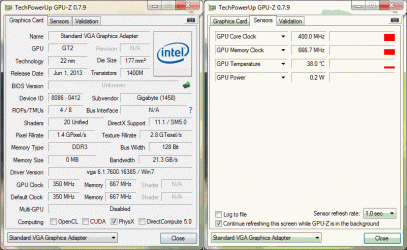
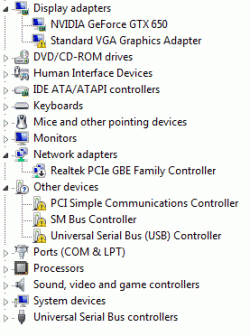
I installed windows with the external GPU (Gigabyte GTX650) connected and then installed only the external gpu drivers. Now there is an error in the device manager for the integrated GPU. Do I need to install its drivers too ? It is being detected as 'Standard VGA Graphics Adapter' in device manager & by GPU-Z (In previous system only the external GPU was detected). Or do I have to disable it from device manager or UEFI ? (It is being shown as enabled in UEFI).
Games are running fine but video playback performance is very poor as most HD videos have low framerate\stuttering and look watery. Even some of the videos which run during games have this problem. These same videos ran perfectly fine on my previous CPU\Board (Core2Duo E8200 & Gigabyte G41MT-S2PT) with integrated GPU.
Hey sevenforums.
I upgraded my CPU and motherboard to :
ARK | Intel® Core? i5-4460 Processor (6M Cache, up to 3.40 GHz)
GIGABYTE - Motherboard - Socket 1150 - GA-H81M-S2PV (rev. 2.0)
I installed windows with the external GPU (Gigabyte GTX650) connected and then installed only the external gpu drivers. Now there is an error in the device manager for the integrated GPU. Do I need to install its drivers too ? It is being detected as 'Standard VGA Graphics Adapter' in device manager & by GPU-Z (In previous system only the external GPU was detected). Or do I have to disable it from device manager or UEFI ? (It is being shown as enabled in UEFI).
Games are running fine but video playback performance is very poor as most HD videos have low framerate\stuttering and look watery. Even some of the videos which run during games have this problem. These same videos ran perfectly fine on my previous CPU\Board (Core2Duo E8200 & Gigabyte G41MT-S2PT) with integrated GPU.
Attachments
Last edited:
My Computer
- Computer type
- PC/Desktop
- OS
- Win7 Ultimate 32bit


