Intel Rapid Storage Technology question...

Cr00zng

New member
Pro User
Local time
11:23 PM
Messages
568
The PC in question is Sandy Bridge based system with one SSD and an HDD. Is it necessary to install the Intel Rapid Storage Technology that installs a service with the same name?

I am trying to get rid of the following error message, event ID 9, in the system log:

The device, \Device\Ide\iaStor0, did not respond within the timeout period.
I've searched for this error and this link has a pretty good explanation; quote:

If your hard drive doesn't support LPM (Link Power Management) then, by default, Intel's controller still attempts to send LPM commands to the drive which causes the computer to freeze for 10 - 30 seconds and it creates two events in the event logs.
That's pretty much the exact description of symptoms my system experienced.

While the link references ICH7R and ICH8R controller hub drivers, the suggested registry fix seemingly fixed event 9 errors for the ICH10R as well.

Removing Intel Rapid Storage Technology probably will not do anything in relation to this error, I don't really see much use of it.

The other question relates to the ICH10R controller driver; is this driver, that freezes my system, necessary at all? The reason for asking is that I have another system based on the Asus P7P55 motherboard that does not have Intel controller driver installed and it works just fine.
Thanks in advance...
 

My Computer

Computer type
PC/Desktop
Computer Manufacturer/Model Number
Custom built at Home
OS
Windows 7 64-bit, Windows 8.1 64-bit, OSX El Capitan, Windows 10 (VMware)
CPU
Intel i5-3350P 3.1 GHz
Motherboard
Gigabyte GA-Z77X-UP5 TH
Memory
16 GBs GSkill Sniper
Graphics Card(s)
Radeon HD 7850
Sound Card
VIA HD Audio
Monitor(s) Displays
Dell U2410 24"
Screen Resolution
1920x1200
Hard Drives
1 x Intel 520 240 GBs
1 x Seagate 1TBs SATA 2.0,
1 x Seagate 1TBs eSATA 2.0
PSU
Thermaltake 850W
Case
Antec P183
Cooling
Noctua NH-D14 Heatsink 2 x 120mm fans, 4 x 120mm case fans
Keyboard
Dell Multimedia keyboard
Mouse
Logitech Trackball
Internet Speed
28.5 Mb/s
Perhaps reading this might help - http://downloadcenter.intel.com/Detail_Desc.aspx?DwnldID=18859

BTW I use it and have no issues. However I don't don't have a RAID setup but I do use AHCI.

It also provides AHCI support on select Intel® 5 Series, 4 Series, 3 Series, 965, 975X, 955X, 945, 925 and 915 chipset-based platforms, as well as on Mobile Intel® 915/910 chipset-based platforms.

If you're not using RAID or AHCI I'd imagine you don't need it.

That's the way I understand it.
 

My Computer

Computer type
PC/Desktop
Computer Manufacturer/Model Number
Custom built by me.
OS
Windows 10 Pro
CPU
Intel Core i7-4770K (3.5Ghz)
Motherboard
Gigabyte G1 Sniper 5 (F10 Bios)
Memory
32 gig Corsair Dominator Platinum (4x8Gig)
Graphics Card(s)
Sapphire Tri-X R9 Fury
Sound Card
Soundblaster ZXR
Monitor(s) Displays
NEC PA242W 24" LCD Monitor
Screen Resolution
1920 x 1200
Hard Drives
Primary - Samsung 850 Pro (512gig), Samsung 840 Pro (256gig), 2TB WD Caviar Black.
PSU
EVGA Supernova 1000 G2
Case
Cooler Master HAF X
Cooling
Corsair H100i with Corsair Air Series SP120 Quiet Fans
Keyboard
Logitech Wireless Wave
Mouse
Logitech Performance MX
Internet Speed
High Speed Cable
Antivirus
Norton Security
Browser
IE11
Other Info
Memory Timings - 1866MHz @ 9-9-9-27-1T @ 1.5 volts
I also use AHCI on both machines, one with and the other without the ICH10R controller driver. Well, first up is removing the Intel Rapid Storage Technology service; the worst can happen is that it'll be re-installed.
Thanks...
 

My Computer

Computer type
PC/Desktop
Computer Manufacturer/Model Number
Custom built at Home
OS
Windows 7 64-bit, Windows 8.1 64-bit, OSX El Capitan, Windows 10 (VMware)
CPU
Intel i5-3350P 3.1 GHz
Motherboard
Gigabyte GA-Z77X-UP5 TH
Memory
16 GBs GSkill Sniper
Graphics Card(s)
Radeon HD 7850
Sound Card
VIA HD Audio
Monitor(s) Displays
Dell U2410 24"
Screen Resolution
1920x1200
Hard Drives
1 x Intel 520 240 GBs
1 x Seagate 1TBs SATA 2.0,
1 x Seagate 1TBs eSATA 2.0
PSU
Thermaltake 850W
Case
Antec P183
Cooling
Noctua NH-D14 Heatsink 2 x 120mm fans, 4 x 120mm case fans
Keyboard
Dell Multimedia keyboard
Mouse
Logitech Trackball
Internet Speed
28.5 Mb/s
Well, removing the Intel Rapid Storage Technology and ICH10R controller driver did result in a number of interesting things.

The Windows performance index no longer completes its assessment, exits with an error about failing to complete the drive assessment.

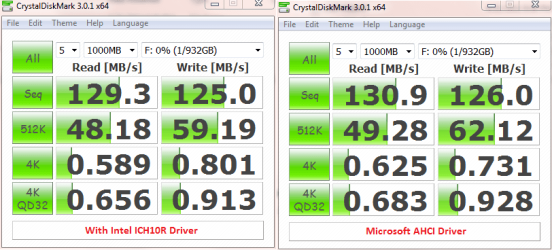
On the flip side, the performance of the drives did not change for the SATA ports. Here's the performance benchmark for with and without the ICH10R driver:

SATA 2 Internal.png

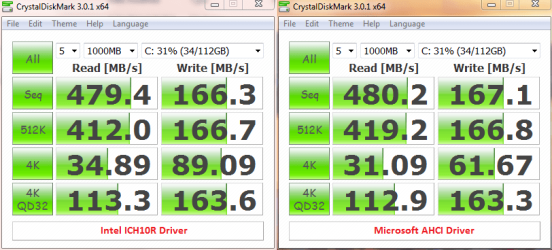
There's a slight increase in performance when the ICH10R driver is removed from the system. Even the OCZ Vertex 3 shows a performance increase in certain performance benchmarks:

SATA 3.png

The 10-30 seconds freeze provided by the ICH10R is a very long time and let's see how the MS driver will behave. The early indications are promising, the system seems more responsive and the CPU temperature also dropped a degree or two. It's too early to tell at this point...
 

My Computer

Computer type
PC/Desktop
Computer Manufacturer/Model Number
Custom built at Home
OS
Windows 7 64-bit, Windows 8.1 64-bit, OSX El Capitan, Windows 10 (VMware)
CPU
Intel i5-3350P 3.1 GHz
Motherboard
Gigabyte GA-Z77X-UP5 TH
Memory
16 GBs GSkill Sniper
Graphics Card(s)
Radeon HD 7850
Sound Card
VIA HD Audio
Monitor(s) Displays
Dell U2410 24"
Screen Resolution
1920x1200
Hard Drives
1 x Intel 520 240 GBs
1 x Seagate 1TBs SATA 2.0,
1 x Seagate 1TBs eSATA 2.0
PSU
Thermaltake 850W
Case
Antec P183
Cooling
Noctua NH-D14 Heatsink 2 x 120mm fans, 4 x 120mm case fans
Keyboard
Dell Multimedia keyboard
Mouse
Logitech Trackball
Internet Speed
28.5 Mb/s
All you need is the F6 install driver. And install it manually. (The AHCI driver)

The Storage app is really only useful if you have any of your drives set up in a RAID array. Othehrwise, its a bit pointless to have.
 

My Computer

Computer Manufacturer/Model Number
Custom (Self Build)
OS
Windows 7 Home Premium 64bit
CPU
Intel Core i7 2700k
Motherboard
eVGA P67 SLI
Memory
8GB Mushkin Redline Ridgebacks @1866
Graphics Card(s)
EVGA GTX570 SC
Sound Card
XiFi Titanium HD
Monitor(s) Displays
LG W2453V
Screen Resolution
1920x1080
Hard Drives
Intel 320 80GB -- Intel X25-V 40GB --WD Black 1TB x2 -- WD Blue 640GB
PSU
Seasonic x750
Case
Corsair 600T SE White
Cooling
eVGA Superclocked CPU Cooler
Keyboard
Saitek Cyborg
Antivirus
Kaspersky
Browser
IE
Other Info
LG BD/DVD
Actually, the MS AHCI driver is added during installation without the need for F6, especially with the slipped streamed SP1 DVD.

But you are correct; I should've never installed the crappy Intel drivers...
 

My Computer

Computer type
PC/Desktop
Computer Manufacturer/Model Number
Custom built at Home
OS
Windows 7 64-bit, Windows 8.1 64-bit, OSX El Capitan, Windows 10 (VMware)
CPU
Intel i5-3350P 3.1 GHz
Motherboard
Gigabyte GA-Z77X-UP5 TH
Memory
16 GBs GSkill Sniper
Graphics Card(s)
Radeon HD 7850
Sound Card
VIA HD Audio
Monitor(s) Displays
Dell U2410 24"
Screen Resolution
1920x1200
Hard Drives
1 x Intel 520 240 GBs
1 x Seagate 1TBs SATA 2.0,
1 x Seagate 1TBs eSATA 2.0
PSU
Thermaltake 850W
Case
Antec P183
Cooling
Noctua NH-D14 Heatsink 2 x 120mm fans, 4 x 120mm case fans
Keyboard
Dell Multimedia keyboard
Mouse
Logitech Trackball
Internet Speed
28.5 Mb/s
cr00zng - your vertex 3 shows a quite remarkable reduction in 4k writes with MS AHCI drivers, compared to IRST. Since 4k read/write is what really pushes your system in load i dont understand how you can see a perfomance boost ...

I'm esp interested in this because my vertex 2 / win7 64 combo is causing random freezes and i cant seem to find a solution. deinstalling the RST seems a bit dramatic
 

My Computer

Computer Manufacturer/Model Number
custom built
OS
win7 home premium x64
CPU
core i7 2600k
Motherboard
Asus P8P67 PRO
Memory
8 GB gskill ripjaws
Graphics Card(s)
Sapphire Radeon 5850 vapor-x
Sound Card
onboard
Hard Drives
OCD Vertex 2 120GB
Spinpoint 3 1TB
PSU
seasonic 650
Case
Lian Li PC8
Cooling
Noctua C12P
Raid & AHCI

I will add my experience to the discussion. I haven't analyzed it to the extent that other posters have. My bios was set to Raid although I had not set any disks to raid (none paired). I set the bios to AHCI and uninstalled Intels Rapid Storage module. There was no performance gain or degradation that was immediately discernable. But I noticed that my cpu was showing activity when it should have been idle. It was not a lot (@3%). I traced it down to iastor.sys. So I loaded the Rapid Storage back. This solved the problem.

I am running the Rapid Storage software although I am not using it in relation to raid.
 

My Computer

Computer Manufacturer/Model Number
BGC (Bob's Garage Crew)
OS
win 7 X64 Ultimate SP1
CPU
I3770K
Motherboard
Asus P8Z77-V Deluxe
Memory
G Skill F3-14900CL9-4GBXL x 4
Graphics Card(s)
NVIDIA GeForce GTX670 + Intel 4000
Sound Card
Realtek HD 5.1 (MOB)
Monitor(s) Displays
Asus VW224T (1)
Screen Resolution
1920 x 1080
Hard Drives
SATA Corsair Force GT 2.5" 180GB (System) Sata 3
OCZ Vertex3 120GB
OCZ Vertex 2 120GB 2.5" SATA II
ST31000524AS 1000.2GB
WD15EARS (External)
PSU
CoolerMaster 1000 Watt
Case
CoolerMaster HAF X
Cooling
CPU -- CoolerMaster 520N
Keyboard
MS Wireless 3000 V2
Mouse
MS Wireless 3000 V2
Internet Speed
Cable
Antivirus
Norton Internet Security
Browser
IE9
Other Info
AMI Bios 1805
OC'd 3%

My Computer

Computer type
PC/Desktop
Computer Manufacturer/Model Number
Custom built by me.
OS
Windows 10 Pro
CPU
Intel Core i7-4770K (3.5Ghz)
Motherboard
Gigabyte G1 Sniper 5 (F10 Bios)
Memory
32 gig Corsair Dominator Platinum (4x8Gig)
Graphics Card(s)
Sapphire Tri-X R9 Fury
Sound Card
Soundblaster ZXR
Monitor(s) Displays
NEC PA242W 24" LCD Monitor
Screen Resolution
1920 x 1200
Hard Drives
Primary - Samsung 850 Pro (512gig), Samsung 840 Pro (256gig), 2TB WD Caviar Black.
PSU
EVGA Supernova 1000 G2
Case
Cooler Master HAF X
Cooling
Corsair H100i with Corsair Air Series SP120 Quiet Fans
Keyboard
Logitech Wireless Wave
Mouse
Logitech Performance MX
Internet Speed
High Speed Cable
Antivirus
Norton Security
Browser
IE11
Other Info
Memory Timings - 1866MHz @ 9-9-9-27-1T @ 1.5 volts
cr00zng - your vertex 3 shows a quite remarkable reduction in 4k writes with MS AHCI drivers, compared to IRST. Since 4k read/write is what really pushes your system in load i dont understand how you can see a perfomance boost ...

As stated initially, "Even the OCZ Vertex 3 shows a performance increase in certain performance benchmarks". The 4K writes wasn't one and while benchmark shows a sizable reduction; however, overall the performance of the system as a whole did not change. I am also not convinced that CDM is the best benchmark tool for testing SSD drives and has been used since the HDD was tested with CDM.

I'm esp interested in this because my vertex 2 / win7 64 combo is causing random freezes and i cant seem to find a solution. deinstalling the RST seems a bit dramatic

De-installing the RST isn't as "dramatic" as you make it sound like; the uninstall routine cleans up nicely and restores the MS ACHI drivers.
 
Last edited:

My Computer

Computer type
PC/Desktop
Computer Manufacturer/Model Number
Custom built at Home
OS
Windows 7 64-bit, Windows 8.1 64-bit, OSX El Capitan, Windows 10 (VMware)
CPU
Intel i5-3350P 3.1 GHz
Motherboard
Gigabyte GA-Z77X-UP5 TH
Memory
16 GBs GSkill Sniper
Graphics Card(s)
Radeon HD 7850
Sound Card
VIA HD Audio
Monitor(s) Displays
Dell U2410 24"
Screen Resolution
1920x1200
Hard Drives
1 x Intel 520 240 GBs
1 x Seagate 1TBs SATA 2.0,
1 x Seagate 1TBs eSATA 2.0
PSU
Thermaltake 850W
Case
Antec P183
Cooling
Noctua NH-D14 Heatsink 2 x 120mm fans, 4 x 120mm case fans
Keyboard
Dell Multimedia keyboard
Mouse
Logitech Trackball
Internet Speed
28.5 Mb/s
I'm just a trial and error knucklehead, but for what it's worth, I did some research, found out my RAID wasn't using IRST, disabled it, and CPU usage dropped from 20 percent at idle down to 2 percent. Would have saved me a lot of time if someone else had posted this little piece of information -so I'm doing it now for someone with a similar problem in the future. To them, I say in advance, "you're welcome."
emotion-14.gif

**IMPORTANT: Make sure your RAID isn't using it: It will tell you how to check when you go to remove it under add/remove programs... or here: Under device manager/Storage Controllers: You should NOT see intel controllers ALSO under Device Manger/IDE ATA/ATAPI controls You should NOT see intel controllers -if you do NOT, you should be able to remove IRST with no problems, like me.
 

My Computer

Computer Manufacturer/Model Number
CyberPower
OS
Windows 7 64bit
CPU
i7-950
Motherboard
Gigabyte x58a-ud3r
Memory
18gb Corsair Dominator
Graphics Card(s)
Nvidia GeForce GTX 480
Sound Card
Creative SB X-Fi Titanium
Monitor(s) Displays
1: AOC 22" 2: Samsung 18"
Hard Drives
Hitachi HDS721010CLA332 x2 Raid 0 Configuration
PSU
Cooler Master 850W Silent Pro
Case
Cooler Master
Cooling
Cooler Master Hyper 212
Back
Top