Intel Toolbox can't find external SSD

garuda

New member
Power User
Local time
2:33 AM
Messages
89
Just bought a new Intel 120GB SSD which had the firmware already installed with latest version. I formatted SSD and placed it in an (older) external 2.5" USB 2.0 CoolMax enclosure. Then moved files to 120 SSD successfully.

I had an older Toolbox version which would recognize and Trim my X25-m 160GB Boot drive and recognize the internal/onboard spin drives; but would not find the new external 120GB SSD in the enclosure. So I updated Intel Toolbox to v2.0.2 but still no luck finding the external 120GB SSD. Yes, I did try "refresh" several times.

Does the Toolbox only find internal/onboard drives? Or might the external enclosure controller be the problem? Any ideas why this is happening (or rather not happening)? Thanx.
 

My Computer

Computer type
PC/Desktop
Computer Manufacturer/Model Number
Homemade with cube tower
OS
Windows 7 Ultimate x64
CPU
2x - Xeon E5-2687W
Motherboard
ASUS Z9PE-D8 WS
Memory
128GB Kingston - (2ea kits – 4x16GB)
Graphics Card(s)
Gigabyte GTX-680 & EVGA GTX-Titan
Sound Card
Realtek ALC898 8-chan audio
Monitor(s) Displays
2ea - Samsung T260HD 25.5-Inch LCD HDTV / Monitors
Screen Resolution
1920x1200
Hard Drives
8 ea. Crucial & Samsung EVO 2TB SSDs; misc 4ea. 8TB external Seagate spinners.
PSU
Corsair AX-1200
Case
Lian-Li cube custom
Cooling
2x Dynatron R-17 - CPU Air sinks (160watts TDP)
Keyboard
HP slimline wireless
Mouse
Microsoft ARC
Internet Speed
Faster than a speeding bullet.
Antivirus
Norton Security 360 - 2020
Just bought a new Intel 120GB SSD which had the firmware already installed with latest version. I formatted SSD and placed it in an (older) external 2.5" USB 2.0 CoolMax enclosure. Then moved files to 120 SSD successfully.

I had an older Toolbox version which would recognize and Trim my X25-m 160GB Boot drive and recognize the internal/onboard spin drives; but would not find the new external 120GB SSD in the enclosure. So I updated Intel Toolbox to v2.0.2 but still no luck finding the external 120GB SSD. Yes, I did try "refresh" several times.

Does the Toolbox only find internal/onboard drives? Or might the external enclosure controller be the problem? Any ideas why this is happening (or rather not happening)? Thanx.
Hello garuda,
I cant answer for the Intel drives but my Vertex toolbox does not find drives connected over USB
 

My Computer

Computer Manufacturer/Model Number
Something I threw together
OS
Windows 7 Ultimate x64
CPU
Intel Core i7-2600K
Motherboard
Asus P8P67
Memory
16 GB G Skill F3-10666 CL9D-4GBRL
Graphics Card(s)
ATI Radeon HD 6870
Sound Card
ATI Radeon HDMI / Realtek ALC892
Monitor(s) Displays
2 x 22" standard monitors / LG32LC56v TV to watch films
Screen Resolution
1920 x1080
Hard Drives
2 x OCZ Vertex2 111.79GB
3 x Samsung103SJ
1 x Samsung103UJ
1 x WD3200BEVT
1 x Hitachi5K320-160
PSU
Thermaltake Toughpower Cable Management 750W
Case
Antec 300
Cooling
Noctua NH-U12P SE2 and 5 120mm Case fans
Keyboard
Microsoft Comfort Curve Keyboard 2000
Mouse
Hama M3110 / Logitech M305
Internet Speed
16000
Other Info
I have also used Fedora, Suse, Ubuntu Linux
And all other Windows from 95 to date except ME
I don't believe the toolbox will be able to find it usimg USB 2.0. I am pretty sure your problems will be solved with an esata external.
 

My Computers

System One System Two

  • Computer type
    PC/Desktop
    Computer Manufacturer/Model Number
    ALWAYS UNDER CONSTRUCTION
    OS
    Windows 11 Pro
    CPU
    Ryzen 9 5900X
    Motherboard
    Asus X570 Crosshair Viii Hero
    Memory
    32GB G Skill DDR4-3600
    Graphics Card(s)
    EVGA RTX 3080 FTW 3 Ultra
    Sound Card
    On Board/Sennheiser PC37X Headset
    Monitor(s) Displays
    3 X Asus 27"
    Screen Resolution
    2560x1440
    Hard Drives
    2 X 1 TB NVME drives
    PSU
    EVGA 850
    Case
    Phanteks Eclipse P400A
    Cooling
    EVGA 280 AIO
    Keyboard
    Logitech G510s/ Logitech G13
    Mouse
    Logitech G502
    Internet Speed
    24/1
    Antivirus
    ESET/MBAM Pro/SAS Pro
    Browser
    Chrome/ Firefox/ Edge
  • Computer type
    Laptop
    System Manufacturer/Model Number
    Dell 16 Plus
    OS
    Windows 11 Pro
    CPU
    Intel Ultra 9 288V
    Memory
    32 GB LPDDR5X 8533
    Monitor(s) Displays
    16" Mini-LED HDR600 Touch 90 Hz
    Screen Resolution
    2560X1600
    Hard Drives
    1 TB NVME
I don't believe the toolbox will be able to find it usimg USB 2.0. I am pretty sure your problems will be solved with an esata external.
Thanks, Pooch.
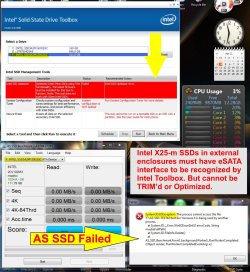
And essenbe, you are correct, eSATA interface is necessary for Toolbox to recognize. However, the Toolbox will neither TRIM nor optimize my external 120GB SSD. Thanks.

Also, I found that the "AS SSD" Bench and the Crystal will not run my external Intel SSD either. Below are the results. Thanx guys for your help. :)
 

Attachments

  • External SSD-Toolbox.jpg
    External SSD-Toolbox.jpg
    469.1 KB · Views: 100

My Computer

Computer type
PC/Desktop
Computer Manufacturer/Model Number
Homemade with cube tower
OS
Windows 7 Ultimate x64
CPU
2x - Xeon E5-2687W
Motherboard
ASUS Z9PE-D8 WS
Memory
128GB Kingston - (2ea kits – 4x16GB)
Graphics Card(s)
Gigabyte GTX-680 & EVGA GTX-Titan
Sound Card
Realtek ALC898 8-chan audio
Monitor(s) Displays
2ea - Samsung T260HD 25.5-Inch LCD HDTV / Monitors
Screen Resolution
1920x1200
Hard Drives
8 ea. Crucial & Samsung EVO 2TB SSDs; misc 4ea. 8TB external Seagate spinners.
PSU
Corsair AX-1200
Case
Lian-Li cube custom
Cooling
2x Dynatron R-17 - CPU Air sinks (160watts TDP)
Keyboard
HP slimline wireless
Mouse
Microsoft ARC
Internet Speed
Faster than a speeding bullet.
Antivirus
Norton Security 360 - 2020
I received the following email from Intel Tech Support regarding Intel SSDs mounted in external enclosures:

Thank you for contacting Intel Technical Support.
I just got another reply, this time from the Business Unit, they state that they no longer need the MSINFO32.exe output, Please see their response below:

-“We don’t validate or authorize use of SSD Optimizer through eSATA enclosures. If a customer wants to use an eSATA enclosure, they must understand they are using a configuration that is not validated by Intel and they are on their own.

-If customer wants to use Optimizer on an Intel SSD, suggest they connect it directly to the host system.

-The list of enclosures provided on Communities is for the Intel Data Migration Software, not the Intel SSD Toolbox”
=====
Intel Customer Support Agent
 

My Computer

Computer type
PC/Desktop
Computer Manufacturer/Model Number
Homemade with cube tower
OS
Windows 7 Ultimate x64
CPU
2x - Xeon E5-2687W
Motherboard
ASUS Z9PE-D8 WS
Memory
128GB Kingston - (2ea kits – 4x16GB)
Graphics Card(s)
Gigabyte GTX-680 & EVGA GTX-Titan
Sound Card
Realtek ALC898 8-chan audio
Monitor(s) Displays
2ea - Samsung T260HD 25.5-Inch LCD HDTV / Monitors
Screen Resolution
1920x1200
Hard Drives
8 ea. Crucial & Samsung EVO 2TB SSDs; misc 4ea. 8TB external Seagate spinners.
PSU
Corsair AX-1200
Case
Lian-Li cube custom
Cooling
2x Dynatron R-17 - CPU Air sinks (160watts TDP)
Keyboard
HP slimline wireless
Mouse
Microsoft ARC
Internet Speed
Faster than a speeding bullet.
Antivirus
Norton Security 360 - 2020
Back
Top