
100% CPU Load Nothing in Task Manager

crisscross

New member
Local time
9:25 AM
Messages
10
Hello,

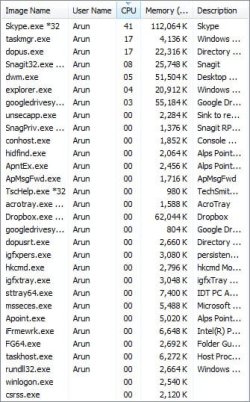
I have Windows 7 Ultimate installed on a Dell E6410. I have a Samsung 830 Pro SSD which is 60% free and I experience random slowdowns which last for long periods. Everything slows to a crawl and CPU load hovers between 90-100%. I can't see any applications/processes taking up the load. Please see screenshot attached.

MSE is installed and updated and checked with no obvious signs of problems. I am at a loss and would appreciate any help.

Thank you.
 

Attachments
  • Task-Manager.jpg
    Task-Manager.jpg
    49.4 KB · Views: 24

My Computer

OS
Windows 7 Ultimate x64
CPU
Core i7 860
Motherboard
gigabyte 880-ud2h
Memory
4GB G-Skill
Graphics Card(s)
Nvidia 8600GT PCI-E
Sound Card
X-fi Xtreme Gamer
Monitor(s) Displays
Dell 2005FPW
Hard Drives
Seagate 500GB
PSU
Corsair 450VX
The high CPU problem may be due the Skype version you're using. A different version may solve the problem.
 

My Computer

Computer type
PC/Desktop
Computer Manufacturer/Model Number
Custom Build
OS
Windows 7 Home Premium 64 bit
CPU
Intel Core i7-4790
Motherboard
GA-Z87X-D3H
Memory
G.SKILL 8GB (2 x 4GB) DDR3 F3-10666CL9D-8GBNT
Graphics Card(s)
AMD Radeon R7 250
Sound Card
Realtek ALC892
Monitor(s) Displays
Samsung UN32EH5000, Dell 1703FPT
Screen Resolution
1920 x 1080, 1280 x 1024
Hard Drives
WD5003AZEX
WD10EZEX
Samsung HD103SJ
Samsung 128 GB 840 PRO
PSU
SeaSonic M12II SS-500GM
Case
Fractal Design Define R4
Cooling
Zalman CNPS9900ALED
Keyboard
Logitech K800
Mouse
Logitech M705
Internet Speed
16 Mbps
Antivirus
Avast
Browser
Firefox
Other Info
Bose Companion 2 Multimedia Speakers
skype, dopus, and snagit seem to be your issues.
 

My Computer

Computer type
PC/Desktop
Computer Manufacturer/Model Number
Weekend Warrior Rig
OS
Windows 10 Pro
CPU
Intel i7-3770K 4.4GHz
Motherboard
ASUS P8Z77-V Pro
Memory
8GB G.SKILL Ripjaws 1866 MHz
Graphics Card(s)
EVGA GTX 980 Classified
Monitor(s) Displays
Asus VH238H 23" 2ms
Screen Resolution
1920x1080
Hard Drives
Intel 330 120GB SSD /
WD Blue 1TB /
WD Black 500GB
PSU
Corsair CX750M
Case
NZXT H440
Cooling
Corsair H80i- CPU / Corsair H90- GPU
Keyboard
Logitech K360 LE
Mouse
Logitech G500
Antivirus
Avast
Browser
Chrome
Other Info
1200W 2.1 Surround Sound Audio
Hello,

I have Windows 7 Ultimate installed on a Dell E6410. I have a Samsung 830 Pro SSD which is 60% free and I experience random slowdowns which last for long periods. Everything slows to a crawl and CPU load hovers between 90-100%. I can't see any applications/processes taking up the load. Please see screenshot attached.

MSE is installed and updated and checked with no obvious signs of problems. I am at a loss and would appreciate any help.

Thank you.

Hi crisscross,

Sort those items with size and you would know what program are causing the CPU load to go so high. You should update then and if you don't use them then kindly remove them from the system.

Check this tutorial below which would help you improve overall performance of the system:

http://www.sevenforums.com/tutorials/220165-troubleshooting-steps-windows-7-a.html

Also, you can perform a clean boot to isolate the source of the issue:

Clean Boot

Keep us posted with the results so we can advise you further.
 

My Computer

Computer type
PC/Desktop
OS
Winndows 7 32 bit
Back
Top