
Hi all,
Firstly, I apologise if this has been covered a lot (I'm sure it has, but it seems a VERY common problem), but this is driving me nuts.
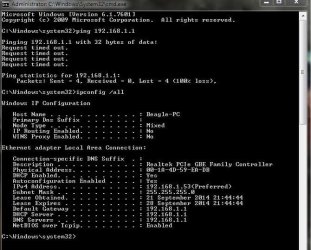
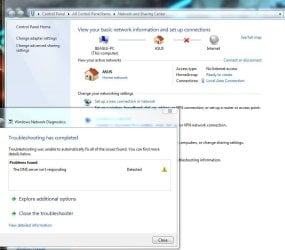
I'm having an intermittent problem where I lose my internet connection. I'm on a wired connection, using an onboard Realtek PCie GBE Family Controller. I will be working fine one minute, then randomly the yellow triangle will appear over the network icon and I'll lose my connection. If I try to diagnose the problem I get the 'dns server is not responding' message'. When this happens nothing I try will fix it.
Things I have tried:
netsh int ip reset
netsh winsock reset
ipconfig /flushdns
Reboot.
I've changed the automatic DNS settings to OpenDNS (on the adapter and the router).
I've started in Safe Mode.
I've turned off the firewall (windows AND on the router).
I've tried two different drivers for the LAN controller.
Then I'll return to my PC a short while later and it'll 'magically' be working again. For example, I went to bed last night with no connection (after trying all the above) and when I checked this morning it was working!
This is happening on a daily basis. I have other devices connected to the same router and they have no problems.
Any ideas how to go about troubleshooting this?
Firstly, I apologise if this has been covered a lot (I'm sure it has, but it seems a VERY common problem), but this is driving me nuts.
I'm having an intermittent problem where I lose my internet connection. I'm on a wired connection, using an onboard Realtek PCie GBE Family Controller. I will be working fine one minute, then randomly the yellow triangle will appear over the network icon and I'll lose my connection. If I try to diagnose the problem I get the 'dns server is not responding' message'. When this happens nothing I try will fix it.
Things I have tried:
netsh int ip reset
netsh winsock reset
ipconfig /flushdns
Reboot.
I've changed the automatic DNS settings to OpenDNS (on the adapter and the router).
I've started in Safe Mode.
I've turned off the firewall (windows AND on the router).
I've tried two different drivers for the LAN controller.
Then I'll return to my PC a short while later and it'll 'magically' be working again. For example, I went to bed last night with no connection (after trying all the above) and when I checked this morning it was working!
This is happening on a daily basis. I have other devices connected to the same router and they have no problems.
Any ideas how to go about troubleshooting this?
Attachments
My Computer
- OS
- Windows 7 Home Premium 64bit


