
Internal and External Microphone

gibintgeorge

New member
Local time
5:14 PM
Messages
2
Location
Kerala
I want to control my external microphone as line in and keep built-in mic as one for calls.

When i plug in my external mic the control passes to the external and the internal mic is not available. I want to control both these separately.

I ham having Toshiba L750 with conexant driver.
It has only one option in Recording devices even if i plug in external mic (as shown in the attachment).
How can i get the line-in (External mic) as a separate option?


Help me plssss
Thanks in Advance
 

Attachments
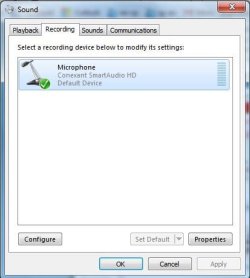
  • Capture.JPG
    Capture.JPG
    26.8 KB · Views: 8

My Computer My Computer

Computer type
Laptop
Computer Manufacturer/Model Number
Toshiba L750
OS
Windows 7 Home Premium 64bit
CPU
Intel core i5
Memory
8gb
Graphics Card(s)
nVIDIA 525m
Sound Card
Conexant
Monitor(s) Displays
15 inch
Screen Resolution
1366x968
Hard Drives
640GB
Cooling
Builtin
Keyboard
Microsoft
Mouse
Microsoft
Internet Speed
512kbps
Antivirus
Kaspersky Internet Security
Browser
Chrome
You need the Microphone mode. The microphone mode provides 5VDC on the "ring" connection, which is required by a "computer" microphone. If you use or set the jack mode to "Line" the "ring" connector will change from 5VDC to a signal in connection and a "computer" microphone will not work.
 

My Computer My Computer

Computer type
PC/Desktop
Computer Manufacturer/Model Number
My Own Build
OS
Windows 10 64 bit
CPU
Intel i7 6700K
Motherboard
ASUS ROG Maximus VIII Hero
Memory
16GB Corsair Dominator
Graphics Card(s)
Intel CPU Graphics
Sound Card
RealTek
Monitor(s) Displays
27" Dell S2719dgf
Screen Resolution
2560X1440
Hard Drives
1 TB Samsung 850 EVO SSD for Win 10 Pro
500GB Samsung 850 EVO SSD for Win 10 Insider
2 TB drive for backup
PSU
EVGA Supernova 750G2
Case
BeQuiet Silent Base 600
Cooling
Deepcool Captain 120EX
Keyboard
Microsoft Wireless 2000
Mouse
Microsoft wireless
Internet Speed
100 MB/sec (Cable)
Antivirus
Microsoft Defender and Malwarebytes
Browser
Edge/Firefox
Other Info
Cakewalk (Sonar) by BandLab and Studio One 4.1 Pro recording studio software. MOTU 896Mk3 Hybrid recording interface, Frontier Tranzport wireless control unit, Behringer X-Touch Control Surface.
Five USB connected optical drives for CD Audio production using Nero BurningROM
Can u make it clear

I dont knw abt microphone mode
 

My Computer My Computer

Computer type
Laptop
Computer Manufacturer/Model Number
Toshiba L750
OS
Windows 7 Home Premium 64bit
CPU
Intel core i5
Memory
8gb
Graphics Card(s)
nVIDIA 525m
Sound Card
Conexant
Monitor(s) Displays
15 inch
Screen Resolution
1366x968
Hard Drives
640GB
Cooling
Builtin
Keyboard
Microsoft
Mouse
Microsoft
Internet Speed
512kbps
Antivirus
Kaspersky Internet Security
Browser
Chrome
If you have an input jack, such as a "Line In" jack, it does not have the required 5 volts DC that is required by a computer microphone to work. Thus a computer microphone will not work plugging into the "Line In" jack.

However, if your PC has an option to configure the Line In jack as a Microphone in jack then it can be used. In most cases it cannot be configured.
 

My Computer My Computer

Computer type
PC/Desktop
Computer Manufacturer/Model Number
My Own Build
OS
Windows 10 64 bit
CPU
Intel i7 6700K
Motherboard
ASUS ROG Maximus VIII Hero
Memory
16GB Corsair Dominator
Graphics Card(s)
Intel CPU Graphics
Sound Card
RealTek
Monitor(s) Displays
27" Dell S2719dgf
Screen Resolution
2560X1440
Hard Drives
1 TB Samsung 850 EVO SSD for Win 10 Pro
500GB Samsung 850 EVO SSD for Win 10 Insider
2 TB drive for backup
PSU
EVGA Supernova 750G2
Case
BeQuiet Silent Base 600
Cooling
Deepcool Captain 120EX
Keyboard
Microsoft Wireless 2000
Mouse
Microsoft wireless
Internet Speed
100 MB/sec (Cable)
Antivirus
Microsoft Defender and Malwarebytes
Browser
Edge/Firefox
Other Info
Cakewalk (Sonar) by BandLab and Studio One 4.1 Pro recording studio software. MOTU 896Mk3 Hybrid recording interface, Frontier Tranzport wireless control unit, Behringer X-Touch Control Surface.
Five USB connected optical drives for CD Audio production using Nero BurningROM
Back
Top