Internal Hard Drive Troubles (Not Reading)

Welsh

New member
Local time
9:34 AM
Messages
39
Hi All,

I was hoping someone here may be able to save the day with my hard drive. I have had a previous thread a few years back and have since built my own PC and only just managed to get around to putting this old drive in the new PC to see if i can take the files off it (I am mainly after the pictures of my kids on there, the rest I have on other pen drives and is worthless.

Drive: WD10 EARS-22Y5B1
PC: WINDOWS 7 PROFESSIONAL - SP1.

Problem:
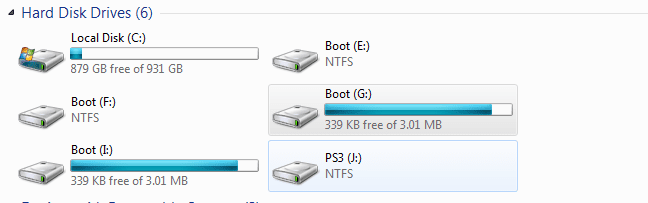
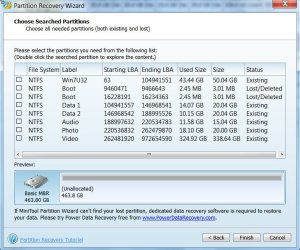
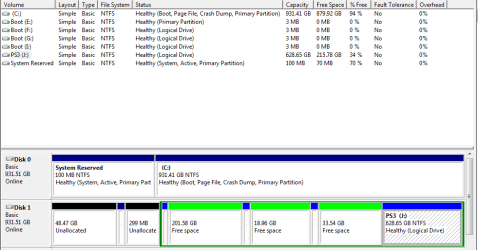
For some time now my hard drive has been playing up and was showing as 'corrupted' - after checking a previous thread and running a partition recovery wizard, I managed to salvage something... Screen Shots attached (image 3).

Only problem is, it has managed to split it in to multiple partitions of nothing really? It has managed to save the least important drive of PS3 - and the main drive which i believe is now the 'unallocated' partition. When I try and access the file through My Computer it comes up with Access denied, I have tried sahring and changing ownership, as administrator and nothing.

I just want to know have the pictures been lost forever, if so, I will just have to take a deep breath and smash the drive to bits :(

I would even be willing to pay someone to get the pictures off there, if they are able...

thanks again in advance.

Shaun
 

Attachments
  • Capture1.PNG
    Capture1.PNG
    13.8 KB · Views: 3
  • Capture2.PNG
    Capture2.PNG
    9.5 KB · Views: 19
  • Capture3.PNG
    Capture3.PNG
    12 KB · Views: 19

My Computer My Computer

Computer type
PC/Desktop
OS
Windows 7 Professional 64bit
CPU
Intel(R) Core(TM) i3-4130 CPU @ 3.40GHz
Motherboard
Asus H81M-Plus
Memory
8GB Kingston Hyper-X
Hard Drives
WD Blue 1 TB
Hello Shaun!

I'm sorry for your problem!

There is something that comes to my mind: Ownership. Make sure you are the administrator of the account, also in Disk Management click the Partitions and choose Properties/Security/Advanced/Owner and add your user account as the Owner of the drive. If not, under Security (the same path) click on Authenticated users, and click on Edit; check full control under Allow.

Where these the original partitions? Can you give some more detail, are there any other errors? Have you tried the drive with a different cable and on a different system?

CK_WD
 

My Computer My Computer

Computer type
PC/Desktop
OS
Windows 7 Home Premium x64
Hi Welsh,

For the time-being stop doing anything with Security/Permissions.

1. How many partitions did the drive have originally?

2. When you ran Partition Recovery Wizard and it shows you the found partitions, you must have carefully selected only those partitions that will make the Disk Map below it to its original state.You must also have checked that your files are there by doubleclicking the selected partition/s before clicking the Finish button and applying. It could be that you had selected the wrong partitions and written it.

Let us see whether you can untangle it.

Run Partition Recovery Wizard again and select the problem drive > Next > Full Disk > Next > Full Scan > Next

The Full Scan will take a lot of time. Let it complete. ( Just start Full Scan, get away from your PC and do your other work, peeping in just once in a while)

When full scan completes and it shows all the partitions found, post the screenshot like the one below.

05-02-2015 16-50-51.jpg

Let us see whether we can select the right partitions. (Do not select the partitions on your own and click on Finish.)

( If I do not respond within three or four hours, do not bother. Just click on the Cancel Button and close Partition Wizard. You can run it again after receiving my instructions. Inevitable because of the different time zones and also I have lots of other things to do.)
 

My Computer My Computer

OS
Windows 7 Home Premium 32 bit
I think jumanji might have meant Do not select the partitions on your own and do not click on Finish.

Minor wording difference, but I just want to make sure you don't click the [Finish] button until jumanji or another member has the chance to review the information.

Bill
.
 

My Computer My Computer

Computer type
Laptop
Computer Manufacturer/Model Number
HP Pavilion dv6-6c10us
OS
x64 (6.3.9600) Win8.1 Pro & soon dual boot x64 (6.1.7601) Win7_SP1 HomePrem
CPU
AMD A6-3420M APU with Radeon(tm) HD Graphics
Motherboard
Hewlett-Packard 1805
Memory
6.00 GB
Graphics Card(s)
AMD Radeon(TM) HD 6520G
Sound Card
(1) AMD High Definition Audio Device (2) IDT High Definiti
Monitor(s) Displays
HP W2072a 20" LCD (1600 x 900) @ 60 Hz
Screen Resolution
1366 x 768 x 32 bits (4294967296 colors) @ 60 Hz
Hard Drives
ST640LM0 00 HM641JI SATA Disk Device
Keyboard
Logitech k520 wireless KB
Mouse
Logitech m320 wireless mouse (bundled with KB)
Internet Speed
15/5 | 54 MB Wireless 'n'
Antivirus
Realtime: Defender or Avast | On-demand: Malwarebytes, ESET
Browser
IE 11 on Win8, IE 10 on win 7
Other Info
Media: [Gimp, Audacity, VLC] || Comm: [WEmail 2012, Skype] || Productivity: [OpenOffice,| Textpad] || Utils: [Sysinternals, cCleaner, Speccy, Defraggler]
^You are absolutely correct. Though what I wrote meant do not select the partitions on your own and do not click on finish, it can certainly be misunderstood. Thanks for making it clear.

Mathematically stated what I wrote is do not ( select the partitions on your own + click on Finish):)
 

My Computer My Computer

OS
Windows 7 Home Premium 32 bit
Hi All, thanks CK_WD for the input. I have tried it on my old machine with a different cable and on this one with new cables. Nothing seems to happen with permissions in respect of adding my account. For some reason it states the same error as in Pic 3 (Access is Denied).

Thank you also jumanji and slartybart.

Originally it had 2 partitions, 50/50. PS3 and the other was labelled Panthro.

I am just running PW again and will post my findings once it has run. Thank you again all for your help - just hope i can resolve this.
 

My Computer My Computer

Computer type
PC/Desktop
OS
Windows 7 Professional 64bit
CPU
Intel(R) Core(TM) i3-4130 CPU @ 3.40GHz
Motherboard
Asus H81M-Plus
Memory
8GB Kingston Hyper-X
Hard Drives
WD Blue 1 TB
Please run the Full Scan and not Quick Scan.
 

My Computer My Computer

OS
Windows 7 Home Premium 32 bit
I have run full scan, as per your instruction. I will post my findings when it completes, which i understand can take some time.
 

My Computer My Computer

Computer type
PC/Desktop
OS
Windows 7 Professional 64bit
CPU
Intel(R) Core(TM) i3-4130 CPU @ 3.40GHz
Motherboard
Asus H81M-Plus
Memory
8GB Kingston Hyper-X
Hard Drives
WD Blue 1 TB
^You are absolutely correct. Though what I wrote meant do not select the partitions on your own and do not click on finish, it can certainly be misunderstood. Thanks for making it clear.

Mathematically stated what I wrote is do not ( select the partitions on your own + click on Finish):)
I knew what you meant ;)
I'm glad it actually was what you meant ...

I always have to look at the application documentation up to confirm my instructions - that takes time and I have to think hard about the correct course.

jumanji, you know this stuff better than I do (I don't do this often enough or dig down as deep as you).
I'll stand by and chip in if needed.

Regards,

Bill
.
 

My Computer My Computer

Computer type
Laptop
Computer Manufacturer/Model Number
HP Pavilion dv6-6c10us
OS
x64 (6.3.9600) Win8.1 Pro & soon dual boot x64 (6.1.7601) Win7_SP1 HomePrem
CPU
AMD A6-3420M APU with Radeon(tm) HD Graphics
Motherboard
Hewlett-Packard 1805
Memory
6.00 GB
Graphics Card(s)
AMD Radeon(TM) HD 6520G
Sound Card
(1) AMD High Definition Audio Device (2) IDT High Definiti
Monitor(s) Displays
HP W2072a 20" LCD (1600 x 900) @ 60 Hz
Screen Resolution
1366 x 768 x 32 bits (4294967296 colors) @ 60 Hz
Hard Drives
ST640LM0 00 HM641JI SATA Disk Device
Keyboard
Logitech k520 wireless KB
Mouse
Logitech m320 wireless mouse (bundled with KB)
Internet Speed
15/5 | 54 MB Wireless 'n'
Antivirus
Realtime: Defender or Avast | On-demand: Malwarebytes, ESET
Browser
IE 11 on Win8, IE 10 on win 7
Other Info
Media: [Gimp, Audacity, VLC] || Comm: [WEmail 2012, Skype] || Productivity: [OpenOffice,| Textpad] || Utils: [Sysinternals, cCleaner, Speccy, Defraggler]
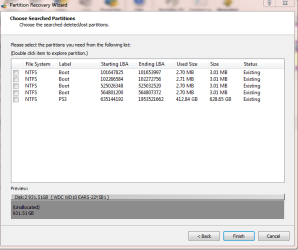
Thank you both for you help. Here is the screen shot, once complete. I await your instruction :)

PS3 is one of the 2 partitions originally setup//
 

Attachments

  • Capture4.PNG
    Capture4.PNG
    17.6 KB · Views: 0

My Computer My Computer

Computer type
PC/Desktop
OS
Windows 7 Professional 64bit
CPU
Intel(R) Core(TM) i3-4130 CPU @ 3.40GHz
Motherboard
Asus H81M-Plus
Memory
8GB Kingston Hyper-X
Hard Drives
WD Blue 1 TB
Yeah, it looks as though your first attempt with PW was incorrect.

The Boot partitions are just remnants of some previous schema.

You mentioned that the drive was originally split 50/50
931.51 /2 = 465.755

The full scan of PW shows PS3 as 628.65.
The Preview shows all 931.51 as unallocated (you haven't selected any partitions to recover yet).

Double click PS3 to explore it - see if the files match your recollection of what the partition contained.

I'll defer to jumanji on whether or not to recover the PS3 part.

There are other tools that might recover the images from the first partition - don't give up hope yet.

jumanji is probably asleep now. leave the PW window open, (minimize it) until he has a chance to review it.

You can do other things on your machine as long as they don't access the 2nd drive (that shouldn't be a problem, eh)

Anticipating jumanji's next move, please download, but do not run, testdisk & photorec:
PhotoRec - CGSecurity

That way if jumanji does want you to run either , you have them ready :)

Don't take any other action on that drive, just look for now and wait.

Post if you think the data on PS3 is intact.

Bill
.
 
Last edited:

My Computer My Computer

Computer type
Laptop
Computer Manufacturer/Model Number
HP Pavilion dv6-6c10us
OS
x64 (6.3.9600) Win8.1 Pro & soon dual boot x64 (6.1.7601) Win7_SP1 HomePrem
CPU
AMD A6-3420M APU with Radeon(tm) HD Graphics
Motherboard
Hewlett-Packard 1805
Memory
6.00 GB
Graphics Card(s)
AMD Radeon(TM) HD 6520G
Sound Card
(1) AMD High Definition Audio Device (2) IDT High Definiti
Monitor(s) Displays
HP W2072a 20" LCD (1600 x 900) @ 60 Hz
Screen Resolution
1366 x 768 x 32 bits (4294967296 colors) @ 60 Hz
Hard Drives
ST640LM0 00 HM641JI SATA Disk Device
Keyboard
Logitech k520 wireless KB
Mouse
Logitech m320 wireless mouse (bundled with KB)
Internet Speed
15/5 | 54 MB Wireless 'n'
Antivirus
Realtime: Defender or Avast | On-demand: Malwarebytes, ESET
Browser
IE 11 on Win8, IE 10 on win 7
Other Info
Media: [Gimp, Audacity, VLC] || Comm: [WEmail 2012, Skype] || Productivity: [OpenOffice,| Textpad] || Utils: [Sysinternals, cCleaner, Speccy, Defraggler]
Drat, lost a post when dropped.

I'll defer to jumanji - he's probably sleeping at this hour of the morning

You stated the drive was originally 50 / 50
PS3 reports as 628.65 which is more than half (931.51 /2 = 465.755), so I'm not sure if PW is wrong, if your 1st attempt to recover the partitions grabbed too much, or if your recollection is off a little.

Double click the PS3 partition and see if the contents look correct.

Just look and report if PS3 seems correct.

You can minimize the PW window so you don't have to run another scan when jumanji returns. You can do other things on your machine as long as you don't access that drive. The more fiddling, the less data can be recovered, if it can be recovered.
There's a good chance that it can be, but there's always a chance that it cannot be recovered. Don't give up hope just yet :)

Anticipating jumanji's next suggestion, please download Testdisk & Photorec
TestDisk Download - CGSecurity

Download only, do not run.
Take a few minutes to familiarize yourself with Photorec, you don't have to become an expert, but it helps if you understand the concepts and basic commands:
PhotoRec - CGSecurity

jumanji will guide you, if in fact that's the path he decides is best.

I'll check back to see if you have any questions that I can answer, but jumanji is the lead on this - he's knows this stuff.

Bill
.
 

My Computer My Computer

Computer type
Laptop
Computer Manufacturer/Model Number
HP Pavilion dv6-6c10us
OS
x64 (6.3.9600) Win8.1 Pro & soon dual boot x64 (6.1.7601) Win7_SP1 HomePrem
CPU
AMD A6-3420M APU with Radeon(tm) HD Graphics
Motherboard
Hewlett-Packard 1805
Memory
6.00 GB
Graphics Card(s)
AMD Radeon(TM) HD 6520G
Sound Card
(1) AMD High Definition Audio Device (2) IDT High Definiti
Monitor(s) Displays
HP W2072a 20" LCD (1600 x 900) @ 60 Hz
Screen Resolution
1366 x 768 x 32 bits (4294967296 colors) @ 60 Hz
Hard Drives
ST640LM0 00 HM641JI SATA Disk Device
Keyboard
Logitech k520 wireless KB
Mouse
Logitech m320 wireless mouse (bundled with KB)
Internet Speed
15/5 | 54 MB Wireless 'n'
Antivirus
Realtime: Defender or Avast | On-demand: Malwarebytes, ESET
Browser
IE 11 on Win8, IE 10 on win 7
Other Info
Media: [Gimp, Audacity, VLC] || Comm: [WEmail 2012, Skype] || Productivity: [OpenOffice,| Textpad] || Utils: [Sysinternals, cCleaner, Speccy, Defraggler]
hmmm, my 'lost' post was found - sorry for the double posting - they should say about the same thing - but I'll leave both.
 

My Computer My Computer

Computer type
Laptop
Computer Manufacturer/Model Number
HP Pavilion dv6-6c10us
OS
x64 (6.3.9600) Win8.1 Pro & soon dual boot x64 (6.1.7601) Win7_SP1 HomePrem
CPU
AMD A6-3420M APU with Radeon(tm) HD Graphics
Motherboard
Hewlett-Packard 1805
Memory
6.00 GB
Graphics Card(s)
AMD Radeon(TM) HD 6520G
Sound Card
(1) AMD High Definition Audio Device (2) IDT High Definiti
Monitor(s) Displays
HP W2072a 20" LCD (1600 x 900) @ 60 Hz
Screen Resolution
1366 x 768 x 32 bits (4294967296 colors) @ 60 Hz
Hard Drives
ST640LM0 00 HM641JI SATA Disk Device
Keyboard
Logitech k520 wireless KB
Mouse
Logitech m320 wireless mouse (bundled with KB)
Internet Speed
15/5 | 54 MB Wireless 'n'
Antivirus
Realtime: Defender or Avast | On-demand: Malwarebytes, ESET
Browser
IE 11 on Win8, IE 10 on win 7
Other Info
Media: [Gimp, Audacity, VLC] || Comm: [WEmail 2012, Skype] || Productivity: [OpenOffice,| Textpad] || Utils: [Sysinternals, cCleaner, Speccy, Defraggler]
Thanks Bill. It appears that the PS3 file contains exactly what was on there (on first inspection) although I am not bothered about those files, so if we need to keep or delete etc, it doesn't matter.

I will keep it minimized and download those programs and await Jumanji's answer. Hopefully we can extract the images :)
 

My Computer My Computer

Computer type
PC/Desktop
OS
Windows 7 Professional 64bit
CPU
Intel(R) Core(TM) i3-4130 CPU @ 3.40GHz
Motherboard
Asus H81M-Plus
Memory
8GB Kingston Hyper-X
Hard Drives
WD Blue 1 TB
Haven't slept yet. Was busy shooting an email to the water supply board on excess billing. Those damn idiots fail to see the epayments made. All sorts of problems because someone is not doing his work properly. problems in life.

Yep, just select the PS3 partition, Double click on it and see whether you can see all your files.Post a screenshot with PS3 partition selected.

There is no trace of the other 300GB partition. What did you have on that? Is it important?

After seeing the screenshot I shall go to sleep.

After you post the screenshot, you may cancel and quit PW.

I may decide to write the partition only after taking a backup copy of the first sector using bootice. That tomorrow after I wake up. I don't know whether Slarty can guide you on doing that. I am already drowsy and can wait only till you post the screenshot.
 

My Computer My Computer

OS
Windows 7 Home Premium 32 bit
Thank you!

PW froze on me and crashed out, although it did show the folders as i recall them. The other partition part was the bit I wanted to save - it had photos of the kids. I thought they were already backed up, but appears they were not.

I can run PW again... Do I just need to select the PS3 drive and that is it? what is this bootice? If you would be as kind as to explain that when you can that would be great...

thanks both.
 

My Computer My Computer

Computer type
PC/Desktop
OS
Windows 7 Professional 64bit
CPU
Intel(R) Core(TM) i3-4130 CPU @ 3.40GHz
Motherboard
Asus H81M-Plus
Memory
8GB Kingston Hyper-X
Hard Drives
WD Blue 1 TB
From post 1:
(I am mainly after the pictures of my kids on there, the rest I have on other pen drives and is worthless.
.....
I just want to know have the pictures been lost forever, if so, I will just have to take a deep breath and smash the drive to bits
I would even be willing to pay someone to get the pictures off there, if they are able...


SevenForum never charges - we all volunteer our time.

jumanji: I thought perhaps you had too many cups of coffee before retiring.
Water utility: I had a similar issue a few years ago with our power company - they charged me my neighbor's usage! Then said they can't adjust my bill because it would affect their bill. Months later after many phone calls .... my bills were adjusted down on a small credit each month. They wouldn't give it all back at once, but in about 6 months time, I was even. All told about 1 year!

Bill
.
 

My Computer My Computer

Computer type
Laptop
Computer Manufacturer/Model Number
HP Pavilion dv6-6c10us
OS
x64 (6.3.9600) Win8.1 Pro & soon dual boot x64 (6.1.7601) Win7_SP1 HomePrem
CPU
AMD A6-3420M APU with Radeon(tm) HD Graphics
Motherboard
Hewlett-Packard 1805
Memory
6.00 GB
Graphics Card(s)
AMD Radeon(TM) HD 6520G
Sound Card
(1) AMD High Definition Audio Device (2) IDT High Definiti
Monitor(s) Displays
HP W2072a 20" LCD (1600 x 900) @ 60 Hz
Screen Resolution
1366 x 768 x 32 bits (4294967296 colors) @ 60 Hz
Hard Drives
ST640LM0 00 HM641JI SATA Disk Device
Keyboard
Logitech k520 wireless KB
Mouse
Logitech m320 wireless mouse (bundled with KB)
Internet Speed
15/5 | 54 MB Wireless 'n'
Antivirus
Realtime: Defender or Avast | On-demand: Malwarebytes, ESET
Browser
IE 11 on Win8, IE 10 on win 7
Other Info
Media: [Gimp, Audacity, VLC] || Comm: [WEmail 2012, Skype] || Productivity: [OpenOffice,| Textpad] || Utils: [Sysinternals, cCleaner, Speccy, Defraggler]
Sorry my friend, I might read up on bootice, but I'm not comfortable using it the first time on another person's machine.

Shaun will have to wait until you are refreshed - sleep well. Call it a night and pick up on this tomorrow - your time.

Bill
.
 

My Computer My Computer

Computer type
Laptop
Computer Manufacturer/Model Number
HP Pavilion dv6-6c10us
OS
x64 (6.3.9600) Win8.1 Pro & soon dual boot x64 (6.1.7601) Win7_SP1 HomePrem
CPU
AMD A6-3420M APU with Radeon(tm) HD Graphics
Motherboard
Hewlett-Packard 1805
Memory
6.00 GB
Graphics Card(s)
AMD Radeon(TM) HD 6520G
Sound Card
(1) AMD High Definition Audio Device (2) IDT High Definiti
Monitor(s) Displays
HP W2072a 20" LCD (1600 x 900) @ 60 Hz
Screen Resolution
1366 x 768 x 32 bits (4294967296 colors) @ 60 Hz
Hard Drives
ST640LM0 00 HM641JI SATA Disk Device
Keyboard
Logitech k520 wireless KB
Mouse
Logitech m320 wireless mouse (bundled with KB)
Internet Speed
15/5 | 54 MB Wireless 'n'
Antivirus
Realtime: Defender or Avast | On-demand: Malwarebytes, ESET
Browser
IE 11 on Win8, IE 10 on win 7
Other Info
Media: [Gimp, Audacity, VLC] || Comm: [WEmail 2012, Skype] || Productivity: [OpenOffice,| Textpad] || Utils: [Sysinternals, cCleaner, Speccy, Defraggler]
Shaun: jumanji needs to sleep - it's early morning his time.

but.... please post a screne shot for him to look at next time thorugh your thread.
jumanji said:
Yep, just select the PS3 partition, Double click on it and see whether you can see all your files.Post a screenshot with PS3 partition selected.
After you post the screenshot, you may cancel and quit PW.

welsh said:
I can run PW again... Do I just need to select the PS3 drive and that is it?
yes please run a full scan again, then follow jumanji's instruction in the quote above.

make sure you grab the screen shot before closing PW ;)
 

My Computer My Computer

Computer type
Laptop
Computer Manufacturer/Model Number
HP Pavilion dv6-6c10us
OS
x64 (6.3.9600) Win8.1 Pro & soon dual boot x64 (6.1.7601) Win7_SP1 HomePrem
CPU
AMD A6-3420M APU with Radeon(tm) HD Graphics
Motherboard
Hewlett-Packard 1805
Memory
6.00 GB
Graphics Card(s)
AMD Radeon(TM) HD 6520G
Sound Card
(1) AMD High Definition Audio Device (2) IDT High Definiti
Monitor(s) Displays
HP W2072a 20" LCD (1600 x 900) @ 60 Hz
Screen Resolution
1366 x 768 x 32 bits (4294967296 colors) @ 60 Hz
Hard Drives
ST640LM0 00 HM641JI SATA Disk Device
Keyboard
Logitech k520 wireless KB
Mouse
Logitech m320 wireless mouse (bundled with KB)
Internet Speed
15/5 | 54 MB Wireless 'n'
Antivirus
Realtime: Defender or Avast | On-demand: Malwarebytes, ESET
Browser
IE 11 on Win8, IE 10 on win 7
Other Info
Media: [Gimp, Audacity, VLC] || Comm: [WEmail 2012, Skype] || Productivity: [OpenOffice,| Textpad] || Utils: [Sysinternals, cCleaner, Speccy, Defraggler]
Shaun,

Download but do not run bootice
Download BOOTICE 32-Bit - MajorGeeks

there's a description on Major Geeks that you can read.

jumanji said:
may decide to write the partition only after taking a backup copy of the first sector using bootice. That tomorrow after I wake up. I don't know whether Slarty can guide you on doing that. I am already drowsy and can wait only till you post the screenshot.
 

My Computer My Computer

Computer type
Laptop
Computer Manufacturer/Model Number
HP Pavilion dv6-6c10us
OS
x64 (6.3.9600) Win8.1 Pro & soon dual boot x64 (6.1.7601) Win7_SP1 HomePrem
CPU
AMD A6-3420M APU with Radeon(tm) HD Graphics
Motherboard
Hewlett-Packard 1805
Memory
6.00 GB
Graphics Card(s)
AMD Radeon(TM) HD 6520G
Sound Card
(1) AMD High Definition Audio Device (2) IDT High Definiti
Monitor(s) Displays
HP W2072a 20" LCD (1600 x 900) @ 60 Hz
Screen Resolution
1366 x 768 x 32 bits (4294967296 colors) @ 60 Hz
Hard Drives
ST640LM0 00 HM641JI SATA Disk Device
Keyboard
Logitech k520 wireless KB
Mouse
Logitech m320 wireless mouse (bundled with KB)
Internet Speed
15/5 | 54 MB Wireless 'n'
Antivirus
Realtime: Defender or Avast | On-demand: Malwarebytes, ESET
Browser
IE 11 on Win8, IE 10 on win 7
Other Info
Media: [Gimp, Audacity, VLC] || Comm: [WEmail 2012, Skype] || Productivity: [OpenOffice,| Textpad] || Utils: [Sysinternals, cCleaner, Speccy, Defraggler]
Back
Top