internet connection present, but no browser works.

mjb123

New member
Local time
2:54 AM
Messages
3
Hi.
I recently upgraded from Windows Vista 64bit to Windows 7 Home Premium 64bit.

However, although I can connect to my home network and have an internet connection, none of my browsers (Firefox, Chrome, IE8, Safari) can access the internet. The Microsoft troubleshooter is as useless as ever. I've had this problem since the install, and am starting to get pretty peeved.

I've scoured the web for help, including this forum (although I've lost that account somehow), and tried EVERYTHING that seems available to me.

Here's a list of what I've done so far.

>pinged google to make sure i do have access. I do.
>Started with disabling/enabling the wireless adaptor. no luck. (this seem to solve most people's problems)
>uninstalled/re-installed the network adaptor, resetting my livebox inbetween. no luck.
> made sure i had the latest adapter drivers. i do.
>Checked all the IP settings, entered it manually. no luck.
>flushed DNS. no luck
>renewed my IP. no luck.
>searched the internet some more. found out the apple program "bonjour" causes problems.
>tried setting bonjour to deleayed startup (works for most) . no luck.
>tried disabling bonjour. No luck.
>tried uninstalling boniour. No luck.

I'm completely at a loss as to what do do.

Just to clarify, I DO have an internet connection, although my browsers can't access the internet.

Any help would be GREATLY appreciated.

Thank you,
Matt.:(
 

My Computer

Computer Manufacturer/Model Number
Dell Studio XPS 1640
OS
Windows 7 Home Premium
Hi there, if you can ping google, then you should be able to browse. On your browser, go to Tools > Internet Options > Connections > LAN settings. What is shown there?

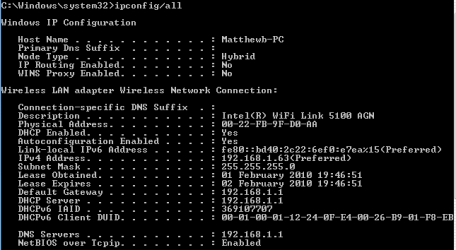
Can you also provide details of your ipconfig /all result.
 

My Computer

Computer Manufacturer/Model Number
Lenovo ThinkPad T60
OS
Windows 7 Ultimate 64Bit
CPU
GenuineIntel Intel(R) Core(TM) DuoCore T2400 @ 1.83GHz
Motherboard
Intel(R) 82801G (ICH7 Family)
Memory
2.00 GB
Graphics Card(s)
Mobile Intel(R) 945 Express Chipset
Sound Card
SoundMAX Integrated Digital HD Audio
Monitor(s) Displays
ThinkPad Display
Screen Resolution
1400x1050
Hard Drives
100Gb SATA
Keyboard
Standard Keyboard
Mouse
HID-compliant Mouse
Internet Speed
Cable Broadband - 54Mbps
Other Info
Intel(R) PRO/1000 PL Network Connection
11a/b/g Wireless LAN Mini PCI Express Adapter
Thanks, i've hopefully included all you asked for in the .png attached.
 

Attachments

  • ipconfigcapture.PNG
    ipconfigcapture.PNG
    5.9 KB · Views: 446

My Computer

Computer Manufacturer/Model Number
Dell Studio XPS 1640
OS
Windows 7 Home Premium
You said you have internet connection present, how do you know this? Are all the pages working or just some?

From the image, it might be that you are missing a DNS suffix entry, or might not have the correct DNS.
 

My Computer

Computer Manufacturer/Model Number
Lenovo ThinkPad T60
OS
Windows 7 Ultimate 64Bit
CPU
GenuineIntel Intel(R) Core(TM) DuoCore T2400 @ 1.83GHz
Motherboard
Intel(R) 82801G (ICH7 Family)
Memory
2.00 GB
Graphics Card(s)
Mobile Intel(R) 945 Express Chipset
Sound Card
SoundMAX Integrated Digital HD Audio
Monitor(s) Displays
ThinkPad Display
Screen Resolution
1400x1050
Hard Drives
100Gb SATA
Keyboard
Standard Keyboard
Mouse
HID-compliant Mouse
Internet Speed
Cable Broadband - 54Mbps
Other Info
Intel(R) PRO/1000 PL Network Connection
11a/b/g Wireless LAN Mini PCI Express Adapter
do you have a firewall on the computer? that might be causing to block port 80 or any of the broswers itself
 

My Computer

Computer Manufacturer/Model Number
HP Pavilion Elite HPE-410f
OS
Windows 7 Ultimate x64
CPU
AMD Phenom x6 1045t
Motherboard
N/A
Memory
8 GB
Graphics Card(s)
ATI Radeon HD 5570
Sound Card
Realtek Highdefinition Audio / 5.1 Dolby Setup
Monitor(s) Displays
HP w2207h Widescreen
Screen Resolution
1680*1050
Hard Drives
1 TB (fixed), 320 Portable maxtor, Server Hard drives
PSU
350 Watt
Case
HP CASE
Cooling
Bass
Keyboard
Logitech MX 5500
Mouse
Logitech MX 5500
Internet Speed
ROAD RUNNER 16MB D/512 U
It may help to reset Winsock for windows 7. This has fixed the same no browser access problem after upgrade from vista problem before.


1. Click start, type cmd in the Start Search box, right-click cmd.exe, click Run as administrator, and then press Continue.


2. Type netsh winsock reset at the command prompt, and then press ENTER.

Note If the command is typed incorrectly, you will receive an error message. Type the command again. When the command is completed successfully, a confirmation appears, followed by a new command prompt. Then, go to step 3.


3. Type exit, and then press ENTER. You should be prompted to reboot, if not you should reboot and test.
 

My Computer

Computer type
PC/Desktop
Computer Manufacturer/Model Number
Home built
OS
Windows 7 Ult, Windows 8.1 Pro,
CPU
Q9650-4.275GHz, E8600 4.5GHz, E6750-3.8GHz
Motherboard
Evga 780i FTW
Memory
G.Skill PC2 9600 1200Mhz 5 5 5 15 2T
Graphics Card(s)
GTX480
Sound Card
Asus Xonar D2
Monitor(s) Displays
HannsG
Screen Resolution
1680X1050
Hard Drives
GSkill Phoenix Pro 120GB SSD
PSU
ThermalTake Toughpower 1000Watt modular
Case
ThermalTake XaserV
Cooling
Xigmatek S1283
Keyboard
Logitech G15
Mouse
Logitech G9
Internet Speed
T1
thanks chev65, everything now works, you have saved me both hassle, and expensive support line bills :)

thanks also to everyone else who helped. :)
 

My Computer

Computer Manufacturer/Model Number
Dell Studio XPS 1640
OS
Windows 7 Home Premium
I'm glad to hear that the resetting of the Winsock worked for you mjb123. I was wondering where you went and hoped that you would find the answer to your problem here waiting for you. :) Took me awhile to research that particular problem...

Thanks for reporting back in. I'll mark this as solved.
 
Last edited:

My Computer

Computer type
PC/Desktop
Computer Manufacturer/Model Number
Home built
OS
Windows 7 Ult, Windows 8.1 Pro,
CPU
Q9650-4.275GHz, E8600 4.5GHz, E6750-3.8GHz
Motherboard
Evga 780i FTW
Memory
G.Skill PC2 9600 1200Mhz 5 5 5 15 2T
Graphics Card(s)
GTX480
Sound Card
Asus Xonar D2
Monitor(s) Displays
HannsG
Screen Resolution
1680X1050
Hard Drives
GSkill Phoenix Pro 120GB SSD
PSU
ThermalTake Toughpower 1000Watt modular
Case
ThermalTake XaserV
Cooling
Xigmatek S1283
Keyboard
Logitech G15
Mouse
Logitech G9
Internet Speed
T1
I would like to reopen this topic! I do have the same problem! Internet connection but not in my browsers (IE, Firefox, Chrome).
When using iTunes I can download everything and windows update also works fine.

Reset of the winsock did not help...

Also trying to reach the helpdesk of packard bell but wow unbelieveable how they manage to be really unaccessable!
 

My Computer

Computer Manufacturer/Model Number
packard Bell
OS
Windows 7 Home premium 64bit
CPU
E5300 2.6Ghz
Graphics Card(s)
NVIDIA
I would like to reopen this topic! I do have the same problem! Internet connection but not in my browsers (IE, Firefox, Chrome).
When using iTunes I can download everything and windows update also works fine.

Reset of the winsock did not help...

Also trying to reach the helpdesk of packard bell but wow unbelieveable how they manage to be really unaccessable!

The problem might seem the same but most likely it's different. When you installed iTunes you also installed the bonjour service which is famous for causing network problems. You will need to remove the bonjour service to fix this problem.

To fix ...
Run MsConfig

Under the Services tab uncheck the service called "##Id_String1.6844[... and then a bunch of numbers]" by Apple

Now that you disabled the service you can do this to get Bonjour off you pc for good.

1. Navigate to C:\Program Files\Bonjour
2. Rename the mdnsNSP.dll file in that folder to mdnsNSP.old
3. Restart your computer
4. Delete the Program Files\Bonjour folder

You might need to rename the file then reboot your machine in order to remove those files.
 

My Computer

Computer type
PC/Desktop
Computer Manufacturer/Model Number
Home built
OS
Windows 7 Ult, Windows 8.1 Pro,
CPU
Q9650-4.275GHz, E8600 4.5GHz, E6750-3.8GHz
Motherboard
Evga 780i FTW
Memory
G.Skill PC2 9600 1200Mhz 5 5 5 15 2T
Graphics Card(s)
GTX480
Sound Card
Asus Xonar D2
Monitor(s) Displays
HannsG
Screen Resolution
1680X1050
Hard Drives
GSkill Phoenix Pro 120GB SSD
PSU
ThermalTake Toughpower 1000Watt modular
Case
ThermalTake XaserV
Cooling
Xigmatek S1283
Keyboard
Logitech G15
Mouse
Logitech G9
Internet Speed
T1
Hi Chev65,

I already read something about the bonjour so I already uninstalled it via programs and features.
Looking at the services I cannot find the service you are mentioning.
Bonjour seems to be uninstalled.... it is not in the Program Files as well.

l Also renewed the ipranges (ipconfig/renew), this also did not help...
Uninstall iTunes as well?

Thanks for the support!!!!
 

My Computer

Computer Manufacturer/Model Number
packard Bell
OS
Windows 7 Home premium 64bit
CPU
E5300 2.6Ghz
Graphics Card(s)
NVIDIA
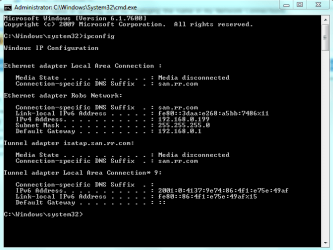
Please Post a screen shot of your ipconfig /all and we can go from there. Example is show below. ;)
 

Attachments

  • ipconfig both connections.PNG
    ipconfig both connections.PNG
    15.9 KB · Views: 54

My Computer

Computer type
PC/Desktop
Computer Manufacturer/Model Number
Home built
OS
Windows 7 Ult, Windows 8.1 Pro,
CPU
Q9650-4.275GHz, E8600 4.5GHz, E6750-3.8GHz
Motherboard
Evga 780i FTW
Memory
G.Skill PC2 9600 1200Mhz 5 5 5 15 2T
Graphics Card(s)
GTX480
Sound Card
Asus Xonar D2
Monitor(s) Displays
HannsG
Screen Resolution
1680X1050
Hard Drives
GSkill Phoenix Pro 120GB SSD
PSU
ThermalTake Toughpower 1000Watt modular
Case
ThermalTake XaserV
Cooling
Xigmatek S1283
Keyboard
Logitech G15
Mouse
Logitech G9
Internet Speed
T1
I'll do that tonight!! I was thinking to just rinstall the whole thing but lets have a look at it first!
 

My Computer

Computer Manufacturer/Model Number
packard Bell
OS
Windows 7 Home premium 64bit
CPU
E5300 2.6Ghz
Graphics Card(s)
NVIDIA
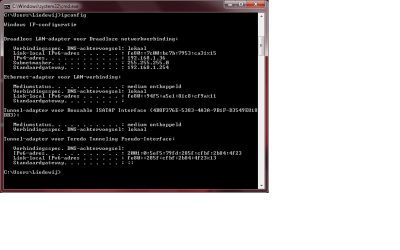
I uploaded the attachment. Hope this will give you more info!
 

Attachments

  • ipconfig 5-11.png
    ipconfig 5-11.png
    16.3 KB · Views: 84

My Computer

Computer Manufacturer/Model Number
packard Bell
OS
Windows 7 Home premium 64bit
CPU
E5300 2.6Ghz
Graphics Card(s)
NVIDIA
Any new ideas based on the ipconfig?
 

My Computer

Computer Manufacturer/Model Number
packard Bell
OS
Windows 7 Home premium 64bit
CPU
E5300 2.6Ghz
Graphics Card(s)
NVIDIA
Thank you

Chev65 thank you for your post, even though it was almost 4 years ago it still worked, netsh winsock reset. When I found this I realized I had done everything mjb123 had already done with no luck as well.

I now have to go look to see what that command does.
 

My Computer

Computer type
Laptop
Computer Manufacturer/Model Number
ASUS
OS
Windows 7 64
Internet running but web browsers do not work

I am unable to use chrome/ IE / Mozilla. My internet connection is working though.
When I restart my laptop it works for 2 mins and again stops to respond.
I have tried netsh winsock command but it is also not helping.

Please help me with the same.
 

My Computer

Computer type
Laptop
Computer Manufacturer/Model Number
Dell
OS
Windows 7 Ultimate x64

My Computer

Computer type
PC/Desktop
Computer Manufacturer/Model Number
Custom Build
OS
Windows 7 Ultimate x64 SP1
CPU
AMD Phenom 2 1090T
Motherboard
Gigabyte GA-890FXA-UD5
Memory
2x8GB Kingston HyperX Fury Black 1600Mhz Unganged
Graphics Card(s)
MSI GTX 970 Gaming 4G
Sound Card
Realtek On-Board HD 7.1 Audio / Logitech G35
Monitor(s) Displays
3xAcer GD245HQ
Screen Resolution
1920x1080
Hard Drives
Samsung 850 Pro 512GB SSD - OS /
WD Caviar Black SATA 3 - 1 TBx2 - Dynamic RAID 0 /
WD Caviar Green SATA 2 - 640GBx2 - Dynamic RAID 0 /
WD Caviar Green SATA 2 - 640GB - Internal Backup /
Seagate Barracude SATA 3 - 3TB - External Backup/ Sync
PSU
HighPower 1000W
Case
Cooler Master HAF 932
Cooling
Noctua NH-D14
Keyboard
Logitech G19
Mouse
Logitech G500
Internet Speed
100/4 Mbit Cable (100GB quota)
Antivirus
ZoneAlarm Extreme Security / MBAM Pro / MBAE Free / SAS Free
Browser
IE 11 - Firefox - Chrome
Other Info
Logitech F710/ G27/ G940/ Z5500 // TrackIR 5 // Nvidia 3D Surround Vision
Back
Top