Internet connection

shankly769

New member
Member
VIP
Local time
2:55 PM
Messages
173
Hello,recently im having some late internet connection,all ISP connections are ok,even the IP is checked by my ISP,my pc is gaming and 16gb ram ,now im waiting at least 5 minutes to internet being connected,was told of a malware,but scans where safe,ran malwarbytes,superantyspyware,and avast,which i uninstalled it and reinstalled it again.

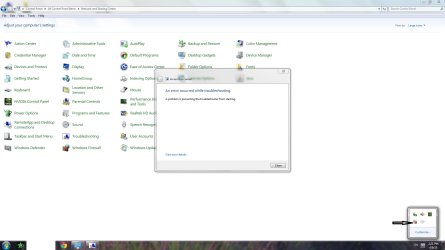
i use avast and sometimes i got a message on screen,image attached.i click switch too and retry several times until it goes,and i have the avast icon in task bar,

what to do?a repair will correct this issue?a repair does not uninstall folders ,am i right?

forgot to say the error code that the diagnostic tool found,it is 0x80070426,

i did a google search and gave me this link :-http://www.sevenforums.com/general-discussion/331143-error-0x80070426.html

does it helps aswell?

thanks
 

Attachments
  • screen shoot.jpg
    screen shoot.jpg
    402.6 KB · Views: 11

My Computer

Computer type
PC/Desktop
OS
Windows 7 Ultimate x32
CPU
AMD Athlom(tm064 Processor 3200+
Motherboard
K8M800-8237 EPPOX
Memory
2gb
Graphics Card(s)
NVIDIA GeForce 7600GT
Did you done system restore?
 

My Computer

Computer type
PC/Desktop
OS
Windows 7 Ultimate 64 bit
CPU
Intel pentium 3
Motherboard
MSI
Memory
2GB RAM DDR 3
Graphics Card(s)
Intel HD Graphics
Sound Card
Realtek Audio
Monitor(s) Displays
zenware
Screen Resolution
1680x1050
Hard Drives
80 GB
Case
i-Max
Cooling
Cooler Master
Keyboard
A4TECH
Mouse
edvan
Antivirus
Avast Anti virus 2015
Browser
Google chrome
Did you done system restore?


yes i tried but gave me yesterdays date and this issue has been for about a week or so,internet comes ok but i think something is there as this is not normal,even that of image i attached.
 

My Computer

Computer type
PC/Desktop
OS
Windows 7 Ultimate x32
CPU
AMD Athlom(tm064 Processor 3200+
Motherboard
K8M800-8237 EPPOX
Memory
2gb
Graphics Card(s)
NVIDIA GeForce 7600GT
Have a look in Task Manager and see if there is any running process that you don't recognize. Of course, this means you need to be familiar with that screen.

How many running processes do you have?

If you have more than about forty then you should take a look at

How to Reduce the Number of Programs That Run At Start-Up In 7 Simple Steps

This will help you to streamline your system a little and may help you catch the culprit who is playing games with your system.
 

My Computer

Computer type
PC/Desktop
OS
Windows 7 Ultimate 64 bit
CPU
Intel pentium 3
Motherboard
MSI
Memory
2GB RAM DDR 3
Graphics Card(s)
Intel HD Graphics
Sound Card
Realtek Audio
Monitor(s) Displays
zenware
Screen Resolution
1680x1050
Hard Drives
80 GB
Case
i-Max
Cooling
Cooler Master
Keyboard
A4TECH
Mouse
edvan
Antivirus
Avast Anti virus 2015
Browser
Google chrome
all there is i think are systems used by the pc,nothing strange.can you think that with repair can fix this issue?

in a repair with the original win disc does internet settings be affected,any files ,words doc etc...?

does this issue will be fixed?because i think this is the only solution to all this,because who tell to scan this and that you'll end to loose such files and the problem arise,so what your opinion?

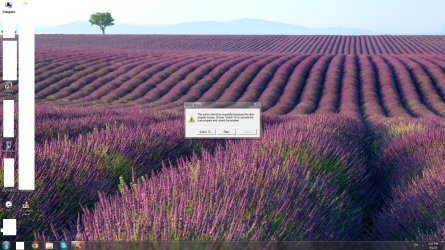
on start up im having these and it will take at least 5 or more minutes to my pc to connect to internet,working with words ok,but this is annoying me so muchhhhhhh.

im having errors with avast as never before,uninstalled it and installed it again,errors as image attached and a VPN settings
 
Last edited:

My Computer

Computer type
PC/Desktop
OS
Windows 7 Ultimate x32
CPU
AMD Athlom(tm064 Processor 3200+
Motherboard
K8M800-8237 EPPOX
Memory
2gb
Graphics Card(s)
NVIDIA GeForce 7600GT
having this before connection is ok after about 5 or 7 minutes
 

Attachments

  • Untitled.jpg
    Untitled.jpg
    100.6 KB · Views: 4

My Computer

Computer type
PC/Desktop
OS
Windows 7 Ultimate x32
CPU
AMD Athlom(tm064 Processor 3200+
Motherboard
K8M800-8237 EPPOX
Memory
2gb
Graphics Card(s)
NVIDIA GeForce 7600GT
Is it just your computer affected or the whole network?
 

My Computer

Computer Manufacturer/Model Number
CustomBuild001
OS
7 ultimate x64
CPU
Intel core i7 2600K
Motherboard
ASUS P8Z68-V PRO
Memory
Vengeance™ — 16GB Triple Channel DDR3 PC16000
Graphics Card(s)
GeForce GTX 560 Ti
Monitor(s) Displays
HannsG 22" widescreen (HDMI)
Screen Resolution
1680x1050
Hard Drives
Samsung 1TB x2(RAID1) Deskstar 160G, Buffalo ExHD 500GB
PSU
Corsair 850HX
Case
Antec Three Hundred Gaming Tower Case
Cooling
CPU Freezer 7 Pro Rev. 2...ANTEC 3phase cooling, 2 intake.
Keyboard
microsoft intellitype 6000 v3.0
Mouse
microsoft sidewinder
Internet Speed
50Mb
Other Info
64GB SSD in pipeline for Intel Smart Response Technology.
Is it just your computer affected or the whole network?

no my computer only,

WiFi and internet on netbook and laptop ok,no problem
 

My Computer

Computer type
PC/Desktop
OS
Windows 7 Ultimate x32
CPU
AMD Athlom(tm064 Processor 3200+
Motherboard
K8M800-8237 EPPOX
Memory
2gb
Graphics Card(s)
NVIDIA GeForce 7600GT
has the driver been updated recently? maybe roll back driver?

failing that use the orignial driver CD and uninstall the driver (dont let windows install again) and reinstall driver.

btw your files are not affected with system restore.
 

My Computer

Computer Manufacturer/Model Number
CustomBuild001
OS
7 ultimate x64
CPU
Intel core i7 2600K
Motherboard
ASUS P8Z68-V PRO
Memory
Vengeance™ — 16GB Triple Channel DDR3 PC16000
Graphics Card(s)
GeForce GTX 560 Ti
Monitor(s) Displays
HannsG 22" widescreen (HDMI)
Screen Resolution
1680x1050
Hard Drives
Samsung 1TB x2(RAID1) Deskstar 160G, Buffalo ExHD 500GB
PSU
Corsair 850HX
Case
Antec Three Hundred Gaming Tower Case
Cooling
CPU Freezer 7 Pro Rev. 2...ANTEC 3phase cooling, 2 intake.
Keyboard
microsoft intellitype 6000 v3.0
Mouse
microsoft sidewinder
Internet Speed
50Mb
Other Info
64GB SSD in pipeline for Intel Smart Response Technology.
Back
Top