Internet crashes while downloading semi-large files

Hammyobob

New member
Local time
8:21 AM
Messages
3
Hi, I recently had to upgrade my harddrives when I kept getting a "No load past start screen" error. I pinpointed the area to one of the harddrives and replaced it accordingly. After doing a fresh install of the OS and everything, I noticed my computer was a little sluggish and the internet was slow. Having being a little.. idiotic about reprogramming computers, I asked a friend who works on computers to fix it. He did the same thing that I did, but reinstalled the drivers differently and the internet worked perfectly after that.

After getting the computer back, I started installing my games and noticed the internet kept disconnecting on my laptop alone (While the rest of the house has internet) and that it would usually spike at a certain point then drop to a 0kbs download and the internet icon would show the "Internet has disconnected" icon. Thinking it was just a minor setback I didn't think anything of it, well its been a month now and it is still disconnecting.

I have tried updating the drivers, but to no avail as they're all up to date (Or so it seems) and ran virus scans/reg cleaners. If anyone has any tips please help!

Also interesting things to note:
  • Windows 7
  • Alienware MX17
  • 16gb memory
  • Atheros Gigabit ethernet controllerr
  • Killer wireless N 1103 adapter
  • Nvidia geforce 675m graphics
  • And intel (R) HD graphics 4000
 

My Computer My Computer

Computer type
PC/Desktop
Computer Manufacturer/Model Number
Dell Alienware MX17
OS
Windows 7
Memory
16gb
Hard Drives
Two terrabyte harddrives
Antivirus
Trend Micro Antivirus
Browser
Chrome
Hi Hammyobob.

The internet discunnection at random may be caused by a lot of factors. Some (hardware and software related) of them are within your control and some are from the part of your ISP.

Can you let us see some info?

upload your MSINFO32.nfo file.

  1. Click on the start button
  2. Type "msinfo32" (without quotes) in the search bar of the start menu, click the resulting link. It will open the System Information window.
  3. File>Save. In the "File Name" filed, put "MSINFO32" (without Quote), give the save location to desktop, and click the "save" button.
  4. Give the time for processing, it will save a .nfo file on your desktop.
  5. Zip it, and upload it following the instruction.
Upload the list of all the third party drivers Using NirSoft DriverView :

  • Download and execute Driverview
  • View > Hide Microsoft Drivers
  • Edit > Select all
  • File > Save Selected Items
  • In the Save dialog, Set the path to desktop, Put "Driverview" in the name field, and save.
  • Zip the .txt file and upload it.
These two files will help us to have a closer look at the things that is within your control.
 

My Computer My Computer

Computer type
PC/Desktop
Computer Manufacturer/Model Number
Self Assembled
OS
Microsoft Windows 10 Pro Insider Preview 64-bit
CPU
Intel(R) Core(TM) i3-4130 CPU @ 3.40GHz
Motherboard
Gigabyte Technology Co., Ltd. B85M-D3H
Memory
Corsair Vengence 4GB x2 (8.00GB Dual-Channel DDR3 @ 798MHz)
Graphics Card(s)
2047MB GeForce GTS 450 (ZOTAC International)
Sound Card
Onboard (Realtek High Definition Audio)
Monitor(s) Displays
LG Flatron E2040T
Screen Resolution
1600x900
Hard Drives
Western Digital 1 TB
Seagate 500 GB
PSU
Corsair VS550
Case
Cooler Master K380
Cooling
Cooler Master Seidon 120V Plus
Keyboard
Logitech MK260r
Mouse
Logitech MK260r
Internet Speed
PMPL Broadband
Antivirus
Windows Defender + MBAM
Browser
Firefox
Other Info
Dell Studio 15" Laptop
I have uploaded them, thanks for helping.
 

Attachments

My Computer My Computer

Computer type
PC/Desktop
Computer Manufacturer/Model Number
Dell Alienware MX17
OS
Windows 7
Memory
16gb
Hard Drives
Two terrabyte harddrives
Antivirus
Trend Micro Antivirus
Browser
Chrome
Last edited:

My Computer My Computer

Computer type
PC/Desktop
Computer Manufacturer/Model Number
Custom
OS
Windows 7 Ultimate 64-bit
CPU
Intel 2.3 Quad
Motherboard
P45Neo3 w/BIOS MS-7514 1.A0
Memory
8GB
Graphics Card(s)
Nvidia GeForce GTX 580 w/ BIOS 70.10.48.00.01
Hard Drives
4 2TB Internal SATA Drives
1 Internal IDE
4 External 2TB MyBooks
Antivirus
AVAST
Browser
Firefox
Hi, I recently had to upgrade my harddrives when I kept getting a "No load past start screen" error. I pinpointed the area to one of the harddrives and replaced it accordingly. After doing a fresh install of the OS and everything, I noticed my computer was a little sluggish and the internet was slow. Having being a little.. idiotic about reprogramming computers, I asked a friend who works on computers to fix it. He did the same thing that I did, but reinstalled the drivers differently and the internet worked perfectly after that.

After getting the computer back, I started installing my games and noticed the internet kept disconnecting on my laptop alone (While the rest of the house has internet) and that it would usually spike at a certain point then drop to a 0kbs download and the internet icon would show the "Internet has disconnected" icon. Thinking it was just a minor setback I didn't think anything of it, well its been a month now and it is still disconnecting.

I have tried updating the drivers, but to no avail as they're all up to date (Or so it seems) and ran virus scans/reg cleaners. If anyone has any tips please help!


Also interesting things to note:
  • Windows 7
  • Alienware MX17
  • 16gb memory
  • Atheros Gigabit ethernet controllerr
  • Killer wireless N 1103 adapter
  • Nvidia geforce 675m graphics
  • And intel (R) HD graphics 4000

Have you tried using the drivers directly from the Dell site for your Alien Ware Dell machine?

The link below goes directly to the Dell drivers for the Atheros and Killer N 1103 devices.

I can't imagine why these default drivers wouldn't be working. :confused:
Product Support | Dell US
 

My Computer My Computer

Computer type
PC/Desktop
Computer Manufacturer/Model Number
Home built
OS
Windows 7 Ult, Windows 8.1 Pro,
CPU
Q9650-4.275GHz, E8600 4.5GHz, E6750-3.8GHz
Motherboard
Evga 780i FTW
Memory
G.Skill PC2 9600 1200Mhz 5 5 5 15 2T
Graphics Card(s)
GTX480
Sound Card
Asus Xonar D2
Monitor(s) Displays
HannsG
Screen Resolution
1680X1050
Hard Drives
GSkill Phoenix Pro 120GB SSD
PSU
ThermalTake Toughpower 1000Watt modular
Case
ThermalTake XaserV
Cooling
Xigmatek S1283
Keyboard
Logitech G15
Mouse
Logitech G9
Internet Speed
T1
Hi chev65.

NetLimiter is a very common guilty to disconnect network connection at random. So uninstall it .....
Code:
Start Menu\Programs\NetLimiter 3
The Bigfoot Networks Bandwidth Control is also not having a good track record; but as it is included in the Killer Network Manager, you cannot isolate it easily. Better you dont let it run all the times in the background. Call it only when it is needed. Remove Killer Network Manager from startup.

  1. Click on the Start button
  2. Type “msconfig (without quotes), click the resulting link. It will open the System Configuration window.
  3. Select the “Startup” tab.
  4. Deselect this item .....
    Code:
    [COLOR=Red]Killer Network Manager[/COLOR]    c:\windows\installer\{7411487a-ff21-481e-ab53-bf27ff30e042}\networkmanager.exe_130c27d738f34c89bddf21bcfd74b56d.exe -minimize    Public    Common Startup
  5. Apply > OK
  6. Accept then restart.
There are some other factors that may affect the situation, but these two are the foremost.

Let us know the situation when done.
 

My Computer My Computer

Computer type
PC/Desktop
Computer Manufacturer/Model Number
Self Assembled
OS
Microsoft Windows 10 Pro Insider Preview 64-bit
CPU
Intel(R) Core(TM) i3-4130 CPU @ 3.40GHz
Motherboard
Gigabyte Technology Co., Ltd. B85M-D3H
Memory
Corsair Vengence 4GB x2 (8.00GB Dual-Channel DDR3 @ 798MHz)
Graphics Card(s)
2047MB GeForce GTS 450 (ZOTAC International)
Sound Card
Onboard (Realtek High Definition Audio)
Monitor(s) Displays
LG Flatron E2040T
Screen Resolution
1600x900
Hard Drives
Western Digital 1 TB
Seagate 500 GB
PSU
Corsair VS550
Case
Cooler Master K380
Cooling
Cooler Master Seidon 120V Plus
Keyboard
Logitech MK260r
Mouse
Logitech MK260r
Internet Speed
PMPL Broadband
Antivirus
Windows Defender + MBAM
Browser
Firefox
Other Info
Dell Studio 15" Laptop
Oh I agree, the drivers should be working fine without the connection software. But this has always been the case.

With a name like Net limiter or bandwidth controller, I would expect those to limit the net in some way and in most cases those only cause problems.

Qualcomm Atheros Bandwidth Control Filter Driver?

NetLimiter 3 NDIS driver?

Still I have to question the driver source, if the Dell drivers aren't working then maybe go with the Widows versions. Not to mention Trend Micro has it's A/V stuff all up in there as well. Third party programs are famous for causing these types of problems and generally speaking Windows can't cause these types of problems on it's own. It's all the crap that people install causing the problems.

If this system was cleaned up a bit it would probably start working as it should.
 

My Computer My Computer

Computer type
PC/Desktop
Computer Manufacturer/Model Number
Home built
OS
Windows 7 Ult, Windows 8.1 Pro,
CPU
Q9650-4.275GHz, E8600 4.5GHz, E6750-3.8GHz
Motherboard
Evga 780i FTW
Memory
G.Skill PC2 9600 1200Mhz 5 5 5 15 2T
Graphics Card(s)
GTX480
Sound Card
Asus Xonar D2
Monitor(s) Displays
HannsG
Screen Resolution
1680X1050
Hard Drives
GSkill Phoenix Pro 120GB SSD
PSU
ThermalTake Toughpower 1000Watt modular
Case
ThermalTake XaserV
Cooling
Xigmatek S1283
Keyboard
Logitech G15
Mouse
Logitech G9
Internet Speed
T1
Still I have to question the driver source,
Hi chev65. :)
As per the Driver Downloads | Qualcomm Atheros, Inc., the network driver is the latest.
Code:
Killergaming.com – 1.1.38.1280 Release Notes
For Killer e2200 | Killer Wireless-N 1102, 1103 and 1202
Filename/ MD5:
KillerSuite_1.1.38.1281_Win7_Win8_Win81.exe / 7f8cd2d65b7919eb89eba1528a6bce2f
Versions:
Installer/Software Suite: 1.1.38.1281
[COLOR=Red]Wireless driver: 10.0.0.274[/COLOR]
E2200 driver: 8.0.2.42
BWC driver: 4.0.2.18
BT suite: 8.0.1.312
So I did not pay attention to the driver initially. As I have seen, this version works good.

Not to mention Trend Micro has it's A/V stuff all up in there as well.
It will be the next thing to look at, if needed. :)
 

My Computer My Computer

Computer type
PC/Desktop
Computer Manufacturer/Model Number
Self Assembled
OS
Microsoft Windows 10 Pro Insider Preview 64-bit
CPU
Intel(R) Core(TM) i3-4130 CPU @ 3.40GHz
Motherboard
Gigabyte Technology Co., Ltd. B85M-D3H
Memory
Corsair Vengence 4GB x2 (8.00GB Dual-Channel DDR3 @ 798MHz)
Graphics Card(s)
2047MB GeForce GTS 450 (ZOTAC International)
Sound Card
Onboard (Realtek High Definition Audio)
Monitor(s) Displays
LG Flatron E2040T
Screen Resolution
1600x900
Hard Drives
Western Digital 1 TB
Seagate 500 GB
PSU
Corsair VS550
Case
Cooler Master K380
Cooling
Cooler Master Seidon 120V Plus
Keyboard
Logitech MK260r
Mouse
Logitech MK260r
Internet Speed
PMPL Broadband
Antivirus
Windows Defender + MBAM
Browser
Firefox
Other Info
Dell Studio 15" Laptop
Hi chev65.

NetLimiter is a very common guilty to disconnect network connection at random. So uninstall it .....
Code:
Start Menu\Programs\NetLimiter 3
The Bigfoot Networks Bandwidth Control is also not having a good track record; but as it is included in the Killer Network Manager, you cannot isolate it easily. Better you dont let it run all the times in the background. Call it only when it is needed. Remove Killer Network Manager from startup.

As I have uninstalled Net Limiter (Only downloaded it, as it might have been a solution to the problem but didn't make a difference as it was going down before & after downloading) I still have an issue with KNM as it's not in the MSconfig startup menu.


Still I have to question the driver source, if the Dell drivers aren't working then maybe go with the Widows versions. Not to mention Trend Micro has it's A/V stuff all up in there as well. Third party programs are famous for causing these types of problems and generally speaking Windows can't cause these types of problems on it's own. It's all the crap that people install causing the problems.

I have uninstalled Trend Micro per your request, unfortunately as soon as something still downloads the internet shuts off promptly around 100 mbs in. Only used that program once to make sure there weren't any viruses on the computer.

Also, as a side note:
After doing a fresh install of the OS and everything, I noticed my computer was a little sluggish and the internet was slow.
Before reinstalling the OS and plugging in the harddrive I had no internet issues. Only after getting the computer running again had the internet started acting "screwy".

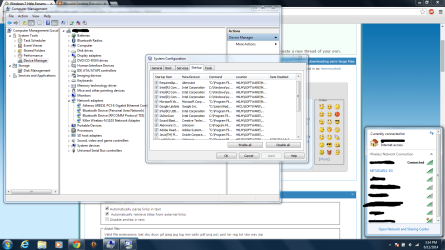
In the picture below has everything that starts up in MSconfig, and also has 2 connections that I can join. The top one is my router which I can flawlessly connect to, and the second one the "Netgear11-5G" I can somehow connect anywhere I go. For instance: I can log into my router and see there's 2 connections, and then go to my cousins and see 2 connections. Coming from one router, I don't know if this is an issue or not.
 

Attachments

  • Msconfigmissing.png
    Msconfigmissing.png
    113 KB · Views: 2
Last edited:

My Computer My Computer

Computer type
PC/Desktop
Computer Manufacturer/Model Number
Dell Alienware MX17
OS
Windows 7
Memory
16gb
Hard Drives
Two terrabyte harddrives
Antivirus
Trend Micro Antivirus
Browser
Chrome
If you uncheck everything in startup other than SynTPEnh and then try a download again, does the connection goes out again?

If so, let us see the changed situation. Upload the files once again as suggested in post #2.
 

My Computer My Computer

Computer type
PC/Desktop
Computer Manufacturer/Model Number
Self Assembled
OS
Microsoft Windows 10 Pro Insider Preview 64-bit
CPU
Intel(R) Core(TM) i3-4130 CPU @ 3.40GHz
Motherboard
Gigabyte Technology Co., Ltd. B85M-D3H
Memory
Corsair Vengence 4GB x2 (8.00GB Dual-Channel DDR3 @ 798MHz)
Graphics Card(s)
2047MB GeForce GTS 450 (ZOTAC International)
Sound Card
Onboard (Realtek High Definition Audio)
Monitor(s) Displays
LG Flatron E2040T
Screen Resolution
1600x900
Hard Drives
Western Digital 1 TB
Seagate 500 GB
PSU
Corsair VS550
Case
Cooler Master K380
Cooling
Cooler Master Seidon 120V Plus
Keyboard
Logitech MK260r
Mouse
Logitech MK260r
Internet Speed
PMPL Broadband
Antivirus
Windows Defender + MBAM
Browser
Firefox
Other Info
Dell Studio 15" Laptop
Back
Top