
Hi guys,
Just wondering if you could help me out with a little problem that I've had with my computer ever since I upgraded from Windows Vista to Windows 7.
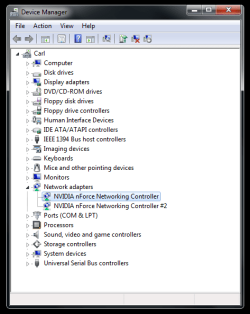
I have a motherboard with two network jacks, but I only use one. They use the NVIDIA nForce Networking Controller driver (see attached) which was installed when I had Vista. I think upgrading to 7 caused a small incompatibility with this driver.
A little more about the problem, it seemingly happens randomly, but when it does happen, it seems to go through a phase of breaking again soon after I fix it by running Diagnostic which simply resets my router. By the way my computer is hooked up to a NETGEAR router which is serving some other people's wireless laptops. It seems to happen when I use a variety of internet-using programs at once like FTP clients and Firefox.
I don't really know how much more information you need, any ideas on how to fix this?
Just wondering if you could help me out with a little problem that I've had with my computer ever since I upgraded from Windows Vista to Windows 7.
I have a motherboard with two network jacks, but I only use one. They use the NVIDIA nForce Networking Controller driver (see attached) which was installed when I had Vista. I think upgrading to 7 caused a small incompatibility with this driver.
A little more about the problem, it seemingly happens randomly, but when it does happen, it seems to go through a phase of breaking again soon after I fix it by running Diagnostic which simply resets my router. By the way my computer is hooked up to a NETGEAR router which is serving some other people's wireless laptops. It seems to happen when I use a variety of internet-using programs at once like FTP clients and Firefox.
I don't really know how much more information you need, any ideas on how to fix this?
Attachments
My Computer
At a glance
Windows 7Intel Core 2 Quad Q9300 Yorkfield 2.5GHzx2 Patriot Viper 4GB (2 x 2GB) 240-Pin DDR3eVGA 280
- Computer Manufacturer/Model Number
- Myself
- OS
- Windows 7
- CPU
- Intel Core 2 Quad Q9300 Yorkfield 2.5GHz
- Motherboard
- ASUS
- Memory
- x2 Patriot Viper 4GB (2 x 2GB) 240-Pin DDR3
- Graphics Card(s)
- eVGA 280
- Sound Card
- integrated
- Monitor(s) Displays
- Asus 24in
- Hard Drives
- x2 Seagate Barracuda 7200.11 ST3500320AS 500GB 7200 RPM SATA 3.0Gb/s 3.5"
- Case
- Wooden


