
Hey all.
This problem has been bugging me for months now, only now I've decided to seek help!
Problem:
When I first start my computer up every morning, my Laptop will automatically connect to my router, everything is fine. The problem I'm having is when I log my computer off, or put the computer into sleep mode. After logging back on to my laptop it won't connect back to the router. I always get the orange star sign over the signal bars. If I try to re-connect by clicking on the signal bars in the bottom right hand side of the screen it won't connect.

This is what I have to do:
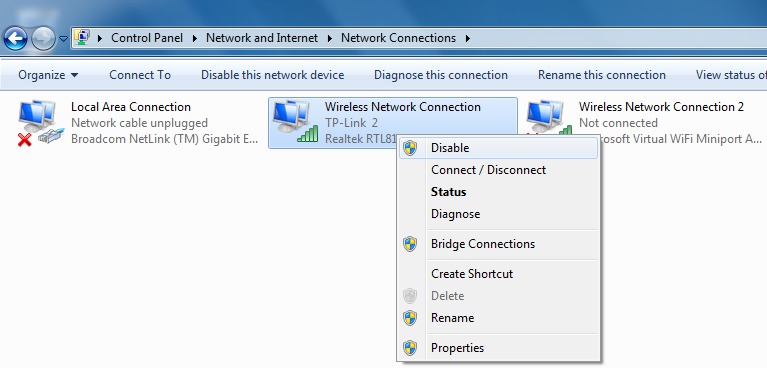
I disable and enable the connection below, I then have to wait 1 minute until the computer recognizes the router and re-connects.
I honestly don't know why this is happening, the only thing I can think is because I updated the Microsoft Virtual WiFi Miniport Adapter.
If anyone could help out I'd really appreciate it.
Thanks in advance.
This problem has been bugging me for months now, only now I've decided to seek help!
Problem:
When I first start my computer up every morning, my Laptop will automatically connect to my router, everything is fine. The problem I'm having is when I log my computer off, or put the computer into sleep mode. After logging back on to my laptop it won't connect back to the router. I always get the orange star sign over the signal bars. If I try to re-connect by clicking on the signal bars in the bottom right hand side of the screen it won't connect.
This is what I have to do:
I disable and enable the connection below, I then have to wait 1 minute until the computer recognizes the router and re-connects.
I honestly don't know why this is happening, the only thing I can think is because I updated the Microsoft Virtual WiFi Miniport Adapter.
If anyone could help out I'd really appreciate it.
Thanks in advance.
My Computer
- Computer Manufacturer/Model Number
- Packard Bell EasyNote TM97
- OS
- Windows 7 64-bit
- CPU
- Intel Core i3 M370
- Memory
- 4GB
- Graphics Card(s)
- Intel HD
