Internet Explorer 10 - Enable 32-bit or 64-bit IE10 in Windows 7

How to Enable 32-bit or 64-bit Internet Explorer 10 (IE10) in Windows 7


   Information
In 32-bit Windows 7, Internet Explorer 10 (IE10) is still only a 32-bit browser.

In 64-bit Windows 7, Internet Explorer 10 (IE10) has 32-bit and 64-bit together in one browser now. The IE10 browser frame process runs 64-bit, but for compatibility with plug-ins, IE10 runs 32-bit tabs by default. If the user turns onEnhanced Protected Mode, they will have 64-bit tabs by default for IE10.

This tutorial will show you how to enable using 32-bit IE10 or 64-bit IE10 in Windows 7 by showing you how to turn on or off Enhanced Protected Mode in IE10.

For more information about IE10 for Windows 7, see:
   Note
Internet Explorer 10 is now available through Windows Update in Windows 7. If you wish, you can also download the standalone IE10 installer at the link below.
Download standalone Internet Explorer 10 Installer

Internet Explorer 10 system requirements
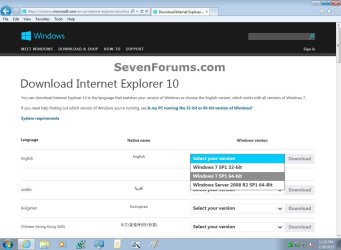
  • If you have 64-bit Windows 7, then you need to use the Windows 7 SP1 64-bit installer for IE10.
  • If you have 32-bit Windows 7, then you need to use the Windows 7 SP1 32-bit installer for IE10.
Windows_7_IE10-1.jpg

   Warning
You will only be able to have 64-bit IE10 if User Account Control (UAC) is not set to Never notify (disabled) or the EnableLUA registry DWORD to "0".

If you enable Enhanced Protected Mode (EPM) in IE10, all of your add-ons must be 64-bit and EPM compatible for all open IE10 processes to be 64-bit.

UAC must be enabled to be able to have 64-bit IE10. Otherwise, it will be 32-bit IE10 even if set to 64-bit in the tutorial below.


EXAMPLE: About Internet Explorer 10 (IE10)
NOTE: You will notice that the about IE10 is the same whether you open iexplorer.exe from either the "Program Files" or "Program Files (x86)" location.
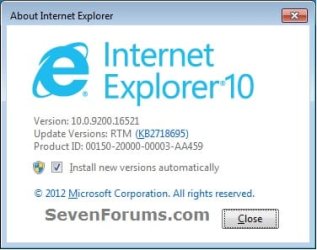
about_IE10_W7.jpg


Here's How:

1. Do step 2 or 3 below for how you would like to open Internet Options.

2. Open the Control Panel (icons view), click/tap on the Internet Options icon, and go to step 4 below.

3. Open IE10, click on the gear icon and Internet options, then go to step 4 below. (see screenshot below)
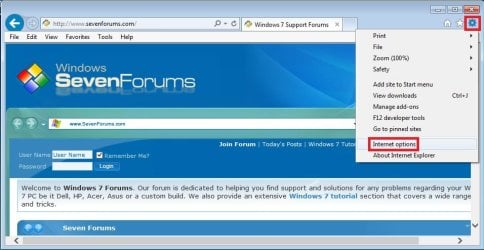
W7_IE10_1.jpg
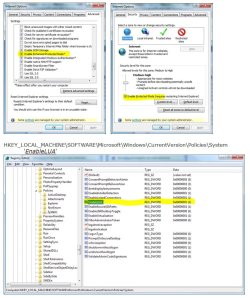
4. Click on the Advanced tab, scroll down to the Security section, and do step 5 or 6 below for what you would like to do. (see screenshot below)
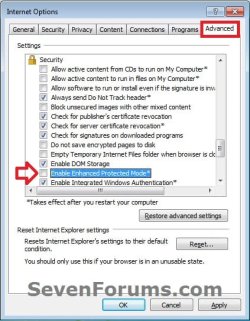
W7_IE10_2.jpg
5. Turn On "Enhanced Protected Mode" for 64-bit IE10 in Windows 7
NOTE: See red warning box at the top of the tutorial.
A) Check the Enable Enhanced Protected Mode box. (see screenshot below step 4)

B) Click/tap on the Security tab, and if not already, check the Enable Protected Mode box for the Internet zone. (see screenshot below)
NOTE: This box is checked by default.
IE10_Security.jpg
C) Click on OK, and go to step 7 below.
6 Turn Off "Enhanced Protected Mode" for 32-bit IE10 in Windows 7
NOTE: This is the default setting.
A) Uncheck the Enable Enhanced Protected Mode box, click on OK, and go to step 7 below. (see screenshot below step 4)
7. Restart the computer to apply.


That's it,
Shawn


Last edited:
@Brink,

There seems to be a typo in step 5:
A) Check the Enable Enhanced Protected Mode box. (see screenshot below step 5)

Maybe it should read:
A) Check the Enable Enhanced Protected Mode box. (see screenshot in step 4)
 

My Computer My Computer

At a glance

W7 Pro SP1 64biti78GBIntel HD Graphics
Computer type
Laptop
Computer Manufacturer/Model Number
Employer provided Dell Latitude
OS
W7 Pro SP1 64bit
CPU
i7
Memory
8GB
Graphics Card(s)
Intel HD Graphics
Hard Drives
crappy SSD
Antivirus
Employer mandated Symantec Endpoint Protection
Browser
Pale Moon 64bit, IE11 64bit & Chrome 64bit
Thank you mate. Corrected. :)
 

My Computer My Computer

At a glance

64-bit Windows 11 Pro for WorkstationsIntel i7-8700K OC'd to 5 GHz64 GB (4x16GB) G.SKILL TridentZ RGB DDR4 3600...ASUS ROG-STRIX-GTX1080TI-O11G-GAMING
Computer type
PC/Desktop
Computer Manufacturer/Model Number
Self built custom
OS
64-bit Windows 11 Pro for Workstations
CPU
Intel i7-8700K OC'd to 5 GHz
Motherboard
ASUS ROG Maximus XI Formula Z390
Memory
64 GB (4x16GB) G.SKILL TridentZ RGB DDR4 3600 MHz
Graphics Card(s)
ASUS ROG-STRIX-GTX1080TI-O11G-GAMING
Sound Card
Integrated
Monitor(s) Displays
2 x Samsung Odyssey G7 27"
Screen Resolution
2560x1440
Hard Drives
1TB Samsung 990 PRO M.2,
4TB Samsung 990 PRO PRO M.2,
TerraMaster F8 SSD Plus NAS
PSU
Seasonic Prime Titanium 850W
Case
Thermaltake Core P3
Cooling
Corsair Hydro H115i
Keyboard
Logitech wireless K800
Mouse
Logitech MX Master 4
Internet Speed
2 Gb/s Download and 100 Mb/s Upload
Antivirus
Malwarebyte Anti-Malware Premium
Browser
Google Chrome
Other Info
Logitech Z625 speaker system,
Logitech BRIO 4K Pro webcam,
HP Color LaserJet Pro MFP M477fdn,
APC SMART-UPS RT 1000 XL - SURT1000XLI,
Galaxy S23 Plus phone
Great info...who knew and the thing about UAC that's scary-
how many other things are affected by -
UAC turned off or down,but really what a mess.
I am not an IE hater ,but what a sordid mess.
And 11 is even worse,God help us all.
Slimbo
 

My Computer My Computer

At a glance

Win 7 Ultimate 32 bit Signed Steve Ballmer ed...Amd Quad 3.4 Phenom 2 BE X4 965 140 watt4 GIG corsair black edition2 radeon cards crossfire
Computer type
PC/Desktop
Computer Manufacturer/Model Number
Custom
OS
Win 7 Ultimate 32 bit Signed Steve Ballmer edition,Win 8 pro 64
CPU
Amd Quad 3.4 Phenom 2 BE X4 965 140 watt
Motherboard
MSI 790 FX GD70
Memory
4 GIG corsair black edition
Graphics Card(s)
2 radeon cards crossfire
Sound Card
on board
Monitor(s) Displays
22inch Emachines made by Acer flat panel
Screen Resolution
native
Hard Drives
wd raptor 300 gig
PSU
Corsair HX850W
Case
Cheap Rosewill
Cooling
Stock
Keyboard
usb cheap
Mouse
old ms track ball
Internet Speed
100mbps supposedly-cable
Antivirus
microsoft
Browser
ie ,fox ,chromo
Other Info
Many other builds and configs,Win 2000,XP pro,Win 7 64,Ubuntu,M-Audio Delta 1010's etc.
Nice to find tutorials to solve problems with Gmail and Yahoo groups message editor using Windows 7, 64-bit and IE10. After trying out IE11 it was not to my liking, so IE10 was put back and that changed some of my settings. To cure the problems I went to:

Tools>Internet options>Security then checked “Enable Protected Mode” in both Internet and Trust sites. That forces IE10 to run in 64-bit mode.

Thanks to tutorials herein things are made easier. :)
 

My Computer My Computer

At a glance

Microsoft Windows 7 Home Premium 64-bit 7601 ...AMD Athlon(tm) Processor 2850e4.00 GBNVIDIA GeForce 6150SE nForce 430
Computer type
PC/Desktop
Computer Manufacturer/Model Number
eMachines EL 1333G-01W
OS
Microsoft Windows 7 Home Premium 64-bit 7601 Multiprocessor Free Service Pack 1
CPU
AMD Athlon(tm) Processor 2850e
Motherboard
eMachines WMCP61M
Memory
4.00 GB
Graphics Card(s)
NVIDIA GeForce 6150SE nForce 430
Sound Card
Realtek High Definition Audio
Monitor(s) Displays
Samsung 730B
Screen Resolution
1280 x 1024 x 32 bits (4294967296 colors) @ 60 Hz
Hard Drives
(1) ST332041 8AS SCSI Disk Device (2) Generic- Compact Flash USB Device (3) Multiple Flash Reader USB Device
Hi.

I want to ask how to run 32bit IE on a 64bit machine running Windows Server 2012 Standard (IE 10)..

I try to play on "Enabled Protected Mode", however regardless of its state (check or unchecked), IE will always run as 64 bit (via TaskManager), each following tab is also on 64bit.

The method of running iexplorer.exe in dir C:\Program Files(x86) also has been tried but to no avail.

According to this read, it will always run as 64 bit.

said:
For IE10, we’ve changed IE such that Manager Processes always run as 64bit processes when running on a 64bit processor running a 64bit version of Windows. This improves security among other things. We do not expect that this change will meaningfully impact compatibility, because the Manager Process is designed not to run 3rd party content, and thus there’s little opportunity for anyone to take a dependency upon the Frame Process’ bitness. In support of this change, the various registry points that point to Internet Explorer have been updated to point to C:\Program Files\Internet Explorer\iexplore.exe. If you manually invoke C:\Program Files (x86)\Internet Explorer\iexplore.exe, that 32bit process will simply launch the 64bit version of iexplore.exe (with the appropriate command line parameters) before exiting.
 

My Computer My Computer

At a glance

Windows 7 Home Premium 64bitInterl Core i7-2670QM8.0GB RAMIntel HD Graphics Family & NVidia GeForce GT ...
Computer type
Laptop
Computer Manufacturer/Model Number
Dell
OS
Windows 7 Home Premium 64bit
CPU
Interl Core i7-2670QM
Memory
8.0GB RAM
Graphics Card(s)
Intel HD Graphics Family & NVidia GeForce GT 540M
Hard Drives
750GB 7200RPM HDD
Antivirus
McAfee
Browser
IE,Chrome,Firefox
Hello darkw1zard,

That just means that the IE10 process will always run 64-bit in 64-bit Windows no matter which iexplore.exe you run, but you should be able to have the tabs run in 32-bit mode if Enhanced Protected Mode is disabled (unchecked), and restart the PC to apply.

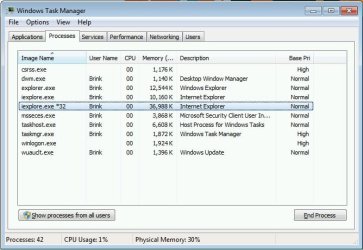
You should have one iexplorer.exe process for the IE10 window itself running in 64-bit mode. After that you should have one iexplorer.exe *32 process for each tab opened in IE10 running in 32-bit mode.

I don't have Windows Server 2012 Standard, but it should be the same in it as well.

Task_Manager.jpg
 

My Computer My Computer

At a glance

64-bit Windows 11 Pro for WorkstationsIntel i7-8700K OC'd to 5 GHz64 GB (4x16GB) G.SKILL TridentZ RGB DDR4 3600...ASUS ROG-STRIX-GTX1080TI-O11G-GAMING
Computer type
PC/Desktop
Computer Manufacturer/Model Number
Self built custom
OS
64-bit Windows 11 Pro for Workstations
CPU
Intel i7-8700K OC'd to 5 GHz
Motherboard
ASUS ROG Maximus XI Formula Z390
Memory
64 GB (4x16GB) G.SKILL TridentZ RGB DDR4 3600 MHz
Graphics Card(s)
ASUS ROG-STRIX-GTX1080TI-O11G-GAMING
Sound Card
Integrated
Monitor(s) Displays
2 x Samsung Odyssey G7 27"
Screen Resolution
2560x1440
Hard Drives
1TB Samsung 990 PRO M.2,
4TB Samsung 990 PRO PRO M.2,
TerraMaster F8 SSD Plus NAS
PSU
Seasonic Prime Titanium 850W
Case
Thermaltake Core P3
Cooling
Corsair Hydro H115i
Keyboard
Logitech wireless K800
Mouse
Logitech MX Master 4
Internet Speed
2 Gb/s Download and 100 Mb/s Upload
Antivirus
Malwarebyte Anti-Malware Premium
Browser
Google Chrome
Other Info
Logitech Z625 speaker system,
Logitech BRIO 4K Pro webcam,
HP Color LaserJet Pro MFP M477fdn,
APC SMART-UPS RT 1000 XL - SURT1000XLI,
Galaxy S23 Plus phone
First of all this topic has helped me loads in figuring out some issues on my desktop. Thank You. I have a Windows 7 Desktop, and had IE 9. I noticed I had the 64 bit operating system but I also had 2 different IE icons in the start program, one for 32 bit/one for 64 bit. I had noticed that when I tried to stream music from certain radio stations, some would stream fine in 32 bit, others only occasionally in 32 bit. I couldn't figure it out until I made a connection with the IE Icons and tried streaming in 64 bit. The other stations streamed without problems. That is, until I upgraded to IE10. My problems began all over again. I seemed to have lost all but one IE Icon. Plus I could not stream again on some radio stations. The problem broke with this article on "Enhanced Protected Mode". It's a little hard for me to comprehend what happened but, when I applied EPM, I could stream music from those other radio stations. I was wondering if the Icons can be replaced ? Can I have an Icon for both 32 and 64 bit again ? 32 bit is (x86) correct ? Or do I even need 2 IE Icons on the desktop ?
 

My Computer My Computer

At a glance

Windows 7 32bit and 64 bit
Computer type
PC/Desktop
Computer Manufacturer/Model Number
HP
OS
Windows 7 32bit and 64 bit
Activating EPM is the only way to run all 64 bit processes,
No you don't need both x64 and x86 icons,
Activating EPM turns the default x86 icon into the x64 process,
If you have issues using the default x86 or *32 bit version I would investigate that issue because that is your real issue,
You should work your way though this link and ask a new question here,
http://www.sevenforums.com/browsers-mail/
with screen shots of your Manage add-ons screens mostly Show all-ons Toolbar and extensions
http://windows.microsoft.com/en-us/internet-explorer/manage-add-ons#ie=ie-10-win-7
Gear%20symbol-Manage%20add-ons.jpg
Red%20active%20x-add-ons.JPG
 

My Computer My Computer

At a glance

Win-7-Pro64bit 7-H-Prem-64biti7-5930K 2nd i9-9940x both water blocked VRM'...Trident-z 3200C14 2nd Trident-z 3600C16EVGA 1080ti ftw3 2nd Titan Xp both water blocked
Computer type
PC/Desktop
Computer Manufacturer/Model Number
Custom assembled by me :}
OS
Win-7-Pro64bit 7-H-Prem-64bit
CPU
i7-5930K 2nd i9-9940x both water blocked VRM's too
Motherboard
ASUS SABERTOOTH X99 2nd ASUS x299 Apex
Memory
Trident-z 3200C14 2nd Trident-z 3600C16
Graphics Card(s)
EVGA 1080ti ftw3 2nd Titan Xp both water blocked
Sound Card
Built-in Realtek
Monitor(s) Displays
1-AOC G2460PG 24"G-Sync 144Hz/ 2nd 1-ASUS VG248QE 24" 144Hz
Screen Resolution
1920 x 1080 144Hz
Hard Drives
2-Samsung M.2 Evo & Evo Plus
2-Samsung 850 EVO 500GB SSD's/ 3-2.5 W.D. Black 1tb-&3-1tb/3-3.5 WD Black 1tb hdd's
PSU
EVGA SuperNOVA 1000-P2 2nd 1200-P2
Case
2-Corsair Obsidian Series 450D Black ATX Mid Tower
Cooling
Custom water loops
Keyboard
Logitech G710+/ 2nd Logitech G910
Mouse
2-RedDragon M901 Perdition 16400 dpi Gaming mouse = wired
Internet Speed
Comcast Ping 19ms 89.31mbps download speed 6.12mbps upload
Antivirus
Malwarebytes Pro/ Superantispyware Pro
Browser
FireFox & Pale moon
Other Info
2nd ASUS X299 Apex/Intel i9-9940x with Custom water loop/7H-Prem-x64/Corsair 450D case/Ram Trident-z 3600C16 4x8gb / Samsung970Evo plus 500gb SSD/Dual ssd EZ swap evo/PSU EVGA SuperNova 1200w-P2 80+Platinum/GPU Titan Xp /8-ML-140 on push-pull on 2-280GTX rads
Dear Shawn, According information on the Microsoft webpage Change security and privacy settings in Internet Explorer - Windows Help the default setting for 32 bit IE 10 in W7 is to have Enhanced Protected Mode enabled, not "turned off" as you suggest in step 6 of the tutorial. Thanks by the way for the terrific work you do on these forums! Cheers, Adrien
 

My Computer My Computer

At a glance

Windows 7 64 bit
Computer type
PC/Desktop
OS
Windows 7 64 bit
Hi and welcome to SevenForums,
I'd say you misread the article or it was just a general safety article
32 bit does not have EPM because it has No 64 bit process to make it possible :(
Cheers.
 

My Computer My Computer

At a glance

Win-7-Pro64bit 7-H-Prem-64biti7-5930K 2nd i9-9940x both water blocked VRM'...Trident-z 3200C14 2nd Trident-z 3600C16EVGA 1080ti ftw3 2nd Titan Xp both water blocked
Computer type
PC/Desktop
Computer Manufacturer/Model Number
Custom assembled by me :}
OS
Win-7-Pro64bit 7-H-Prem-64bit
CPU
i7-5930K 2nd i9-9940x both water blocked VRM's too
Motherboard
ASUS SABERTOOTH X99 2nd ASUS x299 Apex
Memory
Trident-z 3200C14 2nd Trident-z 3600C16
Graphics Card(s)
EVGA 1080ti ftw3 2nd Titan Xp both water blocked
Sound Card
Built-in Realtek
Monitor(s) Displays
1-AOC G2460PG 24"G-Sync 144Hz/ 2nd 1-ASUS VG248QE 24" 144Hz
Screen Resolution
1920 x 1080 144Hz
Hard Drives
2-Samsung M.2 Evo & Evo Plus
2-Samsung 850 EVO 500GB SSD's/ 3-2.5 W.D. Black 1tb-&3-1tb/3-3.5 WD Black 1tb hdd's
PSU
EVGA SuperNOVA 1000-P2 2nd 1200-P2
Case
2-Corsair Obsidian Series 450D Black ATX Mid Tower
Cooling
Custom water loops
Keyboard
Logitech G710+/ 2nd Logitech G910
Mouse
2-RedDragon M901 Perdition 16400 dpi Gaming mouse = wired
Internet Speed
Comcast Ping 19ms 89.31mbps download speed 6.12mbps upload
Antivirus
Malwarebytes Pro/ Superantispyware Pro
Browser
FireFox & Pale moon
Other Info
2nd ASUS X299 Apex/Intel i9-9940x with Custom water loop/7H-Prem-x64/Corsair 450D case/Ram Trident-z 3600C16 4x8gb / Samsung970Evo plus 500gb SSD/Dual ssd EZ swap evo/PSU EVGA SuperNova 1200w-P2 80+Platinum/GPU Titan Xp /8-ML-140 on push-pull on 2-280GTX rads
Hi Mike, Thanks for replying, but I'm afraid your assumption is wrong... 32 bit IE10 has EPM, even on a 32 bit Windows 7 version and it is ENABLED by default (see screenshot of a fresh installed W7-32 computer below), as the Microsoft article - which is specifically written for IE10 in W7 - says, but you have probably not read that, considering the text of your reply. Anyway, I suggest Shawn will have a closer look at it.

https://onedrive.live.com/redir?res...authkey=!ADqdt7CPDs4ZI0w&v=3&ithint=photo,jpg
 

My Computer My Computer

At a glance

Windows 7 64 bit
Computer type
PC/Desktop
OS
Windows 7 64 bit

My Computer My Computer

At a glance

Win-7-Pro64bit 7-H-Prem-64biti7-5930K 2nd i9-9940x both water blocked VRM'...Trident-z 3200C14 2nd Trident-z 3600C16EVGA 1080ti ftw3 2nd Titan Xp both water blocked
Computer type
PC/Desktop
Computer Manufacturer/Model Number
Custom assembled by me :}
OS
Win-7-Pro64bit 7-H-Prem-64bit
CPU
i7-5930K 2nd i9-9940x both water blocked VRM's too
Motherboard
ASUS SABERTOOTH X99 2nd ASUS x299 Apex
Memory
Trident-z 3200C14 2nd Trident-z 3600C16
Graphics Card(s)
EVGA 1080ti ftw3 2nd Titan Xp both water blocked
Sound Card
Built-in Realtek
Monitor(s) Displays
1-AOC G2460PG 24"G-Sync 144Hz/ 2nd 1-ASUS VG248QE 24" 144Hz
Screen Resolution
1920 x 1080 144Hz
Hard Drives
2-Samsung M.2 Evo & Evo Plus
2-Samsung 850 EVO 500GB SSD's/ 3-2.5 W.D. Black 1tb-&3-1tb/3-3.5 WD Black 1tb hdd's
PSU
EVGA SuperNOVA 1000-P2 2nd 1200-P2
Case
2-Corsair Obsidian Series 450D Black ATX Mid Tower
Cooling
Custom water loops
Keyboard
Logitech G710+/ 2nd Logitech G910
Mouse
2-RedDragon M901 Perdition 16400 dpi Gaming mouse = wired
Internet Speed
Comcast Ping 19ms 89.31mbps download speed 6.12mbps upload
Antivirus
Malwarebytes Pro/ Superantispyware Pro
Browser
FireFox & Pale moon
Other Info
2nd ASUS X299 Apex/Intel i9-9940x with Custom water loop/7H-Prem-x64/Corsair 450D case/Ram Trident-z 3600C16 4x8gb / Samsung970Evo plus 500gb SSD/Dual ssd EZ swap evo/PSU EVGA SuperNova 1200w-P2 80+Platinum/GPU Titan Xp /8-ML-140 on push-pull on 2-280GTX rads
Sorry again Mike, but appearantly you have not read my first (and second) post about this subject properly: I'm constantly referring to step 6 of Brinks tutorial. Please read again before replying. Thanks!
 

My Computer My Computer

At a glance

Windows 7 64 bit
Computer type
PC/Desktop
OS
Windows 7 64 bit
Sorry again Mike, but appearantly you have not read my first (and second) post about this subject properly: I'm constantly referring to step 6 of Brinks tutorial. Please read again before replying. Thanks!

Step 6 is referring to the screenshot under step 4 instead. It is not checked by default in 32-bit IE, but the Enable Protected Mode box under step 5 is checked by default. :)

6A) Uncheck the Enable Enhanced Protected Mode box, click on OK, and go to step 7 below. (see screenshot below step 4)
 

My Computer My Computer

At a glance

64-bit Windows 11 Pro for WorkstationsIntel i7-8700K OC'd to 5 GHz64 GB (4x16GB) G.SKILL TridentZ RGB DDR4 3600...ASUS ROG-STRIX-GTX1080TI-O11G-GAMING
Computer type
PC/Desktop
Computer Manufacturer/Model Number
Self built custom
OS
64-bit Windows 11 Pro for Workstations
CPU
Intel i7-8700K OC'd to 5 GHz
Motherboard
ASUS ROG Maximus XI Formula Z390
Memory
64 GB (4x16GB) G.SKILL TridentZ RGB DDR4 3600 MHz
Graphics Card(s)
ASUS ROG-STRIX-GTX1080TI-O11G-GAMING
Sound Card
Integrated
Monitor(s) Displays
2 x Samsung Odyssey G7 27"
Screen Resolution
2560x1440
Hard Drives
1TB Samsung 990 PRO M.2,
4TB Samsung 990 PRO PRO M.2,
TerraMaster F8 SSD Plus NAS
PSU
Seasonic Prime Titanium 850W
Case
Thermaltake Core P3
Cooling
Corsair Hydro H115i
Keyboard
Logitech wireless K800
Mouse
Logitech MX Master 4
Internet Speed
2 Gb/s Download and 100 Mb/s Upload
Antivirus
Malwarebyte Anti-Malware Premium
Browser
Google Chrome
Other Info
Logitech Z625 speaker system,
Logitech BRIO 4K Pro webcam,
HP Color LaserJet Pro MFP M477fdn,
APC SMART-UPS RT 1000 XL - SURT1000XLI,
Galaxy S23 Plus phone
Hi Shawn, Thank you for making it clear to me. But it's pretty confusing this way: could you please adjust the text a little bit, so it becomes more clear? Thanks a lot.
 

My Computer My Computer

At a glance

Windows 7 64 bit
Computer type
PC/Desktop
OS
Windows 7 64 bit
Yea I'm not worried about that too much because finally there is No Enhanced protection mode in a 32 bit system,
Only Enable Protected Mode ;)
But continue to call it what you want :p
 

My Computer My Computer

At a glance

Win-7-Pro64bit 7-H-Prem-64biti7-5930K 2nd i9-9940x both water blocked VRM'...Trident-z 3200C14 2nd Trident-z 3600C16EVGA 1080ti ftw3 2nd Titan Xp both water blocked
Computer type
PC/Desktop
Computer Manufacturer/Model Number
Custom assembled by me :}
OS
Win-7-Pro64bit 7-H-Prem-64bit
CPU
i7-5930K 2nd i9-9940x both water blocked VRM's too
Motherboard
ASUS SABERTOOTH X99 2nd ASUS x299 Apex
Memory
Trident-z 3200C14 2nd Trident-z 3600C16
Graphics Card(s)
EVGA 1080ti ftw3 2nd Titan Xp both water blocked
Sound Card
Built-in Realtek
Monitor(s) Displays
1-AOC G2460PG 24"G-Sync 144Hz/ 2nd 1-ASUS VG248QE 24" 144Hz
Screen Resolution
1920 x 1080 144Hz
Hard Drives
2-Samsung M.2 Evo & Evo Plus
2-Samsung 850 EVO 500GB SSD's/ 3-2.5 W.D. Black 1tb-&3-1tb/3-3.5 WD Black 1tb hdd's
PSU
EVGA SuperNOVA 1000-P2 2nd 1200-P2
Case
2-Corsair Obsidian Series 450D Black ATX Mid Tower
Cooling
Custom water loops
Keyboard
Logitech G710+/ 2nd Logitech G910
Mouse
2-RedDragon M901 Perdition 16400 dpi Gaming mouse = wired
Internet Speed
Comcast Ping 19ms 89.31mbps download speed 6.12mbps upload
Antivirus
Malwarebytes Pro/ Superantispyware Pro
Browser
FireFox & Pale moon
Other Info
2nd ASUS X299 Apex/Intel i9-9940x with Custom water loop/7H-Prem-x64/Corsair 450D case/Ram Trident-z 3600C16 4x8gb / Samsung970Evo plus 500gb SSD/Dual ssd EZ swap evo/PSU EVGA SuperNova 1200w-P2 80+Platinum/GPU Titan Xp /8-ML-140 on push-pull on 2-280GTX rads
I want to test using IE10 64-bit and have read this whole thread (lots of good stuff discussed) and am still at a loss as to why I still have the iexplorer.exe *32 process. I think everything is set to the recommended level/setting (and the computer restarted several times) yet about half of my IE processes in Windows task manager are 64-bit and the other 32-bit.


My Current settings for WIn7 Enterprise IE10 uses both 64-bit and 32-bit are as follows so please let me know if I am missing anything:
  • Enable Enhanced Protection Mode is selected in Internet Advanced Security settings
  • Both Internet and Restricted Sites have Enable Protected Mode checked. (local and trusted are not checked, however I did try checking them and restarting the computer but didn't make a difference)
  • All IE10 add-ins that do not show as 32 and 64-bit have been disabled
  • UAC is set to the highest security level (I do NOT have the never ask selected)
  • My registry value called out in one of the posts that seemed to work for everyone else was already set to 1
Have I missed anything? I have tried to include screenshots, so I hope you can see them. I am not able to show a screenshot of the UAC, because I do not have rights and our Admin who opened it earlier today is not here. I could get that tomorrow if someone things it essential.

Thanks for any help that you can provide!
Lawrence
 

Attachments

  • IE10_Settings_32-vs-64bit.JPG
    IE10_Settings_32-vs-64bit.JPG
    128.5 KB · Views: 152

My Computer My Computer

At a glance

IllinoisXeon(R)8 GBNVidia Quadro K600
Computer type
PC/Desktop
Computer Manufacturer/Model Number
Dell Precision T3600
OS
Illinois
CPU
Xeon(R)
Memory
8 GB
Graphics Card(s)
NVidia Quadro K600
Hard Drives
ATA
Antivirus
Kaspersky
Browser
IE10
Hello LOOregano, and welcome to Seven Forums. :)

You should have a 32-bit IE-10 process for each IE-10 window open, and a 64-bit IE-10 process for each IE-10 tab open.
 

My Computer My Computer

At a glance

64-bit Windows 11 Pro for WorkstationsIntel i7-8700K OC'd to 5 GHz64 GB (4x16GB) G.SKILL TridentZ RGB DDR4 3600...ASUS ROG-STRIX-GTX1080TI-O11G-GAMING
Computer type
PC/Desktop
Computer Manufacturer/Model Number
Self built custom
OS
64-bit Windows 11 Pro for Workstations
CPU
Intel i7-8700K OC'd to 5 GHz
Motherboard
ASUS ROG Maximus XI Formula Z390
Memory
64 GB (4x16GB) G.SKILL TridentZ RGB DDR4 3600 MHz
Graphics Card(s)
ASUS ROG-STRIX-GTX1080TI-O11G-GAMING
Sound Card
Integrated
Monitor(s) Displays
2 x Samsung Odyssey G7 27"
Screen Resolution
2560x1440
Hard Drives
1TB Samsung 990 PRO M.2,
4TB Samsung 990 PRO PRO M.2,
TerraMaster F8 SSD Plus NAS
PSU
Seasonic Prime Titanium 850W
Case
Thermaltake Core P3
Cooling
Corsair Hydro H115i
Keyboard
Logitech wireless K800
Mouse
Logitech MX Master 4
Internet Speed
2 Gb/s Download and 100 Mb/s Upload
Antivirus
Malwarebyte Anti-Malware Premium
Browser
Google Chrome
Other Info
Logitech Z625 speaker system,
Logitech BRIO 4K Pro webcam,
HP Color LaserJet Pro MFP M477fdn,
APC SMART-UPS RT 1000 XL - SURT1000XLI,
Galaxy S23 Plus phone
Thanks and thanks for the fast reply. :) So how do I get them all to all be 64-bit processes?
 

My Computer My Computer

At a glance

IllinoisXeon(R)8 GBNVidia Quadro K600
Computer type
PC/Desktop
Computer Manufacturer/Model Number
Dell Precision T3600
OS
Illinois
CPU
Xeon(R)
Memory
8 GB
Graphics Card(s)
NVidia Quadro K600
Hard Drives
ATA
Antivirus
Kaspersky
Browser
IE10

My Computer My Computer

At a glance

64-bit Windows 11 Pro for WorkstationsIntel i7-8700K OC'd to 5 GHz64 GB (4x16GB) G.SKILL TridentZ RGB DDR4 3600...ASUS ROG-STRIX-GTX1080TI-O11G-GAMING
Computer type
PC/Desktop
Computer Manufacturer/Model Number
Self built custom
OS
64-bit Windows 11 Pro for Workstations
CPU
Intel i7-8700K OC'd to 5 GHz
Motherboard
ASUS ROG Maximus XI Formula Z390
Memory
64 GB (4x16GB) G.SKILL TridentZ RGB DDR4 3600 MHz
Graphics Card(s)
ASUS ROG-STRIX-GTX1080TI-O11G-GAMING
Sound Card
Integrated
Monitor(s) Displays
2 x Samsung Odyssey G7 27"
Screen Resolution
2560x1440
Hard Drives
1TB Samsung 990 PRO M.2,
4TB Samsung 990 PRO PRO M.2,
TerraMaster F8 SSD Plus NAS
PSU
Seasonic Prime Titanium 850W
Case
Thermaltake Core P3
Cooling
Corsair Hydro H115i
Keyboard
Logitech wireless K800
Mouse
Logitech MX Master 4
Internet Speed
2 Gb/s Download and 100 Mb/s Upload
Antivirus
Malwarebyte Anti-Malware Premium
Browser
Google Chrome
Other Info
Logitech Z625 speaker system,
Logitech BRIO 4K Pro webcam,
HP Color LaserJet Pro MFP M477fdn,
APC SMART-UPS RT 1000 XL - SURT1000XLI,
Galaxy S23 Plus phone
Back
Top