Internet Explorer 11 - Uninstall in Windows 7

How to Uninstall IE11 in Windows 7 to Restore Previous Version of Internet Explorer


   Information
This tutorial will show you how to uninstall Internet Explorer 11 (IE11) to return to the previously installed version of Internet Explorer for all users in Windows 7.

You must be logged in as an administrator to be able to uninstall IE11.


EXAMPLE: About Internet Explorer 11
NOTE: In Internet Explorer, click on Help (Menu bar) and About Internet Explorer to see this.
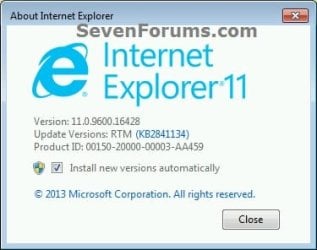
About_IE11.jpg


OPTION ONE

Uninstall IE11 in "Installed Updates" in Windows 7


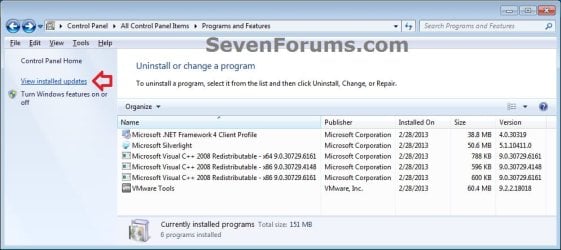
1. Open the Control Panel (icons view), and click on the Programs and Features icon.

2. In Programs and Features, click on the View installed updates link on the left side. (see screenshot below)
Uninstall_IE11_from_W7_Installed_Updates-A.jpg

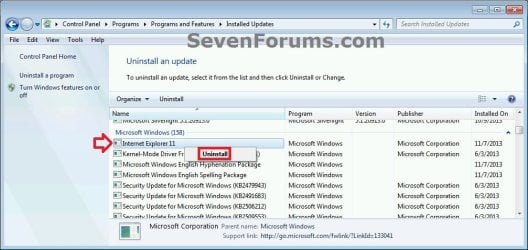
3. In Installed Updates, scroll down to find Internet Explorer 11, and do either action below. (see screenshots below)
  • Double click on Internet Explorer 11, and go to step 4 below.
  • Select Internet Explorer 11, click on Uninstall button on toolbar, and go to step 4 below.
  • Right click on Internet Explorer 11, click on Uninstall, and go to step 4 below.
Uninstall_IE11_from_W7_Installed_Updates-1.jpg

Uninstall_IE11_from_W7_Installed_Updates-2.jpg
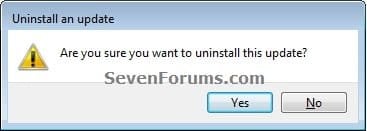
4. Click on Yes. (see screenshot below)
Uninstall_IE11_from_W7_Installed_Updates-3.jpg
5. If prompted by UAC, click on Yes.

6. When IE11 has finished being uninstalled, click on Restart Now to apply. (see screenshots below)
Uninstall_IE11_from_W7_Installed_Updates-4.jpg
7. When the PC has restarted, you may wish to hide the Windows Update for Internet Explorer for Windows 7 for x86/x64-based Systems to prevent IE11 from being mistakenly reinstalled again. (see screenshot below)
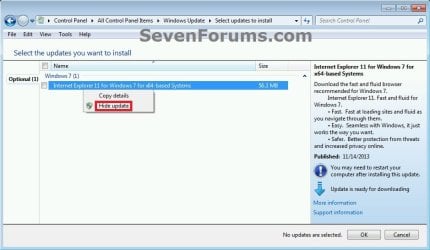
Hide_IE11_Windows_Update.jpg


OPTION TWO

Uninstall IE11 in an Elevated Command Prompt in Windows 7


1. Open an elevated command prompt.

2. In the elevated command prompt, copy and paste the command below, and press Enter. (see screenshot below step 4)
Code:
FORFILES /P %WINDIR%\servicing\Packages /M Microsoft-Windows-InternetExplorer-*11.*.mum /c "cmd /c echo Uninstalling package @fname && start /w pkgmgr /up:@fname /norestart"
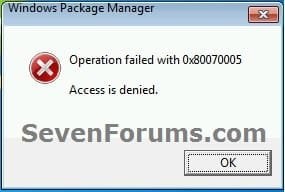
3. If you get the error message below, then click on OK to continue. You may get this error for each of the first 3 lines returned in the command prompt, but this is normal and fine. (see screenshot below)
Uninstall_IE11_CMD_error.jpg
4. When you see the C:\Windows\system32> prompt, then it means IE11 has finished uninstalling. Restart the computer to apply. (see screenshot below)
NOTE: This may take a few minutes to finish. Be sure to do step 3 as needed.
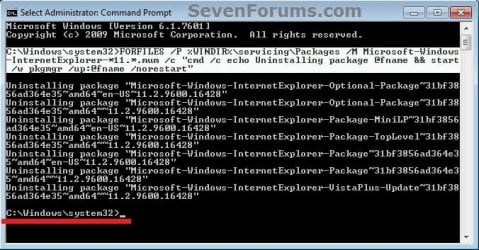
Uninstall_IE11_from_W7_Command.jpg
5. When the PC has restarted, you may wish to hide the Windows Update for Internet Explorer for Windows 7 for x86/x64-based Systems to prevent IE11 from being mistakenly reinstalled again. (see screenshot below)
Hide_IE11_Windows_Update.jpg
That's it,
Shawn


Last edited:
Hello Brink, thanks for replying.
No, I didn't install any IE since I installed my windows. I mean I didn't change anything since that.
And No, I didn't reset my Windows Update history before what is showing now. I've turned off the auto update.
 

My Computer My Computer

At a glance

Windows 7 Home Premium 64bit
Computer type
PC/Desktop
OS
Windows 7 Home Premium 64bit
If the update isn't listed as being installed, are you sure that you actually have it installed?
 

My Computer My Computer

At a glance

64-bit Windows 11 Pro for WorkstationsIntel i7-8700K OC'd to 5 GHz64 GB (4x16GB) G.SKILL TridentZ RGB DDR4 3600...ASUS ROG-STRIX-GTX1080TI-O11G-GAMING
Computer type
PC/Desktop
Computer Manufacturer/Model Number
Self built custom
OS
64-bit Windows 11 Pro for Workstations
CPU
Intel i7-8700K OC'd to 5 GHz
Motherboard
ASUS ROG Maximus XI Formula Z390
Memory
64 GB (4x16GB) G.SKILL TridentZ RGB DDR4 3600 MHz
Graphics Card(s)
ASUS ROG-STRIX-GTX1080TI-O11G-GAMING
Sound Card
Integrated
Monitor(s) Displays
2 x Samsung Odyssey G7 27"
Screen Resolution
2560x1440
Hard Drives
1TB Samsung 990 PRO M.2,
4TB Samsung 990 PRO PRO M.2,
TerraMaster F8 SSD Plus NAS
PSU
Seasonic Prime Titanium 850W
Case
Thermaltake Core P3
Cooling
Corsair Hydro H115i
Keyboard
Logitech wireless K800
Mouse
Logitech MX Master 4
Internet Speed
2 Gb/s Download and 100 Mb/s Upload
Antivirus
Malwarebyte Anti-Malware Premium
Browser
Google Chrome
Other Info
Logitech Z625 speaker system,
Logitech BRIO 4K Pro webcam,
HP Color LaserJet Pro MFP M477fdn,
APC SMART-UPS RT 1000 XL - SURT1000XLI,
Galaxy S23 Plus phone
Look, I don't know what this supposed to mean. Please tell me what I should do. I don't know what version of IE is installed on my windows since I installed my windows. Looks like I better ask first how should I realize that :D
em... I don't want to have any IE in my windows. Is there a way I can uninstall it completely?
 

My Computer My Computer

At a glance

Windows 7 Home Premium 64bit
Computer type
PC/Desktop
OS
Windows 7 Home Premium 64bit
Basically it shows that you don't have the IE11 update installed, so you can't possibly uninstall what you don't have installed.
 

My Computer My Computer

At a glance

64-bit Windows 11 Pro for WorkstationsIntel i7-8700K OC'd to 5 GHz64 GB (4x16GB) G.SKILL TridentZ RGB DDR4 3600...ASUS ROG-STRIX-GTX1080TI-O11G-GAMING
Computer type
PC/Desktop
Computer Manufacturer/Model Number
Self built custom
OS
64-bit Windows 11 Pro for Workstations
CPU
Intel i7-8700K OC'd to 5 GHz
Motherboard
ASUS ROG Maximus XI Formula Z390
Memory
64 GB (4x16GB) G.SKILL TridentZ RGB DDR4 3600 MHz
Graphics Card(s)
ASUS ROG-STRIX-GTX1080TI-O11G-GAMING
Sound Card
Integrated
Monitor(s) Displays
2 x Samsung Odyssey G7 27"
Screen Resolution
2560x1440
Hard Drives
1TB Samsung 990 PRO M.2,
4TB Samsung 990 PRO PRO M.2,
TerraMaster F8 SSD Plus NAS
PSU
Seasonic Prime Titanium 850W
Case
Thermaltake Core P3
Cooling
Corsair Hydro H115i
Keyboard
Logitech wireless K800
Mouse
Logitech MX Master 4
Internet Speed
2 Gb/s Download and 100 Mb/s Upload
Antivirus
Malwarebyte Anti-Malware Premium
Browser
Google Chrome
Other Info
Logitech Z625 speaker system,
Logitech BRIO 4K Pro webcam,
HP Color LaserJet Pro MFP M477fdn,
APC SMART-UPS RT 1000 XL - SURT1000XLI,
Galaxy S23 Plus phone
Look, I don't know what this supposed to mean. Please tell me what I should do. I don't know what version of IE is installed on my windows since I installed my windows. Looks like I better ask first how should I realize that :D
em... I don't want to have any IE in my windows. Is there a way I can uninstall it completely?

Okay be nice ;)
See if ie11 is listed here and has a check mark next to it,
If not listed what is list as Internet explorer ;)
 

My Computer My Computer

At a glance

Win-7-Pro64bit 7-H-Prem-64biti7-5930K 2nd i9-9940x both water blocked VRM'...Trident-z 3200C14 2nd Trident-z 3600C16EVGA 1080ti ftw3 2nd Titan Xp both water blocked
Computer type
PC/Desktop
Computer Manufacturer/Model Number
Custom assembled by me :}
OS
Win-7-Pro64bit 7-H-Prem-64bit
CPU
i7-5930K 2nd i9-9940x both water blocked VRM's too
Motherboard
ASUS SABERTOOTH X99 2nd ASUS x299 Apex
Memory
Trident-z 3200C14 2nd Trident-z 3600C16
Graphics Card(s)
EVGA 1080ti ftw3 2nd Titan Xp both water blocked
Sound Card
Built-in Realtek
Monitor(s) Displays
1-AOC G2460PG 24"G-Sync 144Hz/ 2nd 1-ASUS VG248QE 24" 144Hz
Screen Resolution
1920 x 1080 144Hz
Hard Drives
2-Samsung M.2 Evo & Evo Plus
2-Samsung 850 EVO 500GB SSD's/ 3-2.5 W.D. Black 1tb-&3-1tb/3-3.5 WD Black 1tb hdd's
PSU
EVGA SuperNOVA 1000-P2 2nd 1200-P2
Case
2-Corsair Obsidian Series 450D Black ATX Mid Tower
Cooling
Custom water loops
Keyboard
Logitech G710+/ 2nd Logitech G910
Mouse
2-RedDragon M901 Perdition 16400 dpi Gaming mouse = wired
Internet Speed
Comcast Ping 19ms 89.31mbps download speed 6.12mbps upload
Antivirus
Malwarebytes Pro/ Superantispyware Pro
Browser
FireFox & Pale moon
Other Info
2nd ASUS X299 Apex/Intel i9-9940x with Custom water loop/7H-Prem-x64/Corsair 450D case/Ram Trident-z 3600C16 4x8gb / Samsung970Evo plus 500gb SSD/Dual ssd EZ swap evo/PSU EVGA SuperNova 1200w-P2 80+Platinum/GPU Titan Xp /8-ML-140 on push-pull on 2-280GTX rads
Shawn - sorry to return to an ancient tutorial, but do either of the IE11 uninstall OPTIONS tidy up the registry, removing all IE11-specific keys and values? It seems unlikely that Option 2 would do this...

Thanks!
 

My Computer My Computer

At a glance

Windows 7 Pro 64-bit
OS
Windows 7 Pro 64-bit
Hello John, :)

I'm afraid not. This will only turn on or off the IE11 feature. Trying to actually uninstall all traces of IE11 will break Windows.
 

My Computer My Computer

At a glance

64-bit Windows 11 Pro for WorkstationsIntel i7-8700K OC'd to 5 GHz64 GB (4x16GB) G.SKILL TridentZ RGB DDR4 3600...ASUS ROG-STRIX-GTX1080TI-O11G-GAMING
Computer type
PC/Desktop
Computer Manufacturer/Model Number
Self built custom
OS
64-bit Windows 11 Pro for Workstations
CPU
Intel i7-8700K OC'd to 5 GHz
Motherboard
ASUS ROG Maximus XI Formula Z390
Memory
64 GB (4x16GB) G.SKILL TridentZ RGB DDR4 3600 MHz
Graphics Card(s)
ASUS ROG-STRIX-GTX1080TI-O11G-GAMING
Sound Card
Integrated
Monitor(s) Displays
2 x Samsung Odyssey G7 27"
Screen Resolution
2560x1440
Hard Drives
1TB Samsung 990 PRO M.2,
4TB Samsung 990 PRO PRO M.2,
TerraMaster F8 SSD Plus NAS
PSU
Seasonic Prime Titanium 850W
Case
Thermaltake Core P3
Cooling
Corsair Hydro H115i
Keyboard
Logitech wireless K800
Mouse
Logitech MX Master 4
Internet Speed
2 Gb/s Download and 100 Mb/s Upload
Antivirus
Malwarebyte Anti-Malware Premium
Browser
Google Chrome
Other Info
Logitech Z625 speaker system,
Logitech BRIO 4K Pro webcam,
HP Color LaserJet Pro MFP M477fdn,
APC SMART-UPS RT 1000 XL - SURT1000XLI,
Galaxy S23 Plus phone
Thanks very much! In the end I did Option One followed by Option Two, and was amazed just how long Option Two took with seven Command Prompt windows doing things simultaneously.

Hopefully this and the reinstall of IE11 will fix the apparent corruption.
 

My Computer My Computer

At a glance

Windows 7 Pro 64-bit
OS
Windows 7 Pro 64-bit
I hope so to avoid a clean install.
 

My Computer My Computer

At a glance

64-bit Windows 11 Pro for WorkstationsIntel i7-8700K OC'd to 5 GHz64 GB (4x16GB) G.SKILL TridentZ RGB DDR4 3600...ASUS ROG-STRIX-GTX1080TI-O11G-GAMING
Computer type
PC/Desktop
Computer Manufacturer/Model Number
Self built custom
OS
64-bit Windows 11 Pro for Workstations
CPU
Intel i7-8700K OC'd to 5 GHz
Motherboard
ASUS ROG Maximus XI Formula Z390
Memory
64 GB (4x16GB) G.SKILL TridentZ RGB DDR4 3600 MHz
Graphics Card(s)
ASUS ROG-STRIX-GTX1080TI-O11G-GAMING
Sound Card
Integrated
Monitor(s) Displays
2 x Samsung Odyssey G7 27"
Screen Resolution
2560x1440
Hard Drives
1TB Samsung 990 PRO M.2,
4TB Samsung 990 PRO PRO M.2,
TerraMaster F8 SSD Plus NAS
PSU
Seasonic Prime Titanium 850W
Case
Thermaltake Core P3
Cooling
Corsair Hydro H115i
Keyboard
Logitech wireless K800
Mouse
Logitech MX Master 4
Internet Speed
2 Gb/s Download and 100 Mb/s Upload
Antivirus
Malwarebyte Anti-Malware Premium
Browser
Google Chrome
Other Info
Logitech Z625 speaker system,
Logitech BRIO 4K Pro webcam,
HP Color LaserJet Pro MFP M477fdn,
APC SMART-UPS RT 1000 XL - SURT1000XLI,
Galaxy S23 Plus phone
Hi all,

I applied the uninstalling in command window. It took time. But in drive C, free disc space decreased vey much after It finished.
What is the cause and how can delete temp or unneccessary files
thnks
 

My Computer My Computer

At a glance

windows 7i54 gb610M
Computer type
Laptop
Computer Manufacturer/Model Number
asus
OS
windows 7
CPU
i5
Motherboard
intel
Memory
4 gb
Graphics Card(s)
610M
Antivirus
eset
Browser
chrome
Hello scop, :)

You shouldn't have seen a huge difference in drive space my just uninstalling Internet Explorer since it really only just turns off the feature.

If you like, the tutorial below has some more options for freeing up drive space.

:ar: Hard Disk Space - Free Up and Recover - Windows 7 Help Forums
 

My Computer My Computer

At a glance

64-bit Windows 11 Pro for WorkstationsIntel i7-8700K OC'd to 5 GHz64 GB (4x16GB) G.SKILL TridentZ RGB DDR4 3600...ASUS ROG-STRIX-GTX1080TI-O11G-GAMING
Computer type
PC/Desktop
Computer Manufacturer/Model Number
Self built custom
OS
64-bit Windows 11 Pro for Workstations
CPU
Intel i7-8700K OC'd to 5 GHz
Motherboard
ASUS ROG Maximus XI Formula Z390
Memory
64 GB (4x16GB) G.SKILL TridentZ RGB DDR4 3600 MHz
Graphics Card(s)
ASUS ROG-STRIX-GTX1080TI-O11G-GAMING
Sound Card
Integrated
Monitor(s) Displays
2 x Samsung Odyssey G7 27"
Screen Resolution
2560x1440
Hard Drives
1TB Samsung 990 PRO M.2,
4TB Samsung 990 PRO PRO M.2,
TerraMaster F8 SSD Plus NAS
PSU
Seasonic Prime Titanium 850W
Case
Thermaltake Core P3
Cooling
Corsair Hydro H115i
Keyboard
Logitech wireless K800
Mouse
Logitech MX Master 4
Internet Speed
2 Gb/s Download and 100 Mb/s Upload
Antivirus
Malwarebyte Anti-Malware Premium
Browser
Google Chrome
Other Info
Logitech Z625 speaker system,
Logitech BRIO 4K Pro webcam,
HP Color LaserJet Pro MFP M477fdn,
APC SMART-UPS RT 1000 XL - SURT1000XLI,
Galaxy S23 Plus phone
This CMD procedure worked perfectly but slow (overnight). Could it be use with others earlier versions, say IE-8 in XP?
Thanks.
 

My Computer My Computer

At a glance

windows 7Intel 2.58 GB
Computer Manufacturer/Model Number
Lenovo Thinkpad
OS
windows 7
CPU
Intel 2.5
Motherboard
Lenovo
Memory
8 GB
This CMD procedure worked perfectly but slow (overnight). Could it be use with others earlier versions, say IE-8 in XP?
Thanks.

Hello, :-)

I'm glad it could help.

You should be able to use at least option 1 in XP for IE8.

The command in option 2 would be different for IE8, and would need to change "11" in the command to "8".
 

My Computer My Computer

At a glance

64-bit Windows 11 Pro for WorkstationsIntel i7-8700K OC'd to 5 GHz64 GB (4x16GB) G.SKILL TridentZ RGB DDR4 3600...ASUS ROG-STRIX-GTX1080TI-O11G-GAMING
Computer type
PC/Desktop
Computer Manufacturer/Model Number
Self built custom
OS
64-bit Windows 11 Pro for Workstations
CPU
Intel i7-8700K OC'd to 5 GHz
Motherboard
ASUS ROG Maximus XI Formula Z390
Memory
64 GB (4x16GB) G.SKILL TridentZ RGB DDR4 3600 MHz
Graphics Card(s)
ASUS ROG-STRIX-GTX1080TI-O11G-GAMING
Sound Card
Integrated
Monitor(s) Displays
2 x Samsung Odyssey G7 27"
Screen Resolution
2560x1440
Hard Drives
1TB Samsung 990 PRO M.2,
4TB Samsung 990 PRO PRO M.2,
TerraMaster F8 SSD Plus NAS
PSU
Seasonic Prime Titanium 850W
Case
Thermaltake Core P3
Cooling
Corsair Hydro H115i
Keyboard
Logitech wireless K800
Mouse
Logitech MX Master 4
Internet Speed
2 Gb/s Download and 100 Mb/s Upload
Antivirus
Malwarebyte Anti-Malware Premium
Browser
Google Chrome
Other Info
Logitech Z625 speaker system,
Logitech BRIO 4K Pro webcam,
HP Color LaserJet Pro MFP M477fdn,
APC SMART-UPS RT 1000 XL - SURT1000XLI,
Galaxy S23 Plus phone
Unistalling IE-11 and IE-7

As previously stated, the cmd remedy worked perfectly with IE-11 and it cleared my problem, so I reinstalled also perfectly. The command did not worked for IE-7, but the old one did.
"%windir%\ei7xx\spuninst\spuninst.exe"
worked perfectly.
Hope it will help.
Thanks and cheers.
 

My Computer My Computer

At a glance

windows 7Intel 2.58 GB
Computer Manufacturer/Model Number
Lenovo Thinkpad
OS
windows 7
CPU
Intel 2.5
Motherboard
Lenovo
Memory
8 GB
According to my past experiences IE8 especially in Windows XP this intergrades with Outlook 2003 so this to be able to demonstrate HTML content within emails.
And even Outlook 2010 this behaves identically.

In XP if IE8 gets downgraded to IE6 then Outlook office 2003 email preview this getting worst due lack of newer html code proper formatting.

About Win7 I will simply assume that MS using identical principals’.
IE11 this will be required for Microsoft Office Outlook to run properly.

Only if you switch to Thunderbird then it might IE11 this to not be needed any more.
Personally just for compatibility purposes I do not remove IE from windows I am just not using it.
 

My Computer My Computer

At a glance

Win 7 Professional x64 UK (Retail) SP1 & SP2Q66004GB DDR3HD5770
Computer type
PC/Desktop
Computer Manufacturer/Model Number
custom build
OS
Win 7 Professional x64 UK (Retail) SP1 & SP2
CPU
Q6600
Motherboard
ASUS P5QC
Memory
4GB DDR3
Graphics Card(s)
HD5770
Sound Card
X-Fi Extreme Audio
Monitor(s) Displays
DELL 23"
Hard Drives
RAID1 - WD RAPTOR
PSU
750W
Cooling
Prolimatech - ARMAGEDON
Browser
Firefox
Back
Top