Internet Explorer 8 & delete browsing History

stevecuns

New member
Local time
9:38 AM
Messages
13
Hi All,

Just a quickie, When I try and delete the browsing History (with IE8 or ccleaner) it still seems to be there. I open up IE8 and click the drop down arrow in the address bar and it still shows the History, along with Favorites etc.

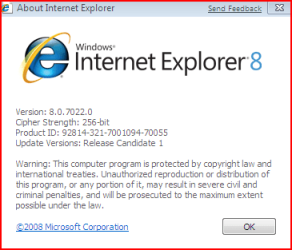
Anyone having the same problem or am I doing something wrong? I have Build 7022 on a 32Bit system with IE8

Regards

Steve.....
 

Attachments
  • ie8.PNG
    ie8.PNG
    10.6 KB · Views: 138

My Computer

Computer Manufacturer/Model Number
Fujitsu Amilopro
OS
windows 7 Ultimate 7600 32bit
Memory
1gb
I've seen this happening too, but only for a few URLs...A few of them remained in the drop-down list.

The new thing in IE8 is that when you hover over a URL in the drop-down list, an X icon appears at the right side. When you click on it, the URL is permanently deleted.
 

My Computer

Computer Manufacturer/Model Number
ENIAC
OS
Windows 7 RC 7100 32bit/64bit
CPU
Intel Core2Duo E4500 2.20 GHz
Motherboard
ASUS P5LD2-X/1333
Memory
2x1GB Kinsgston DDR2 800MHz
Graphics Card(s)
Nvidia 8500GT
Sound Card
Onboard High Definition Audio Device
Monitor(s) Displays
Sony Bravia 42"
Case
LINKW 2222
Cooling
Standard Intel
Keyboard
Some cheap one
Mouse
Microsoft Intellimouse something
Internet Speed
24MBps ADSL
Hi Steve,

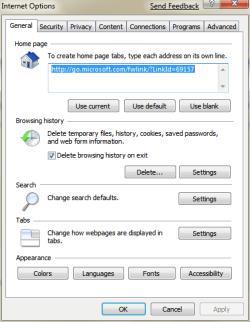
Have you checked (ticked) the option Delete browsing history on exit as shown in the image below?
Capture.PNG
 

My Computer

Computer type
PC/Desktop
Computer Manufacturer/Model Number
Dwarf Dwf/11/2012 r09/2013
OS
Windows 8.1 Pro RTM x64
CPU
Intel Core-i5-3570K 4-core @ 3.4GHz (Ivy Bridge) (OC 4.4GHz)
Motherboard
ASRock Z77 Extreme4-M
Memory
4 x 4GB DDR3-1600 Corsair Vengeance CMZ8GX3M2A1600C9B (16GB)
Graphics Card(s)
MSI GeForce GTX770 Gaming OC 2GB
Sound Card
Realtek High Definition on board solution (ALC 898)
Monitor(s) Displays
ViewSonic VA1912w Widescreen (VGA)
Screen Resolution
1440x900
Hard Drives
OCZ Agility 3 SSD 120GB SATA III x2 (RAID 0)
Samsung HD501LJ 500GB SATA II x2
Hitachi HDS721010CLA332 1TB SATA II
Iomega 1.5TB Ext USB 2.0
WD 2.0TB Ext USB 3.0
PSU
XFX Pro Series 850W Semi-Modular
Case
Gigabyte IF233
Cooling
1 x 120mm Front Inlet 1 x 120mm Rear Exhaust
Keyboard
Microsoft Comfort Curve Keyboard 3000 (USB)
Mouse
Microsoft Comfort Mouse 3000 for Business (USB)
Internet Speed
NetGear DG834Gv3 ADSL Modem/Router (Ethernet) ~4.0 Mb/s (O2)
Antivirus
Avast! 8.0.1497
Browser
IE 11
Other Info
Optical Drive: HL-DT-ST BD-RE BH10LS30 SATA Bluray
Lexmark S305 Printer/Scanner/Copier (USB)
WEI Score: 8.1/8.1/8.5/8.5/8.25
Asus Eee PC 1011PX Netbook (Windows 7 x86 Starter)
limneos

Thanks for the advice, deleting now.

Dwarf

Thanks for the advice, have just tried your sugestion but the history is still there.


Is a funny one, i delete the history as said by Limneos but when i open IE8 again and look at the History there are other web sites that I have looked at at an earlier date still there.

This is not a major problem, just thought id let you all know....

Regards

Steve.....
 

My Computer

Computer Manufacturer/Model Number
Fujitsu Amilopro
OS
windows 7 Ultimate 7600 32bit
Memory
1gb
Back
Top