
Solved Internet Explorer 9 - Favorites snag

kwil

New member
Member
VIP
Local time
1:37 AM
Messages
105
Hello...
I'm running Win7 (64-bit) with Internet Explorer 9.
I've been cleaning up my Favorites list, deleting no longer needed entries.
However, one stubbornly refuses to go. I'd created a folder to place the entries in and the entries themselves have deleted but left me with an empty folder I cannot delete.
All I get is a window saying 'cannot be found at this location'. I tried going into Users>My Name>Favorites>then trying deletion from there.
But no joy....
Also tried renaming with a view to deletion...but IE wouldn't let me rename...same window as above.
All this is more of an irritation than anything else but I feel I must be missing something simple...and want to know what to do in order to update my own 'knowledge base'.
Anyone know if I can 'forcibly' delete this annoyance?
Many thanks
 

My Computer My Computer

At a glance

Microsoft Windows 7 Home Premium 64-bit 7601 ...Intel(R) Core(TM) i7-2600 CPU @ 3.40GHz8.00 GBIntel(R) HD Graphics Family
Computer type
PC/Desktop
OS
Microsoft Windows 7 Home Premium 64-bit 7601 Multiprocessor Free Service Pack 1
CPU
Intel(R) Core(TM) i7-2600 CPU @ 3.40GHz
Motherboard
ASRock H61M/U3S3
Memory
8.00 GB
Graphics Card(s)
Intel(R) HD Graphics Family
Sound Card
(1) Realtek High Definition Audio (2) High Definition Audi
Screen Resolution
1920 x 1080 x 32 bits (4294967296 colors) @ 59 Hz
Hard Drives
(1) ST3500413AS ATA Device (2) ST3500413AS ATA Device (3) Generic- Card Reader USB Device

My Computer My Computer

At a glance

windows 7 home premium 64 bitAMD Phenom(tm) II X4 830 Processor, 2800 Mhz,...12.00 GBATI Radeon 4200
Computer Manufacturer/Model Number
HP/ Pavilion P6751C
OS
windows 7 home premium 64 bit
CPU
AMD Phenom(tm) II X4 830 Processor, 2800 Mhz, 4 core
Motherboard
N-Alvorix-RS880-uATX (Alvorix) motherboard
Memory
12.00 GB
Graphics Card(s)
ATI Radeon 4200
Sound Card
Creative Labs Sound Blaster Recon3D
Monitor(s) Displays
46" Sony TV KDL-46NX810
Screen Resolution
1920x1090P
Hard Drives
1 TB
PSU
Internal 250W
Case
Mid-size ATX
Cooling
1 rear case fan
Keyboard
Logitech USB Wireless K800
Mouse
Logitech USB Wireless M305
Internet Speed
22mb-28mb
Hi quickdraw....thanks for taking time to reply.
Went into Safe Mode>Users>Favorites>still no joy. Folder just refuses to budge.
Now this is really going to annoy me till I find out what's going on!:rolleyes:
Any other ideas?

Regards
 

My Computer My Computer

At a glance

Microsoft Windows 7 Home Premium 64-bit 7601 ...Intel(R) Core(TM) i7-2600 CPU @ 3.40GHz8.00 GBIntel(R) HD Graphics Family
Computer type
PC/Desktop
OS
Microsoft Windows 7 Home Premium 64-bit 7601 Multiprocessor Free Service Pack 1
CPU
Intel(R) Core(TM) i7-2600 CPU @ 3.40GHz
Motherboard
ASRock H61M/U3S3
Memory
8.00 GB
Graphics Card(s)
Intel(R) HD Graphics Family
Sound Card
(1) Realtek High Definition Audio (2) High Definition Audi
Screen Resolution
1920 x 1080 x 32 bits (4294967296 colors) @ 59 Hz
Hard Drives
(1) ST3500413AS ATA Device (2) ST3500413AS ATA Device (3) Generic- Card Reader USB Device
OK, what is the folder name, and it's location?

Are you trying to remove a protected file, or Service that is currently running?
 
Last edited:

My Computer My Computer

At a glance

windows 7 home premium 64 bitAMD Phenom(tm) II X4 830 Processor, 2800 Mhz,...12.00 GBATI Radeon 4200
Computer Manufacturer/Model Number
HP/ Pavilion P6751C
OS
windows 7 home premium 64 bit
CPU
AMD Phenom(tm) II X4 830 Processor, 2800 Mhz, 4 core
Motherboard
N-Alvorix-RS880-uATX (Alvorix) motherboard
Memory
12.00 GB
Graphics Card(s)
ATI Radeon 4200
Sound Card
Creative Labs Sound Blaster Recon3D
Monitor(s) Displays
46" Sony TV KDL-46NX810
Screen Resolution
1920x1090P
Hard Drives
1 TB
PSU
Internal 250W
Case
Mid-size ATX
Cooling
1 rear case fan
Keyboard
Logitech USB Wireless K800
Mouse
Logitech USB Wireless M305
Internet Speed
22mb-28mb
Hi quickdraw...
The folder name is 'NEW COMPUTER PURCHASE'
At 'Users>Favorites': right clicking folder>Properties gives location as: C:\Users\My Name\Favorites.

Trying to delete it brings up a window saying: ''no longer located' here!:rolleyes:

I don't see how the folder can be 'protected' or how this attempt at deletion can be affecting a service that is running. Anyway of checking this?

In Safe Mode: I also tried dragging folder to Trash bin....no luck.

I'm stumped..
 

My Computer My Computer

At a glance

Microsoft Windows 7 Home Premium 64-bit 7601 ...Intel(R) Core(TM) i7-2600 CPU @ 3.40GHz8.00 GBIntel(R) HD Graphics Family
Computer type
PC/Desktop
OS
Microsoft Windows 7 Home Premium 64-bit 7601 Multiprocessor Free Service Pack 1
CPU
Intel(R) Core(TM) i7-2600 CPU @ 3.40GHz
Motherboard
ASRock H61M/U3S3
Memory
8.00 GB
Graphics Card(s)
Intel(R) HD Graphics Family
Sound Card
(1) Realtek High Definition Audio (2) High Definition Audi
Screen Resolution
1920 x 1080 x 32 bits (4294967296 colors) @ 59 Hz
Hard Drives
(1) ST3500413AS ATA Device (2) ST3500413AS ATA Device (3) Generic- Card Reader USB Device
I edited my earlier comments. I was tired and about ready for bed. Moving on.

Did you try using a registry cleaner to remove it.

Download CCleaner, update, scan and fix. Online help link, bottom left corner of program.

CCleaner - Download.com
 

My Computer My Computer

At a glance

windows 7 home premium 64 bitAMD Phenom(tm) II X4 830 Processor, 2800 Mhz,...12.00 GBATI Radeon 4200
Computer Manufacturer/Model Number
HP/ Pavilion P6751C
OS
windows 7 home premium 64 bit
CPU
AMD Phenom(tm) II X4 830 Processor, 2800 Mhz, 4 core
Motherboard
N-Alvorix-RS880-uATX (Alvorix) motherboard
Memory
12.00 GB
Graphics Card(s)
ATI Radeon 4200
Sound Card
Creative Labs Sound Blaster Recon3D
Monitor(s) Displays
46" Sony TV KDL-46NX810
Screen Resolution
1920x1090P
Hard Drives
1 TB
PSU
Internal 250W
Case
Mid-size ATX
Cooling
1 rear case fan
Keyboard
Logitech USB Wireless K800
Mouse
Logitech USB Wireless M305
Internet Speed
22mb-28mb
Hi quickdraw....appreciate your patience and time on this little irritation. Hope you're all bright and bush-tailed now!
Don't know about you, but I do like to find out things like why this damn folder isn't deleting. It's empty, so there really should be no problem.

Already have CCleaner, run it regularly...In 'Applications', all Internet Explorer options ticked....Doesn't remove the offending folder.

I also tried going into Command Prompt: C:Users\My Name\dir to see if I could remove it from there
It lists 'Favorites' but I can't dig down into the Favorites folder to get at 'NEW COMPUTER PURCHASE'....GRRR!

I also right-clicked the folder>Properties>Security tab to check if it's being inadvertently 'shared'.
I got a window stating: 'the requested security information is either unavailable or can't be displayed'...double grrr!
So, square one looms again!
Any further suggestions?
Many thanks
 

My Computer My Computer

At a glance

Microsoft Windows 7 Home Premium 64-bit 7601 ...Intel(R) Core(TM) i7-2600 CPU @ 3.40GHz8.00 GBIntel(R) HD Graphics Family
Computer type
PC/Desktop
OS
Microsoft Windows 7 Home Premium 64-bit 7601 Multiprocessor Free Service Pack 1
CPU
Intel(R) Core(TM) i7-2600 CPU @ 3.40GHz
Motherboard
ASRock H61M/U3S3
Memory
8.00 GB
Graphics Card(s)
Intel(R) HD Graphics Family
Sound Card
(1) Realtek High Definition Audio (2) High Definition Audi
Screen Resolution
1920 x 1080 x 32 bits (4294967296 colors) @ 59 Hz
Hard Drives
(1) ST3500413AS ATA Device (2) ST3500413AS ATA Device (3) Generic- Card Reader USB Device
Yeah, this is a difficult one. Is it also listed in the Favorite's Bar? If so, try deleting from there.
 

My Computer My Computer

At a glance

windows 7 home premium 64 bitAMD Phenom(tm) II X4 830 Processor, 2800 Mhz,...12.00 GBATI Radeon 4200
Computer Manufacturer/Model Number
HP/ Pavilion P6751C
OS
windows 7 home premium 64 bit
CPU
AMD Phenom(tm) II X4 830 Processor, 2800 Mhz, 4 core
Motherboard
N-Alvorix-RS880-uATX (Alvorix) motherboard
Memory
12.00 GB
Graphics Card(s)
ATI Radeon 4200
Sound Card
Creative Labs Sound Blaster Recon3D
Monitor(s) Displays
46" Sony TV KDL-46NX810
Screen Resolution
1920x1090P
Hard Drives
1 TB
PSU
Internal 250W
Case
Mid-size ATX
Cooling
1 rear case fan
Keyboard
Logitech USB Wireless K800
Mouse
Logitech USB Wireless M305
Internet Speed
22mb-28mb
Hi quickdraw...listed but doesn't delete from there either...oh dear, oh dear...
 

My Computer My Computer

At a glance

Microsoft Windows 7 Home Premium 64-bit 7601 ...Intel(R) Core(TM) i7-2600 CPU @ 3.40GHz8.00 GBIntel(R) HD Graphics Family
Computer type
PC/Desktop
OS
Microsoft Windows 7 Home Premium 64-bit 7601 Multiprocessor Free Service Pack 1
CPU
Intel(R) Core(TM) i7-2600 CPU @ 3.40GHz
Motherboard
ASRock H61M/U3S3
Memory
8.00 GB
Graphics Card(s)
Intel(R) HD Graphics Family
Sound Card
(1) Realtek High Definition Audio (2) High Definition Audi
Screen Resolution
1920 x 1080 x 32 bits (4294967296 colors) @ 59 Hz
Hard Drives
(1) ST3500413AS ATA Device (2) ST3500413AS ATA Device (3) Generic- Card Reader USB Device
Hello kwil, looks like you lost your helper :zip:

Try this:

Start> In search box type cmd> Right click on cmd.exe in results above and choose Run as administrator

In command prompt type

CD "C:\Users\(your user name here)\Favorites\NEW COMPUTER PURCHASE"

Enter

Now type

RMDIR /S "C:\Users\(your user name here)\Favorites\NEW COMPUTER PURCHASE"

Enter

Type Y for yes when prompted if you really want to do it.

Let us know if that got it ;)

A Guy
 

My Computer My Computer

At a glance

Windows 10 Home x64INTEL Core i5-750 Quad-Core 3.37GHzHyperX Fury Black Series 8GB (2 x 4GB) 1866MhzEVGA GeForce GTX 750 Superclocked 1GB 128-Bit...
Computer type
PC/Desktop
OS
Windows 10 Home x64
CPU
INTEL Core i5-750 Quad-Core 3.37GHz
Motherboard
ASUS P7P55D
Memory
HyperX Fury Black Series 8GB (2 x 4GB) 1866Mhz
Graphics Card(s)
EVGA GeForce GTX 750 Superclocked 1GB 128-Bit GDDR5
Monitor(s) Displays
LG 32MA68HY 32" IPS
Screen Resolution
1920 x 1080
Hard Drives
Samsung 840 Evo 120GB, SEAGATE 500GB Barracuda® 7200.12, SATA 3 Gb/s, 7200 RPM, 16MB cache
PSU
ANTEC TruePower New TP-550, 80 PLUS, 550W
Case
ANTEC Three Hundred Illusion
Cooling
COOLER MASTER Hyper 212 Plus, 4 x 120mm 1 x 140mm Noctua's
Internet Speed
85 + Mbps
Antivirus
Avast
Browser
Vivaldi
Hi 'A Guy'....
Thanks for the reply. Looked too promising to be true.
Got to the Yes/No part with fingers crossed...but result: 'couldn't find the file specified':cry:

Regards
 

My Computer My Computer

At a glance

Microsoft Windows 7 Home Premium 64-bit 7601 ...Intel(R) Core(TM) i7-2600 CPU @ 3.40GHz8.00 GBIntel(R) HD Graphics Family
Computer type
PC/Desktop
OS
Microsoft Windows 7 Home Premium 64-bit 7601 Multiprocessor Free Service Pack 1
CPU
Intel(R) Core(TM) i7-2600 CPU @ 3.40GHz
Motherboard
ASRock H61M/U3S3
Memory
8.00 GB
Graphics Card(s)
Intel(R) HD Graphics Family
Sound Card
(1) Realtek High Definition Audio (2) High Definition Audi
Screen Resolution
1920 x 1080 x 32 bits (4294967296 colors) @ 59 Hz
Hard Drives
(1) ST3500413AS ATA Device (2) ST3500413AS ATA Device (3) Generic- Card Reader USB Device
I can only assume that the folder in favorites points elsewhere, but where? You might try d/l Everything, and do a search for that file name. It's a puzzler. A Guy
 

My Computer My Computer

At a glance

Windows 10 Home x64INTEL Core i5-750 Quad-Core 3.37GHzHyperX Fury Black Series 8GB (2 x 4GB) 1866MhzEVGA GeForce GTX 750 Superclocked 1GB 128-Bit...
Computer type
PC/Desktop
OS
Windows 10 Home x64
CPU
INTEL Core i5-750 Quad-Core 3.37GHz
Motherboard
ASUS P7P55D
Memory
HyperX Fury Black Series 8GB (2 x 4GB) 1866Mhz
Graphics Card(s)
EVGA GeForce GTX 750 Superclocked 1GB 128-Bit GDDR5
Monitor(s) Displays
LG 32MA68HY 32" IPS
Screen Resolution
1920 x 1080
Hard Drives
Samsung 840 Evo 120GB, SEAGATE 500GB Barracuda® 7200.12, SATA 3 Gb/s, 7200 RPM, 16MB cache
PSU
ANTEC TruePower New TP-550, 80 PLUS, 550W
Case
ANTEC Three Hundred Illusion
Cooling
COOLER MASTER Hyper 212 Plus, 4 x 120mm 1 x 140mm Noctua's
Internet Speed
85 + Mbps
Antivirus
Avast
Browser
Vivaldi
Thanks again, 'A Guy'
I have a similar piece of search software, but I downloaded 'Everything' and ran it...
All it came up with was the location of the offending folder....Same place as always: in Favorites etc....:mad:
All this really is small stuff I know, but now it's more academic exercise than anything else...
Got to be some way of getting round this...and possibly helping others with similar Favorites deletion problems...

Maybe someone else has a solution?

Regards
 

My Computer My Computer

At a glance

Microsoft Windows 7 Home Premium 64-bit 7601 ...Intel(R) Core(TM) i7-2600 CPU @ 3.40GHz8.00 GBIntel(R) HD Graphics Family
Computer type
PC/Desktop
OS
Microsoft Windows 7 Home Premium 64-bit 7601 Multiprocessor Free Service Pack 1
CPU
Intel(R) Core(TM) i7-2600 CPU @ 3.40GHz
Motherboard
ASRock H61M/U3S3
Memory
8.00 GB
Graphics Card(s)
Intel(R) HD Graphics Family
Sound Card
(1) Realtek High Definition Audio (2) High Definition Audi
Screen Resolution
1920 x 1080 x 32 bits (4294967296 colors) @ 59 Hz
Hard Drives
(1) ST3500413AS ATA Device (2) ST3500413AS ATA Device (3) Generic- Card Reader USB Device
Let's try to see if CMD sees it as being in Favorites

Open an advanced command prompt as above> Type

cd /d %USERPROFILE%\Favorites

Enter

Then type

dir/ad

Enter

Does the offending folder still show? If so, type

attrib /s /d NEW COMPUTER PURCHASE

Enter

See if cmd says it is in Favorites. If so...I'm not giving up, it's just a thinker...

It's possible that you could download a linux distro, like Knoppix, and burn it to a cd. Then run the live cd to navigate to the favorites folder and see if you can delete it outside of windows. Although the issue isn't a file that windows won't let you delete, but one that windows doesn't see as existing.

A Guy
 

My Computer My Computer

At a glance

Windows 10 Home x64INTEL Core i5-750 Quad-Core 3.37GHzHyperX Fury Black Series 8GB (2 x 4GB) 1866MhzEVGA GeForce GTX 750 Superclocked 1GB 128-Bit...
Computer type
PC/Desktop
OS
Windows 10 Home x64
CPU
INTEL Core i5-750 Quad-Core 3.37GHz
Motherboard
ASUS P7P55D
Memory
HyperX Fury Black Series 8GB (2 x 4GB) 1866Mhz
Graphics Card(s)
EVGA GeForce GTX 750 Superclocked 1GB 128-Bit GDDR5
Monitor(s) Displays
LG 32MA68HY 32" IPS
Screen Resolution
1920 x 1080
Hard Drives
Samsung 840 Evo 120GB, SEAGATE 500GB Barracuda® 7200.12, SATA 3 Gb/s, 7200 RPM, 16MB cache
PSU
ANTEC TruePower New TP-550, 80 PLUS, 550W
Case
ANTEC Three Hundred Illusion
Cooling
COOLER MASTER Hyper 212 Plus, 4 x 120mm 1 x 140mm Noctua's
Internet Speed
85 + Mbps
Antivirus
Avast
Browser
Vivaldi
Hi Guy
After, 'dir/ad': offending folder still shows in Favorites
After 'attrib' etc, info showing: 'Parameter format not correct'
I tried a few times, double-checking spelling etc, but still getting the above, so could progress no further....grrr!

Regards
 

My Computer My Computer

At a glance

Microsoft Windows 7 Home Premium 64-bit 7601 ...Intel(R) Core(TM) i7-2600 CPU @ 3.40GHz8.00 GBIntel(R) HD Graphics Family
Computer type
PC/Desktop
OS
Microsoft Windows 7 Home Premium 64-bit 7601 Multiprocessor Free Service Pack 1
CPU
Intel(R) Core(TM) i7-2600 CPU @ 3.40GHz
Motherboard
ASRock H61M/U3S3
Memory
8.00 GB
Graphics Card(s)
Intel(R) HD Graphics Family
Sound Card
(1) Realtek High Definition Audio (2) High Definition Audi
Screen Resolution
1920 x 1080 x 32 bits (4294967296 colors) @ 59 Hz
Hard Drives
(1) ST3500413AS ATA Device (2) ST3500413AS ATA Device (3) Generic- Card Reader USB Device
If you put the correct spaces in attrib /s /d NEW COMPUTER PURCHASE, then command cannot find the location. I will ask the Gurus if anyone has any other ideas. A Guy
 

My Computer My Computer

At a glance

Windows 10 Home x64INTEL Core i5-750 Quad-Core 3.37GHzHyperX Fury Black Series 8GB (2 x 4GB) 1866MhzEVGA GeForce GTX 750 Superclocked 1GB 128-Bit...
Computer type
PC/Desktop
OS
Windows 10 Home x64
CPU
INTEL Core i5-750 Quad-Core 3.37GHz
Motherboard
ASUS P7P55D
Memory
HyperX Fury Black Series 8GB (2 x 4GB) 1866Mhz
Graphics Card(s)
EVGA GeForce GTX 750 Superclocked 1GB 128-Bit GDDR5
Monitor(s) Displays
LG 32MA68HY 32" IPS
Screen Resolution
1920 x 1080
Hard Drives
Samsung 840 Evo 120GB, SEAGATE 500GB Barracuda® 7200.12, SATA 3 Gb/s, 7200 RPM, 16MB cache
PSU
ANTEC TruePower New TP-550, 80 PLUS, 550W
Case
ANTEC Three Hundred Illusion
Cooling
COOLER MASTER Hyper 212 Plus, 4 x 120mm 1 x 140mm Noctua's
Internet Speed
85 + Mbps
Antivirus
Avast
Browser
Vivaldi
I've read through the thread twice (and I'm surprised none of the things you have tried worked - they are good suggestions), so sorry if I missed this.

If you haven't tried any of these, they are quick and easy (and hopefully worth a shot):

1) Try making a new folder and dragging the troublemaker into it, then see if you can delete the new folder (and hopefully its contents). I know this is Internet Explorer, but this is an old trick which sometimes works in Windows Explorer.

2) Try putting a new shortcut in the stubborn folder and see if that makes any difference.

3) Export all your favorites, then try to delete the main favorites folder. Recreate it, then import, then cross your fingers.
 

My Computer My Computer

At a glance

Main - Windows 7 Pro SP1 64-Bit; 2nd - Window...Main - Core i7 2600K; 2nd - Core i7 920Main - 16GB Corsair Vengeance; 2nd - 12GB Cor...Main - XFX Radeon 6870 1GB; 2nd - XFX Radeon ...
Computer Manufacturer/Model Number
Self
OS
Main - Windows 7 Pro SP1 64-Bit; 2nd - Windows Server 2008 R2
CPU
Main - Core i7 2600K; 2nd - Core i7 920
Motherboard
Main - Asus P8Z68-V Pro/Gen3; 2nd - Gigabyte GA-EX58-UDR3
Memory
Main - 16GB Corsair Vengeance; 2nd - 12GB Corsair Vengeance
Graphics Card(s)
Main - XFX Radeon 6870 1GB; 2nd - XFX Radeon 4870 1GB
Sound Card
Both: Onboard Realtek Azalia
Monitor(s) Displays
Main - Hann 25" + I-INC 25" + Acer 23"; 2nd - Upgrading Soon
Screen Resolution
Main - 1920x1080 (All Three Monitors); 2nd - Upgrading Soon
Hard Drives
Main - (1) Crucial M4 128GB (Boot)
Main - (1) Seagate 2TB 64MB Cache (Data)
Main - (1) Seagate 2TB 64MB Cache (Data Backup)
2nd - (1) Intel X25-M SSD 80GB (Boot)
2nd - (3) Seagate 1TB 32MB Cache (Data Backup)
2nd - (1) Seagate 320GB (Because)
PSU
Main - OCZ 600W Modular; 2nd - OCZ 600W
Case
Main - Thermaltake Element G; 2nd - NZXT something or other
Cooling
Main - Corsair H80; 2nd - Prolimatech Megahalems
Keyboard
Main - Razer Reclusa; 2nd - Old MS Keyboard
Mouse
Main - Logitech MX Revolution; 2nd - Old MS Mouse
Internet Speed
20Mbps Time-Warner Cable
  • Like
Reactions: Arc
Hi profdlp...thanks for the input
Tried 1 & 2...no luck
Exporting - IE9 'Help' states:
Click the Favorites button, click the arrow next to the Add to Favorites button, and then click Import and Export.
There is NO arrow my 'next to Add To Favorites'...so no menu selection.

I tried 'attrib' as above etc again adding 'del NEW COMPUTER PURCHASE'....didn't work.

Tried creating a folder of same name in Firefox & Chrome, then exporting it to IE in the hope it would try and replace original folder. Again, no joy!

Just a passing thought: can IE9 be deleted then re-created?

Anyway, the puzzle lives on....maybe I'll just forget it and stick to Firefox...

Regards
 

My Computer My Computer

At a glance

Microsoft Windows 7 Home Premium 64-bit 7601 ...Intel(R) Core(TM) i7-2600 CPU @ 3.40GHz8.00 GBIntel(R) HD Graphics Family
Computer type
PC/Desktop
OS
Microsoft Windows 7 Home Premium 64-bit 7601 Multiprocessor Free Service Pack 1
CPU
Intel(R) Core(TM) i7-2600 CPU @ 3.40GHz
Motherboard
ASRock H61M/U3S3
Memory
8.00 GB
Graphics Card(s)
Intel(R) HD Graphics Family
Sound Card
(1) Realtek High Definition Audio (2) High Definition Audi
Screen Resolution
1920 x 1080 x 32 bits (4294967296 colors) @ 59 Hz
Hard Drives
(1) ST3500413AS ATA Device (2) ST3500413AS ATA Device (3) Generic- Card Reader USB Device
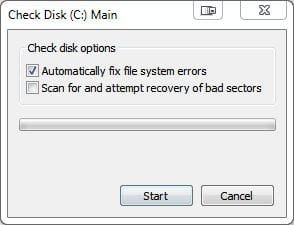
How about running a Disk Check? If something is still showing up as "there" but can't be found, that might do it.
 

Attachments

  • chkdsk.JPG
    chkdsk.JPG
    16.6 KB · Views: 297

My Computer My Computer

At a glance

Main - Windows 7 Pro SP1 64-Bit; 2nd - Window...Main - Core i7 2600K; 2nd - Core i7 920Main - 16GB Corsair Vengeance; 2nd - 12GB Cor...Main - XFX Radeon 6870 1GB; 2nd - XFX Radeon ...
Computer Manufacturer/Model Number
Self
OS
Main - Windows 7 Pro SP1 64-Bit; 2nd - Windows Server 2008 R2
CPU
Main - Core i7 2600K; 2nd - Core i7 920
Motherboard
Main - Asus P8Z68-V Pro/Gen3; 2nd - Gigabyte GA-EX58-UDR3
Memory
Main - 16GB Corsair Vengeance; 2nd - 12GB Corsair Vengeance
Graphics Card(s)
Main - XFX Radeon 6870 1GB; 2nd - XFX Radeon 4870 1GB
Sound Card
Both: Onboard Realtek Azalia
Monitor(s) Displays
Main - Hann 25" + I-INC 25" + Acer 23"; 2nd - Upgrading Soon
Screen Resolution
Main - 1920x1080 (All Three Monitors); 2nd - Upgrading Soon
Hard Drives
Main - (1) Crucial M4 128GB (Boot)
Main - (1) Seagate 2TB 64MB Cache (Data)
Main - (1) Seagate 2TB 64MB Cache (Data Backup)
2nd - (1) Intel X25-M SSD 80GB (Boot)
2nd - (3) Seagate 1TB 32MB Cache (Data Backup)
2nd - (1) Seagate 320GB (Because)
PSU
Main - OCZ 600W Modular; 2nd - OCZ 600W
Case
Main - Thermaltake Element G; 2nd - NZXT something or other
Cooling
Main - Corsair H80; 2nd - Prolimatech Megahalems
Keyboard
Main - Razer Reclusa; 2nd - Old MS Keyboard
Mouse
Main - Logitech MX Revolution; 2nd - Old MS Mouse
Internet Speed
20Mbps Time-Warner Cable

My Computer My Computer

At a glance

Windows 10 Home x64INTEL Core i5-750 Quad-Core 3.37GHzHyperX Fury Black Series 8GB (2 x 4GB) 1866MhzEVGA GeForce GTX 750 Superclocked 1GB 128-Bit...
Computer type
PC/Desktop
OS
Windows 10 Home x64
CPU
INTEL Core i5-750 Quad-Core 3.37GHz
Motherboard
ASUS P7P55D
Memory
HyperX Fury Black Series 8GB (2 x 4GB) 1866Mhz
Graphics Card(s)
EVGA GeForce GTX 750 Superclocked 1GB 128-Bit GDDR5
Monitor(s) Displays
LG 32MA68HY 32" IPS
Screen Resolution
1920 x 1080
Hard Drives
Samsung 840 Evo 120GB, SEAGATE 500GB Barracuda® 7200.12, SATA 3 Gb/s, 7200 RPM, 16MB cache
PSU
ANTEC TruePower New TP-550, 80 PLUS, 550W
Case
ANTEC Three Hundred Illusion
Cooling
COOLER MASTER Hyper 212 Plus, 4 x 120mm 1 x 140mm Noctua's
Internet Speed
85 + Mbps
Antivirus
Avast
Browser
Vivaldi
Back
Top