Solved Internet Explorer has stopped working

KenBaynham

Ken
Member
Local time
12:17 PM
Messages
89
Location
Hereford
Hi all

I have a fairly new desktop PC I used my original windows 7 home edition as my operating system and updated to Internet Explorer 11.

Just lately I have been experiencing 'Internet Explorer has stopped working problems'. I went onto the Microsoft help site and followed a procedure which involved turning off all my start up programs with the exception of the Microsoft ones. When I tried to restart at the end of the procedure my PC froze.

It seems I have a problem more deep seated than the Explorer problem and could really do with some help.

Hoping for a reply soon.

Best Regards Ken.
 

My Computer

Computer type
PC/Desktop
Computer Manufacturer/Model Number
custom build
OS
Windows 7 Home Premium
CPU
Intel(R) Core(TM) i5-4670K CPU @ 3.40GHz
Motherboard
ASUSTeK COMPUTER INC. Z87-K
Memory
8GB Corsair PC3-12800 1600MHz DDR3 Memory (2 x 4GB sticks)
Graphics Card(s)
NVIDIA GeForce GTX 650 Ti BOOST
Sound Card
1) NVIDIA Virtual Audio Device (Wave Extensible) (WDM) (2)
Screen Resolution
1680x1050
Hard Drives
(1) ST1000DM ST1000DM003-1CH1 SCSI Disk Device (2) Hitachi HDS721010CLA332 USB Device
Keyboard
USB
Mouse
Wireless
Internet Speed
36 M
Antivirus
Bulldog
Browser
Internet Explorer
Hi and welcome to SevenForums,
Did you ask a question on the Microsoft help if so post a link to it so we won't give duplicate suggestions,
Cheers.
 

My Computer

Computer type
PC/Desktop
Computer Manufacturer/Model Number
Custom assembled by me :}
OS
Win-7-Pro64bit 7-H-Prem-64bit
CPU
i7-5930K 2nd i9-9940x both water blocked VRM's too
Motherboard
ASUS SABERTOOTH X99 2nd ASUS x299 Apex
Memory
Trident-z 3200C14 2nd Trident-z 3600C16
Graphics Card(s)
EVGA 1080ti ftw3 2nd Titan Xp both water blocked
Sound Card
Built-in Realtek
Monitor(s) Displays
1-AOC G2460PG 24"G-Sync 144Hz/ 2nd 1-ASUS VG248QE 24" 144Hz
Screen Resolution
1920 x 1080 144Hz
Hard Drives
2-Samsung M.2 Evo & Evo Plus
2-Samsung 850 EVO 500GB SSD's/ 3-2.5 W.D. Black 1tb-&3-1tb/3-3.5 WD Black 1tb hdd's
PSU
EVGA SuperNOVA 1000-P2 2nd 1200-P2
Case
2-Corsair Obsidian Series 450D Black ATX Mid Tower
Cooling
Custom water loops
Keyboard
Logitech G710+/ 2nd Logitech G910
Mouse
2-RedDragon M901 Perdition 16400 dpi Gaming mouse = wired
Internet Speed
Comcast Ping 19ms 89.31mbps download speed 6.12mbps upload
Antivirus
Malwarebytes Pro/ Superantispyware Pro
Browser
FireFox & Pale moon
Other Info
2nd ASUS X299 Apex/Intel i9-9940x with Custom water loop/7H-Prem-x64/Corsair 450D case/Ram Trident-z 3600C16 4x8gb / Samsung970Evo plus 500gb SSD/Dual ssd EZ swap evo/PSU EVGA SuperNova 1200w-P2 80+Platinum/GPU Titan Xp /8-ML-140 on push-pull on 2-280GTX rads
There were a number of fixes for IE9,10 and 11 just last week. I remember seeing the "'Internet Explorer has stopped working" addressed in one or two of them. These were part of the MS monthly update cycle so make sure you're up to date. I tried to find the link again but can't. :(
 

My Computer

Computer type
PC/Desktop
Computer Manufacturer/Model Number
Built 2/11/2011
OS
Windows 7 Pro-x64
CPU
i7-2600 3.4GHz - 3.8GHz Turbo
Motherboard
Intel DH67BL-B3
Memory
8Gb - 2x4GB, Muskin 991770 PC3-1333
Graphics Card(s)
Integrated Intel HD 2000
Sound Card
Integrated Intel 10.1 HD, RealTek ALC892
Monitor(s) Displays
Asus LCD VH222H, Haier HL24XSL2a
Screen Resolution
1920x1080, 1920x1080
Hard Drives
Crucial SSD C300-128Gb,
Western Digital WD5002AALX - 500Gb,
Western Digital WD7501AALS - 750Gb
PSU
Seasonic 650W 80+ Gold Modular
Case
Rosewill Defender
Cooling
Stock CPU, Four 120mm case fans, PCH fan added
Keyboard
Logitech EX100 Y-RBH94 Wireless
Mouse
Logitech EX100 M-RCE95 Wireless
Internet Speed
3.0/1.5 Mbs
Antivirus
Microsoft Security Essentials
Browser
Microsoft Internet Explorer 11
Other Info
Antec Veris Premier-Multimedia IR Station,
Cyber Accoustics-3602 Speakers,
AFT XM-5U Card Reader,
Hauppauge TV-HVR-2250,
Sony LX300 USB Turntable

My Computer

Computer type
PC/Desktop
Computer Manufacturer/Model Number
custom build
OS
Windows 7 Home Premium
CPU
Intel(R) Core(TM) i5-4670K CPU @ 3.40GHz
Motherboard
ASUSTeK COMPUTER INC. Z87-K
Memory
8GB Corsair PC3-12800 1600MHz DDR3 Memory (2 x 4GB sticks)
Graphics Card(s)
NVIDIA GeForce GTX 650 Ti BOOST
Sound Card
1) NVIDIA Virtual Audio Device (Wave Extensible) (WDM) (2)
Screen Resolution
1680x1050
Hard Drives
(1) ST1000DM ST1000DM003-1CH1 SCSI Disk Device (2) Hitachi HDS721010CLA332 USB Device
Keyboard
USB
Mouse
Wireless
Internet Speed
36 M
Antivirus
Bulldog
Browser
Internet Explorer
Hi Carwiz

Thanks for prompt reply.

Although the Explorer issue was the initial issue it is the fact that I can't alter my start up programs that causes my real concern. seemed more like a virus to me. Although having said that the Explorer issue is getting worse.

Best regards Ken.
 

My Computer

Computer type
PC/Desktop
Computer Manufacturer/Model Number
custom build
OS
Windows 7 Home Premium
CPU
Intel(R) Core(TM) i5-4670K CPU @ 3.40GHz
Motherboard
ASUSTeK COMPUTER INC. Z87-K
Memory
8GB Corsair PC3-12800 1600MHz DDR3 Memory (2 x 4GB sticks)
Graphics Card(s)
NVIDIA GeForce GTX 650 Ti BOOST
Sound Card
1) NVIDIA Virtual Audio Device (Wave Extensible) (WDM) (2)
Screen Resolution
1680x1050
Hard Drives
(1) ST1000DM ST1000DM003-1CH1 SCSI Disk Device (2) Hitachi HDS721010CLA332 USB Device
Keyboard
USB
Mouse
Wireless
Internet Speed
36 M
Antivirus
Bulldog
Browser
Internet Explorer
Hi Thanks for the link,
A popular article,
What errors happened on Reset,
Look at this and report any discrepancies in the process,
Especially after checking the box to delete personal settings
Reset process first opening Internet explorer
After reset the only add-on still Enabled would be Adobe Shockwave flash player/ please confirm,
Shockwave-disable.JPG
 

My Computer

Computer type
PC/Desktop
Computer Manufacturer/Model Number
Custom assembled by me :}
OS
Win-7-Pro64bit 7-H-Prem-64bit
CPU
i7-5930K 2nd i9-9940x both water blocked VRM's too
Motherboard
ASUS SABERTOOTH X99 2nd ASUS x299 Apex
Memory
Trident-z 3200C14 2nd Trident-z 3600C16
Graphics Card(s)
EVGA 1080ti ftw3 2nd Titan Xp both water blocked
Sound Card
Built-in Realtek
Monitor(s) Displays
1-AOC G2460PG 24"G-Sync 144Hz/ 2nd 1-ASUS VG248QE 24" 144Hz
Screen Resolution
1920 x 1080 144Hz
Hard Drives
2-Samsung M.2 Evo & Evo Plus
2-Samsung 850 EVO 500GB SSD's/ 3-2.5 W.D. Black 1tb-&3-1tb/3-3.5 WD Black 1tb hdd's
PSU
EVGA SuperNOVA 1000-P2 2nd 1200-P2
Case
2-Corsair Obsidian Series 450D Black ATX Mid Tower
Cooling
Custom water loops
Keyboard
Logitech G710+/ 2nd Logitech G910
Mouse
2-RedDragon M901 Perdition 16400 dpi Gaming mouse = wired
Internet Speed
Comcast Ping 19ms 89.31mbps download speed 6.12mbps upload
Antivirus
Malwarebytes Pro/ Superantispyware Pro
Browser
FireFox & Pale moon
Other Info
2nd ASUS X299 Apex/Intel i9-9940x with Custom water loop/7H-Prem-x64/Corsair 450D case/Ram Trident-z 3600C16 4x8gb / Samsung970Evo plus 500gb SSD/Dual ssd EZ swap evo/PSU EVGA SuperNova 1200w-P2 80+Platinum/GPU Titan Xp /8-ML-140 on push-pull on 2-280GTX rads
Hi

Glad the link worked. Wasn't to sure it would work.

Reset procedure was OK but restart just resulted in Windows revolving circle. Only way out was a cold start and the 'Start Windows Normally' prompt.

Hope this helps.
 

My Computer

Computer type
PC/Desktop
Computer Manufacturer/Model Number
custom build
OS
Windows 7 Home Premium
CPU
Intel(R) Core(TM) i5-4670K CPU @ 3.40GHz
Motherboard
ASUSTeK COMPUTER INC. Z87-K
Memory
8GB Corsair PC3-12800 1600MHz DDR3 Memory (2 x 4GB sticks)
Graphics Card(s)
NVIDIA GeForce GTX 650 Ti BOOST
Sound Card
1) NVIDIA Virtual Audio Device (Wave Extensible) (WDM) (2)
Screen Resolution
1680x1050
Hard Drives
(1) ST1000DM ST1000DM003-1CH1 SCSI Disk Device (2) Hitachi HDS721010CLA332 USB Device
Keyboard
USB
Mouse
Wireless
Internet Speed
36 M
Antivirus
Bulldog
Browser
Internet Explorer
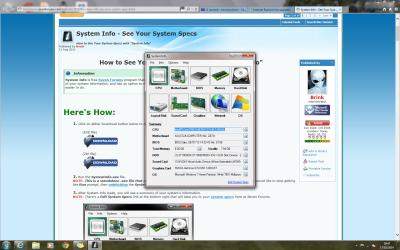
Unlike the Microsoft site we have here a utility to fill in your system spec's for you,
See the link above my hot signature picture on how to use it,
Also post what security suite you use and have installed or ever had installed,
Any third party utilities used/ ccleaner/ Tuneup/......
Post screen shots,
Click the start button and type msconfig
Click on the suggestion or the enter key,
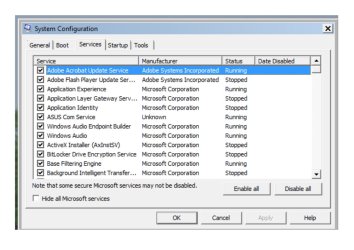
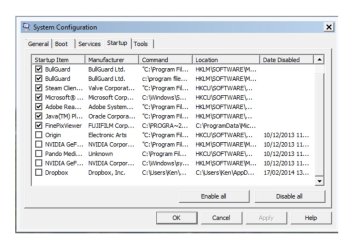
Go to the Startup section and the Services section/ Check the box to Hide Microsoft services and repeat the screen shot,
Cheers.
 

My Computer

Computer type
PC/Desktop
Computer Manufacturer/Model Number
Custom assembled by me :}
OS
Win-7-Pro64bit 7-H-Prem-64bit
CPU
i7-5930K 2nd i9-9940x both water blocked VRM's too
Motherboard
ASUS SABERTOOTH X99 2nd ASUS x299 Apex
Memory
Trident-z 3200C14 2nd Trident-z 3600C16
Graphics Card(s)
EVGA 1080ti ftw3 2nd Titan Xp both water blocked
Sound Card
Built-in Realtek
Monitor(s) Displays
1-AOC G2460PG 24"G-Sync 144Hz/ 2nd 1-ASUS VG248QE 24" 144Hz
Screen Resolution
1920 x 1080 144Hz
Hard Drives
2-Samsung M.2 Evo & Evo Plus
2-Samsung 850 EVO 500GB SSD's/ 3-2.5 W.D. Black 1tb-&3-1tb/3-3.5 WD Black 1tb hdd's
PSU
EVGA SuperNOVA 1000-P2 2nd 1200-P2
Case
2-Corsair Obsidian Series 450D Black ATX Mid Tower
Cooling
Custom water loops
Keyboard
Logitech G710+/ 2nd Logitech G910
Mouse
2-RedDragon M901 Perdition 16400 dpi Gaming mouse = wired
Internet Speed
Comcast Ping 19ms 89.31mbps download speed 6.12mbps upload
Antivirus
Malwarebytes Pro/ Superantispyware Pro
Browser
FireFox & Pale moon
Other Info
2nd ASUS X299 Apex/Intel i9-9940x with Custom water loop/7H-Prem-x64/Corsair 450D case/Ram Trident-z 3600C16 4x8gb / Samsung970Evo plus 500gb SSD/Dual ssd EZ swap evo/PSU EVGA SuperNova 1200w-P2 80+Platinum/GPU Titan Xp /8-ML-140 on push-pull on 2-280GTX rads
Hi ThrashZone

Hope this is as you require. Not that good at this sort of thing.

I use an antivirus called Bulldog which came installed on my PC and CCleaner.

As part of this exercise I discovered that trying to apply any change to the startup utility results in my PC locking up and the subsequent cold start.

Regards.
 

Attachments

  • System.png
    System.png
    194.3 KB · Views: 1
  • Start Up.jpg
    Start Up.jpg
    207.6 KB · Views: 2

My Computer

Computer type
PC/Desktop
Computer Manufacturer/Model Number
custom build
OS
Windows 7 Home Premium
CPU
Intel(R) Core(TM) i5-4670K CPU @ 3.40GHz
Motherboard
ASUSTeK COMPUTER INC. Z87-K
Memory
8GB Corsair PC3-12800 1600MHz DDR3 Memory (2 x 4GB sticks)
Graphics Card(s)
NVIDIA GeForce GTX 650 Ti BOOST
Sound Card
1) NVIDIA Virtual Audio Device (Wave Extensible) (WDM) (2)
Screen Resolution
1680x1050
Hard Drives
(1) ST1000DM ST1000DM003-1CH1 SCSI Disk Device (2) Hitachi HDS721010CLA332 USB Device
Keyboard
USB
Mouse
Wireless
Internet Speed
36 M
Antivirus
Bulldog
Browser
Internet Explorer

My Computer

Computer type
PC/Desktop
Computer Manufacturer/Model Number
Custom assembled by me :}
OS
Win-7-Pro64bit 7-H-Prem-64bit
CPU
i7-5930K 2nd i9-9940x both water blocked VRM's too
Motherboard
ASUS SABERTOOTH X99 2nd ASUS x299 Apex
Memory
Trident-z 3200C14 2nd Trident-z 3600C16
Graphics Card(s)
EVGA 1080ti ftw3 2nd Titan Xp both water blocked
Sound Card
Built-in Realtek
Monitor(s) Displays
1-AOC G2460PG 24"G-Sync 144Hz/ 2nd 1-ASUS VG248QE 24" 144Hz
Screen Resolution
1920 x 1080 144Hz
Hard Drives
2-Samsung M.2 Evo & Evo Plus
2-Samsung 850 EVO 500GB SSD's/ 3-2.5 W.D. Black 1tb-&3-1tb/3-3.5 WD Black 1tb hdd's
PSU
EVGA SuperNOVA 1000-P2 2nd 1200-P2
Case
2-Corsair Obsidian Series 450D Black ATX Mid Tower
Cooling
Custom water loops
Keyboard
Logitech G710+/ 2nd Logitech G910
Mouse
2-RedDragon M901 Perdition 16400 dpi Gaming mouse = wired
Internet Speed
Comcast Ping 19ms 89.31mbps download speed 6.12mbps upload
Antivirus
Malwarebytes Pro/ Superantispyware Pro
Browser
FireFox & Pale moon
Other Info
2nd ASUS X299 Apex/Intel i9-9940x with Custom water loop/7H-Prem-x64/Corsair 450D case/Ram Trident-z 3600C16 4x8gb / Samsung970Evo plus 500gb SSD/Dual ssd EZ swap evo/PSU EVGA SuperNova 1200w-P2 80+Platinum/GPU Titan Xp /8-ML-140 on push-pull on 2-280GTX rads
Hi Thrash

Things are getting worse. Cant get onto Internet explorer at all at the moment just the infamous revolving circle. I got on to the forum by changing my home page to Google. Does the Google Browser use Internet Explorer?

My PC was built by a company called Chillblast who enjoy quite a good reputation here in the UK. I can only think the name derives from the fact they use a mini refrigeration unit as the cooling medium which makes them super quiet. I may have misunderstood your request for screenshots. From my system configuration do you require both service and start-up lists?

My Email at Google is ** REMOVED ** as long as that doesn't go down as well.

Hope we can sort things

Best regards Ken.

Forgot to mention I have a red cross against the flag at the bottom right of screen if I click on it tells me 1 urgent message which is 'Turn on Windows Security centre service' but when I left click on the message I get the message 'The widows Security system cannot be started'.
 
Last edited by a moderator:

My Computer

Computer type
PC/Desktop
Computer Manufacturer/Model Number
custom build
OS
Windows 7 Home Premium
CPU
Intel(R) Core(TM) i5-4670K CPU @ 3.40GHz
Motherboard
ASUSTeK COMPUTER INC. Z87-K
Memory
8GB Corsair PC3-12800 1600MHz DDR3 Memory (2 x 4GB sticks)
Graphics Card(s)
NVIDIA GeForce GTX 650 Ti BOOST
Sound Card
1) NVIDIA Virtual Audio Device (Wave Extensible) (WDM) (2)
Screen Resolution
1680x1050
Hard Drives
(1) ST1000DM ST1000DM003-1CH1 SCSI Disk Device (2) Hitachi HDS721010CLA332 USB Device
Keyboard
USB
Mouse
Wireless
Internet Speed
36 M
Antivirus
Bulldog
Browser
Internet Explorer

My Computer

Computer type
PC/Desktop
Computer Manufacturer/Model Number
Custom assembled by me :}
OS
Win-7-Pro64bit 7-H-Prem-64bit
CPU
i7-5930K 2nd i9-9940x both water blocked VRM's too
Motherboard
ASUS SABERTOOTH X99 2nd ASUS x299 Apex
Memory
Trident-z 3200C14 2nd Trident-z 3600C16
Graphics Card(s)
EVGA 1080ti ftw3 2nd Titan Xp both water blocked
Sound Card
Built-in Realtek
Monitor(s) Displays
1-AOC G2460PG 24"G-Sync 144Hz/ 2nd 1-ASUS VG248QE 24" 144Hz
Screen Resolution
1920 x 1080 144Hz
Hard Drives
2-Samsung M.2 Evo & Evo Plus
2-Samsung 850 EVO 500GB SSD's/ 3-2.5 W.D. Black 1tb-&3-1tb/3-3.5 WD Black 1tb hdd's
PSU
EVGA SuperNOVA 1000-P2 2nd 1200-P2
Case
2-Corsair Obsidian Series 450D Black ATX Mid Tower
Cooling
Custom water loops
Keyboard
Logitech G710+/ 2nd Logitech G910
Mouse
2-RedDragon M901 Perdition 16400 dpi Gaming mouse = wired
Internet Speed
Comcast Ping 19ms 89.31mbps download speed 6.12mbps upload
Antivirus
Malwarebytes Pro/ Superantispyware Pro
Browser
FireFox & Pale moon
Other Info
2nd ASUS X299 Apex/Intel i9-9940x with Custom water loop/7H-Prem-x64/Corsair 450D case/Ram Trident-z 3600C16 4x8gb / Samsung970Evo plus 500gb SSD/Dual ssd EZ swap evo/PSU EVGA SuperNova 1200w-P2 80+Platinum/GPU Titan Xp /8-ML-140 on push-pull on 2-280GTX rads
There were a number of fixes for IE9,10 and 11 just last week. I remember seeing the "'Internet Explorer has stopped working" addressed in one or two of them. These were part of the MS monthly update cycle so make sure you're up to date. I tried to find the link again but can't. :(
I saw those too. Unfortunately they did not help. The saga continues. Just had one a few minutes ago. The IE always recovers but when you were in the middle of a posting, everything is gone.
 

My Computer

Computer Manufacturer/Model Number
HP, Dell, Gateway, Toshiba - 4 laptops and 2 desktops
OS
Vista, Windows7, Mint Mate, Zorin, Windows 8
CPU
from 1.6GHz Duo to i7
Monitor(s) Displays
2x HP w2207
Hard Drives
5x HDD, 7x SSD, 12x Externals
Keyboard
with trackball - no mices
Mouse
Trackball mice
Internet Speed
DSL 6000
I rolled back to ie10 a few days ago because it started acting up,
Not sure what your running Wolfgang ?
Cheers.
 

My Computer

Computer type
PC/Desktop
Computer Manufacturer/Model Number
Custom assembled by me :}
OS
Win-7-Pro64bit 7-H-Prem-64bit
CPU
i7-5930K 2nd i9-9940x both water blocked VRM's too
Motherboard
ASUS SABERTOOTH X99 2nd ASUS x299 Apex
Memory
Trident-z 3200C14 2nd Trident-z 3600C16
Graphics Card(s)
EVGA 1080ti ftw3 2nd Titan Xp both water blocked
Sound Card
Built-in Realtek
Monitor(s) Displays
1-AOC G2460PG 24"G-Sync 144Hz/ 2nd 1-ASUS VG248QE 24" 144Hz
Screen Resolution
1920 x 1080 144Hz
Hard Drives
2-Samsung M.2 Evo & Evo Plus
2-Samsung 850 EVO 500GB SSD's/ 3-2.5 W.D. Black 1tb-&3-1tb/3-3.5 WD Black 1tb hdd's
PSU
EVGA SuperNOVA 1000-P2 2nd 1200-P2
Case
2-Corsair Obsidian Series 450D Black ATX Mid Tower
Cooling
Custom water loops
Keyboard
Logitech G710+/ 2nd Logitech G910
Mouse
2-RedDragon M901 Perdition 16400 dpi Gaming mouse = wired
Internet Speed
Comcast Ping 19ms 89.31mbps download speed 6.12mbps upload
Antivirus
Malwarebytes Pro/ Superantispyware Pro
Browser
FireFox & Pale moon
Other Info
2nd ASUS X299 Apex/Intel i9-9940x with Custom water loop/7H-Prem-x64/Corsair 450D case/Ram Trident-z 3600C16 4x8gb / Samsung970Evo plus 500gb SSD/Dual ssd EZ swap evo/PSU EVGA SuperNova 1200w-P2 80+Platinum/GPU Titan Xp /8-ML-140 on push-pull on 2-280GTX rads
Hi Thrash

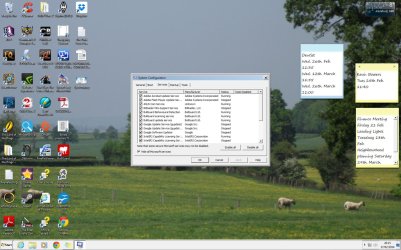
Haven't had time to do clean boot yet but things seem better this morning so I thought I would take the chance to send you the screen shots you requested. Clean boot and monitor next.

Many Thanks Ken
 

Attachments

  • Services 1.jpg
    Services 1.jpg
    92 KB · Views: 0
  • Services 2.jpg
    Services 2.jpg
    101.8 KB · Views: 0
  • Startup1.jpg
    Startup1.jpg
    103.1 KB · Views: 0
  • Startup2.jpg
    Startup2.jpg
    96.9 KB · Views: 0

My Computer

Computer type
PC/Desktop
Computer Manufacturer/Model Number
custom build
OS
Windows 7 Home Premium
CPU
Intel(R) Core(TM) i5-4670K CPU @ 3.40GHz
Motherboard
ASUSTeK COMPUTER INC. Z87-K
Memory
8GB Corsair PC3-12800 1600MHz DDR3 Memory (2 x 4GB sticks)
Graphics Card(s)
NVIDIA GeForce GTX 650 Ti BOOST
Sound Card
1) NVIDIA Virtual Audio Device (Wave Extensible) (WDM) (2)
Screen Resolution
1680x1050
Hard Drives
(1) ST1000DM ST1000DM003-1CH1 SCSI Disk Device (2) Hitachi HDS721010CLA332 USB Device
Keyboard
USB
Mouse
Wireless
Internet Speed
36 M
Antivirus
Bulldog
Browser
Internet Explorer
Hi Again Thrash

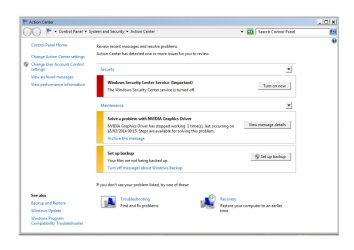
Tried to initiate the clean start but when I pressed OK to the system configuration changes my system froze with the infamous revolving circle again. Pretty much the same sort of thing with the Action Centre when I try to correct anything I am told it can't be done. The reliability monitor doesn't seem to be doing anything either. Do I have to switch it on?

Look forward to your thoughts

Best Regards Ken.
 

Attachments

  • Reliability Monitor.jpg
    Reliability Monitor.jpg
    42.6 KB · Views: 2
  • Action Center.jpg
    Action Center.jpg
    63.3 KB · Views: 2

My Computer

Computer type
PC/Desktop
Computer Manufacturer/Model Number
custom build
OS
Windows 7 Home Premium
CPU
Intel(R) Core(TM) i5-4670K CPU @ 3.40GHz
Motherboard
ASUSTeK COMPUTER INC. Z87-K
Memory
8GB Corsair PC3-12800 1600MHz DDR3 Memory (2 x 4GB sticks)
Graphics Card(s)
NVIDIA GeForce GTX 650 Ti BOOST
Sound Card
1) NVIDIA Virtual Audio Device (Wave Extensible) (WDM) (2)
Screen Resolution
1680x1050
Hard Drives
(1) ST1000DM ST1000DM003-1CH1 SCSI Disk Device (2) Hitachi HDS721010CLA332 USB Device
Keyboard
USB
Mouse
Wireless
Internet Speed
36 M
Antivirus
Bulldog
Browser
Internet Explorer
Hi thanks click on View Message on the NVidia Graphic Driver listing,
I'm pretty sure it needs a new more recent driver,
But post the message content or take a screen shot of it,
Cheers.

Something is wrong with BullGuard because windows isn't recognizing it's security features I believe that is why Windows security center service is off and notifying you of that to turn window security on ?
 

My Computer

Computer type
PC/Desktop
Computer Manufacturer/Model Number
Custom assembled by me :}
OS
Win-7-Pro64bit 7-H-Prem-64bit
CPU
i7-5930K 2nd i9-9940x both water blocked VRM's too
Motherboard
ASUS SABERTOOTH X99 2nd ASUS x299 Apex
Memory
Trident-z 3200C14 2nd Trident-z 3600C16
Graphics Card(s)
EVGA 1080ti ftw3 2nd Titan Xp both water blocked
Sound Card
Built-in Realtek
Monitor(s) Displays
1-AOC G2460PG 24"G-Sync 144Hz/ 2nd 1-ASUS VG248QE 24" 144Hz
Screen Resolution
1920 x 1080 144Hz
Hard Drives
2-Samsung M.2 Evo & Evo Plus
2-Samsung 850 EVO 500GB SSD's/ 3-2.5 W.D. Black 1tb-&3-1tb/3-3.5 WD Black 1tb hdd's
PSU
EVGA SuperNOVA 1000-P2 2nd 1200-P2
Case
2-Corsair Obsidian Series 450D Black ATX Mid Tower
Cooling
Custom water loops
Keyboard
Logitech G710+/ 2nd Logitech G910
Mouse
2-RedDragon M901 Perdition 16400 dpi Gaming mouse = wired
Internet Speed
Comcast Ping 19ms 89.31mbps download speed 6.12mbps upload
Antivirus
Malwarebytes Pro/ Superantispyware Pro
Browser
FireFox & Pale moon
Other Info
2nd ASUS X299 Apex/Intel i9-9940x with Custom water loop/7H-Prem-x64/Corsair 450D case/Ram Trident-z 3600C16 4x8gb / Samsung970Evo plus 500gb SSD/Dual ssd EZ swap evo/PSU EVGA SuperNova 1200w-P2 80+Platinum/GPU Titan Xp /8-ML-140 on push-pull on 2-280GTX rads
It might help to backup a bit and ensure the underlying system is healthy.

1. Click Start
orb.png

2. In the search box, type cmd
3. In the list that appears, right-click on cmd.exe and choose Run as administrator
4. In the command window that opens, type sfc /scannow and hit enter.

Report the output from the command window once it finishes.

More detail: http://www.sevenforums.com/tutorials/1538-sfc-scannow-command-system-file-checker.html
 

My Computer

Computer type
PC/Desktop
Computer Manufacturer/Model Number
Golden Mk. I.4
OS
Windows 10 Pro x64 ; Xubuntu x64
CPU
Intel i7 860 @ 2.80 GHz O/C'ed to 4.0GHz
Motherboard
Gigabyte P55A-UD3R Rev.1. Award BIOS F13
Memory
16GB Corsair Vengance DDR3 @ 661 MHz Dual Channel (9-9-9-24)
Graphics Card(s)
EVGA NVidia GTX 560 1024MB
Sound Card
Realtek Integrated
Monitor(s) Displays
Dual Samsung SyncMaster 2494HS
Screen Resolution
1920*1080 and 1920*1080
Hard Drives
1*Samsung 840 EVO 120GB SSD;
1*OCZ Vertex 2 60GB SSD;
2*Samsung F3 SpinPoint 1TB in RAID0;
1*Samsung F1 SpinPoint 1TB;
2*Western Digital 1TB External USB 3.0
1*Western Digital 500GB External USB 3.0
1*Seagate 500GB External USB 2.0
PSU
Thermaltake ToughPower QFan 750W
Case
Thermaltake Element S VK60001W2Z
Cooling
Corsair H60 Water Cooling, 2*230mm and 2*80mm case fans
Keyboard
Logitech G110
Mouse
Logitech MX518
I believe Microsoft was down for a while for a few hours last night.
At least my computers couldn't find anything Microsoft. Works now.
 

My Computer

Computer type
PC/Desktop
Computer Manufacturer/Model Number
Home made Desktop
OS
Windows 10 Pro. 64/ version 1709 Windows 7 Pro/64
CPU
Intel i7-6800K @ 4.3
Motherboard
ASUS X-99 Deluxe II
Memory
Corsair Platinum 16 gig @2400
Graphics Card(s)
EVGA GTX 1070 OC
Monitor(s) Displays
Asus 27" LED LCD/VE278Q
Screen Resolution
1920-1080 or 1280-720 HDMI
Hard Drives
INTEL SSD 730-240 Gb Sata 3.0/
PSU
EVGA Platium 1200W
Case
Phanteks Luxe Tempered Glass 8 fans/ one radiator
Cooling
XSPC/ Water Cooled CPU
Keyboard
Das 4 Professional
Mouse
Logitech M705/MX Anywhere 2-S
Internet Speed
100 mbits
Antivirus
Microsoft Security Essentials/ Malwarebytes Premium 3.0/ SAS
Browser
I.E. 11 default/Firefox/ ISP Time Warner Cable/Spectrum
Other Info
LG BluRay Burner/
Sound system-KLipsch-THX/
Icy Dock ssd Hot Swap bays.
Just a thought:

From the KenBaynham Specs. Antivirus Bulldog.
Did it come with a firewall that is blocking things?

Back to watching.
 

My Computer

Computer type
PC/Desktop
Computer Manufacturer/Model Number
Home made Desktop
OS
Windows 10 Pro. 64/ version 1709 Windows 7 Pro/64
CPU
Intel i7-6800K @ 4.3
Motherboard
ASUS X-99 Deluxe II
Memory
Corsair Platinum 16 gig @2400
Graphics Card(s)
EVGA GTX 1070 OC
Monitor(s) Displays
Asus 27" LED LCD/VE278Q
Screen Resolution
1920-1080 or 1280-720 HDMI
Hard Drives
INTEL SSD 730-240 Gb Sata 3.0/
PSU
EVGA Platium 1200W
Case
Phanteks Luxe Tempered Glass 8 fans/ one radiator
Cooling
XSPC/ Water Cooled CPU
Keyboard
Das 4 Professional
Mouse
Logitech M705/MX Anywhere 2-S
Internet Speed
100 mbits
Antivirus
Microsoft Security Essentials/ Malwarebytes Premium 3.0/ SAS
Browser
I.E. 11 default/Firefox/ ISP Time Warner Cable/Spectrum
Other Info
LG BluRay Burner/
Sound system-KLipsch-THX/
Icy Dock ssd Hot Swap bays.
Back
Top