JavaScript is disabled. For a better experience, please enable JavaScript in your browser before proceeding.
You are using an out of date browser. It may not display this or other websites correctly.
You should upgrade or use an
alternative browser .
Solved internet exployer and skype
I signed up fpr skype because i got a new computer camera .Once i saw it (without using it) i uninstalled it .I couldn't take out my user name or e-mail address. I thought i had to get this to use my camera but no I didn't.
What happens now when i use the internet exployer to go onlne i am okay until i x out.
Not only is their the page i close but also a skype page behind it that says "thank you for downloading the skye toolbar"
I am worried this is spywear or something that can follow me on the internet. I do banking on the internet.
Tried everything i know to get it off. Can you help me please. Carol
Hi Carol.
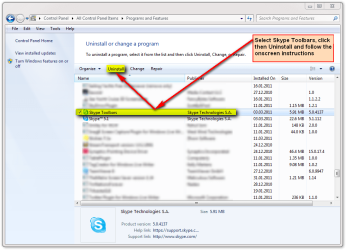
Skype toolbar is not malware, it does no harm. Still, it can be an annoyance. You can uninstall it simply from
Control Panel > Programs and Features .
(Click to enlarge)
Kari
Computer type Laptop Computer Manufacturer/Model Number HP ENVY 17-1150eg OS Windows 10 Pro x64 EN-GB CPU 1.6 GHz Intel Core i7-720QM Processor Memory 6 GB Graphics Card(s) ATI Mobility Radeon HD 5850 Graphics Sound Card Beats sound system with integrated subwoofer Monitor(s) Displays 17" laptop display, 22" LED and 32" Full HD TV through HDMI Screen Resolution 1600*900 (1), 1920*1080 (2&3) Hard Drives Internal: 2 x 500 GB SATA Hard Disk Drive 7200 rpm
External: 2TB for backups, 3TB USB3 network drive for media Cooling As Envy runs a bit warm, I have it on a Cooler Master pad Keyboard Logitech diNovo Media Desktop Laser (bluetooth) Mouse Logitech Performance Mouse MX Internet Speed 50/10 Mbps VDSL Antivirus Windows Defender 4.3.9431.0 Browser Maxthon 3.5.2., IE11
YES
yes i did that and also anything that said skype in the control panel. thanks Carol
You are welcome
Kari
Computer type Laptop Computer Manufacturer/Model Number HP ENVY 17-1150eg OS Windows 10 Pro x64 EN-GB CPU 1.6 GHz Intel Core i7-720QM Processor Memory 6 GB Graphics Card(s) ATI Mobility Radeon HD 5850 Graphics Sound Card Beats sound system with integrated subwoofer Monitor(s) Displays 17" laptop display, 22" LED and 32" Full HD TV through HDMI Screen Resolution 1600*900 (1), 1920*1080 (2&3) Hard Drives Internal: 2 x 500 GB SATA Hard Disk Drive 7200 rpm
External: 2TB for backups, 3TB USB3 network drive for media Cooling As Envy runs a bit warm, I have it on a Cooler Master pad Keyboard Logitech diNovo Media Desktop Laser (bluetooth) Mouse Logitech Performance Mouse MX Internet Speed 50/10 Mbps VDSL Antivirus Windows Defender 4.3.9431.0 Browser Maxthon 3.5.2., IE11
skype
I meant to say i already did all that yesterday and the problem is still here. thanks Carol
OK, I misunderstood you. Sorry
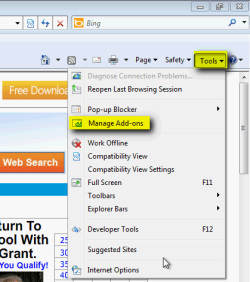
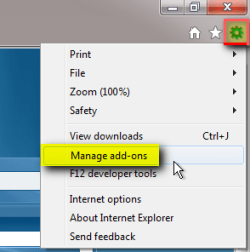
Open Manage add-ons from IE's Tools menu, images below show how. First image is for IE8, second for IE9:
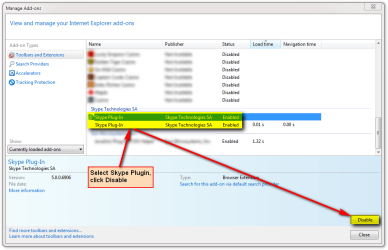
Scroll down to Skype plugin, select it, click Disable:
Kari
Computer type Laptop Computer Manufacturer/Model Number HP ENVY 17-1150eg OS Windows 10 Pro x64 EN-GB CPU 1.6 GHz Intel Core i7-720QM Processor Memory 6 GB Graphics Card(s) ATI Mobility Radeon HD 5850 Graphics Sound Card Beats sound system with integrated subwoofer Monitor(s) Displays 17" laptop display, 22" LED and 32" Full HD TV through HDMI Screen Resolution 1600*900 (1), 1920*1080 (2&3) Hard Drives Internal: 2 x 500 GB SATA Hard Disk Drive 7200 rpm
External: 2TB for backups, 3TB USB3 network drive for media Cooling As Envy runs a bit warm, I have it on a Cooler Master pad Keyboard Logitech diNovo Media Desktop Laser (bluetooth) Mouse Logitech Performance Mouse MX Internet Speed 50/10 Mbps VDSL Antivirus Windows Defender 4.3.9431.0 Browser Maxthon 3.5.2., IE11
skype
I got the manage add ons then
toolbars and extensions highlighted
only google toolbar
bing toolbar
and norton toolbar.
nothing about skype
Carol
Then it is completely uninstalled. I'm sorry but I have no other ideas. I'll ask some other geeks to take a look at this. In the mean time I can only assure this is, although annoying, totally harmless.
Kari
Computer type Laptop Computer Manufacturer/Model Number HP ENVY 17-1150eg OS Windows 10 Pro x64 EN-GB CPU 1.6 GHz Intel Core i7-720QM Processor Memory 6 GB Graphics Card(s) ATI Mobility Radeon HD 5850 Graphics Sound Card Beats sound system with integrated subwoofer Monitor(s) Displays 17" laptop display, 22" LED and 32" Full HD TV through HDMI Screen Resolution 1600*900 (1), 1920*1080 (2&3) Hard Drives Internal: 2 x 500 GB SATA Hard Disk Drive 7200 rpm
External: 2TB for backups, 3TB USB3 network drive for media Cooling As Envy runs a bit warm, I have it on a Cooler Master pad Keyboard Logitech diNovo Media Desktop Laser (bluetooth) Mouse Logitech Performance Mouse MX Internet Speed 50/10 Mbps VDSL Antivirus Windows Defender 4.3.9431.0 Browser Maxthon 3.5.2., IE11
You could try resetting IE to its default settings by opening IE clicking Tools>Internet Options>Advanced and click reset.
Just a thought.
OS Windows 7 Professional x64 Backtrack 4 R2 CPU Intel Core i5-650 Motherboard Gigabyte P55-UD3 Memory 4 GB Geil PC3 12800 Graphics Card(s) HIS HD 4870 X2 Sound Card Sound Blaster X-Fi Titanium Fatal1ty Champion Monitor(s) Displays BenQ 22" G2220HD Hard Drives Seagate Barracuda 7200.12 500GB
Seagate Barracuda 7200.12 500GB PSU Antec High Current Gamer 620W Power Supply Case Thermaltake Armor+ MX Keyboard Microsoft SideWinder X6 Mouse Razer Abyssus
Computer type PC/Desktop Computer Manufacturer/Model Number Gateway DX4831-01e (Mid-Tower Desktop) OS Originally Win 7 Hm Prem x64 Ver 6.1.7600 Build 7601-SP1 | Upgraded to Windows 10 December 14, 2019 CPU Intel i3 530 2.93GHz, 2933MHz 2 Cores 4 Logical Processors Motherboard Gateway H57M01 133 megahertz Memory 6GB of 1,333MHz DDR3 SDRAM Graphics Card(s) 32MB Intel Graphics Media Accelerator HD IGChip Sound Card Realtek High Definition Audio Monitor(s) Displays Gateway HX2000 20inch TFT active matrix TN Screen Resolution 1600 x 900 x 59 hertz Hard Drives WDC WD10EADS-00M2B0 [HDD] (1000.20 GB) -- drive 0,
HL-DT-ST DVDRAM GH41N [CD-ROM dr]
Four card readers, and Four USB 2.0 PSU 300watts. Case Mid-Tower Desktop Cooling Stock from Gateway Keyboard Natural Ergonomic Keyboard 4000, see Other Info Mouse Orig. Gateway wore out now using Insignia USB wired optical Internet Speed Vz FIOS 10ms png 57.64Mbps down 65.53Mbps up Speedtest.org Antivirus Zamana Anti-logger with Anti-malware, MSE, Windows Firewall, Browser IE11.0.9600.19399-Upd ver11.0.135, Firefox 68.0.1 x64 Other Info System Specs by Belarc.
BIOS: American Megatrends Inc. P01-A0 11/17/2009
Replaced the MS 'Natural' Standard PS/2 Enhanced 101-102 Keyboard with a new Natural Ergonomic Keyboard 4000 on August 1st 2014.
Canon Pixma MG3222 Printer.
Updated to IE11 on 12102015 | Fios Quantum Router g1100
Additional AV: SpywareBlaster, manual Mbam, SAS
Download and run Toolbar Cop. It's an older program, but works fine on my Windows Seven x64. It will show if there is still a Skype toolbar installed, and if so, you can delete it.
Usage and d/l locations
HERE
A Guy
Computer type PC/Desktop OS Windows 10 Home x64 CPU INTEL Core i5-750 Quad-Core 3.37GHz Motherboard ASUS P7P55D Memory HyperX Fury Black Series 8GB (2 x 4GB) 1866Mhz Graphics Card(s) EVGA GeForce GTX 750 Superclocked 1GB 128-Bit GDDR5 Monitor(s) Displays LG 32MA68HY 32" IPS Screen Resolution 1920 x 1080 Hard Drives Samsung 840 Evo 120GB, SEAGATE 500GB Barracuda® 7200.12, SATA 3 Gb/s, 7200 RPM, 16MB cache PSU ANTEC TruePower New TP-550, 80 PLUS, 550W Case ANTEC Three Hundred Illusion Cooling COOLER MASTER Hyper 212 Plus, 4 x 120mm 1 x 140mm Noctua's Internet Speed 85 + Mbps Antivirus Avast Browser Vivaldi
Hi There , I did all those things in both post and in the registrt part it would not delete.
Here is the page that comes up when i use internet exployer.
Thanks for installing the Skype Toolbar
thank Carol I no longer have the toolbar or anything.
I did everything you told me to. There is one in the registry that can't be deleted.
My last post didn't go on the board maybe because i put the web page i am talking about on. I will do it seperate and try again. thanks Carol
Computer type PC/Desktop Computer Manufacturer/Model Number Gateway DX4831-01e (Mid-Tower Desktop) OS Originally Win 7 Hm Prem x64 Ver 6.1.7600 Build 7601-SP1 | Upgraded to Windows 10 December 14, 2019 CPU Intel i3 530 2.93GHz, 2933MHz 2 Cores 4 Logical Processors Motherboard Gateway H57M01 133 megahertz Memory 6GB of 1,333MHz DDR3 SDRAM Graphics Card(s) 32MB Intel Graphics Media Accelerator HD IGChip Sound Card Realtek High Definition Audio Monitor(s) Displays Gateway HX2000 20inch TFT active matrix TN Screen Resolution 1600 x 900 x 59 hertz Hard Drives WDC WD10EADS-00M2B0 [HDD] (1000.20 GB) -- drive 0,
HL-DT-ST DVDRAM GH41N [CD-ROM dr]
Four card readers, and Four USB 2.0 PSU 300watts. Case Mid-Tower Desktop Cooling Stock from Gateway Keyboard Natural Ergonomic Keyboard 4000, see Other Info Mouse Orig. Gateway wore out now using Insignia USB wired optical Internet Speed Vz FIOS 10ms png 57.64Mbps down 65.53Mbps up Speedtest.org Antivirus Zamana Anti-logger with Anti-malware, MSE, Windows Firewall, Browser IE11.0.9600.19399-Upd ver11.0.135, Firefox 68.0.1 x64 Other Info System Specs by Belarc.
BIOS: American Megatrends Inc. P01-A0 11/17/2009
Replaced the MS 'Natural' Standard PS/2 Enhanced 101-102 Keyboard with a new Natural Ergonomic Keyboard 4000 on August 1st 2014.
Canon Pixma MG3222 Printer.
Updated to IE11 on 12102015 | Fios Quantum Router g1100
Additional AV: SpywareBlaster, manual Mbam, SAS
You have the Skype website set as the default start page in your browser. Change the default start page, and delete the Skype bookmark.
That is not a toolbar, it is a website.
Regards....Mike Connor
OS Several, including Windows 7 x64 Ultimate
You may want to try Revo Uninstaller 1st before mucking around in the registry....Free.
Computer Manufacturer/Model Number Self-Built OS Vista Ultimate X64/ Windows 7 Dual-boot CPU Q6600 Motherboard ASUS P5K Memory 4G OCZ PC2 8500 Platinum Graphics Card(s) EVGA 8800GTS Vid Card Hard Drives 500G Seagate SATA
200G Seagate SATA
100G WD Caviar SATA
80G WD Caviar IDE PSU OCZ Elite 800W PSU Case RaidMax Smilodon Case
Hey Mike, you did it.......thanks to everyone. Both global and skype was in for the homepage. yipee!!!!!!!!!!!!!!!!!!!!!!!!!!!!!!!!!!Carol
Glad to hear you have it sorted out Carol!
Computer type PC/Desktop Computer Manufacturer/Model Number Gateway DX4831-01e (Mid-Tower Desktop) OS Originally Win 7 Hm Prem x64 Ver 6.1.7600 Build 7601-SP1 | Upgraded to Windows 10 December 14, 2019 CPU Intel i3 530 2.93GHz, 2933MHz 2 Cores 4 Logical Processors Motherboard Gateway H57M01 133 megahertz Memory 6GB of 1,333MHz DDR3 SDRAM Graphics Card(s) 32MB Intel Graphics Media Accelerator HD IGChip Sound Card Realtek High Definition Audio Monitor(s) Displays Gateway HX2000 20inch TFT active matrix TN Screen Resolution 1600 x 900 x 59 hertz Hard Drives WDC WD10EADS-00M2B0 [HDD] (1000.20 GB) -- drive 0,
HL-DT-ST DVDRAM GH41N [CD-ROM dr]
Four card readers, and Four USB 2.0 PSU 300watts. Case Mid-Tower Desktop Cooling Stock from Gateway Keyboard Natural Ergonomic Keyboard 4000, see Other Info Mouse Orig. Gateway wore out now using Insignia USB wired optical Internet Speed Vz FIOS 10ms png 57.64Mbps down 65.53Mbps up Speedtest.org Antivirus Zamana Anti-logger with Anti-malware, MSE, Windows Firewall, Browser IE11.0.9600.19399-Upd ver11.0.135, Firefox 68.0.1 x64 Other Info System Specs by Belarc.
BIOS: American Megatrends Inc. P01-A0 11/17/2009
Replaced the MS 'Natural' Standard PS/2 Enhanced 101-102 Keyboard with a new Natural Ergonomic Keyboard 4000 on August 1st 2014.
Canon Pixma MG3222 Printer.
Updated to IE11 on 12102015 | Fios Quantum Router g1100
Additional AV: SpywareBlaster, manual Mbam, SAS
Carol, I owe you an apology. I wasn't even thinking this could be so easy as to remove an extra home page. Feeling me quite stupid now...
Nice you got rid of the annoyance.
Kari
Computer type Laptop Computer Manufacturer/Model Number HP ENVY 17-1150eg OS Windows 10 Pro x64 EN-GB CPU 1.6 GHz Intel Core i7-720QM Processor Memory 6 GB Graphics Card(s) ATI Mobility Radeon HD 5850 Graphics Sound Card Beats sound system with integrated subwoofer Monitor(s) Displays 17" laptop display, 22" LED and 32" Full HD TV through HDMI Screen Resolution 1600*900 (1), 1920*1080 (2&3) Hard Drives Internal: 2 x 500 GB SATA Hard Disk Drive 7200 rpm
External: 2TB for backups, 3TB USB3 network drive for media Cooling As Envy runs a bit warm, I have it on a Cooler Master pad Keyboard Logitech diNovo Media Desktop Laser (bluetooth) Mouse Logitech Performance Mouse MX Internet Speed 50/10 Mbps VDSL Antivirus Windows Defender 4.3.9431.0 Browser Maxthon 3.5.2., IE11