Internet Lag Spikes

theraz

New member
Local time
7:40 AM
Messages
10
Yes , as the title says I`ve been having internet lag spikes for 2 weeks now ( they happen randomly everyday , every hour) , I contacted my ISP over and over again they changed the switch they changed the cable , I changed my router and my network card but nothing changed also I reformatted and nothing happened so now I desperately ask for your help please tell me what info should I provide.
I also know for a fact it`s not the ISP`s fault since my nextdoor neighbour has absolutely no problems.

My setup is here:

And Ipconfig here:
 
Last edited by a moderator:

My Computer

OS
Windows 7
Yes , as the title says I`ve been having internet lag spikes for 2 weeks now ( they happen randomly everyday , every hour) , I contacted my ISP over and over again they changed the switch they changed the cable , I changed my router and my network card but nothing changed also I reformatted and nothing happened so now I desperately ask for your help please tell me what info should I provide.
I also know for a fact it`s not the ISP`s fault since my nextdoor neighbour has absolutely no problems.

My setup is here:

And Ipconfig here:

Do you have Norton A/V installed by any chance?

Try running the DPC latency checker which will show lag spikes if you are having a latency problem, post the results here please.
DPC Latency Checker
 
Last edited by a moderator:

My Computer

Computer type
PC/Desktop
Computer Manufacturer/Model Number
Home built
OS
Windows 7 Ult, Windows 8.1 Pro,
CPU
Q9650-4.275GHz, E8600 4.5GHz, E6750-3.8GHz
Motherboard
Evga 780i FTW
Memory
G.Skill PC2 9600 1200Mhz 5 5 5 15 2T
Graphics Card(s)
GTX480
Sound Card
Asus Xonar D2
Monitor(s) Displays
HannsG
Screen Resolution
1680X1050
Hard Drives
GSkill Phoenix Pro 120GB SSD
PSU
ThermalTake Toughpower 1000Watt modular
Case
ThermalTake XaserV
Cooling
Xigmatek S1283
Keyboard
Logitech G15
Mouse
Logitech G9
Internet Speed
T1
No , I do not have Norton AV installed and well the latency checker hasn`t gone over the green bar in 20 minutes I still can`t get my head around this problem since it only affects applications that depend on internet to run like online games , my skype conversations on which there is usually a brief pause and after a few seconds I can hear my friends again.

Edit I just got a spike for absolute maximum of 29301.
 
Last edited by a moderator:

My Computer

OS
Windows 7
No , I do not have Norton AV installed and well the latency checker hasn`t gone over the green bar in 20 minutes I still can`t get my head around this problem since it only affects applications that depend on internet to run like online games , my skype conversations on which there is usually a brief pause and after a few seconds I can hear my friends again.

Edit I just got a spike for absolute maximum of 29301.
latency checker.png

Yes that lag spike is the problem that you seem to be having but I'm not sure what is causing it. Have you tried to update the routers firmware?
 

My Computer

Computer type
PC/Desktop
Computer Manufacturer/Model Number
Home built
OS
Windows 7 Ult, Windows 8.1 Pro,
CPU
Q9650-4.275GHz, E8600 4.5GHz, E6750-3.8GHz
Motherboard
Evga 780i FTW
Memory
G.Skill PC2 9600 1200Mhz 5 5 5 15 2T
Graphics Card(s)
GTX480
Sound Card
Asus Xonar D2
Monitor(s) Displays
HannsG
Screen Resolution
1680X1050
Hard Drives
GSkill Phoenix Pro 120GB SSD
PSU
ThermalTake Toughpower 1000Watt modular
Case
ThermalTake XaserV
Cooling
Xigmatek S1283
Keyboard
Logitech G15
Mouse
Logitech G9
Internet Speed
T1
Yes it`s the latest version and actually the only version for this router .. btw I`ve tried direct connection aswell and same issue and I`m in desperate need of help so if you need more info that you don`t have in those to files in my initial post please ask.
 
Last edited:

My Computer

OS
Windows 7
Could the lag spikes be cause by the ATI drivers ?
 

My Computer

OS
Windows 7
Could be the drivers but you havn't listed your system specs so I'm not really sure what your system is.
 

My Computer

Computer type
PC/Desktop
Computer Manufacturer/Model Number
Home built
OS
Windows 7 Ult, Windows 8.1 Pro,
CPU
Q9650-4.275GHz, E8600 4.5GHz, E6750-3.8GHz
Motherboard
Evga 780i FTW
Memory
G.Skill PC2 9600 1200Mhz 5 5 5 15 2T
Graphics Card(s)
GTX480
Sound Card
Asus Xonar D2
Monitor(s) Displays
HannsG
Screen Resolution
1680X1050
Hard Drives
GSkill Phoenix Pro 120GB SSD
PSU
ThermalTake Toughpower 1000Watt modular
Case
ThermalTake XaserV
Cooling
Xigmatek S1283
Keyboard
Logitech G15
Mouse
Logitech G9
Internet Speed
T1
You have it here mate:
 
Last edited by a moderator:

My Computer

OS
Windows 7
Have you tried getting you're ISP to run a line check? I've seen similar happen with my next door neighbor. It might not be the same exact issue that you have but it could be worth a try.


OS
 

My Computer

Computer Manufacturer/Model Number
Compaq Desktop
OS
Windows 7 Ultimate x64
CPU
AMD Sempron Dual Core
Memory
3GB
Graphics Card(s)
NVIDIA GeForce 6150SE nForce 430
Screen Resolution
1024x768
Hard Drives
150GB Sata
They did and found nothing Orbital :(

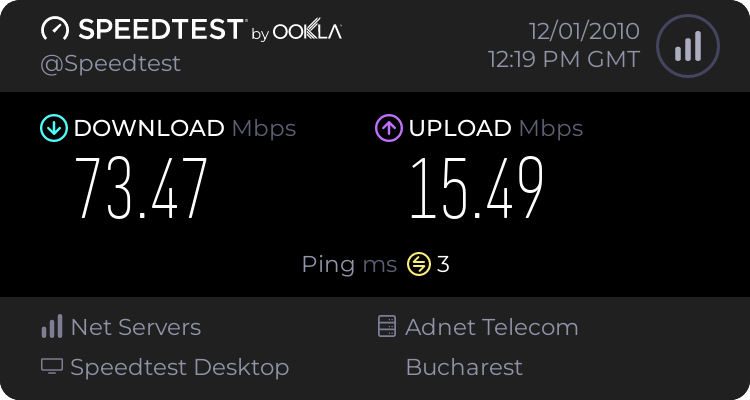
Here is my ping test and speed test:


Damn this is really ruining my gaming experience :(
 
Last edited:

My Computer

OS
Windows 7
And more bumps for those who didn`t bother to read the sysinfo file here is my setup
Motherboard:Asus P5QL PRO
CPU:Intel Core2Quad Q9550 2.8GHZ
Graphic card:Ati Radeon HD4850
Ram:4 gigs 1 Corsair Dominator kit
 

My Computer

OS
Windows 7
Everything I read about this problem points to the router or it's firmware. Have you tried connecting directly to the modem to see if the problem persists?
 

My Computer

Computer type
PC/Desktop
Computer Manufacturer/Model Number
Home built
OS
Windows 7 Ult, Windows 8.1 Pro,
CPU
Q9650-4.275GHz, E8600 4.5GHz, E6750-3.8GHz
Motherboard
Evga 780i FTW
Memory
G.Skill PC2 9600 1200Mhz 5 5 5 15 2T
Graphics Card(s)
GTX480
Sound Card
Asus Xonar D2
Monitor(s) Displays
HannsG
Screen Resolution
1680X1050
Hard Drives
GSkill Phoenix Pro 120GB SSD
PSU
ThermalTake Toughpower 1000Watt modular
Case
ThermalTake XaserV
Cooling
Xigmatek S1283
Keyboard
Logitech G15
Mouse
Logitech G9
Internet Speed
T1
Yes and no change whatsoever but I`ll try again and there is no new firmware for the router but the original one , I`ve checked on the site: last and only update 2008.
 
Last edited:

My Computer

OS
Windows 7
Back
Top