Internet Problems

WyattWhiteEagle

Member
Member
VIP
Local time
4:10 PM
Messages
166
Please remember that I do not have administrator priveledges to the access point as I am only allow to connect using that access point.

The issue I'm having is frequent disconnections.

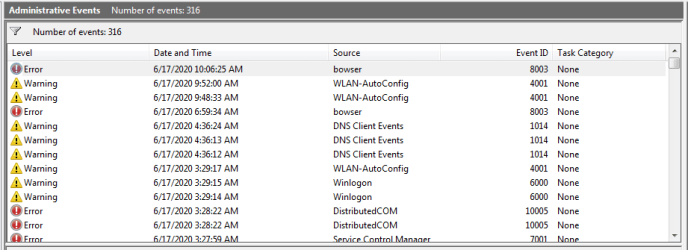
Event Viewer Shows the following
Code:
Event ID 1014, DNS Client: Name resolution for the name isatap.hsd1.ga.comcast.net timed out after none of the configured DNS servers responded.

Event ID 1003, Dhcp-Client: Your computer was not able to renew its address from the network (from the DHCP Server) for the Network Card with network address 0x68A3C4895A7B.  The following error occurred: 0x79. Your computer will continue to try and obtain an address on its own from the network address (DHCP) server.

1. This a wireless connection issue.

2. The ISP is Comcast.

3. The type of Broadband connection is DSL.

4. The Make and Model is Xfinity Arris TG1682G.

5. Currently and temporarily, I use no Anti-Virus. I use Windows Defender and Windows Firewall.

6. Here is my Xirrus Wi-Fi Inspector output.

Code:
Connected		True
SSID			harkins62
Signal(dBm)		-84
Network Mode		802.11n
Default Encryption	AES-CCMP
Default Auth		WPA2/PSK
Vendor			Unknown
BSSID			9C:34:26:9C:82:BA
Channel			6
Frequency		2437
Network Type		Access Point
Adapter Description	Atheros AR5B95 Wireless Network Adapter
---------------------------------------------------------------
Connected		False
SSID			ATT9s8a2K2
Signal(dBm)		-88,
Network Mode		802.11n,
Default Encryption	AES-CCMP,
Default Auth		WPA2/PSK,
Vendor			Unknown,
BSSID			84:61:A0:B9:56:70,
Channel			11,
Frequency		2462,
Network Type		Access Point
Adapter Description	Atheros AR5B95 Wireless Network Adapter

7. Here is the output of my ipconfig /all.

Code:
Windows IP Configuration

   Host Name . . . . . . . . . . . . : Wyatt-PC
   Primary Dns Suffix  . . . . . . . : 
   Node Type . . . . . . . . . . . . : Hybrid
   IP Routing Enabled. . . . . . . . : No
   WINS Proxy Enabled. . . . . . . . : No
   DNS Suffix Search List. . . . . . : hsd1.ga.comcast.net

Wireless LAN adapter Wireless Network Connection:

   Connection-specific DNS Suffix  . : hsd1.ga.comcast.net
   Description . . . . . . . . . . . : Atheros AR5B95 Wireless Network Adapter
   Physical Address. . . . . . . . . : 68-A3-C4-89-5A-7B
   DHCP Enabled. . . . . . . . . . . : Yes
   Autoconfiguration Enabled . . . . : Yes
   IPv6 Address. . . . . . . . . . . : 2601:cf:8480:afe0::a05a(Preferred) 
   Lease Obtained. . . . . . . . . . : Saturday, June 13, 2020 11:25:47 AM
   Lease Expires . . . . . . . . . . : Saturday, June 20, 2020 11:25:47 AM
   IPv6 Address. . . . . . . . . . . : 2601:cf:8480:afe0:3d81:ff8f:d1e1:a0d9(Preferred) 
   Temporary IPv6 Address. . . . . . : 2601:cf:8480:afe0:b16b:794b:cc95:9912(Preferred) 
   Link-local IPv6 Address . . . . . : fe80::3d81:ff8f:d1e1:a0d9%11(Preferred) 
   IPv4 Address. . . . . . . . . . . : 10.0.0.63(Preferred) 
   Subnet Mask . . . . . . . . . . . : 255.255.255.0
   Lease Obtained. . . . . . . . . . : Saturday, June 13, 2020 11:23:52 AM
   Lease Expires . . . . . . . . . . : Saturday, June 20, 2020 11:23:52 AM
   Default Gateway . . . . . . . . . : fe80::9e34:26ff:fe9c:82c2%11
                                       10.0.0.1
   DHCP Server . . . . . . . . . . . : 10.0.0.1
   DHCPv6 IAID . . . . . . . . . . . : 191407044
   DHCPv6 Client DUID. . . . . . . . : 00-01-00-01-26-75-F1-28-68-A3-C4-89-5A-7B
   DNS Servers . . . . . . . . . . . : 2001:558:feed::1
                                       2001:558:feed::2
                                       75.75.75.75
                                       75.75.76.76
   NetBIOS over Tcpip. . . . . . . . : Enabled

Tunnel adapter isatap.hsd1.ga.comcast.net:

   Media State . . . . . . . . . . . : Media disconnected
   Connection-specific DNS Suffix  . : hsd1.ga.comcast.net
   Description . . . . . . . . . . . : Microsoft ISATAP Adapter
   Physical Address. . . . . . . . . : 00-00-00-00-00-00-00-E0
   DHCP Enabled. . . . . . . . . . . : No
   Autoconfiguration Enabled . . . . : Yes
 
Last edited:

My Computer

Computer type
Laptop
Computer Manufacturer/Model Number
Acer Aspire E1-532
OS
Microsoft Windows 7 Home Premium 64-bit 7601 Multiprocessor Free Service Pack 1
CPU
Intel(R) Celeron(R) 2957U @ 1.40GHz
Motherboard
Acer EA50_HW
Memory
8.00 GB
Graphics Card(s)
Intel(R) HD Graphics
Sound Card
High Definition Audio Device
Screen Resolution
1366 x 768 x 32 bits (4294967296 colors) @ 59 Hz
Hard Drives
TOSHIBA MQ01ABD100 ATA Device
So your not getting an IP from the router are you on a week signal as that would cause it but the lease is for 7 days so shouldnt happen to often. The only way around it is to set a fixed IP and see if it lets you in with that. Set your DNS to 1.1.1.1 & 1.0.0.1
 

My Computer

Computer type
PC/Desktop
OS
win 8 32 bit
hi
any reason why your using enterrpise security encrytion on your your wifi.

most run on wpa2-personnal

Roy
 

My Computer

Computer type
PC/Desktop
Computer Manufacturer/Model Number
medionl/Aspire 6930G/acer x55a
OS
W7 home premium 32bit/W7HP 64bit/w10 tp insider ring
CPU
E5300 dual core
Motherboard
medion MS7366
Memory
3gb
Graphics Card(s)
Nvidia Geforce 7100 Nforce 630i
Monitor(s) Displays
avixc
Internet Speed
n (isp resticted to 72)
Antivirus
mse/pands
Browser
palemoon
Other Info
Belkin Fd7050 n USB using Railink RT2870 drivers, more upto date
hi
any reason why your using enterrpise security encrytion on your your wifi.

most run on wpa2-personnal

Roy

Hi,

As far as I know, Enterprise Security Encryption isn't mentioned but it does mention the wpa2.

How do I change from the Enterprise Security Encryption to wpa2-personal. The output mentions wpa2/psk.

Code:
Default Encryption	AES-CCMP
Default Auth		WPA2/PSK
 

My Computer

Computer type
Laptop
Computer Manufacturer/Model Number
Acer Aspire E1-532
OS
Microsoft Windows 7 Home Premium 64-bit 7601 Multiprocessor Free Service Pack 1
CPU
Intel(R) Celeron(R) 2957U @ 1.40GHz
Motherboard
Acer EA50_HW
Memory
8.00 GB
Graphics Card(s)
Intel(R) HD Graphics
Sound Card
High Definition Audio Device
Screen Resolution
1366 x 768 x 32 bits (4294967296 colors) @ 59 Hz
Hard Drives
TOSHIBA MQ01ABD100 ATA Device
hi

left click on your signal bars, then right click on your network - select properties - security tab
choose wpa2 personal

also select advanced tab - uncheck fips if neccessary

Roy
 

My Computer

Computer type
PC/Desktop
Computer Manufacturer/Model Number
medionl/Aspire 6930G/acer x55a
OS
W7 home premium 32bit/W7HP 64bit/w10 tp insider ring
CPU
E5300 dual core
Motherboard
medion MS7366
Memory
3gb
Graphics Card(s)
Nvidia Geforce 7100 Nforce 630i
Monitor(s) Displays
avixc
Internet Speed
n (isp resticted to 72)
Antivirus
mse/pands
Browser
palemoon
Other Info
Belkin Fd7050 n USB using Railink RT2870 drivers, more upto date
After changing DNS and securing wpa2-personal, it seems to have had some effect but only a little.

Is there something more I can try.

I noticed there are 5 preferred's. Should there be that many preferred?

Also, would making changes in services.msc be of any help?
 
Last edited:

My Computer

Computer type
Laptop
Computer Manufacturer/Model Number
Acer Aspire E1-532
OS
Microsoft Windows 7 Home Premium 64-bit 7601 Multiprocessor Free Service Pack 1
CPU
Intel(R) Celeron(R) 2957U @ 1.40GHz
Motherboard
Acer EA50_HW
Memory
8.00 GB
Graphics Card(s)
Intel(R) HD Graphics
Sound Card
High Definition Audio Device
Screen Resolution
1366 x 768 x 32 bits (4294967296 colors) @ 59 Hz
Hard Drives
TOSHIBA MQ01ABD100 ATA Device
2. The ISP is Comcast.

3. The type of Broadband connection is DSL.


Where did you get the information from that the connection was DSL? Comcast isn't DSL, they are cable. DSL is provided over the phone line.

Your last error there seems to suggest to me that the router or modem to which you make a connection to is not able to renew your computer's IP address. This would probably be an issue with the modem or router its self.

Try this once.

Go to the search box in the start orb and enter cmd. Right click command and open it as Admin. Now enter the following two commands one after another hitting the enter key.

Code:
ipconfig /release
Code:
ipconfig /renew
 

My Computer

Computer type
PC/Desktop
OS
Windows 7 Ultimate x64
Where did you get the information from that the connection was DSL? Comcast isn't DSL, they are cable. DSL is provided over the phone line.

Please allow me to repeat specific info in my ipconfig /all

Code:
Windows IP Configuration
   DNS Suffix Search List. . . . . . : hsd1.ga.comcast.net

Wireless LAN adapter Wireless Network Connection:
   Connection-specific DNS Suffix  . : hsd1.ga.comcast.net

Tunnel adapter isatap.hsd1.ga.comcast.net:
   Connection-specific DNS Suffix  . : hsd1.ga.comcast.net

Notice the Wireless LAN adapter Wireless Network Connection-specific DNS Suffix. It says hsd.ga.comcast.net.

If Comcast is strictly cable, and my wireless adapter keeps trying to connect to cable instead of what it should be trying to connect to. I don't see how that would be a router issue, but a network adapter configuration issue. Especially when 2 pc's are practically sitting right next to each other and only one of them is having the issues when the other one is not having the issue.

It would seem I need to reconfigure my network adapter preferred connctions, but nobody has suggested doing that yet so I'm not sure if that would be part of the problem since I mentioned the preferred connections in a previous post.

Goes back to the rule: If it ain't broke, don't break it by fixin' it!

Your last error there seems to suggest to me that the router or modem to which you make a connection to is not able to renew your computer's IP address. This would probably be an issue with the modem or router its self.

My fiance's parents have control over the router. They say they aren't having any issue's with the router or internet connection. The pc next to mine is my fiance's and it isn't having any issue's either.

So nope, not a router issue.

Try this once.

Go to the search box in the start orb and enter cmd. Right click command and open it as Admin. Now enter the following two commands one after another hitting the enter key.

Code:
ipconfig /release
Code:
ipconfig /renew

Tried that and still having the issue's.
 

My Computer

Computer type
Laptop
Computer Manufacturer/Model Number
Acer Aspire E1-532
OS
Microsoft Windows 7 Home Premium 64-bit 7601 Multiprocessor Free Service Pack 1
CPU
Intel(R) Celeron(R) 2957U @ 1.40GHz
Motherboard
Acer EA50_HW
Memory
8.00 GB
Graphics Card(s)
Intel(R) HD Graphics
Sound Card
High Definition Audio Device
Screen Resolution
1366 x 768 x 32 bits (4294967296 colors) @ 59 Hz
Hard Drives
TOSHIBA MQ01ABD100 ATA Device
Ok, I took the time to just observe the issue frequency.

In Event Viewer, the issue(s) are happening every 2 to 5 minutes. This frequency seems to be when I have a web browser open.

Also, Event viewer shows some of them to be a little less frequent, every 5 to 10 minutes, when a web browser isn't open.

Connection seems more stable when I move my pc to a spot about half way between my fiance's pc and the router, but event viewer begins to also reflect master browser argument events that mention my fiance's comp either stopping or forcing an election. (lol, just sounds funny with all the presidential debate goin' on.)

I'm wondering if I should do a clean install, system drivers udpates from Acer, and install only my most frequently used applications (except Chrome) and run Internet Explorer during a 24-48 hr observance. Or maybe a full hour observance between each install.

I'm thinking of using the clean install to see if system updating or an installed application may be causing these issue's.

Any idea's?
 
Last edited:

My Computer

Computer type
Laptop
Computer Manufacturer/Model Number
Acer Aspire E1-532
OS
Microsoft Windows 7 Home Premium 64-bit 7601 Multiprocessor Free Service Pack 1
CPU
Intel(R) Celeron(R) 2957U @ 1.40GHz
Motherboard
Acer EA50_HW
Memory
8.00 GB
Graphics Card(s)
Intel(R) HD Graphics
Sound Card
High Definition Audio Device
Screen Resolution
1366 x 768 x 32 bits (4294967296 colors) @ 59 Hz
Hard Drives
TOSHIBA MQ01ABD100 ATA Device
Um...I'm not sure what happened...

I went to bed around 3:45am this morn and woke up at about 9:00am. Open my lid and noticed a better more stable connection. I then created a Restore Point in System Protection via Control Panel.

I opened Xirrus Wi-Fi Inspector and noticed the router channel had changed from channel 6 to channel 1.

On Monday the 15th, I deteted 4 items from the registry via the instruction at the following link...

It seemed to have little to no effect.

I've made no other changes after that.

Event ID 10016 - The application-specific permission settings do not grant Local Activation permission for the COM Server application with CLSID

Code:
Answers
Question
Sign in to vote
11
Sign in to vote
Hello all,

Please take a try with the steps below, to reset the DCOM permission:

The DCOM ACLs are stored in the registry under the key HKEY_LOCAL_MACHINE\SOFTWARE\Microsoft\Ole, in the following binary values:

DefaultAccessPermission
DefaultLaunchPermission
MachineAccessRestriction
MachineLaunchRestriction
please backup the registry first, then delete all those values listed avove, DCOM will load the default settings if there is no values reference.

Regards

Please remember to mark the replies as answers if they help, and unmark the answers if they provide no help. If you have feedback for TechNet Support, contact [email protected].

Proposed as answer by Michael_LSModerator Tuesday, August 25, 2015 2:51 AM
Marked as answer by Kate LiMicrosoft employee, Moderator Monday, September 14, 2015 9:29 AM
Friday, August 21, 2015 5:03 AM
Reply|Quote
Avatar of Michael_LS
Michael_LS47,215 Points
Moderator
 

Attachments

  • EvtVwr.png
    EvtVwr.png
    28.9 KB · Views: 0

My Computer

Computer type
Laptop
Computer Manufacturer/Model Number
Acer Aspire E1-532
OS
Microsoft Windows 7 Home Premium 64-bit 7601 Multiprocessor Free Service Pack 1
CPU
Intel(R) Celeron(R) 2957U @ 1.40GHz
Motherboard
Acer EA50_HW
Memory
8.00 GB
Graphics Card(s)
Intel(R) HD Graphics
Sound Card
High Definition Audio Device
Screen Resolution
1366 x 768 x 32 bits (4294967296 colors) @ 59 Hz
Hard Drives
TOSHIBA MQ01ABD100 ATA Device
Back
Top