Internet wrapper.exe I guess. Please help.

The process I've done now has been performed on safe mode since performing any action is taking too long on normal mode . Now after all these steps have been taken, the lag has reduced but still experiencing those in normal mode . If I play a movie or any video clip the audio is like in slow motion and all breaking up and gets stuck. :( If I connect LAN wire , this lag increases even more .

Are you saying there is no problem in Safe Mode ?
You only have the problem in Normal Mode ?

If that's true, do a clean startup to try and find what program(s) are causing the issue.
Here is a tutorial by Brink:
http://www.sevenforums.com/tutorial...ation-conflicts-performing-clean-startup.html
 

My Computer

Computer type
PC/Desktop
Computer Manufacturer/Model Number
home built
OS
Multi-Boot W7_Pro_x64 W8.1_Pro_x64 W10_Pro_x64 +Linux_VMs +Chromium_VM
CPU
AMD Athlon II x4 620
Motherboard
Gigabyte GA-MA785G-UD3H
Memory
6GB GSkill DDR2 800
Graphics Card(s)
AMD 4670 GPU + AMD 4200 IGP
Sound Card
on board Realtek ALC889A
Monitor(s) Displays
RCA 40" LCD TV, Insignia 32" LCD TV, HP 15" LCD monitor
Screen Resolution
1680 x 1050
Hard Drives
OCZ Vertex 3 120GB,
Samsung F3 1TB (3),
Several others - WD, Seagate, Hitachi, ...
PSU
Corsair 500 W
Case
Rosewill mid tower
Cooling
CM 90mm rifle
Keyboard
Gyration wireless, Logitech wireless, Dell USB wired
Mouse
Gyration wireless, Logitech wireless, V7 USB wired
Internet Speed
Spectrum - 100Mbps D / 10Mbps U
Antivirus
Avast, MBAM3, EMET, WinPatrol
Browser
Pale Moon, Firefox, IE
Other Info
2 multi-boot PC's
Mainly HTPC/Office/Gen purpose (no gaming).
Trendnet USB KVM.
LG DVD burner/Blue Ray Player.
Tray system for removable SATA backup drives.

Not currently OCd, under-volted.
I use Hybrid sleep, rarely re-boot or shutdown.

Hauppauge HD-PVR, Avermedia PCIe TV Tuner, Hauppauge PCI TV Tuner.
I have uninstalled vaio smart network as you asked Mr Gator and also I have reinstalled my LAN driver, the lag spikes have reduced but they still exist . Opening my computer or partition disks or any folders takes long time . I have a system image I had created after clean install before , maybe I should restore my system image, I need help with that too if it's the only way to get rid of this problem .
 

My Computer

Computer type
Laptop
Computer Manufacturer/Model Number
Sony
OS
Windows 7 professional 64 bit i5
Memory
4GB
If that's true, do a clean startup to try and find what program(s) are causing the issue.
Here is a tutorial by Brink:
http://www.sevenforums.com/tutorial...ation-conflicts-performing-clean-startup.html[/QUOTE]

I have try all the steps listed in the link you've posted . I find an unknown program on my startup list named as convert ad.exe. And when I follow the path to its location I don't find any file with such name, tried even viewing hidden files . Must this be the problem ? How do I remove it.
 

My Computer

Computer type
Laptop
Computer Manufacturer/Model Number
Sony
OS
Windows 7 professional 64 bit i5
Memory
4GB
This convert ad.exe could be a browser add on.
Take a look in there for it.

Did you or did you not remove all the things that AdwCleaner found?

Did you or did you not remove all the thing that SAS found?

Did you or did you not remove all the things that Malwarebytes found?

Edit:
I'm unable to find where you removed any of the findings.
 

My Computer

Computer type
PC/Desktop
Computer Manufacturer/Model Number
Home made Desktop
OS
Windows 10 Pro. 64/ version 1709 Windows 7 Pro/64
CPU
Intel i7-6800K @ 4.3
Motherboard
ASUS X-99 Deluxe II
Memory
Corsair Platinum 16 gig @2400
Graphics Card(s)
EVGA GTX 1070 OC
Monitor(s) Displays
Asus 27" LED LCD/VE278Q
Screen Resolution
1920-1080 or 1280-720 HDMI
Hard Drives
INTEL SSD 730-240 Gb Sata 3.0/
PSU
EVGA Platium 1200W
Case
Phanteks Luxe Tempered Glass 8 fans/ one radiator
Cooling
XSPC/ Water Cooled CPU
Keyboard
Das 4 Professional
Mouse
Logitech M705/MX Anywhere 2-S
Internet Speed
100 mbits
Antivirus
Microsoft Security Essentials/ Malwarebytes Premium 3.0/ SAS
Browser
I.E. 11 default/Firefox/ ISP Time Warner Cable/Spectrum
Other Info
LG BluRay Burner/
Sound system-KLipsch-THX/
Icy Dock ssd Hot Swap bays.

My Computer

Computer type
PC/Desktop
Computer Manufacturer/Model Number
Custom
OS
Dual Boot: Windows 8.1 & Server 2012r2 VMs: Kali Linux, Backbox, Matriux, Windows 8.1
CPU
A10 7700 Kavari SteamRoller
Motherboard
ASUS A88XM-PLUS (FM2+ )
Memory
8GB DDR3 SDRAM PC3-8500
Graphics Card(s)
1024MB ATI AMD Radeon R7 Graphics
Sound Card
Realtek High Definition Audio
Monitor(s) Displays
Samsung
Hard Drives
SSD Crucial 120gb
WD VelociRaptor 1tb
PSU
Rosewill Gaming 650w
Case
Rosewill Galaxy 2
Internet Speed
55/12
Antivirus
Malwarebytes, MSE, SAS
Browser
FireFox, Chrome
Yes Mr Bear. I have performed malware bytes , super anti spyware and adw scans and have cleaned all that's been found as a threat with these respective programs. But I still experience these lag spikes . This does not occur in safe mode(rarely actually,) .
And I have even performed a clean start up as Mr David suggested . And that how I've seen this unknown program convert ad.exe .
 

My Computer

Computer type
Laptop
Computer Manufacturer/Model Number
Sony
OS
Windows 7 professional 64 bit i5
Memory
4GB
Also, did you ever run an SFC Scan? May or may not do anything at all, but it never hurts in situations like this.

http://www.sevenforums.com/tutorials/1538-sfc-scannow-command-system-file-checker.html
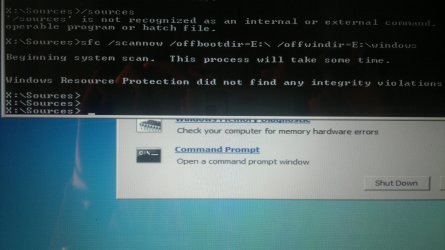
As there were couple or more methods in the link. I chose method 1 as it was easy . And I have run the sfc scan using command prompt, and it resulted in no errors .

But, the original code in the link was:X:\windows/system32>sfc /scannow /offbootdir=F:\ /offwindir=F:\windows.
whereas, I have it as X:Sources> . Is it okay with this? or do I have to change that and perform this scan again, if so tell me how that directory could be changed .
 

Attachments

  • 2015-01-10-852.jpg
    2015-01-10-852.jpg
    965.2 KB · Views: 0

My Computer

Computer type
Laptop
Computer Manufacturer/Model Number
Sony
OS
Windows 7 professional 64 bit i5
Memory
4GB
Back
Top