
Inverse Search

huffman

New member
Pro User
Local time
10:49 AM
Messages
715
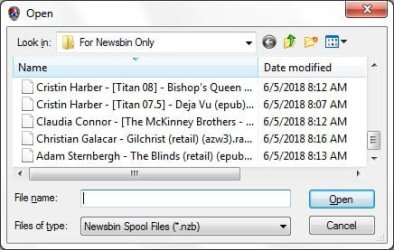
I have one condition where I want to open a number items in order to download them using Newsbin.
download.jpg

Here is what it looks like and I see no way to change it. It only occurs when I try to download ebooks

Thanks
 

My Computer

OS
Windows 7 Pro
CPU
Intel(R) Pentium(R) Duel CPU E2200 2.20 Ghz
Motherboard
GA-G41M-ES2L
Memory
4 gb 2.96 Usable
Graphics Card(s)
Onboard
Sound Card
Onboard
Hard Drives
2 - 1TB WD Sata Drives
What do you mean "inverse search"? Do you mean search results ordered from Z to A? From your picture, I see the little triangle pointing downwards, in the "Name" field. This usually means search results are ordered from Z to A. And I think that is what the picture shows. If you click on the "Name" field, the results should be re-ordered from A to Z, just like in Windows Explorer. So I do not really understand the nature of the question. Could you repeat the question, and paraphrase a little?
 

My Computer

Computer type
PC/Desktop
OS
Windows 7 x64, Vista x64, 8.1 smartphone
CPU
Intel E8400 65W 64-bit
Motherboard
Gigabyte EP45-UD3LR
Memory
DDR2 2 x 2GB, 1GB x 2
Graphics Card(s)
XFX Radeon HD5750
Sound Card
AMD High Definition Audio; Realtek High Definition Audio
Monitor(s) Displays
iiyama prolite X2377HDS
Screen Resolution
1920 x 1080
Hard Drives
500GB 7200 rpm Seagate ST3500413AS 16MB, 500GB 5400 rpm Toshiba MQ02ABF050H 32MB, 200GB 7200 rpm Seagate ST3200820AS 8MB, 2TB 7200 rpm Western Digital WD20EZRX 64MB
PSU
Enermax Liberty Modular
Case
Antec P193 Midi Tower
Keyboard
Mionix ZIBAL 60
Mouse
Razer USB 2.0 Diamondback Mouse or Huion Graphics Tablet
Browser
Internet Explorer, Lunascape, Firefox, Opera, Avast Safezone
If you are referring to the names being in reverse just hit that little triangle. Otherwise we need to know what you are referring to. You aren't actually asking a question.
 

My Computers

System One System Two

Back
Top