Solved "Invisible" My Documents folder?

Bro

Windows n00b :D
Member
Local time
4:13 PM
Messages
31
Location
Miami, Florida, USA
As of late I've been having issues with my copy of a game called Borderlands. I start the game fresh, have fun, and decide to call it quits for the night; I save and turn it off. Next time I play it, I find my save file not saved at all, and my configurations for the game have reset as well.

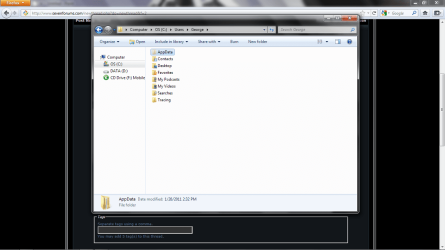
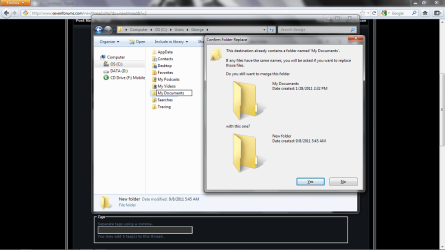
I looked into the problem, and I found out that it's a common issue among users with multiple partitions. Found one of the fixes to be to just manually create the folders the data is saved. The directory for the first folder was located in "USER NAME\My Documents\", so I navigated to that directory. Didn't see a My Documents folder, so I had decided to create one myself. Lo and behold in my first attached screenshot, Win7 tells me there is already such a folder located there. At this point I'm pretty confused, since I have all hidden files and folders showing, as I have displayed in the second screenshot provided. So I have an invisible My Documents folder?

I can access it by manually inputting "USER NAME\My Documents\", but otherwise I can't see it, nor can other programs seem to interact with it. I have no idea what's going on with this, so, as this posted thread implies, I need some assistance here from Seven Forum's best, lol.

Thanks in advance, and I apologize for the long post.
 

Attachments
  • screen1.png
    screen1.png
    60.9 KB · Views: 70
  • screen2.png
    screen2.png
    64.6 KB · Views: 52

My Computer

Computer Manufacturer/Model Number
ASUSTeK Computer Inc./ASUS Notebook G60Vx Series
OS
Windows 7 Home Premium SP1 x64
CPU
Intel Core 2 Duo P7450 @ 2.13GHz
Motherboard
PEGATRON Corp. G60VX
Memory
2x2GB DDR2
Graphics Card(s)
NVIDIA GeForce GTX 260M
Sound Card
Realtek High Definition Audio
Monitor(s) Displays
16" HD/LED Backlight
Screen Resolution
1366 x 768
Hard Drives
320 GB Seagate ST9320423AS
Keyboard
Microsoft eHome MCIR 109 Keyboard
Mouse
Logitech M305 Wireless Mouse
Internet Speed
~25 MBPS

My Computer

Computer Manufacturer/Model Number
acer aspire 5935g
OS
Windows 7 Home Premium x64 SP1
CPU
intel(R)core(TM)2 duo CPU T6600 @ 2.20GHz
Motherboard
intel gm45/gm47 revision 07
Memory
3 gb ddr3
Graphics Card(s)
ati radeon hd4570/512mb
Monitor(s) Displays
lop156wh2-tle1 15.3 flat
Screen Resolution
1366x768
Hard Drives
OCZ-Agility3 60gig ssd
320gig external hdd
500gig external hdd
Mouse
Optical
Internet Speed
30Mbps Down/30Mbps Up
When did this problem start occurring? Do you have a http://www.sevenforums.com/tutorials/700-system-restore.html point from before it started?

You should also try running CCleaner and checking all of the Windows Explorer options as well as as many System options as possible.
CCleaner - Optimization and Cleaning - Free Download

In the slight chance it is malware or a virus, try running a full scan with your current anti-virus as well as with Malwarebytes.
Malwarebytes : Free anti-malware, anti-virus and spyware removal download


You would also benefit in running an sfc/scannow command in an elevated command prompt. If any deleted or corrupted system files are causing this problem, this should fix it. You should run this command three times with a restart after each.
http://www.sevenforums.com/tutorials/1538-sfc-scannow-command-system-file-checker.html

Also have a read of the following tutorial and see if it changes anything.
http://www.sevenforums.com/tutorials/18583-user-folders-restore-default-location.html
 

My Computer

Computer Manufacturer/Model Number
Custom Build
OS
Windows 7 Ultimate x64/Windows 8 Consumer Preview x64/Ubuntu 11.04
CPU
Intel Pentium Dual Core E6700 3.2GHz
Motherboard
ASUS P5G41T-M LX
Memory
Strontium 8192MB DDR3 1333Mhz
Graphics Card(s)
msi GeForce N560GTX-M2D1GD5 1GB
Sound Card
Realtek HD Audio
Monitor(s) Displays
CHIMEI CMV 221D 22"
Screen Resolution
1680x1050
Hard Drives
Seagate Barracuda LP Green 3.5'' 2TB Internal HDD 5900RPM + WD Elements Desktop 1TB External HDD 7200RPM
PSU
SHAW Viper-1500w Gaming PSU
Case
Black eMaxx ATX Mini Tower Case
Keyboard
Microsoft Wireless Keyboard 1000
Mouse
Microsoft Wireless Optical Mouse 2000
Internet Speed
100GB @ 4.76Mbps
  • Like
Reactions: Bro
Scratch that, seems I found the problem. I had set up my other partition to be the default Documents location. Simple right-click menu did the trick. I'll be installing my game again to see how it works now.

xxxdannyxxx and JaidynM, I appreciate the help, especially with the link to the thread with the step-by-step instructions on how to restore the default location of these folders.

Thanks. :)
 

My Computer

Computer Manufacturer/Model Number
ASUSTeK Computer Inc./ASUS Notebook G60Vx Series
OS
Windows 7 Home Premium SP1 x64
CPU
Intel Core 2 Duo P7450 @ 2.13GHz
Motherboard
PEGATRON Corp. G60VX
Memory
2x2GB DDR2
Graphics Card(s)
NVIDIA GeForce GTX 260M
Sound Card
Realtek High Definition Audio
Monitor(s) Displays
16" HD/LED Backlight
Screen Resolution
1366 x 768
Hard Drives
320 GB Seagate ST9320423AS
Keyboard
Microsoft eHome MCIR 109 Keyboard
Mouse
Logitech M305 Wireless Mouse
Internet Speed
~25 MBPS
Scratch that, seems I found the problem. I had set up my other partition to be the default Documents location. Simple right-click menu did the trick. I'll be installing my game again to see how it works now.

xxxdannyxxx and JaidynM, I appreciate the help, especially with the link to the thread with the step-by-step instructions on how to restore the default location of these folders.

Thanks. :)

No problem you're welcome
 

My Computer

Computer Manufacturer/Model Number
acer aspire 5935g
OS
Windows 7 Home Premium x64 SP1
CPU
intel(R)core(TM)2 duo CPU T6600 @ 2.20GHz
Motherboard
intel gm45/gm47 revision 07
Memory
3 gb ddr3
Graphics Card(s)
ati radeon hd4570/512mb
Monitor(s) Displays
lop156wh2-tle1 15.3 flat
Screen Resolution
1366x768
Hard Drives
OCZ-Agility3 60gig ssd
320gig external hdd
500gig external hdd
Mouse
Optical
Internet Speed
30Mbps Down/30Mbps Up
Scratch that, seems I found the problem. I had set up my other partition to be the default Documents location. Simple right-click menu did the trick. I'll be installing my game again to see how it works now.

xxxdannyxxx and JaidynM, I appreciate the help, especially with the link to the thread with the step-by-step instructions on how to restore the default location of these folders.

Thanks. :)

No worries, I'm glad you found a fix. ;)
 

My Computer

Computer Manufacturer/Model Number
Custom Build
OS
Windows 7 Ultimate x64/Windows 8 Consumer Preview x64/Ubuntu 11.04
CPU
Intel Pentium Dual Core E6700 3.2GHz
Motherboard
ASUS P5G41T-M LX
Memory
Strontium 8192MB DDR3 1333Mhz
Graphics Card(s)
msi GeForce N560GTX-M2D1GD5 1GB
Sound Card
Realtek HD Audio
Monitor(s) Displays
CHIMEI CMV 221D 22"
Screen Resolution
1680x1050
Hard Drives
Seagate Barracuda LP Green 3.5'' 2TB Internal HDD 5900RPM + WD Elements Desktop 1TB External HDD 7200RPM
PSU
SHAW Viper-1500w Gaming PSU
Case
Black eMaxx ATX Mini Tower Case
Keyboard
Microsoft Wireless Keyboard 1000
Mouse
Microsoft Wireless Optical Mouse 2000
Internet Speed
100GB @ 4.76Mbps
Back
Top