Solved Iomega external HD not detected by any computer

RicardoZagada

New member
Local time
11:07 PM
Messages
13
Location
Coimbra
Hi!

I have an external hard drive of 500Gb from iomega, and it stopped working recentely.
It is not detected in Windows 7 and from what I know so far this is what I realised:

- It appears on "Device Management" and it says to be working properly
- No message of windows on the bottom-left corner saying that the drive cold not be connected
- It does not appear on "My Computer"
- The above applies even if I start in "Safe Mode"
- BIOS detects it when I try to change how the windows is botted
- the Hard Drive light flickers normaly when I connect the power supply
- Already tried to change the USB cables but the problem presists
- Tried in other computers, with the same results listed above


The problem is that I have important data that I want to recover from the drive, so fromating the drive must be the last resort.

Thanks in advance for your time :) and sorry for my english :p
 

My Computer My Computer

At a glance

MS Windows 7 Ultimate 32-bit SP1AMD Phenom X2 Dual-Core Processor GP-77302,0 GB RAMNVidia GeForce 9800 GT
Computer Manufacturer/Model Number
ASUS desktop computer
OS
MS Windows 7 Ultimate 32-bit SP1
CPU
AMD Phenom X2 Dual-Core Processor GP-7730
Memory
2,0 GB RAM
Graphics Card(s)
NVidia GeForce 9800 GT
Sound Card
High Definition Audio Device
Monitor(s) Displays
SyncMaster 720N/731N
Screen Resolution
1280 x 1024
Hard Drives
MAXTOR S TM3160215AS SCSI Disk Device
Maxtor OneTouch USB Device
Iomega External HD USB Device
Keyboard
standard PS/2 Keyboard
Mouse
standard USB mouse
Is it possible to open up the external Iomega caddy and remove the drive? The drive enclosure might be the problem, so removing the drive and trying a different enclosure or installing it into another computer might work.
 

My Computer My Computer

At a glance

Windows 7 Ultimate x64 SP1Core i7-2670QM8GB DDR3 PC3-10600Intel HD Graphics 3000 + GeForce GT 540M
Computer Manufacturer/Model Number
Dell XPS 15 L502x
OS
Windows 7 Ultimate x64 SP1
CPU
Core i7-2670QM
Memory
8GB DDR3 PC3-10600
Graphics Card(s)
Intel HD Graphics 3000 + GeForce GT 540M
Screen Resolution
1920x1080
Hard Drives
1TB 5400RPM Seagate
Ricardo,
Help us to help you.

Update your SevenForums System Specs
User CP (located on the top menu bar) |
Your Profile | Edit System Spec
(left-hand column)

To gather info, use Speccy (my favorite) or SIW or System Info

In the System Manufacturer Block, enter:
Manufacturer and Model and
ADD the word laptop, desktop, netbook or tablet.
For example:
Toshiba Satellite L305D notebook.

Provide full windows version info, for example:
MS Windows 7 Ultimate SP1 64-bit

Use the “Other Info” block for Optical Reader,
Mouse, touchpad, wifi adapter, speakers, monitor, etc

Scroll down and click on SAVE CHANGES.

You will find that in Speccy, you can select info from the display
using your mouse/touchpad and then paste that info into your specs.

SIW is a marvelous program, but the free version does not offer
this capability.
 

My Computer My Computer

At a glance

MS Windows 7 Ultimate SP1 64-bitAMD A10-4600M6.00 GB Dual-Channel DDR3 @ 798MHz (11-11-12-28)AMD Radeon HD 7660G
Computer Manufacturer/Model Number
Toshiba Satellite S875D-S7239 laptop
OS
MS Windows 7 Ultimate SP1 64-bit
CPU
AMD A10-4600M
Motherboard
AMD Pumori (Socket FT1)
Memory
6.00 GB Dual-Channel DDR3 @ 798MHz (11-11-12-28)
Graphics Card(s)
AMD Radeon HD 7660G
Sound Card
High Definition Audio Device
Monitor(s) Displays
Generic PnP Monitor (1600x900@60Hz)
Screen Resolution
1600x900@60Hz
Hard Drives
SSD 119GB Corsair CSSD-V128GB2 ATA Device
Keyboard
Standard PS/2 Keyboard
Mouse
HP Wireless Optical Mobile Mouse Model FHA-3410
Internet Speed
What the local pub, local coffee shop offers.
Other Info
Optical Drive:MATSHITA BD-CMB UJ160B ATA Device


Also have an Asus ha1002xp netbook with Win 7 Ultimate installed.
Thanks for the reply!

Well the thing is I don't feel very safe with the "open the drive enclosure" thing but i can try if nothing else works.

It is the same in every computer. Think about a working Hard Drive, everything works properly in the system, the only diference is that it doesn't appear represented by a letter in my computer, it doesn't appear at all. I tried to install it in a new computer, and the steps are completed normaly: disc detected, installing, it is now installed and ready to use. But it is still the same thing, it doesn't appear in the explorer, it appears everyhere but the explorer. :confused:

Is there any software capable of tracking this kind problems related to external HD? :rolleyes:

At the end like I said, if that kind of software cant recover my files or solve the problem, I will gladly pick up my screwdriver following the guideline you just gave me ;)

EDIT: Thank you karlsnooks. Some of my specs have been updated.
 
Last edited:

My Computer My Computer

At a glance

MS Windows 7 Ultimate 32-bit SP1AMD Phenom X2 Dual-Core Processor GP-77302,0 GB RAMNVidia GeForce 9800 GT
Computer Manufacturer/Model Number
ASUS desktop computer
OS
MS Windows 7 Ultimate 32-bit SP1
CPU
AMD Phenom X2 Dual-Core Processor GP-7730
Memory
2,0 GB RAM
Graphics Card(s)
NVidia GeForce 9800 GT
Sound Card
High Definition Audio Device
Monitor(s) Displays
SyncMaster 720N/731N
Screen Resolution
1280 x 1024
Hard Drives
MAXTOR S TM3160215AS SCSI Disk Device
Maxtor OneTouch USB Device
Iomega External HD USB Device
Keyboard
standard PS/2 Keyboard
Mouse
standard USB mouse
see post #3
 

My Computer My Computer

At a glance

MS Windows 7 Ultimate SP1 64-bitAMD A10-4600M6.00 GB Dual-Channel DDR3 @ 798MHz (11-11-12-28)AMD Radeon HD 7660G
Computer Manufacturer/Model Number
Toshiba Satellite S875D-S7239 laptop
OS
MS Windows 7 Ultimate SP1 64-bit
CPU
AMD A10-4600M
Motherboard
AMD Pumori (Socket FT1)
Memory
6.00 GB Dual-Channel DDR3 @ 798MHz (11-11-12-28)
Graphics Card(s)
AMD Radeon HD 7660G
Sound Card
High Definition Audio Device
Monitor(s) Displays
Generic PnP Monitor (1600x900@60Hz)
Screen Resolution
1600x900@60Hz
Hard Drives
SSD 119GB Corsair CSSD-V128GB2 ATA Device
Keyboard
Standard PS/2 Keyboard
Mouse
HP Wireless Optical Mobile Mouse Model FHA-3410
Internet Speed
What the local pub, local coffee shop offers.
Other Info
Optical Drive:MATSHITA BD-CMB UJ160B ATA Device


Also have an Asus ha1002xp netbook with Win 7 Ultimate installed.

My Computer My Computer

At a glance

MS Windows 7 Ultimate 32-bit SP1AMD Phenom X2 Dual-Core Processor GP-77302,0 GB RAMNVidia GeForce 9800 GT
Computer Manufacturer/Model Number
ASUS desktop computer
OS
MS Windows 7 Ultimate 32-bit SP1
CPU
AMD Phenom X2 Dual-Core Processor GP-7730
Memory
2,0 GB RAM
Graphics Card(s)
NVidia GeForce 9800 GT
Sound Card
High Definition Audio Device
Monitor(s) Displays
SyncMaster 720N/731N
Screen Resolution
1280 x 1024
Hard Drives
MAXTOR S TM3160215AS SCSI Disk Device
Maxtor OneTouch USB Device
Iomega External HD USB Device
Keyboard
standard PS/2 Keyboard
Mouse
standard USB mouse
HOW TO POST A SNAPSHOT OF DISK MANAGEMENT DISPLAY
Run disk management:
WIN |
type DISKMGMT.MSC | ENTER
This method gives you a display without the unneeded navigation pane.
WIN=key with Microsoft logo on top.

Maximize the output of Disk Management:
ALT-Spacebar key combo | X key (selects Maximize) |
Drag the field separators (such as between Status and Capacity) to show entire field.


Make a snapshot:
WIN |
type SNIPPING | ENTER | New
Drag the cursor around the area you want to snip.
File | Save as | select save location and name | Save


Post the snapshot:
Post a File or Screenshot in Seven Forums
 

My Computer My Computer

At a glance

MS Windows 7 Ultimate SP1 64-bitAMD A10-4600M6.00 GB Dual-Channel DDR3 @ 798MHz (11-11-12-28)AMD Radeon HD 7660G
Computer Manufacturer/Model Number
Toshiba Satellite S875D-S7239 laptop
OS
MS Windows 7 Ultimate SP1 64-bit
CPU
AMD A10-4600M
Motherboard
AMD Pumori (Socket FT1)
Memory
6.00 GB Dual-Channel DDR3 @ 798MHz (11-11-12-28)
Graphics Card(s)
AMD Radeon HD 7660G
Sound Card
High Definition Audio Device
Monitor(s) Displays
Generic PnP Monitor (1600x900@60Hz)
Screen Resolution
1600x900@60Hz
Hard Drives
SSD 119GB Corsair CSSD-V128GB2 ATA Device
Keyboard
Standard PS/2 Keyboard
Mouse
HP Wireless Optical Mobile Mouse Model FHA-3410
Internet Speed
What the local pub, local coffee shop offers.
Other Info
Optical Drive:MATSHITA BD-CMB UJ160B ATA Device


Also have an Asus ha1002xp netbook with Win 7 Ultimate installed.
Sorry it took so long but I had to change the Windows language from Portuguese to English, and also my seven hours of sleep were required.

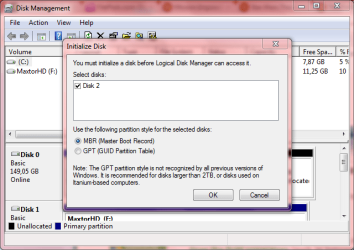
When I entered in DISKMGMT.MSC this is the first screen that comes up:

Capture1.PNG

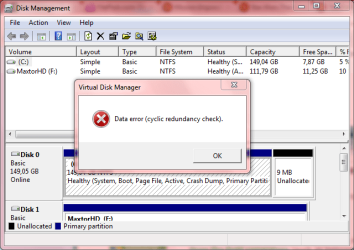
The choice doesn't matter because the outcome is the same:

Capture2.PNG

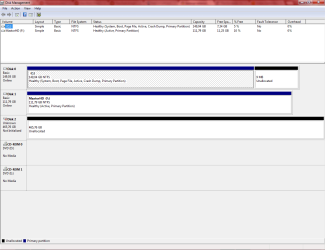
At the end this is the result:

Capture3.PNG

It is branded as "Unallocated". Hope it helps because this doesn't look good :confused:

EDIT: My Data Recovery Software can't locate the iomega HD.
 
Last edited:

My Computer My Computer

At a glance

MS Windows 7 Ultimate 32-bit SP1AMD Phenom X2 Dual-Core Processor GP-77302,0 GB RAMNVidia GeForce 9800 GT
Computer Manufacturer/Model Number
ASUS desktop computer
OS
MS Windows 7 Ultimate 32-bit SP1
CPU
AMD Phenom X2 Dual-Core Processor GP-7730
Memory
2,0 GB RAM
Graphics Card(s)
NVidia GeForce 9800 GT
Sound Card
High Definition Audio Device
Monitor(s) Displays
SyncMaster 720N/731N
Screen Resolution
1280 x 1024
Hard Drives
MAXTOR S TM3160215AS SCSI Disk Device
Maxtor OneTouch USB Device
Iomega External HD USB Device
Keyboard
standard PS/2 Keyboard
Mouse
standard USB mouse
That's a start now:
Run diskmanagment in the manner described in the procedure I gave.
thanks,
karl
 

My Computer My Computer

At a glance

MS Windows 7 Ultimate SP1 64-bitAMD A10-4600M6.00 GB Dual-Channel DDR3 @ 798MHz (11-11-12-28)AMD Radeon HD 7660G
Computer Manufacturer/Model Number
Toshiba Satellite S875D-S7239 laptop
OS
MS Windows 7 Ultimate SP1 64-bit
CPU
AMD A10-4600M
Motherboard
AMD Pumori (Socket FT1)
Memory
6.00 GB Dual-Channel DDR3 @ 798MHz (11-11-12-28)
Graphics Card(s)
AMD Radeon HD 7660G
Sound Card
High Definition Audio Device
Monitor(s) Displays
Generic PnP Monitor (1600x900@60Hz)
Screen Resolution
1600x900@60Hz
Hard Drives
SSD 119GB Corsair CSSD-V128GB2 ATA Device
Keyboard
Standard PS/2 Keyboard
Mouse
HP Wireless Optical Mobile Mouse Model FHA-3410
Internet Speed
What the local pub, local coffee shop offers.
Other Info
Optical Drive:MATSHITA BD-CMB UJ160B ATA Device


Also have an Asus ha1002xp netbook with Win 7 Ultimate installed.
Ok, sorry. Now I have followed faithfully the procedure the best I could as it was described:

Capture4.PNG

If this is not what you want, please state it because the language barrier sometimes plays tricks. Thanks.
 

My Computer My Computer

At a glance

MS Windows 7 Ultimate 32-bit SP1AMD Phenom X2 Dual-Core Processor GP-77302,0 GB RAMNVidia GeForce 9800 GT
Computer Manufacturer/Model Number
ASUS desktop computer
OS
MS Windows 7 Ultimate 32-bit SP1
CPU
AMD Phenom X2 Dual-Core Processor GP-7730
Memory
2,0 GB RAM
Graphics Card(s)
NVidia GeForce 9800 GT
Sound Card
High Definition Audio Device
Monitor(s) Displays
SyncMaster 720N/731N
Screen Resolution
1280 x 1024
Hard Drives
MAXTOR S TM3160215AS SCSI Disk Device
Maxtor OneTouch USB Device
Iomega External HD USB Device
Keyboard
standard PS/2 Keyboard
Mouse
standard USB mouse
You evidently have no language barrier plus there is always google translate.

Thanks for the new snip which is excellent and answers a couple of questions.

Let's try doing this with Microsoft software.

1st: go to an "elevated command prompt'.
Go To an Elevated Command Prompt


Elevated command prompt = Run CMD.EXE as administrator
WIN | type CMD.EXE | do not hit Enter |
CTRL+SHIFT+ENTER keycombo| YES

WIN is the key with the Microsoft flag on top.


=================================================

Use DISKPART to prepare your external disk for use

Enter all commands (shown in bold) followed by hitting ENTER.
Be sure to read the comments.

DISKPART (run the DiskPart program)

LIST DISK (this will list your disks)

SELECT DISK 2 (this should be 500gb external iomega)

DETAIL DISK (this info should help you verify that you have selected the iomega)

CLEAN (this will zero any partition table)

CREATE PARTITION PRIMARY (will create one partition for entire drive)

FORMAT FS=NTFS (will format the disk in the New Technology Format System)

ASSIGN (win 7 will assign the next available letter to the partition you created)

EXIT (to exit DiskPart)

EXIT (to exit the command shell)

==============================================

Now you disk management should show the drive as allocated and with DiskManagement you can change the partition letter if desired, shrink the partition and create a new paritition in the space freed up, give the partition a name, etc)
 

My Computer My Computer

At a glance

MS Windows 7 Ultimate SP1 64-bitAMD A10-4600M6.00 GB Dual-Channel DDR3 @ 798MHz (11-11-12-28)AMD Radeon HD 7660G
Computer Manufacturer/Model Number
Toshiba Satellite S875D-S7239 laptop
OS
MS Windows 7 Ultimate SP1 64-bit
CPU
AMD A10-4600M
Motherboard
AMD Pumori (Socket FT1)
Memory
6.00 GB Dual-Channel DDR3 @ 798MHz (11-11-12-28)
Graphics Card(s)
AMD Radeon HD 7660G
Sound Card
High Definition Audio Device
Monitor(s) Displays
Generic PnP Monitor (1600x900@60Hz)
Screen Resolution
1600x900@60Hz
Hard Drives
SSD 119GB Corsair CSSD-V128GB2 ATA Device
Keyboard
Standard PS/2 Keyboard
Mouse
HP Wireless Optical Mobile Mouse Model FHA-3410
Internet Speed
What the local pub, local coffee shop offers.
Other Info
Optical Drive:MATSHITA BD-CMB UJ160B ATA Device


Also have an Asus ha1002xp netbook with Win 7 Ultimate installed.
In the "DETAIL DISK" part, the program stops working and I need to start all over again. can I skip that phase?
 

My Computer My Computer

At a glance

MS Windows 7 Ultimate 32-bit SP1AMD Phenom X2 Dual-Core Processor GP-77302,0 GB RAMNVidia GeForce 9800 GT
Computer Manufacturer/Model Number
ASUS desktop computer
OS
MS Windows 7 Ultimate 32-bit SP1
CPU
AMD Phenom X2 Dual-Core Processor GP-7730
Memory
2,0 GB RAM
Graphics Card(s)
NVidia GeForce 9800 GT
Sound Card
High Definition Audio Device
Monitor(s) Displays
SyncMaster 720N/731N
Screen Resolution
1280 x 1024
Hard Drives
MAXTOR S TM3160215AS SCSI Disk Device
Maxtor OneTouch USB Device
Iomega External HD USB Device
Keyboard
standard PS/2 Keyboard
Mouse
standard USB mouse
yes, if you are sure that you have selected the correct disk.
 

My Computer My Computer

At a glance

MS Windows 7 Ultimate SP1 64-bitAMD A10-4600M6.00 GB Dual-Channel DDR3 @ 798MHz (11-11-12-28)AMD Radeon HD 7660G
Computer Manufacturer/Model Number
Toshiba Satellite S875D-S7239 laptop
OS
MS Windows 7 Ultimate SP1 64-bit
CPU
AMD A10-4600M
Motherboard
AMD Pumori (Socket FT1)
Memory
6.00 GB Dual-Channel DDR3 @ 798MHz (11-11-12-28)
Graphics Card(s)
AMD Radeon HD 7660G
Sound Card
High Definition Audio Device
Monitor(s) Displays
Generic PnP Monitor (1600x900@60Hz)
Screen Resolution
1600x900@60Hz
Hard Drives
SSD 119GB Corsair CSSD-V128GB2 ATA Device
Keyboard
Standard PS/2 Keyboard
Mouse
HP Wireless Optical Mobile Mouse Model FHA-3410
Internet Speed
What the local pub, local coffee shop offers.
Other Info
Optical Drive:MATSHITA BD-CMB UJ160B ATA Device


Also have an Asus ha1002xp netbook with Win 7 Ultimate installed.
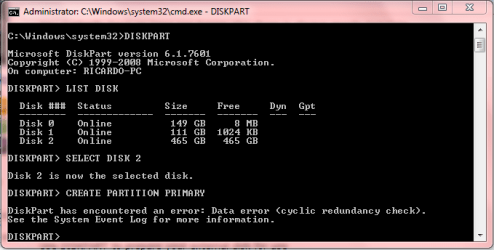
There was an error in the following step:

Capture5.PNG

its the same given before, in the "Disk Management" (post #8)
 

My Computer My Computer

At a glance

MS Windows 7 Ultimate 32-bit SP1AMD Phenom X2 Dual-Core Processor GP-77302,0 GB RAMNVidia GeForce 9800 GT
Computer Manufacturer/Model Number
ASUS desktop computer
OS
MS Windows 7 Ultimate 32-bit SP1
CPU
AMD Phenom X2 Dual-Core Processor GP-7730
Memory
2,0 GB RAM
Graphics Card(s)
NVidia GeForce 9800 GT
Sound Card
High Definition Audio Device
Monitor(s) Displays
SyncMaster 720N/731N
Screen Resolution
1280 x 1024
Hard Drives
MAXTOR S TM3160215AS SCSI Disk Device
Maxtor OneTouch USB Device
Iomega External HD USB Device
Keyboard
standard PS/2 Keyboard
Mouse
standard USB mouse
Very possibly a problem with either the firmware of the external drive or the controller of the external drive.

I suggest contacting the iomega website.
 

My Computer My Computer

At a glance

MS Windows 7 Ultimate SP1 64-bitAMD A10-4600M6.00 GB Dual-Channel DDR3 @ 798MHz (11-11-12-28)AMD Radeon HD 7660G
Computer Manufacturer/Model Number
Toshiba Satellite S875D-S7239 laptop
OS
MS Windows 7 Ultimate SP1 64-bit
CPU
AMD A10-4600M
Motherboard
AMD Pumori (Socket FT1)
Memory
6.00 GB Dual-Channel DDR3 @ 798MHz (11-11-12-28)
Graphics Card(s)
AMD Radeon HD 7660G
Sound Card
High Definition Audio Device
Monitor(s) Displays
Generic PnP Monitor (1600x900@60Hz)
Screen Resolution
1600x900@60Hz
Hard Drives
SSD 119GB Corsair CSSD-V128GB2 ATA Device
Keyboard
Standard PS/2 Keyboard
Mouse
HP Wireless Optical Mobile Mouse Model FHA-3410
Internet Speed
What the local pub, local coffee shop offers.
Other Info
Optical Drive:MATSHITA BD-CMB UJ160B ATA Device


Also have an Asus ha1002xp netbook with Win 7 Ultimate installed.
You might want to use Speccy or SIW to get yourself a little more info about that iomega drive other than being an external drive. I suspect they will be interested in a model number and possibly a serial number.

karl
 

My Computer My Computer

At a glance

MS Windows 7 Ultimate SP1 64-bitAMD A10-4600M6.00 GB Dual-Channel DDR3 @ 798MHz (11-11-12-28)AMD Radeon HD 7660G
Computer Manufacturer/Model Number
Toshiba Satellite S875D-S7239 laptop
OS
MS Windows 7 Ultimate SP1 64-bit
CPU
AMD A10-4600M
Motherboard
AMD Pumori (Socket FT1)
Memory
6.00 GB Dual-Channel DDR3 @ 798MHz (11-11-12-28)
Graphics Card(s)
AMD Radeon HD 7660G
Sound Card
High Definition Audio Device
Monitor(s) Displays
Generic PnP Monitor (1600x900@60Hz)
Screen Resolution
1600x900@60Hz
Hard Drives
SSD 119GB Corsair CSSD-V128GB2 ATA Device
Keyboard
Standard PS/2 Keyboard
Mouse
HP Wireless Optical Mobile Mouse Model FHA-3410
Internet Speed
What the local pub, local coffee shop offers.
Other Info
Optical Drive:MATSHITA BD-CMB UJ160B ATA Device


Also have an Asus ha1002xp netbook with Win 7 Ultimate installed.
No luck... the problem presists. I think I will give it to repair and ask for a budget. If it is not worth it then I will just get another Externel HD. Still, 5 years was a good run for an Iomega HD. I only have to thank you for your time trying to solve my problem karlsnooks.

Thanks for your time ;)

Should I Mark this thread as solved?
 

My Computer My Computer

At a glance

MS Windows 7 Ultimate 32-bit SP1AMD Phenom X2 Dual-Core Processor GP-77302,0 GB RAMNVidia GeForce 9800 GT
Computer Manufacturer/Model Number
ASUS desktop computer
OS
MS Windows 7 Ultimate 32-bit SP1
CPU
AMD Phenom X2 Dual-Core Processor GP-7730
Memory
2,0 GB RAM
Graphics Card(s)
NVidia GeForce 9800 GT
Sound Card
High Definition Audio Device
Monitor(s) Displays
SyncMaster 720N/731N
Screen Resolution
1280 x 1024
Hard Drives
MAXTOR S TM3160215AS SCSI Disk Device
Maxtor OneTouch USB Device
Iomega External HD USB Device
Keyboard
standard PS/2 Keyboard
Mouse
standard USB mouse
Yes.
 

My Computer My Computer

At a glance

MS Windows 7 Ultimate SP1 64-bitAMD A10-4600M6.00 GB Dual-Channel DDR3 @ 798MHz (11-11-12-28)AMD Radeon HD 7660G
Computer Manufacturer/Model Number
Toshiba Satellite S875D-S7239 laptop
OS
MS Windows 7 Ultimate SP1 64-bit
CPU
AMD A10-4600M
Motherboard
AMD Pumori (Socket FT1)
Memory
6.00 GB Dual-Channel DDR3 @ 798MHz (11-11-12-28)
Graphics Card(s)
AMD Radeon HD 7660G
Sound Card
High Definition Audio Device
Monitor(s) Displays
Generic PnP Monitor (1600x900@60Hz)
Screen Resolution
1600x900@60Hz
Hard Drives
SSD 119GB Corsair CSSD-V128GB2 ATA Device
Keyboard
Standard PS/2 Keyboard
Mouse
HP Wireless Optical Mobile Mouse Model FHA-3410
Internet Speed
What the local pub, local coffee shop offers.
Other Info
Optical Drive:MATSHITA BD-CMB UJ160B ATA Device


Also have an Asus ha1002xp netbook with Win 7 Ultimate installed.
Back
Top