
Is anyone still using Windows 7?

Sourceforge (32-bit, 64-bit, installable and portable versions)

(I prefer using the portable versions whenever available, which means I can copy the app's folder to a USB stick when traveling and have all my browser customizations with me on any computer I may use or borrow.)

Aloha !
Thanks, I installed it yesterday & really like it but still need to figure out how to get the list pages to appear when using search.
Can't find it yet in the settings & I hope it can be done. Screenshot shows what I'm trying to get. (Eg from Edge browser.)
Suggestions anyone ?
Thanks !
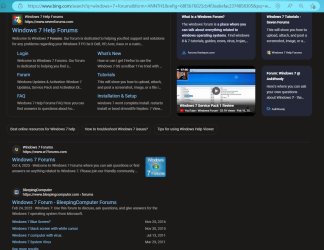
Bing Search.JPG
 

My Computer My Computer

Computer type
PC/Desktop
Computer Manufacturer/Model Number
HP Pavilion / P6670T
OS
Windows 7 Home Premium 64 bit
CPU
Intel Core i3
Motherboard
HP
Memory
4 GB
Graphics Card(s)
Intel HD Graphics
Sound Card
Realtek HD Audio
Monitor(s) Displays
HP M22f
Screen Resolution
1920 x 1080
Hard Drives
Hitachi
Case
Mid
Keyboard
Microsoft 600
Mouse
Microsoft 3500 Cyan Blue, Logitech M325, Blue
Internet Speed
Fast enough !!
Antivirus
MSE
Browser
IE 11, MS Edge
Other Info
TV Tuner w/Windows Media Center
External Speakers: Creative Labs T40 Series II
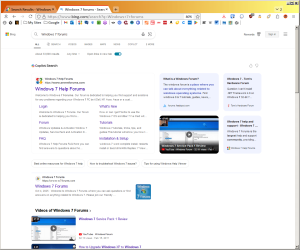
still need to figure out how to get the list pages to appear when using search.
Can't find it yet in the settings & I hope it can be done. Screenshot shows what I'm trying to get. (Eg from Edge browser.)

View attachment 425155


I don't understand what you mean by "list pages" . . . here's what I see when using your Bing Search example on R3dfox 139. What's different?

Image1.png
 

My Computer My Computer

Computer type
PC/Desktop
Computer Manufacturer/Model Number
Dell Optiplex 7050
OS
Windows 7/8.1/10 multiboot
CPU
Intel Core i7-7700
Motherboard
Dell, Intel Q270 chipset
Memory
48GB (2x16GB Crucial DDR4-3200 + 2x8GB Hynix DDR4-2400)
Graphics Card(s)
Intel HD630 + AMD Radeon R7 450 PCIe
Monitor(s) Displays
Asus VC279 (27")
Screen Resolution
1920x1080
Hard Drives
Toshiba M.2 NVMe (256GB),
Samsung 960 Evo (500GB),
WD Red Plus 80EFBX (8TB)
I'm not getting lists of websites in search. Just pictures & suggestions to click on. My screenshot is an example from ms edge browser & I can't get that in R3dfox.
Yours looks fine. What did you do in settings ?

Thanks
 

My Computer My Computer

Computer type
PC/Desktop
Computer Manufacturer/Model Number
HP Pavilion / P6670T
OS
Windows 7 Home Premium 64 bit
CPU
Intel Core i3
Motherboard
HP
Memory
4 GB
Graphics Card(s)
Intel HD Graphics
Sound Card
Realtek HD Audio
Monitor(s) Displays
HP M22f
Screen Resolution
1920 x 1080
Hard Drives
Hitachi
Case
Mid
Keyboard
Microsoft 600
Mouse
Microsoft 3500 Cyan Blue, Logitech M325, Blue
Internet Speed
Fast enough !!
Antivirus
MSE
Browser
IE 11, MS Edge
Other Info
TV Tuner w/Windows Media Center
External Speakers: Creative Labs T40 Series II
You've posted an Edge screenshot (of what you want) but not a R3dfox screenshot, so I don't know what you're seeing that you don't like.

Are both using the same search engine? Is either browser logged into a user profile associated with the search engine (i.e., logged into a Google acct during a Google search, or logged into a MS acct during a Bing search)?

I wonder if you're getting some kind of AI search instead of a traditional search . . . but I don't know why that would happen because I don't see any AI options in R3dfox Settings.
 

My Computer My Computer

Computer type
PC/Desktop
Computer Manufacturer/Model Number
Dell Optiplex 7050
OS
Windows 7/8.1/10 multiboot
CPU
Intel Core i7-7700
Motherboard
Dell, Intel Q270 chipset
Memory
48GB (2x16GB Crucial DDR4-3200 + 2x8GB Hynix DDR4-2400)
Graphics Card(s)
Intel HD630 + AMD Radeon R7 450 PCIe
Monitor(s) Displays
Asus VC279 (27")
Screen Resolution
1920x1080
Hard Drives
Toshiba M.2 NVMe (256GB),
Samsung 960 Evo (500GB),
WD Red Plus 80EFBX (8TB)
MS Edge uses Bing by default unless you manually change the search engine. R3DFOX uses Google by default.
 

My Computer My Computer

Computer type
PC/Desktop
Computer Manufacturer/Model Number
custom
OS
Windows 7 Ultimate 64-bit (now 11 24H2)
CPU
Intel Core-i3 3770 3.5GHz
Motherboard
Asus P8H61
Memory
16GB DDR3 1600Mhz
Graphics Card(s)
nVidia Geforce RTX 3050
Sound Card
Realtek HD audio
Monitor(s) Displays
Sony 19" LCD TV via VGA
Screen Resolution
1440x900
Hard Drives
WD 1TB SATA III SSD
PSU
unknown
Case
unknown
Cooling
Intel's provided with CPU
Antivirus
Windows Defender (Windows 11)
Browser
Microsoft Edge
Other Info
Previously Windows 7 Ultimate, now Windows 11 24H2
You've posted an Edge screenshot (of what you want) but not a R3dfox screenshot, so I don't know what you're seeing that you don't like.

Are both using the same search engine? Is either browser logged into a user profile associated with the search engine (i.e., logged into a Google acct during a Google search, or logged into a MS acct during a Bing search)?

I wonder if you're getting some kind of AI search instead of a traditional search . . . but I don't know why that would happen because I don't see any AI options in R3dfox Settings.

Here's the results using Bing or Google (No log ons) in R3dfox. Practically blank ! Just tried DuckDuckGo & it's fine but prefer Bing or Google.
I'm thinking it's something in settings or wrong version of
R3dfox.
2nd
screenshot is page scrolled down.

Firefox II Screen Shot.JPGFirefox II Screen Shot II.JPG

Blue Ques..gif


My Computer My Computer

Computer type
PC/Desktop
Computer Manufacturer/Model Number
HP Pavilion / P6670T
OS
Windows 7 Home Premium 64 bit
CPU
Intel Core i3
Motherboard
HP
Memory
4 GB
Graphics Card(s)
Intel HD Graphics
Sound Card
Realtek HD Audio
Monitor(s) Displays
HP M22f
Screen Resolution
1920 x 1080
Hard Drives
Hitachi
Case
Mid
Keyboard
Microsoft 600
Mouse
Microsoft 3500 Cyan Blue, Logitech M325, Blue
Internet Speed
Fast enough !!
Antivirus
MSE
Browser
IE 11, MS Edge
Other Info
TV Tuner w/Windows Media Center
External Speakers: Creative Labs T40 Series II
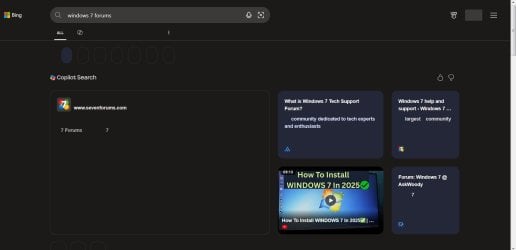
Thanks for the screenshot; that helps to see what it is you're talking about.

It sort of appears like it may have something to do with DNS or an overactive AV program, but the fact other browsers don't exhibit the same behavior suggests that's not the cause. It must be something in your copy of R3dfox or its configuration.

Most options in the browser's Settings don't seem relevant to this issue except for the "Privacy and Security" section, so let's start there.

In my R3dfox, I'm using:
  • Enhanced Tracking Protection: Standard
  • Cookie Banner Blocker/Automatically refuse cookie banners: yes
  • Deceptive Content and Dangerous Software Protection/Block dangerous and deceptive content: yes
  • HTTPS-Only Mode: Don’t enable HTTPS-Only Mode
  • DNS over HTTPS: Off
  • Enable DNS over HTTPS using: Standard Protection
Which R3dfox are you using? 32 or 64-bit? Installed or portable?
 

My Computer My Computer

Computer type
PC/Desktop
Computer Manufacturer/Model Number
Dell Optiplex 7050
OS
Windows 7/8.1/10 multiboot
CPU
Intel Core i7-7700
Motherboard
Dell, Intel Q270 chipset
Memory
48GB (2x16GB Crucial DDR4-3200 + 2x8GB Hynix DDR4-2400)
Graphics Card(s)
Intel HD630 + AMD Radeon R7 450 PCIe
Monitor(s) Displays
Asus VC279 (27")
Screen Resolution
1920x1080
Hard Drives
Toshiba M.2 NVMe (256GB),
Samsung 960 Evo (500GB),
WD Red Plus 80EFBX (8TB)
I use the 32-bit version with the default settings. An easy workaround is to add Bing and Google in the bookmarks bar and click on each to search.
 

My Computer My Computer

Computer type
PC/Desktop
Computer Manufacturer/Model Number
custom
OS
Windows 7 Ultimate 64-bit (now 11 24H2)
CPU
Intel Core-i3 3770 3.5GHz
Motherboard
Asus P8H61
Memory
16GB DDR3 1600Mhz
Graphics Card(s)
nVidia Geforce RTX 3050
Sound Card
Realtek HD audio
Monitor(s) Displays
Sony 19" LCD TV via VGA
Screen Resolution
1440x900
Hard Drives
WD 1TB SATA III SSD
PSU
unknown
Case
unknown
Cooling
Intel's provided with CPU
Antivirus
Windows Defender (Windows 11)
Browser
Microsoft Edge
Other Info
Previously Windows 7 Ultimate, now Windows 11 24H2
Ran into another problem. Can't sign in to websites (Can't type).
I currently have version 140.0.4- 1
Gonna uninstall it & download it from another website.
Thanks for your help guys.

I've had it !! Pissed-Off Cusser.gifPissed Off.gif
 

My Computer My Computer

Computer type
PC/Desktop
Computer Manufacturer/Model Number
HP Pavilion / P6670T
OS
Windows 7 Home Premium 64 bit
CPU
Intel Core i3
Motherboard
HP
Memory
4 GB
Graphics Card(s)
Intel HD Graphics
Sound Card
Realtek HD Audio
Monitor(s) Displays
HP M22f
Screen Resolution
1920 x 1080
Hard Drives
Hitachi
Case
Mid
Keyboard
Microsoft 600
Mouse
Microsoft 3500 Cyan Blue, Logitech M325, Blue
Internet Speed
Fast enough !!
Antivirus
MSE
Browser
IE 11, MS Edge
Other Info
TV Tuner w/Windows Media Center
External Speakers: Creative Labs T40 Series II

How'd this thread morph into "what browser do I use?". :sarc:
 

My Computer My Computer

Computer type
Laptop
Computer Manufacturer/Model Number
Dell Latitude E6540 Laptop
OS
Windows 7 Professional 64bit
CPU
Intel Core i7 4600M @ 2.90GHz
Motherboard
Dell Inc. 0CYT5F (SOCKET 0)
Memory
16.0GB Dual-Channel DDR3 @ 797MHz (11-11-11-28)
Graphics Card(s)
Intel HD Graphics 4600 (Dell) 2048MB ATI AMD Radeon HD 8790M
Sound Card
Realtek High Definition Audio
Monitor(s) Displays
HP ZR30w (2560x1600@60Hz)
Hard Drives
256GB LITEONIT LMT-256M6M-41 mm SATA (SSD)
1TB Samsung SSD 860 EVO mSATA SATA (SSD)
2TB USB 3.0 USB Device
115GB SanDisk Ultra Fit USB
Other Info
Multiple Dell E-Port Plus II Port Replicator/Docking Stations 0Y72NH USB 3.0 + 130W AC Adapters
Thanks for the screenshot; that helps to see what it is you're talking about.

It sort of appears like it may have something to do with DNS or an overactive AV program, but the fact other browsers don't exhibit the same behavior suggests that's not the cause. It must be something in your copy of R3dfox or its configuration.

Most options in the browser's Settings don't seem relevant to this issue except for the "Privacy and Security" section, so let's start there.

In my R3dfox, I'm using:
  • Enhanced Tracking Protection: Standard
  • Cookie Banner Blocker/Automatically refuse cookie banners: yes
  • Deceptive Content and Dangerous Software Protection/Block dangerous and deceptive content: yes
  • HTTPS-Only Mode: Don’t enable HTTPS-Only Mode
  • DNS over HTTPS: Off
  • Enable DNS over HTTPS using: Standard Protection
Which R3dfox are you using? 32 or 64-bit? Installed or portable?

Using 64 bit installed. Tried your settings w/no results. Tried uninstalling & reinstalling from a different site w/no results.
Weird, huh ?!
 

My Computer My Computer

Computer type
PC/Desktop
Computer Manufacturer/Model Number
HP Pavilion / P6670T
OS
Windows 7 Home Premium 64 bit
CPU
Intel Core i3
Motherboard
HP
Memory
4 GB
Graphics Card(s)
Intel HD Graphics
Sound Card
Realtek HD Audio
Monitor(s) Displays
HP M22f
Screen Resolution
1920 x 1080
Hard Drives
Hitachi
Case
Mid
Keyboard
Microsoft 600
Mouse
Microsoft 3500 Cyan Blue, Logitech M325, Blue
Internet Speed
Fast enough !!
Antivirus
MSE
Browser
IE 11, MS Edge
Other Info
TV Tuner w/Windows Media Center
External Speakers: Creative Labs T40 Series II
Try the 32-bit version instead, just in case.
 

My Computer My Computer

Computer type
PC/Desktop
Computer Manufacturer/Model Number
custom
OS
Windows 7 Ultimate 64-bit (now 11 24H2)
CPU
Intel Core-i3 3770 3.5GHz
Motherboard
Asus P8H61
Memory
16GB DDR3 1600Mhz
Graphics Card(s)
nVidia Geforce RTX 3050
Sound Card
Realtek HD audio
Monitor(s) Displays
Sony 19" LCD TV via VGA
Screen Resolution
1440x900
Hard Drives
WD 1TB SATA III SSD
PSU
unknown
Case
unknown
Cooling
Intel's provided with CPU
Antivirus
Windows Defender (Windows 11)
Browser
Microsoft Edge
Other Info
Previously Windows 7 Ultimate, now Windows 11 24H2
Using 64 bit installed. Tried your settings w/no results. Tried uninstalling & reinstalling from a different site w/no results.
Weird, huh ?!

I'm not a fan of uninstalling/reinstalling as a matter of routine, unless you're solving a known problem. For just exploring or troubleshooting, I prefer to use the portable, no-install editions because they leave no detritus on your system when removed; you just delete the extracted folder. For instance, you can download and extract the portable 64-bit version of 140, and then delete the folder and try portable 32-bit 140, and then portable 32-bit 139, 64-bit 138, etc., all without leaving any traces or wrestling with any uninstall rigamarole.

If you have any AV installed, I'd also try disabling that during troubleshooting. And just to make sure the problem isn't one of black text on a black background, I'd switch out of dark mode, at least temporarily during troubleshooting.

And if you're testing with portable versions, you can safely do comparison tests on other computers without permanently altering those devices, just to see if you can confirm whether it's just your computer.
 

My Computer My Computer

Computer type
PC/Desktop
Computer Manufacturer/Model Number
Dell Optiplex 7050
OS
Windows 7/8.1/10 multiboot
CPU
Intel Core i7-7700
Motherboard
Dell, Intel Q270 chipset
Memory
48GB (2x16GB Crucial DDR4-3200 + 2x8GB Hynix DDR4-2400)
Graphics Card(s)
Intel HD630 + AMD Radeon R7 450 PCIe
Monitor(s) Displays
Asus VC279 (27")
Screen Resolution
1920x1080
Hard Drives
Toshiba M.2 NVMe (256GB),
Samsung 960 Evo (500GB),
WD Red Plus 80EFBX (8TB)
I'm not a fan of uninstalling/reinstalling as a matter of routine, unless you're solving a known problem. For just exploring or troubleshooting, I prefer to use the portable, no-install editions because they leave no detritus on your system when removed; you just delete the extracted folder. For instance, you can download and extract the portable 64-bit version of 140, and then delete the folder and try portable 32-bit 140, and then portable 32-bit 139, 64-bit 138, etc., all without leaving any traces or wrestling with any uninstall rigamarole.

If you have any AV installed, I'd also try disabling that during troubleshooting. And just to make sure the problem isn't one of black text on a black background, I'd switch out of dark mode, at least temporarily during troubleshooting.

And if you're testing with portable versions, you can safely do comparison tests on other computers without permanently altering those devices, just to see if you can confirm whether it's just your computer.

I understand what you're saying & I'm not a fan of uninstalling/reinstalling either. I use Revo & it seems to work great along with getting rid of the rubbish. I've had it out of dk mode w/same results. I may try the 32 bit ?
 

My Computer My Computer

Computer type
PC/Desktop
Computer Manufacturer/Model Number
HP Pavilion / P6670T
OS
Windows 7 Home Premium 64 bit
CPU
Intel Core i3
Motherboard
HP
Memory
4 GB
Graphics Card(s)
Intel HD Graphics
Sound Card
Realtek HD Audio
Monitor(s) Displays
HP M22f
Screen Resolution
1920 x 1080
Hard Drives
Hitachi
Case
Mid
Keyboard
Microsoft 600
Mouse
Microsoft 3500 Cyan Blue, Logitech M325, Blue
Internet Speed
Fast enough !!
Antivirus
MSE
Browser
IE 11, MS Edge
Other Info
TV Tuner w/Windows Media Center
External Speakers: Creative Labs T40 Series II
Yes, you have nothing to lose. I would try the 32-bit version.
 

My Computer My Computer

Computer type
PC/Desktop
Computer Manufacturer/Model Number
custom
OS
Windows 7 Ultimate 64-bit (now 11 24H2)
CPU
Intel Core-i3 3770 3.5GHz
Motherboard
Asus P8H61
Memory
16GB DDR3 1600Mhz
Graphics Card(s)
nVidia Geforce RTX 3050
Sound Card
Realtek HD audio
Monitor(s) Displays
Sony 19" LCD TV via VGA
Screen Resolution
1440x900
Hard Drives
WD 1TB SATA III SSD
PSU
unknown
Case
unknown
Cooling
Intel's provided with CPU
Antivirus
Windows Defender (Windows 11)
Browser
Microsoft Edge
Other Info
Previously Windows 7 Ultimate, now Windows 11 24H2
I installed Windows 10 pro on a second hard drive for internet browsing and office. I got an OEM key for cheap on Walmart. I was able to set up ESU for free and I installed AtlasOS for privacy and improvement optimizations. It removed Edge (a big bonus) as well as the CEIP settings (which I hope means that it's disabled). I also install open shell which restored the functionality of Windows 7 start menu (although not entirely the look). I'm happy with this although I don't like how windows 10 installs all the updates without giving the user the option to ignore some. For example I installed Office 2007 except for a few unneeded components like Outlook yet it still installed updates for those components like the outlook updates and junk filters. I guess it doesn't realize (or care) that if I don't have outlook installed then I don't need those updates. Atlas OS blocked Microsoft accounts so you might want to enable ESU first.

I still have 7 installed and I use that every day.
 
Last edited:

My Computers My Computers

System One System Two

2026 is here and still working on Windows 7 computers. We have Microsoft Security Essentials installed and I noticed that it cannot always update spyware definitions database automatically. No worries, just manually download the latest definitions update from Microsoft and install it. Wait several minute for the update to complete and you will be updated and protected.

Latest security intelligence updates for Microsoft Defender Antivirus and other Microsoft antimalware - Microsoft Security Intelligence
 

My Computer My Computer

Computer type
PC/Desktop
Computer Manufacturer/Model Number
custom
OS
Windows 7 Ultimate 64-bit (now 11 24H2)
CPU
Intel Core-i3 3770 3.5GHz
Motherboard
Asus P8H61
Memory
16GB DDR3 1600Mhz
Graphics Card(s)
nVidia Geforce RTX 3050
Sound Card
Realtek HD audio
Monitor(s) Displays
Sony 19" LCD TV via VGA
Screen Resolution
1440x900
Hard Drives
WD 1TB SATA III SSD
PSU
unknown
Case
unknown
Cooling
Intel's provided with CPU
Antivirus
Windows Defender (Windows 11)
Browser
Microsoft Edge
Other Info
Previously Windows 7 Ultimate, now Windows 11 24H2
All the time. My Windows 10 PC is for the companies that don't think Windows 7 customers are worth their time: Cricut, Brother, Husqvarna, etc...
 

My Computers My Computers

System One System Two

  • Computer type
    PC/Desktop
    Computer Manufacturer/Model Number
    Me
    OS
    Windows 7 Professional 64
    CPU
    AMD Phenom II X4 840 3.2GHz
    Motherboard
    MSI 970A-G43 Plus
    Memory
    Ballistix Sport 16GB (2 x 8GB) DDR3 1600
    Graphics Card(s)
    NVIDIA GeForce GT 610
    Hard Drives
    ST2000DM 008-2FR102 SATA Disk Device
  • Computer type
    PC/Desktop
    System Manufacturer/Model Number
    Dell Optiplex 3020
    OS
    Windows 10
    CPU
    i5-4590
    Motherboard
    0WMJ54
    Memory
    8GB DDR3
    Graphics Card(s)
    Intel HD 4600
    Monitor(s) Displays
    Samsung
    Hard Drives
    WD5000AAKX ATA Device
I didn't have the chance to try it, but I have read about running Windows 7 64-bit on modern hardware (that supports only Windows 10/11) by forcing some Windows 10/11 drivers in Windows 7 64-bit. If you can extract the driver files in a folder and have access to the .inf file, you can try to manually force a specific driver in Windows 7 64-bit from Device Manager. I don't expect success for all devices, but I would like to have the time to try it. For the time being I have no "modern" PC. My main PC is a good old 3rd generation Core-i7 which can run Windows 7 64-bit without forcing any drivers. Bypassing compatibility check I managed to run Windows 11 25H2 so I can stay "modern" as long as I like or when Microsoft devises a new artificial hardware requirement to cut off my CPU. Even then I will stick with the latest compatible Windows 11 version. Sorry, turning back to Windows 7 would mean a lot of compatibility restraints, let alone all the trouble to install everything from start.
 

My Computer My Computer

Computer type
PC/Desktop
Computer Manufacturer/Model Number
custom
OS
Windows 7 Ultimate 64-bit (now 11 24H2)
CPU
Intel Core-i3 3770 3.5GHz
Motherboard
Asus P8H61
Memory
16GB DDR3 1600Mhz
Graphics Card(s)
nVidia Geforce RTX 3050
Sound Card
Realtek HD audio
Monitor(s) Displays
Sony 19" LCD TV via VGA
Screen Resolution
1440x900
Hard Drives
WD 1TB SATA III SSD
PSU
unknown
Case
unknown
Cooling
Intel's provided with CPU
Antivirus
Windows Defender (Windows 11)
Browser
Microsoft Edge
Other Info
Previously Windows 7 Ultimate, now Windows 11 24H2
Yes for a dedicated automotive diagnostics tool

Two HP Elitebook 8440p laptops new win 7 Pro install fully activated Oct.2025

Now functioning as intended. But it has not been easy.Getting all the drivers for the HP laptops, has been difficult. Getting Net framework 4.5.2 was also a bear.
Lastly fighting with the driver signing, for my ALDL to USB cable . Having to use the F8 key to disable the driver enforcement is a pain.
 

My Computer My Computer

Computer type
PC/Desktop
Computer Manufacturer/Model Number
custom
OS
windows 7 pro 64bit
CPU
intel 7
Motherboard
ASUS Z97-A
Memory
8 gig Skill ddr3 2133
Graphics Card(s)
intel integrated
Hard Drives
1 tb ssd 6gbps
Antivirus
none
Browser
Firefox
Back
Top