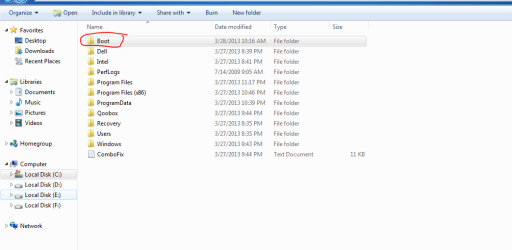
is c/boot directory needed? may delete it?

quiclslvr

Banned
Local time
2:47 AM
Messages
42
when i have installed windows 7 ultimate then i didnt had this folder . but this time i am getting this boot folder,,,,is it required folder or not? why this is seen this time and not previous installtion of win7? may i delete this ? is there any wrong going if i delete this? please help me
pic is here
 

Attachments

  • boot.PNG
    boot.PNG
    18.6 KB · Views: 28

My Computer

OS
win 7
Rename it and run for awhile and see what happens. If not problem delete it. If problem, put it back.
 

My Computer

Computer type
PC/Desktop
Computer Manufacturer/Model Number
Lenovo IdeaCenter 450
OS
Windows 10 Pro X64
CPU
Intel Quad Core i7-4770 @ 3.4Ghz
Memory
16.0GB PC3-12800 DDR3 SDRAM 1600 MHz
Graphics Card(s)
Intel Integrated HD Graphics
Sound Card
Realtek HD Audio
Monitor(s) Displays
HP 22" LCD
Screen Resolution
1680 x 1050
Hard Drives
250GB Samsung EVO SATA-3 SSD
2TB Seagate ST2000DM001 SATA-2
1.5TB Seagate ST3150041AS SATA
Keyboard
Dell USB
Mouse
Lenovo USB
Internet Speed
Cable via Road Runner 3MB Upload, 30MB Download
Antivirus
Windows Defender, MBAM Pro, MBAE
Browser
Seamonkey
Other Info
UEFI/GPT
PLDS DVD-RW DH16AERSH
Rename it and run for awhile and see what happens. If not problem delete it. If problem, put it back.
how to know is it performing well or not after the renaming....what it i leave it as it is
 

My Computer

OS
win 7
Does your system have the System Reserved partition? If not, the Boot folder contains the boot records needed to boot your system.

What is inside the folder?
 

My Computer

Computer type
PC/Desktop
Computer Manufacturer/Model Number
Custom Built
OS
Windows 10 Pro x64, Windows 8.1 Pro x64, Windows 7 Ultimate x64 SP1,
CPU
INTEL i9-7920X LGA 2066
Motherboard
Gigabyte X299-WU8 F3
Memory
64 GB (4 X 16 GB) G-Skill V Series DDR4 3200 Quad Channel
Graphics Card(s)
EVGA GTX 1060 SC 3 GB
Sound Card
Realtek Onboard ALC1220
Monitor(s) Displays
2 x Samsung S27E310
Screen Resolution
1920x1080
Hard Drives
Samsung 2 x 970 EVO Plus 500 GB NVMe
1 x 6TB WD 6003FZBX SATA
1 x 6TB WD 60EFRX SATA
12 x 3TB WD 30EFRX SATA
PSU
Seasonic X-1050
Case
Thermaltake Armor+
Cooling
Corsair H80i V2 Liquid AOI Cooler
Keyboard
Logitech G510s
Mouse
Logitech MX Master 2S
Internet Speed
200 Mb/s
Antivirus
ESET NOD32 13.1
Browser
EDGE (Dev, Canary, Beta), Chrome
Other Info
ASUS RT-AC68U router
Malwarebytes 4.0.4
+1 - if you force the system to not create the additional 100MB partition during setup, and instead install everything into one main partition on the volume, you will get this folder (which contains the boot configuration database and other things needed to boot the OS).
 

My Computer

Computer type
PC/Desktop
Computer Manufacturer/Model Number
Custom
OS
Windows 10 Pro x64
CPU
Intel Core i7 4790K @ 4.5GHz
Motherboard
Asus Maximus Hero VII
Memory
32GB DDR3
Graphics Card(s)
Nvidia GeForce GTX970
Sound Card
Realtek HD Audio
Screen Resolution
1920x1200
Hard Drives
1x Samsung 250GB SSD
4x WD RE 2TB (RAIDZ)
PSU
Corsair AX760i
Case
Fractal Design Define R4
Cooling
Noctua NH-D15
That folder contains your boot files that allows Windows to boot. If you have a System Reserved partition, this might not be needed. I can see that your Boot folder is NOT hidden. It's normally a hidden folder. So this might not be the actual boot folder that boots your system.

Go to disk management and check if there's a system reserved partition before C drive and if it's marked as "Boot" or not.
 
Do you have Macrium Reflect installed?
 

My Computer

Computer type
PC/Desktop
OS
Windows 7 Home Premium 64bit
Back
Top