Is csrss.exe a trojan?

My Computer

Computer type
Laptop
Computer Manufacturer/Model Number
Employer provided Dell Latitude
OS
W7 Pro SP1 64bit
CPU
i7
Memory
8GB
Graphics Card(s)
Intel HD Graphics
Hard Drives
crappy SSD
Antivirus
Employer mandated Symantec Endpoint Protection
Browser
Pale Moon 64bit, IE11 64bit & Chrome 64bit
I am also having this issue, however i cannot post the req info via this thread as its too big.
 

My Computer

Computer Manufacturer/Model Number
Self
OS
windows 7 professional x64
CPU
I7 860 [email protected]
Motherboard
MSI p67
Memory
Corsair Extreme < 4x2 gig Sticks >
Graphics Card(s)
Nvidea GTX-860 oc - MSI Extreme OC
Sound Card
Xonar DX2
Monitor(s) Displays
1. Visio 47", 2. Ferarri 22"
Hard Drives
150 Gig Raptor 10k
300 Gig Raptor 10k
500 Seagate barracuda 7.5k
PSU
Coolmaster x850 Extreme
Case
Coolmaster HAF-15
Cooling
Corsair x50 Liquid
Welcome to the forum.

What issue are you having?
The fact that the process is running is not an issue.
 

My Computer

Computer type
PC/Desktop
Computer Manufacturer/Model Number
HP
OS
Windows 7 Pro 64 bit
CPU
Xeon W3520
Memory
8 GB
Graphics Card(s)
Nvidia Geforce 210
I have this issue also

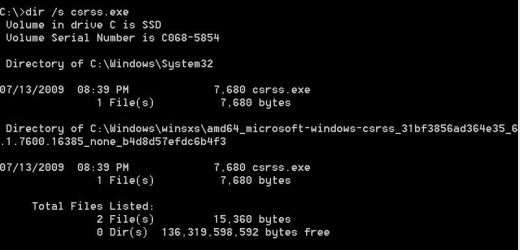
I have the file csrss.exe active. Unlike the others on the list, right-clicking and trying to open the location doesn't work. My scan for the file location showed this result:

csrss.jpg

Your thoughts?
 

My Computer

Computer type
PC/Desktop
OS
Win 7 Pro (64)
Hi jmrathbun, welcome to 7F! :)

The first location looks okay, but the second in the winsxs folder does not.
When I searched for the class ID attached to the second csrss file: 31bf3856ad364e35_6.1.7600.16385_none_b4d8d57efdc6b4f3 I had one hit and it was a user looking for malware removal help. This doesn't necessarily mean your machine has malware, but,

Do you notice any recent peculiarities with your machine?

  • Slowness,

  • Browser redirects,

  • Unusual web activity even when no one is using your machine and it's asleep (watch your router lights),

  • HDD thrashing.

I would start several cleaning processes with these and the freeware versions are okay to use:


If after running these and your CMD search still turns up that second csrss in winsxs I would seriously consider starting a new separate thread here in the System Security Forum.
 

My Computer

Computer type
PC/Desktop
Computer Manufacturer/Model Number
Gateway DX4831-01e (Mid-Tower Desktop)
OS
Originally Win 7 Hm Prem x64 Ver 6.1.7600 Build 7601-SP1 | Upgraded to Windows 10 December 14, 2019
CPU
Intel i3 530 2.93GHz, 2933MHz 2 Cores 4 Logical Processors
Motherboard
Gateway H57M01 133 megahertz
Memory
6GB of 1,333MHz DDR3 SDRAM
Graphics Card(s)
32MB Intel Graphics Media Accelerator HD IGChip
Sound Card
Realtek High Definition Audio
Monitor(s) Displays
Gateway HX2000 20inch TFT active matrix TN
Screen Resolution
1600 x 900 x 59 hertz
Hard Drives
WDC WD10EADS-00M2B0 [HDD] (1000.20 GB) -- drive 0,
HL-DT-ST DVDRAM GH41N [CD-ROM dr]
Four card readers, and Four USB 2.0
PSU
300watts.
Case
Mid-Tower Desktop
Cooling
Stock from Gateway
Keyboard
Natural Ergonomic Keyboard 4000, see Other Info
Mouse
Orig. Gateway wore out now using Insignia USB wired optical
Internet Speed
Vz FIOS 10ms png 57.64Mbps down 65.53Mbps up Speedtest.org
Antivirus
Zamana Anti-logger with Anti-malware, MSE, Windows Firewall,
Browser
IE11.0.9600.19399-Upd ver11.0.135, Firefox 68.0.1 x64
Other Info
System Specs by Belarc.

BIOS: American Megatrends Inc. P01-A0 11/17/2009

Replaced the MS 'Natural' Standard PS/2 Enhanced 101-102 Keyboard with a new Natural Ergonomic Keyboard 4000 on August 1st 2014.

Canon Pixma MG3222 Printer.

Updated to IE11 on 12102015 | Fios Quantum Router g1100

Additional AV: SpywareBlaster, manual Mbam, SAS
Thanks for your input!

I got interested when I saw a popup at logon this AM asking if it was OK for a program I didn't recognize to do a disc write. Unfortunately, I wasn't alert enough to write down the program's name, but I wasn't so stupid as to allow it to go to work on my system.

I tried to rename the second copy of CSRSS but it won't let me; it requires permission of 'Trusted Installer'. I don't know who that would be other than me, because I built this machine myself!

Currently I'm running a deep scan with Webroot, since that's already installed. I've noticed a few unexpected behaviors this AM but was attributing that to having run around 150 Windows Updates yesterday.

I wonder if there's a way to edit the Registry to give me access to the second copy of CSRSS?
 

My Computer

Computer type
PC/Desktop
OS
Win 7 Pro (64)
You're welcome.

What you describe could indicate malware (a disk write). Try to get the name if it pops up again..

You could go to the Properties >Security tab of the file csrss in winsxs then click on advance. it might show more info on who/what is the trustedinstaller (TI), malware developers use TI to mask/spoof the real installer.

Have you tried to access the registry key with an elevated registry editor?
Type regedit into the Start Menu Search box, then right click on the first listing regedit.exe under Programs, and click 'run as administrator'

If that doesn't work try this, it may help the registry edit; Go to step #3 under Here's How: To Change the Access Permissions of a Registry Key

Remember to back up the Registry: http://www.sevenforums.com/tutorials/4230-registry-backup-restore.html
 

My Computer

Computer type
PC/Desktop
Computer Manufacturer/Model Number
Gateway DX4831-01e (Mid-Tower Desktop)
OS
Originally Win 7 Hm Prem x64 Ver 6.1.7600 Build 7601-SP1 | Upgraded to Windows 10 December 14, 2019
CPU
Intel i3 530 2.93GHz, 2933MHz 2 Cores 4 Logical Processors
Motherboard
Gateway H57M01 133 megahertz
Memory
6GB of 1,333MHz DDR3 SDRAM
Graphics Card(s)
32MB Intel Graphics Media Accelerator HD IGChip
Sound Card
Realtek High Definition Audio
Monitor(s) Displays
Gateway HX2000 20inch TFT active matrix TN
Screen Resolution
1600 x 900 x 59 hertz
Hard Drives
WDC WD10EADS-00M2B0 [HDD] (1000.20 GB) -- drive 0,
HL-DT-ST DVDRAM GH41N [CD-ROM dr]
Four card readers, and Four USB 2.0
PSU
300watts.
Case
Mid-Tower Desktop
Cooling
Stock from Gateway
Keyboard
Natural Ergonomic Keyboard 4000, see Other Info
Mouse
Orig. Gateway wore out now using Insignia USB wired optical
Internet Speed
Vz FIOS 10ms png 57.64Mbps down 65.53Mbps up Speedtest.org
Antivirus
Zamana Anti-logger with Anti-malware, MSE, Windows Firewall,
Browser
IE11.0.9600.19399-Upd ver11.0.135, Firefox 68.0.1 x64
Other Info
System Specs by Belarc.

BIOS: American Megatrends Inc. P01-A0 11/17/2009

Replaced the MS 'Natural' Standard PS/2 Enhanced 101-102 Keyboard with a new Natural Ergonomic Keyboard 4000 on August 1st 2014.

Canon Pixma MG3222 Printer.

Updated to IE11 on 12102015 | Fios Quantum Router g1100

Additional AV: SpywareBlaster, manual Mbam, SAS
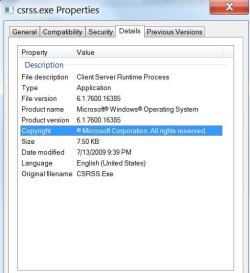
Well, here's what it has to say for itself:
CSRSS Properties.jpg

I'm currently corresponding with Webroot technical support to see if that's possibly part of their library of malware names.
 

My Computer

Computer type
PC/Desktop
OS
Win 7 Pro (64)
Well, it seems an old dog can learn new tricks, and I'm going to have to re-think this csrss thing....

I've been looking around and if one has more than one csrss it's because; You have one for your logged on user and one for all users, that is normal.
"If you have more than one running in task manager for any/each user, there's a good chance you may be infected. If so, post back and we'll discuss how to deal with that. Otherwise it's not only normal but required."

You have one for your logged on user and one for all users, that is normal.
Multiple processes listed more than once is also normal.
svchost is a host process used by many different things. It is not unusual to see many listed running copies of this process.

-steve

Source; The bottom of page two
The trick here is: IF, you have more than one running in task manager for any/each user, then you have a problem.

Then at the top of page six, the second and third posts I found another user in the second post on that page that has the same class ID (CLSID) as you C:\Windows\winsxs\amd64_microsoft-windows-csrss_31bf3856ad364e35_6.1.7600.16385_none_b4d8d57efdc6b4f3.with Stephen Boots reply:

Hi there

I have the following csrss.exe files appear, can you look through them for me please to see if they are fine or not? Not sure how to get a file listing to post here

1) amd64_microsoft-windows-csrss_31bf3856ad364e35_6.1.7600.16385_none_b4d8d57efdc6b4f3_csrss

2) csrss..........System32 (C:\windows)

3) csrss..............C:\Windows\winsxs\amd64_microsoft-windows-csrss_31bf3856ad364e35_6.1.7600.16385_none_b4d8d57efdc6b4f3

4) csrss.exe.mui.....en-US (C:\Windows\System32)

5) csrss.exe.mui.....en-US (C:\Windows\SysWOW64)

6) csrss.exe.mui.....C:\Windows\winsxs\amd64_microsoft-windows-csrss.resources_31bf3856ad364e35_6.1.7600.16385_en-us_3685fcbdfb21a5ac

7) csrss.exe.mui.....C:\Windows\winsxs\x86_microsoft-windows-csrss.resources_31bf3856ad364e35_6.1.7600.16385_en-us_da67613a42c43476

Thanks

Mike


Stephen Boots
MVP Insider Community Moderator Wiki Author MCC: Content Creator MCC: Content Curator Launch expert - Windows 10

All good.

#2 is the one that is installed and running.

All the rest are either inside installers and backup copies.

-steve
So, according to Stephen Boots your screenshot is showing either and inside installer or a backup copy. Look at your screenshot, both are the same size and date.

Bottom line; If you don't have the problems I mentioned in my first reply to you, your two instances of csrss are normal.

Here's something to scare the masses, this is what SystemLookup has found: http://Search | csrss.exe | www.systemlookup.com
 

My Computer

Computer type
PC/Desktop
Computer Manufacturer/Model Number
Gateway DX4831-01e (Mid-Tower Desktop)
OS
Originally Win 7 Hm Prem x64 Ver 6.1.7600 Build 7601-SP1 | Upgraded to Windows 10 December 14, 2019
CPU
Intel i3 530 2.93GHz, 2933MHz 2 Cores 4 Logical Processors
Motherboard
Gateway H57M01 133 megahertz
Memory
6GB of 1,333MHz DDR3 SDRAM
Graphics Card(s)
32MB Intel Graphics Media Accelerator HD IGChip
Sound Card
Realtek High Definition Audio
Monitor(s) Displays
Gateway HX2000 20inch TFT active matrix TN
Screen Resolution
1600 x 900 x 59 hertz
Hard Drives
WDC WD10EADS-00M2B0 [HDD] (1000.20 GB) -- drive 0,
HL-DT-ST DVDRAM GH41N [CD-ROM dr]
Four card readers, and Four USB 2.0
PSU
300watts.
Case
Mid-Tower Desktop
Cooling
Stock from Gateway
Keyboard
Natural Ergonomic Keyboard 4000, see Other Info
Mouse
Orig. Gateway wore out now using Insignia USB wired optical
Internet Speed
Vz FIOS 10ms png 57.64Mbps down 65.53Mbps up Speedtest.org
Antivirus
Zamana Anti-logger with Anti-malware, MSE, Windows Firewall,
Browser
IE11.0.9600.19399-Upd ver11.0.135, Firefox 68.0.1 x64
Other Info
System Specs by Belarc.

BIOS: American Megatrends Inc. P01-A0 11/17/2009

Replaced the MS 'Natural' Standard PS/2 Enhanced 101-102 Keyboard with a new Natural Ergonomic Keyboard 4000 on August 1st 2014.

Canon Pixma MG3222 Printer.

Updated to IE11 on 12102015 | Fios Quantum Router g1100

Additional AV: SpywareBlaster, manual Mbam, SAS
One of my system that has no problems or infections.

For Today Only.PNG
 

My Computer

Computer type
PC/Desktop
Computer Manufacturer/Model Number
Home made Desktop
OS
Windows 10 Pro. 64/ version 1709 Windows 7 Pro/64
CPU
Intel i7-6800K @ 4.3
Motherboard
ASUS X-99 Deluxe II
Memory
Corsair Platinum 16 gig @2400
Graphics Card(s)
EVGA GTX 1070 OC
Monitor(s) Displays
Asus 27" LED LCD/VE278Q
Screen Resolution
1920-1080 or 1280-720 HDMI
Hard Drives
INTEL SSD 730-240 Gb Sata 3.0/
PSU
EVGA Platium 1200W
Case
Phanteks Luxe Tempered Glass 8 fans/ one radiator
Cooling
XSPC/ Water Cooled CPU
Keyboard
Das 4 Professional
Mouse
Logitech M705/MX Anywhere 2-S
Internet Speed
100 mbits
Antivirus
Microsoft Security Essentials/ Malwarebytes Premium 3.0/ SAS
Browser
I.E. 11 default/Firefox/ ISP Time Warner Cable/Spectrum
Other Info
LG BluRay Burner/
Sound system-KLipsch-THX/
Icy Dock ssd Hot Swap bays.
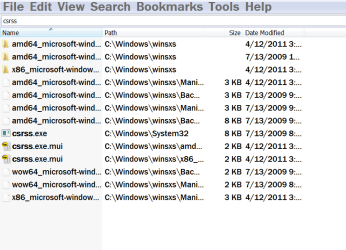
I only have 4:
csrsswinsxs.PNG

The CLSID C:\Windows\winsxs\amd64_microsoft-windows-csrss_31bf3856ad364e35_6.1.7600.16385_none_b4d8d57efdc6b4f3 must have been popular, all the ones of mine are the same as yours jm.
 

My Computer

Computer type
PC/Desktop
Computer Manufacturer/Model Number
Gateway DX4831-01e (Mid-Tower Desktop)
OS
Originally Win 7 Hm Prem x64 Ver 6.1.7600 Build 7601-SP1 | Upgraded to Windows 10 December 14, 2019
CPU
Intel i3 530 2.93GHz, 2933MHz 2 Cores 4 Logical Processors
Motherboard
Gateway H57M01 133 megahertz
Memory
6GB of 1,333MHz DDR3 SDRAM
Graphics Card(s)
32MB Intel Graphics Media Accelerator HD IGChip
Sound Card
Realtek High Definition Audio
Monitor(s) Displays
Gateway HX2000 20inch TFT active matrix TN
Screen Resolution
1600 x 900 x 59 hertz
Hard Drives
WDC WD10EADS-00M2B0 [HDD] (1000.20 GB) -- drive 0,
HL-DT-ST DVDRAM GH41N [CD-ROM dr]
Four card readers, and Four USB 2.0
PSU
300watts.
Case
Mid-Tower Desktop
Cooling
Stock from Gateway
Keyboard
Natural Ergonomic Keyboard 4000, see Other Info
Mouse
Orig. Gateway wore out now using Insignia USB wired optical
Internet Speed
Vz FIOS 10ms png 57.64Mbps down 65.53Mbps up Speedtest.org
Antivirus
Zamana Anti-logger with Anti-malware, MSE, Windows Firewall,
Browser
IE11.0.9600.19399-Upd ver11.0.135, Firefox 68.0.1 x64
Other Info
System Specs by Belarc.

BIOS: American Megatrends Inc. P01-A0 11/17/2009

Replaced the MS 'Natural' Standard PS/2 Enhanced 101-102 Keyboard with a new Natural Ergonomic Keyboard 4000 on August 1st 2014.

Canon Pixma MG3222 Printer.

Updated to IE11 on 12102015 | Fios Quantum Router g1100

Additional AV: SpywareBlaster, manual Mbam, SAS
csrss.exe is a system file that is located in windows\system32 and C:\Windows\winsxs\amd64_microsoft-windows-csrss_31bf3856ad364e35_6.1.7600.16385_none_b4d8d5.
Anywhere else and it's probably infected. Use a csrss.exe removal tool.
Backup first the ones I mentioned above. Also beware when downloading this tool not to download
attempts to push third-party software onto the system. :cool:
 

My Computer

Computer type
Laptop
OS
Windows 7

My Computer

Computer type
PC/Desktop
Computer Manufacturer/Model Number
Home made Desktop
OS
Windows 10 Pro. 64/ version 1709 Windows 7 Pro/64
CPU
Intel i7-6800K @ 4.3
Motherboard
ASUS X-99 Deluxe II
Memory
Corsair Platinum 16 gig @2400
Graphics Card(s)
EVGA GTX 1070 OC
Monitor(s) Displays
Asus 27" LED LCD/VE278Q
Screen Resolution
1920-1080 or 1280-720 HDMI
Hard Drives
INTEL SSD 730-240 Gb Sata 3.0/
PSU
EVGA Platium 1200W
Case
Phanteks Luxe Tempered Glass 8 fans/ one radiator
Cooling
XSPC/ Water Cooled CPU
Keyboard
Das 4 Professional
Mouse
Logitech M705/MX Anywhere 2-S
Internet Speed
100 mbits
Antivirus
Microsoft Security Essentials/ Malwarebytes Premium 3.0/ SAS
Browser
I.E. 11 default/Firefox/ ISP Time Warner Cable/Spectrum
Other Info
LG BluRay Burner/
Sound system-KLipsch-THX/
Icy Dock ssd Hot Swap bays.

My Computer

Computer type
PC/Desktop
Computer Manufacturer/Model Number
Gateway DX4831-01e (Mid-Tower Desktop)
OS
Originally Win 7 Hm Prem x64 Ver 6.1.7600 Build 7601-SP1 | Upgraded to Windows 10 December 14, 2019
CPU
Intel i3 530 2.93GHz, 2933MHz 2 Cores 4 Logical Processors
Motherboard
Gateway H57M01 133 megahertz
Memory
6GB of 1,333MHz DDR3 SDRAM
Graphics Card(s)
32MB Intel Graphics Media Accelerator HD IGChip
Sound Card
Realtek High Definition Audio
Monitor(s) Displays
Gateway HX2000 20inch TFT active matrix TN
Screen Resolution
1600 x 900 x 59 hertz
Hard Drives
WDC WD10EADS-00M2B0 [HDD] (1000.20 GB) -- drive 0,
HL-DT-ST DVDRAM GH41N [CD-ROM dr]
Four card readers, and Four USB 2.0
PSU
300watts.
Case
Mid-Tower Desktop
Cooling
Stock from Gateway
Keyboard
Natural Ergonomic Keyboard 4000, see Other Info
Mouse
Orig. Gateway wore out now using Insignia USB wired optical
Internet Speed
Vz FIOS 10ms png 57.64Mbps down 65.53Mbps up Speedtest.org
Antivirus
Zamana Anti-logger with Anti-malware, MSE, Windows Firewall,
Browser
IE11.0.9600.19399-Upd ver11.0.135, Firefox 68.0.1 x64
Other Info
System Specs by Belarc.

BIOS: American Megatrends Inc. P01-A0 11/17/2009

Replaced the MS 'Natural' Standard PS/2 Enhanced 101-102 Keyboard with a new Natural Ergonomic Keyboard 4000 on August 1st 2014.

Canon Pixma MG3222 Printer.

Updated to IE11 on 12102015 | Fios Quantum Router g1100

Additional AV: SpywareBlaster, manual Mbam, SAS
Strange.
I have 7 dated 2009 when the operating system was was built using a Microsoft DVD OEM Builders Windows 7 64 Pro.
Maybe along the way I have taken ownership of some things I didn't need to.

If you can try that program I suggested.
 

My Computer

Computer type
PC/Desktop
Computer Manufacturer/Model Number
Home made Desktop
OS
Windows 10 Pro. 64/ version 1709 Windows 7 Pro/64
CPU
Intel i7-6800K @ 4.3
Motherboard
ASUS X-99 Deluxe II
Memory
Corsair Platinum 16 gig @2400
Graphics Card(s)
EVGA GTX 1070 OC
Monitor(s) Displays
Asus 27" LED LCD/VE278Q
Screen Resolution
1920-1080 or 1280-720 HDMI
Hard Drives
INTEL SSD 730-240 Gb Sata 3.0/
PSU
EVGA Platium 1200W
Case
Phanteks Luxe Tempered Glass 8 fans/ one radiator
Cooling
XSPC/ Water Cooled CPU
Keyboard
Das 4 Professional
Mouse
Logitech M705/MX Anywhere 2-S
Internet Speed
100 mbits
Antivirus
Microsoft Security Essentials/ Malwarebytes Premium 3.0/ SAS
Browser
I.E. 11 default/Firefox/ ISP Time Warner Cable/Spectrum
Other Info
LG BluRay Burner/
Sound system-KLipsch-THX/
Icy Dock ssd Hot Swap bays.
I would be interested to hear from anybody who knows the normal function of the c:\windows\winsxs folder.
 

My Computer

Computer type
PC/Desktop
OS
Win 7 Pro (64)
Strange.
I have 7 dated 2009 when the operating system was was built using a Microsoft DVD OEM Builders Windows 7 64 Pro.
Maybe along the way I have taken ownership of some things I didn't need to.

If you can try that program I suggested.
Jack, if you're referring to voidtools' Everything Search I have tried it and it only found 4 entries.

From post #51:
Just those same 4 from the Explorer search, Jack. I tried both the x86 and x64 versions and 4 is the lucky number for me.
   Note
That should have read:

Just those same 4 from the Microsoft Explorer search, Jack. I tried both the x86 and x64 versions of voidtools Explorer, and 4 is the lucky number for me.

Apologies for any confusion Jack. :o

~~~ ~~~~ ~~~~~ ~~~~ ~~~

I would be interested to hear from anybody who knows the normal function of the c:\windows\winsxs folder.
From the horse's mouth:
The Windows component store (C:\Windows\winsxs) directory is used during servicing operations within Windows installations. Servicing operations include, but are not limited to, Windows Update, service pack, and hotfix installations.

Source, from the Cause section: https://support.microsoft.com/en-us/kb/2795190
In other words, the winsxs folder is used to store all install and uninstall files, and windows packages. Not only the current version of a component, but also the previous ones and, out-of-band releases. So, it will grow over time.

And, in even simpler terms; The winsxs (win side by side) Folder is the operating system's (OS) cache.

It used to be a pain to glean until an update allowed it through Disk Cleanup, see step #5 under Here's How: To Delete Unnecessary System Files What happens is the list to pick from gets expanded and you can pick from there.

There is a member here that used to cleanup system files manually and he had a thread on it, but I can't find it at the moment; He called it his hallelujah moment when microsoft included it in updates, and he could stop doing it manually, I understand he still checks it manually just to make sure it's still working. I believe I installed the KB during normal Tuesday patches about a year ago.

Layback Bear; Do you know who I am trying to think of?


Related Links:

http://WinSxS Folder in Windows 7 / 8 / 10 explained | www.thewindowsclub.com

http://What is the WINSXS directory in Windows 2008 and Windows Vista and why is it so large? | blogs.technet.com

Sevenforums search for: http://Delete Unnecessary System Files | www.sevenforums.com

Google search for function of the c:\windows\winsxs folder; And, purpose of winsxs folder in windows 7
 

My Computer

Computer type
PC/Desktop
Computer Manufacturer/Model Number
Gateway DX4831-01e (Mid-Tower Desktop)
OS
Originally Win 7 Hm Prem x64 Ver 6.1.7600 Build 7601-SP1 | Upgraded to Windows 10 December 14, 2019
CPU
Intel i3 530 2.93GHz, 2933MHz 2 Cores 4 Logical Processors
Motherboard
Gateway H57M01 133 megahertz
Memory
6GB of 1,333MHz DDR3 SDRAM
Graphics Card(s)
32MB Intel Graphics Media Accelerator HD IGChip
Sound Card
Realtek High Definition Audio
Monitor(s) Displays
Gateway HX2000 20inch TFT active matrix TN
Screen Resolution
1600 x 900 x 59 hertz
Hard Drives
WDC WD10EADS-00M2B0 [HDD] (1000.20 GB) -- drive 0,
HL-DT-ST DVDRAM GH41N [CD-ROM dr]
Four card readers, and Four USB 2.0
PSU
300watts.
Case
Mid-Tower Desktop
Cooling
Stock from Gateway
Keyboard
Natural Ergonomic Keyboard 4000, see Other Info
Mouse
Orig. Gateway wore out now using Insignia USB wired optical
Internet Speed
Vz FIOS 10ms png 57.64Mbps down 65.53Mbps up Speedtest.org
Antivirus
Zamana Anti-logger with Anti-malware, MSE, Windows Firewall,
Browser
IE11.0.9600.19399-Upd ver11.0.135, Firefox 68.0.1 x64
Other Info
System Specs by Belarc.

BIOS: American Megatrends Inc. P01-A0 11/17/2009

Replaced the MS 'Natural' Standard PS/2 Enhanced 101-102 Keyboard with a new Natural Ergonomic Keyboard 4000 on August 1st 2014.

Canon Pixma MG3222 Printer.

Updated to IE11 on 12102015 | Fios Quantum Router g1100

Additional AV: SpywareBlaster, manual Mbam, SAS
OK. As I understand it, it's not suspicious to find a second copy of ANY OS file in that folder. Now I feel better!

:)
 

My Computer

Computer type
PC/Desktop
OS
Win 7 Pro (64)
That is correct. The suspicion comes into play when you experience any of the symptoms I mention earlier or you have an unexplained plethora of csrss processes.

You can now breathe in - breathe out.
 

My Computer

Computer type
PC/Desktop
Computer Manufacturer/Model Number
Gateway DX4831-01e (Mid-Tower Desktop)
OS
Originally Win 7 Hm Prem x64 Ver 6.1.7600 Build 7601-SP1 | Upgraded to Windows 10 December 14, 2019
CPU
Intel i3 530 2.93GHz, 2933MHz 2 Cores 4 Logical Processors
Motherboard
Gateway H57M01 133 megahertz
Memory
6GB of 1,333MHz DDR3 SDRAM
Graphics Card(s)
32MB Intel Graphics Media Accelerator HD IGChip
Sound Card
Realtek High Definition Audio
Monitor(s) Displays
Gateway HX2000 20inch TFT active matrix TN
Screen Resolution
1600 x 900 x 59 hertz
Hard Drives
WDC WD10EADS-00M2B0 [HDD] (1000.20 GB) -- drive 0,
HL-DT-ST DVDRAM GH41N [CD-ROM dr]
Four card readers, and Four USB 2.0
PSU
300watts.
Case
Mid-Tower Desktop
Cooling
Stock from Gateway
Keyboard
Natural Ergonomic Keyboard 4000, see Other Info
Mouse
Orig. Gateway wore out now using Insignia USB wired optical
Internet Speed
Vz FIOS 10ms png 57.64Mbps down 65.53Mbps up Speedtest.org
Antivirus
Zamana Anti-logger with Anti-malware, MSE, Windows Firewall,
Browser
IE11.0.9600.19399-Upd ver11.0.135, Firefox 68.0.1 x64
Other Info
System Specs by Belarc.

BIOS: American Megatrends Inc. P01-A0 11/17/2009

Replaced the MS 'Natural' Standard PS/2 Enhanced 101-102 Keyboard with a new Natural Ergonomic Keyboard 4000 on August 1st 2014.

Canon Pixma MG3222 Printer.

Updated to IE11 on 12102015 | Fios Quantum Router g1100

Additional AV: SpywareBlaster, manual Mbam, SAS
Back
Top