

SomeUserName
Banned
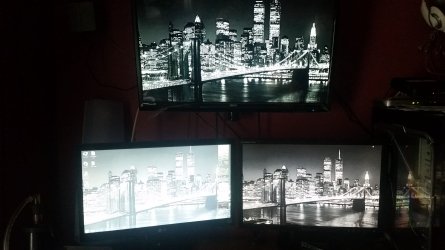
Had a power outage yesterday. Screwed up my old LCD. Could only find LED replacement. Canada’s best deal on Lg 20M37 19.5 Led Lcd Monitor 20M37 19 - First one looked whitewashed. Exchanged it for another of the same thinking it was defective but the new one is the same thing. Whitewashed. Is there any way to get blacks more black or is this normal for LED? Brightness & contrast dont do what I trying for.
This doesn't make sense b/c monitor/TV on top is LED as well and isn't whitewashed.
I dont think its supposed to look like this but had to ask because this this is TWO LG monitors both looking whitewashed.
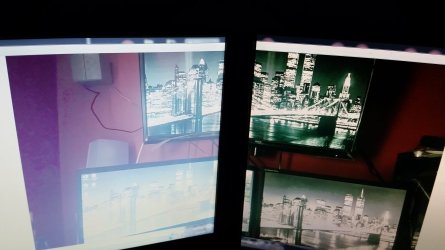
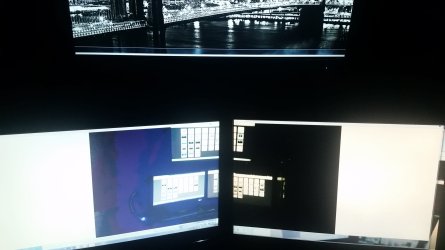
Also look at the wall on the left side of picture 3 & 4. That reminds me of the days of the old 256 color display when the same image is stretched across both monitors.
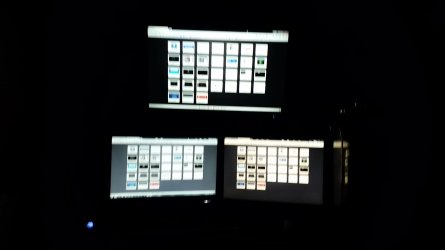
Picture 1&2 are of the actual displays while picture 3&4 are a PHOTO of my displays in windows picture viewer stretched across the two bottom displays.
It looks worse in person than my camera is allowing me to capture. Is LG just a garbage brand name as this is 2 LG monitors both doing the same?
Bottom left = LED LG 20M37 om DVI
Bottom right = LCD Samsung Syncmaster 941BW on VGA
Top = LED RCA Rled2845a on HDMI
The 2 bottom monitors on are one video card VGA and DVI while the HDMI TV on top is on HDMI of a 2nd video card. This should be irrelevant though since the old monitor was fine but just mentioning it anyway.
This doesn't make sense b/c monitor/TV on top is LED as well and isn't whitewashed.
I dont think its supposed to look like this but had to ask because this this is TWO LG monitors both looking whitewashed.
Also look at the wall on the left side of picture 3 & 4. That reminds me of the days of the old 256 color display when the same image is stretched across both monitors.
Picture 1&2 are of the actual displays while picture 3&4 are a PHOTO of my displays in windows picture viewer stretched across the two bottom displays.
It looks worse in person than my camera is allowing me to capture. Is LG just a garbage brand name as this is 2 LG monitors both doing the same?
Bottom left = LED LG 20M37 om DVI
Bottom right = LCD Samsung Syncmaster 941BW on VGA
Top = LED RCA Rled2845a on HDMI
The 2 bottom monitors on are one video card VGA and DVI while the HDMI TV on top is on HDMI of a 2nd video card. This should be irrelevant though since the old monitor was fine but just mentioning it anyway.
Attachments
My Computer
At a glance
Windows 7 Ultimate 64Bit (SP1)Intel® Core™ i3-6100 Processor (3M Cache, 3.7...Kingston 16GB Hyper X Fury Blue DDR3 1600Mhz ...On board (Asus B150M-C D3) VGA and DVI on Ext...
- Computer type
- PC/Desktop
- Computer Manufacturer/Model Number
- Custom built by myself
- OS
- Windows 7 Ultimate 64Bit (SP1)
- CPU
- Intel® Core™ i3-6100 Processor (3M Cache, 3.70 GHz)
- Motherboard
- Asus B150M-C D3
- Memory
- Kingston 16GB Hyper X Fury Blue DDR3 1600Mhz (2x 8GB sticks)
- Graphics Card(s)
- On board (Asus B150M-C D3) VGA and DVI on Extended Desktop
- Sound Card
- On Board (Asus B150M-C D3)
- Monitor(s) Displays
- Left DVI: Samsung 920WM - Right VGA: Samsung 941BW
- Hard Drives
- WD WD5000AADS 500GB SATA Green--WD 1TB WD1001FALS SATA Black--WD 320GB WD3200JB
- PSU
- Cooler Master 700W Silent Pro
- Case
- See through Side panel--right hinge door--5x 5" & 2x 3" bays
- Cooling
- Side, Front, Rear fan & Power supply fan
- Keyboard
- Logitech MX5000 BT
- Mouse
- Logitech MX500
- Internet Speed
- 40Mb down--10Mb Up
- Antivirus
- AVG Internet Security
- Browser
- Chrome-Firefox-Opera-IE-TOR
- Other Info
- 2x LG DVD-RW--NZXT Fan contoller--4in1 Card reader


