Is it normal for LED monitor to look whitewashed?

SomeUserName

Banned
Local time
11:58 AM
Messages
129
Location
Niagara Falls, ON
Had a power outage yesterday. Screwed up my old LCD. Could only find LED replacement. Canada’s best deal on Lg 20M37 19.5 Led Lcd Monitor 20M37 19 - First one looked whitewashed. Exchanged it for another of the same thinking it was defective but the new one is the same thing. Whitewashed. Is there any way to get blacks more black or is this normal for LED? Brightness & contrast dont do what I trying for.

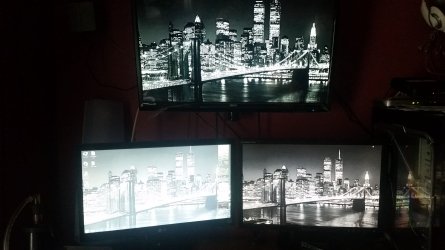
This doesn't make sense b/c monitor/TV on top is LED as well and isn't whitewashed.

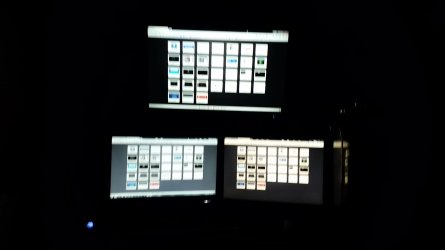
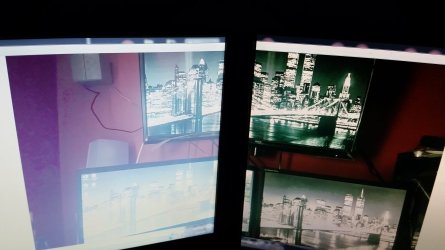
I dont think its supposed to look like this but had to ask because this this is TWO LG monitors both looking whitewashed.

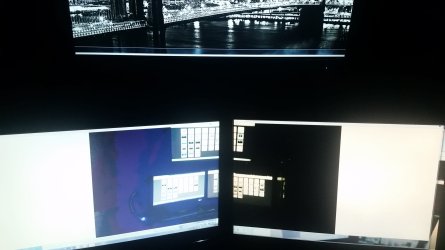
Also look at the wall on the left side of picture 3 & 4. That reminds me of the days of the old 256 color display when the same image is stretched across both monitors.

Picture 1&2 are of the actual displays while picture 3&4 are a PHOTO of my displays in windows picture viewer stretched across the two bottom displays.

It looks worse in person than my camera is allowing me to capture. Is LG just a garbage brand name as this is 2 LG monitors both doing the same?

Bottom left = LED LG 20M37 om DVI
Bottom right = LCD Samsung Syncmaster 941BW on VGA
Top = LED RCA Rled2845a on HDMI

The 2 bottom monitors on are one video card VGA and DVI while the HDMI TV on top is on HDMI of a 2nd video card. This should be irrelevant though since the old monitor was fine but just mentioning it anyway.
 

Attachments
  • 20160513_172623.jpg
    20160513_172623.jpg
    425.9 KB · Views: 0
  • 20160514_010326.jpg
    20160514_010326.jpg
    131.2 KB · Views: 1
  • 20160514_012316.jpg
    20160514_012316.jpg
    290.6 KB · Views: 0
  • 20160514_013303.jpg
    20160514_013303.jpg
    254.3 KB · Views: 1

My Computer My Computer

At a glance

Windows 7 Ultimate 64Bit (SP1)Intel® Core™ i3-6100 Processor (3M Cache, 3.7...Kingston 16GB Hyper X Fury Blue DDR3 1600Mhz ...On board (Asus B150M-C D3) VGA and DVI on Ext...
Computer type
PC/Desktop
Computer Manufacturer/Model Number
Custom built by myself
OS
Windows 7 Ultimate 64Bit (SP1)
CPU
Intel® Core™ i3-6100 Processor (3M Cache, 3.70 GHz)
Motherboard
Asus B150M-C D3
Memory
Kingston 16GB Hyper X Fury Blue DDR3 1600Mhz (2x 8GB sticks)
Graphics Card(s)
On board (Asus B150M-C D3) VGA and DVI on Extended Desktop
Sound Card
On Board (Asus B150M-C D3)
Monitor(s) Displays
Left DVI: Samsung 920WM - Right VGA: Samsung 941BW
Hard Drives
WD WD5000AADS 500GB SATA Green--WD 1TB WD1001FALS SATA Black--WD 320GB WD3200JB
PSU
Cooler Master 700W Silent Pro
Case
See through Side panel--right hinge door--5x 5" & 2x 3" bays
Cooling
Side, Front, Rear fan & Power supply fan
Keyboard
Logitech MX5000 BT
Mouse
Logitech MX500
Internet Speed
40Mb down--10Mb Up
Antivirus
AVG Internet Security
Browser
Chrome-Firefox-Opera-IE-TOR
Other Info
2x LG DVD-RW--NZXT Fan contoller--4in1 Card reader
If you bring up the color black for the whole display does it have white all over it? Seems like super back light bleed, but also could be your settings have you checked to make sure it's not in its reading mode?

LG Support Search Results | LG India (manual here)
 

My Computer My Computer

At a glance

10 Pro x64Ryzen 9 3900X64GB(4x16GB) DDR4EVGA 1080ti FTW3
Computer type
PC/Desktop
Computer Manufacturer/Model Number
Custom
OS
10 Pro x64
CPU
Ryzen 9 3900X
Motherboard
Asrock x370 Tachi
Memory
64GB(4x16GB) DDR4
Graphics Card(s)
EVGA 1080ti FTW3
Sound Card
ASUS Xonar Essence STX (V4 Bursons), ODAC rev B, NFB-11, O2
Monitor(s) Displays
3xASUS PB278Q/R, Optoma HD142X
Screen Resolution
3x1440p, 1080p
Hard Drives
512GB 850 EVO(OS, Programs)
4TB (Movies)
3TB (Downloads)
3TB (Programs)
1TB HDD (Games)
2x6TB R1 (videos)
PSU
AX760
Case
Fractal Define R5
Cooling
NH-D15S
Keyboard
Massdrop Ctrl with Box Navy's
Mouse
G903, Alioth XXL Mat
Internet Speed
280/40
Antivirus
MBAM, ESET
Browser
Canary 64 Bit
Other Info
I also own a Thinkpad P50 Xeon 4K, X220T, X1C5
Looks like the GAMMA is way out. Try calibrating the monitor after installing drivers for the monitor. See the CD that came with it. No LG monitors are some of the best performing image wise. Try swapping the cables over and see if the distortion swaps too. If it does then uninstall your graphics card drivers and reinstall them using a clean install.
 
Last edited:

My Computer My Computer

At a glance

Windows 7 x64 Ultimate and numerous virtual m...AMD FX-8350 Vishera 32nm Technology @ 4.2 GHz...G Skill 32.0GB Dual-Channel DDR3 @ 1204MHz (1...EVGA GeForce GTX 960 4GB Super SC ACX 2.0+ wi...
Computer type
PC/Desktop
Computer Manufacturer/Model Number
Bluethunder II
OS
Windows 7 x64 Ultimate and numerous virtual machines
CPU
AMD FX-8350 Vishera 32nm Technology @ 4.2 GHz default
Motherboard
ASUSTeK COMPUTER INC. SABERTOOTH 990FX R2.0 (Socket 942)
Memory
G Skill 32.0GB Dual-Channel DDR3 @ 1204MHz (11-13-13-31)
Graphics Card(s)
EVGA GeForce GTX 960 4GB Super SC ACX 2.0+ with Back Plate
Sound Card
Creative X-Fi Titanium HD Audiophile PCIe
Monitor(s) Displays
LG L227WTG x 3
Screen Resolution
1680 x 1050 16:10
Hard Drives
238GB Samsung850 PRO SATA Disk Device (SSD)
1863GB Seagate ST2000DM 001-1CH164 (SATA)
1397GB Seagate ST1500DL 003-9VT16L(SATA)
466GB Western Digital WDC WD50 03AZEX-00K1GA0 (SATA) x 2
932GB Seagate ST310005 28AS SATA Disk Device (SATA)
PSU
Enermax Revolution87+ 1000 Watts Gold Certified Power Supply
Case
Rocketfish Full Tower
Cooling
Cooler Master Hyper 212 EVO Push Pull 120mm Fans
Keyboard
Logitech K740
Mouse
Logitech G100S Laser LED + Logitech Gamepad F310
Internet Speed
500 mbs down and 30mbs up
Antivirus
Malwarebytes Pro & Avast and MSE on certain Virtual Machines
Browser
Firefox (Main) Chrome, Internet Explorer (Back Up)
Other Info
Logitech X 230 2.1 Stereo System and 5.1 Yamaha RX V2090
B&W DM6 Monitor Speakers + Center and Surround Speakers
Using Mouse Without Borders (Google it)
Took the second LG LED monitor back and got my money back. Got a used **NON** LED Samsung Syncmaster 920WM with speakers sand it works great. Its also a close match to my Syncmaster 940BW that I already had for the secondary. All looks great in the display monitor front now :)
 

My Computer My Computer

At a glance

Windows 7 Ultimate 64Bit (SP1)Intel® Core™ i3-6100 Processor (3M Cache, 3.7...Kingston 16GB Hyper X Fury Blue DDR3 1600Mhz ...On board (Asus B150M-C D3) VGA and DVI on Ext...
Computer type
PC/Desktop
Computer Manufacturer/Model Number
Custom built by myself
OS
Windows 7 Ultimate 64Bit (SP1)
CPU
Intel® Core™ i3-6100 Processor (3M Cache, 3.70 GHz)
Motherboard
Asus B150M-C D3
Memory
Kingston 16GB Hyper X Fury Blue DDR3 1600Mhz (2x 8GB sticks)
Graphics Card(s)
On board (Asus B150M-C D3) VGA and DVI on Extended Desktop
Sound Card
On Board (Asus B150M-C D3)
Monitor(s) Displays
Left DVI: Samsung 920WM - Right VGA: Samsung 941BW
Hard Drives
WD WD5000AADS 500GB SATA Green--WD 1TB WD1001FALS SATA Black--WD 320GB WD3200JB
PSU
Cooler Master 700W Silent Pro
Case
See through Side panel--right hinge door--5x 5" & 2x 3" bays
Cooling
Side, Front, Rear fan & Power supply fan
Keyboard
Logitech MX5000 BT
Mouse
Logitech MX500
Internet Speed
40Mb down--10Mb Up
Antivirus
AVG Internet Security
Browser
Chrome-Firefox-Opera-IE-TOR
Other Info
2x LG DVD-RW--NZXT Fan contoller--4in1 Card reader
Glad you got something your happy with in the end. It was probably gamma though as Tony had suggested.
 

My Computer My Computer

At a glance

10 Pro x64Ryzen 9 3900X64GB(4x16GB) DDR4EVGA 1080ti FTW3
Computer type
PC/Desktop
Computer Manufacturer/Model Number
Custom
OS
10 Pro x64
CPU
Ryzen 9 3900X
Motherboard
Asrock x370 Tachi
Memory
64GB(4x16GB) DDR4
Graphics Card(s)
EVGA 1080ti FTW3
Sound Card
ASUS Xonar Essence STX (V4 Bursons), ODAC rev B, NFB-11, O2
Monitor(s) Displays
3xASUS PB278Q/R, Optoma HD142X
Screen Resolution
3x1440p, 1080p
Hard Drives
512GB 850 EVO(OS, Programs)
4TB (Movies)
3TB (Downloads)
3TB (Programs)
1TB HDD (Games)
2x6TB R1 (videos)
PSU
AX760
Case
Fractal Define R5
Cooling
NH-D15S
Keyboard
Massdrop Ctrl with Box Navy's
Mouse
G903, Alioth XXL Mat
Internet Speed
280/40
Antivirus
MBAM, ESET
Browser
Canary 64 Bit
Other Info
I also own a Thinkpad P50 Xeon 4K, X220T, X1C5
Back
Top