Is it OK not to use Documents folder?

MBernard

New member
Member
Local time
10:47 AM
Messages
40
Location
Cambridge, UK
I keep my data files just about anywhere except 'My Documents'. Some are in subfolders of the program that runs them. Others are in folders named 'Downloads', 'Business', 'Computer-related' 'Temp' and similar, on the C: drive. My photographs are on drives devoted solely to photograhs. I have no music or video. My email is stored on an Exchange server.

I have used this general structure through every change in Windows from 3.1 onwards. It works for me, and I like it. I have thousands of data files, many in an elaborate hierarchy of subfolders, and can't just hurl them into an undifferentiated Documents folder and hope to find them again. If I moved them to subfolders of Documents, I'd essentially be re-creating the already-existing folder structure of the C: drive, which seems to me a little crazy. And it would be one more click to open them (in my Windows Explorer replacement: I never open anything from the Start Menu). I've always thought it was OK to do as I've been doing, because a number of programs offer a choice of where to store data files.

But today I contacted tech support for a shareware notes program that I run (and whose data files I store in the program's folder under C:\Program Files (x86)\.....). He said:

"In Vista/Windows 7, etc, you are not supposed put any writable files under Program Files, or for that matter, in arbitrary folders in your windows drive......You should be keeping them with your other application documents, either in Documents folder, its subfolders or if you prefer to keep in your own folders, another drive letter altogether."

So I am wondering: is he right, and is there a genuine, computer-related reason not to save data files in subfolders of the program that runs them? They are backed up several times a day to external HDs, and to date I've never had a problem that struck me as related to the locations of my data files.

Thanks

Mary
 

My Computer My Computer

Computer Manufacturer/Model Number
self-built
OS
Windows 7x64 + XP Mode
CPU
i7-740
Motherboard
Asus P6T Deluxe
Memory
12 GB DDR3
Graphics Card(s)
Sapphire Radeon HD 4870
Sound Card
on board
Monitor(s) Displays
Eizo 30" CG301; Dell 20" 2007FP,
Screen Resolution
Eizo: 2560x1600; Dell: 1600x1024
Hard Drives
3 x WD Velociraptors, 320 GB
2 x Seagate Barracuda 1.5 GB
PSU
Zalman ZM850
Case
Coolermaster ATCS 840
Cooling
Swiftech H20-220 watercooling kit
Keyboard
Logitech G11
Mouse
Logitech cordless
Internet Speed
slow broadband
Can't see any problems. I save work and personal files in my own folder structures - far away from My Documents (I do use this for general stuff).

Now I have got my head around libries in W7 the need to store in the old "My Docs/video/picture" structure has gone.

I would just be careful that any software you use is configured to use you folders, and remember any changes to your folder structure will stop the original programme from saving there until you update it.
 

My Computer My Computer

Computer type
PC/Desktop
OS
openSUSE 13.1 64bit
CPU
i7
Motherboard
Gigabyte UD5
Memory
6gb Gskill matched DDR3
Graphics Card(s)
Radeon HD4600
Sound Card
All onboard
Monitor(s) Displays
HP 2159v
Hard Drives
120gb Samsung SSD for the OS
2 * 1tb WD Caviar Black for storage
PSU
Corsair 750w
Case
Antec 920
Cooling
Aksas Nero
I keep my data files just about anywhere except 'My Documents'. Some are in subfolders of the program that runs them. Others are in folders named 'Downloads', 'Business', 'Computer-related' 'Temp' and similar, on the C: drive. My photographs are on drives devoted solely to photograhs. I have no music or video. My email is stored on an Exchange server.

I have used this general structure through every change in Windows from 3.1 onwards. It works for me, and I like it. I have thousands of data files, many in an elaborate hierarchy of subfolders, and can't just hurl them into an undifferentiated Documents folder and hope to find them again. If I moved them to subfolders of Documents, I'd essentially be re-creating the already-existing folder structure of the C: drive, which seems to me a little crazy. And it would be one more click to open them (in my Windows Explorer replacement: I never open anything from the Start Menu). I've always thought it was OK to do as I've been doing, because a number of programs offer a choice of where to store data files.

But today I contacted tech support for a shareware notes program that I run (and whose data files I store in the program's folder under C:\Program Files (x86)\.....). He said:

"In Vista/Windows 7, etc, you are not supposed put any writable files under Program Files, or for that matter, in arbitrary folders in your windows drive......You should be keeping them with your other application documents, either in Documents folder, its subfolders or if you prefer to keep in your own folders, another drive letter altogether."

So I am wondering: is he right, and is there a genuine, computer-related reason not to save data files in subfolders of the program that runs them? They are backed up several times a day to external HDs, and to date I've never had a problem that struck me as related to the locations of my data files.

Thanks

Mary

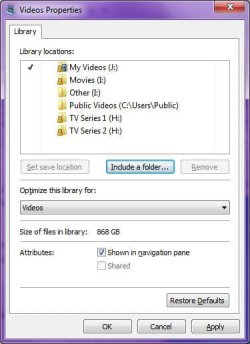
It doesn't really matter where you store your files. And with the new "Libraries" feature, they can be spread across multiple folders in multiple locations, with the traditional "My Documents" being only a singular part of the deal.

For example, the Videos library on my computer is pointing to 6 different locations:
MyVideos.jpg

There's no reason really for you to not keep your current folder structure. Just add the relevant folders to the "Documents" library. Thats the whole beauty of it all. You get to continue working with files and folders as you like, but you also get one convienient location that consolidates everything into one place.

You might want to look over these tutorials:
New Library - Create
Libraries - Personal and Public User Folders
Library - Set Save Folder

You can get more tutorials regarding Libraries in the Tutorial Index...
 

My Computer My Computer

Computer type
PC/Desktop
Computer Manufacturer/Model Number
Virtual Machine
OS
Windows 7 Professional 32-bit SP1
CPU
AMD A4/A6
Motherboard
Intel Corporation 440BX Desktop Reference Platform
Memory
3.00GB EDO
Graphics Card(s)
VMware SVGA 3D
Sound Card
High Definition Audio Device
Monitor(s) Displays
Generic Non-PnP Monitor on VMware SVGA 3D
Screen Resolution
1440x900
Hard Drives
1 x 60GB VMware Virtual SATA Hard Drive ATA Device
Antivirus
Kaspersky Total Security
You should not store files in Program Files, I don't care where else it doesn't matter. But Program Files is a protected directory, changing permissions and settings of this directory is not advisable. Use your user directory or other user controlled directory to store files. Plus keeping data separate from the respective programs make it easier to backup.
 

My Computer My Computer

Computer type
PC/Desktop
Computer Manufacturer/Model Number
Alienware Aurora ALX R4
OS
Windows 10 Pro (x64)
CPU
Intel Core i7-3930K (3.2GHz - 4.5GHz)
Motherboard
Alienware Aurora-R4 x79
Memory
4x Samsung 4GB PC3-12800 DDR3 (16GB 1600MHz)
Graphics Card(s)
Nvidia Geforce GTX 690
Sound Card
SteelSeries Siberia Elite
Monitor(s) Displays
Dell UltraSharp U3011
Screen Resolution
2560x1600
Hard Drives
Samsung 850 Pro 256 GB, Seagate 1TB Desktop Hybrid HDD, 2x Western Digital 4TB Green HDD
PSU
875W Some Dell PSU <.<
Case
Alienware Aurora ALX
Cooling
Custom Liquid Cooling (EK CPU & GPU blocks) dual EK 480RAD
Keyboard
Logitech G710+ Mechanical
Mouse
Logitech G700s
Internet Speed
Verizon Fios (50 mbps average)
Other Info
Server: Intel NUC D54250WYK: i5-4250U, 16GB, 256 GB mSATA, Windows Server 2012 R2
But today I contacted tech support for a shareware notes program that I run (and whose data files I store in the program's folder under C:\Program Files (x86)\.....). He said:

"In Vista/Windows 7, etc, you are not supposed put any writable files under Program Files, or for that matter, in arbitrary folders in your windows drive......You should be keeping them with your other application documents, either in Documents folder, its subfolders or if you prefer to keep in your own folders, another drive letter altogether."

So I am wondering: is he right, and is there a genuine, computer-related reason not to save data files in subfolders of the program that runs them? They are backed up several times a day to external HDs, and to date I've never had a problem that struck me as related to the locations of my data files.

Thanks

Mary

Actually, the are reasons for it, mostly regarding system stability and reliability. If a program is capable of writing data to a protected location, such as the "Program Files" or "Windows" folders, then they are also capable of altering program code stored in those locations (or they can be spoofed by malware in order to overwrite program code).

It as become generally accepted with the new security protocols and software design guidelines introduced with Vista that data and programs must be kept seperated. There are ways and means of falling back to allowing programs full access to everything, but doing so is not a good idea, because it increases the threshold of attack that can be exploited by malware.

But this doesn't necessarily mean that you, the user, are forced to use them ("Documents", "Videos", "Pictures", "Downloads", etc) as such. As I mentioned in my earlier post, thats the whole beauty of the Libraries structure. You get to manage your documents in any way you desire, and have them stored wherever you want, all the while allowing software developers to adhere to design guidelines...

It's a win-win situation really. Software becomes more secure without hampering user productivity.
 

My Computer My Computer

Computer type
PC/Desktop
Computer Manufacturer/Model Number
Virtual Machine
OS
Windows 7 Professional 32-bit SP1
CPU
AMD A4/A6
Motherboard
Intel Corporation 440BX Desktop Reference Platform
Memory
3.00GB EDO
Graphics Card(s)
VMware SVGA 3D
Sound Card
High Definition Audio Device
Monitor(s) Displays
Generic Non-PnP Monitor on VMware SVGA 3D
Screen Resolution
1440x900
Hard Drives
1 x 60GB VMware Virtual SATA Hard Drive ATA Device
Antivirus
Kaspersky Total Security
Here's another good reason not to do what you're doing:

I have a computer repair shop and I ask my customers prior to doing any work if I need to back up their data before I begin (if they do it themselves, I don't worry about it).

If they tell me that I do need to, the Program Files structure is an area that I don't even consider backing up because of size, and because if we have to reinstall Windows, that area won't matter anyway.

In that scenario, your data would be lost. I realize you have your own backups, but you just need to be aware that it's a really bad idea. It is VERY far out of the norm and not advised in any way.

I'm curious as to how you started this practice of saving to Program Files, and what types of programs we are talking about? Also, why would you NOT use the Documents structure when it makes so much more sense to have all your data centrally located?
 

My Computer My Computer

Computer Manufacturer/Model Number
Custom
OS
Windows 7 Ultimate RTM (Technet)
CPU
3.00 gigahertz Intel Core2 Duo E8400
Motherboard
ASUSTeK Computer INC. P5K/EPU Rev 1.xx
Memory
4GB
Graphics Card(s)
ATI Radeon X1950 Pro
Sound Card
Built in HD Audio
Monitor(s) Displays
22" Gateway LCD
Screen Resolution
1920 x 1200
Hard Drives
ST3160023A [Hard drive] (160.04 GB) -- drive 0, rev 8.01, ST3500630AS [Hard drive] (500.11 GB) -- drive 2, rev 3.AAK
ST3500630AS [Hard drive] (500.11 GB) -- drive 1, rev 3.AAK
Keyboard
Logitech G11
Mouse
Microsoft Wireless Laser Mouse 5000
Internet Speed
13.44 Mbps
I'd like to thank everyone who replied to my query. I'm now convinced that it's a bad idea to do what I've been doing, and I'll slowly (in spare time!) move my data to a new folder structure named maybe Files or Data, directly under C:.

MacGyvr asked: >>I'm curious as to how you started this practice of saving to Program Files, and what types of programs we are talking about? Also, why would you NOT use the Documents structure when it makes so much more sense to have all your data centrally located?<<

Which programs? The ones I use most heavily are Photoshop CS5, Nota Bene 9.x (in XPMode), Directory Opus, Whizfolders, Macro Express, Opera (all data are in \user\roaming etc), Clipmate (data in \...roaming), PowerPro and Outlook. They're running all the time. Less frequently I use Omnipage, Inkscape, and Word and its stablemates; and various other shareware programs.

I can't remember how I started storing data in Program Files. It probably dates back to DOS days. I don't remember having any sort of Documents folder in DOS, or in Windows 3.1.

I resisted the change to a docs folder in Win95, chiefly because I already had a complex folder structure, and thought I couldn't copy that into My Documents. Also, I dislike the name 'My' Documents andcalling files 'documents'. Back then, I don't think you could rename the folder, and I wasn't going to use a folder called 'my' anything!

As for the usefulness of the central location of the Documents folder - I really want my different types of data (word processor files, notes database, macros, photographs) stored in different places or categories, so that I can browse only the one type of file in my Explorer-substitute, which I use constantly. I don't want to come across 'Fred at 18.tif' when I'm looking for 'Fred at 18.docx', for instance.

It was Adobe Bridge that made me leery of libraries. In Bridge you can have Collections, and they can sometimes be very useful; but it's also possible to delete not just the collections, but the files in them, when you just want to delete the collection (library). I did it once, and had to spend hours restoring files to different actual locations from backups, not to mention that it was hard to remember what had been in the dratted Collection!

However, I've now read about Libraries, and have learned that that can't happen with them. I may even start using them, once I've transferred my data files to the new C:\Data (or maybe AnotherDrive:\Data) and told my programs where to look.

Again, thanks to all. You've convinced me.

Mary
 

My Computer My Computer

Computer Manufacturer/Model Number
self-built
OS
Windows 7x64 + XP Mode
CPU
i7-740
Motherboard
Asus P6T Deluxe
Memory
12 GB DDR3
Graphics Card(s)
Sapphire Radeon HD 4870
Sound Card
on board
Monitor(s) Displays
Eizo 30" CG301; Dell 20" 2007FP,
Screen Resolution
Eizo: 2560x1600; Dell: 1600x1024
Hard Drives
3 x WD Velociraptors, 320 GB
2 x Seagate Barracuda 1.5 GB
PSU
Zalman ZM850
Case
Coolermaster ATCS 840
Cooling
Swiftech H20-220 watercooling kit
Keyboard
Logitech G11
Mouse
Logitech cordless
Internet Speed
slow broadband
Back
Top