Is it possible to change default OS at boot?

Poolemahu

New member
Local time
12:07 AM
Messages
47
Hi All,

I'm not sure if Im in deep trouble or if this is something trivial. Please help me out.

I had once tried to install windows xp SP3 (long back) and it had failed.. The result was that I got 2 options (healthy xp and not working SP3) Everytime during boot. I continued working choosing the healthy one. The default always was the corrupt sp3 and if I was not alert to change it it would try to install Sp3.. Say something got corrupted and restart again during which time I would select the healthy Xp.

Sometime back I got Windows 7 and installed the same. Rather than clean up and format my drive I went for an install that didn't delete my other drives. It took a back up of xp and installed win 7. My C drive had 9Gb of space and I continued working. At boot up I now had 3 options.

annoyed at constantly being asked 3 choices at start up I found my way to uncheck the 'time' box in the advanced setting in windows 7. I thought this meant that win 7 would load automatically without asking for other choices.

Now when I start my system it doesn't ask any choices but goes straight to install from the the corrupt SP3 version, fails and prompts for a restart.. At restart the same thing happens again... I am now stuck and can't seem to either boot up windows 7 or get that list of OS to choose at boot..

Are there any options in bios through which I can increase the time so that it displays that list again or can I change default OS to boot there?

I am not sure of installing win7 again as I believe I don't have enough space on C drive and even if I take the pain of doing all the installation will it still go to the corrupt SP3 because no where during installation do I change the time to list the OS on the machine. Plus I don want to lose my data as there is years of work. I do have a back up on an external drive but it is with a friend who has borrowed it for Atleast a month.

In case you ask me to install win 7 again can I just do it in such a way that only the C drive is formatted? But I need to be sure that corrupt sp3 is not there to cause problem at boot.

Please help me I'm in deep trouble. I don't have any other machine to work on and I type this on phone..

If you need any further info please let me know..

Thanks.
 

My Computer My Computer

At a glance

Win 7 Ultimate 32 bit
Computer type
PC/Desktop
Computer Manufacturer/Model Number
Custom built
OS
Win 7 Ultimate 32 bit
If you type "msconfig" in the start menu and then choose the "Boot" tab, are there different operating systems listed?
 

My Computer My Computer

At a glance

Win 7 Home Premium x64AMD Phenom II X4 955 Black Edition Deneb Quad...20GB G.SKILL Ripjaws DDR3 1600 (PC3 12800)SAPPHIRE Radeon HD 5750 (1GB)
Computer type
PC/Desktop
Computer Manufacturer/Model Number
Specced Out
OS
Win 7 Home Premium x64
CPU
AMD Phenom II X4 955 Black Edition Deneb Quad-Core 3.2GHz
Motherboard
ASUSTeK Computer INC. M4A77TD
Memory
20GB G.SKILL Ripjaws DDR3 1600 (PC3 12800)
Graphics Card(s)
SAPPHIRE Radeon HD 5750 (1GB)
Sound Card
Sound Blaster Audigy
Monitor(s) Displays
Dual Monitors
Hard Drives
128GB OCZ Vertex 3 SSD
1TB Hitachi HDS721010CLA332
1TB Western Digital WD1001FALS
3TB Toshiba DT01ACA300
3x1TB External Seagate
PSU
Corsair TX CMPSU-750TX 750W ATX12V - SLI & Crossfire Ready
Case
Cooler Master Elite 310 ATX
Also, download the free version of Macrium and create a Rescue CD as shown on that page.

Boot to that disc and when Macrium loads the environment, choose the option on the left side of the dialog box for repairing Windows boot issues. This will fix your MBR (Master Boot Record).

If, when the environment is loading, you are prompted about loading drivers just press no or cancel, you don't need to inject any drivers.
 

My Computer My Computer

At a glance

Win 7 Home Premium x64AMD Phenom II X4 955 Black Edition Deneb Quad...20GB G.SKILL Ripjaws DDR3 1600 (PC3 12800)SAPPHIRE Radeon HD 5750 (1GB)
Computer type
PC/Desktop
Computer Manufacturer/Model Number
Specced Out
OS
Win 7 Home Premium x64
CPU
AMD Phenom II X4 955 Black Edition Deneb Quad-Core 3.2GHz
Motherboard
ASUSTeK Computer INC. M4A77TD
Memory
20GB G.SKILL Ripjaws DDR3 1600 (PC3 12800)
Graphics Card(s)
SAPPHIRE Radeon HD 5750 (1GB)
Sound Card
Sound Blaster Audigy
Monitor(s) Displays
Dual Monitors
Hard Drives
128GB OCZ Vertex 3 SSD
1TB Hitachi HDS721010CLA332
1TB Western Digital WD1001FALS
3TB Toshiba DT01ACA300
3x1TB External Seagate
PSU
Corsair TX CMPSU-750TX 750W ATX12V - SLI & Crossfire Ready
Case
Cooler Master Elite 310 ATX
Hi Comicsnut,

Thanks for replying.
The problem is that I don't get a proper boot to happen.
When I power ON my machine it doesn't show any list of OS and tries to install the XP SP3 which doesn't and hence the machine goes into a loop of restart and failed attempts of installing SP3..
I can't get to access windows at all... And since its the only machine I have, I am unable to download software.

Any other solution?
 

My Computer My Computer

At a glance

Win 7 Ultimate 32 bit
Computer type
PC/Desktop
Computer Manufacturer/Model Number
Custom built
OS
Win 7 Ultimate 32 bit
Is the data on your hard drive on its own partition? Or is it on a partition shared by an operating system?

If the personal data that you care about was known to be secure and saved (backed up), would you bite the bullet and install Windows 7 only and get rid of XP entirely?

Do you have an ordinary valid Windows 7 installation disc?

Unless your hard drive is actually damaged, I'd think you should be able to gain access to your data--possibly by using Linux if nothing else. Wait for more comments and don't do anything rash.
 

My Computer My Computer

At a glance

Windows 7 Home Premium SP1, 64-bitIntel Skylake i5-6600K, not overclocked8 GB HyperX DDR4-2666 (2 x 4 GB)none; graphics are integrated on CPU
Computer type
PC/Desktop
Computer Manufacturer/Model Number
Ignatz Special; 4 speed manual gearbox; factory air conditioning; one of one
OS
Windows 7 Home Premium SP1, 64-bit
CPU
Intel Skylake i5-6600K, not overclocked
Motherboard
AsRock Z170M Extreme 4, micro ATX
Memory
8 GB HyperX DDR4-2666 (2 x 4 GB)
Graphics Card(s)
none; graphics are integrated on CPU
Sound Card
onboard: Realtek ALC1150; external: USB Behringer UF0-202
Monitor(s) Displays
Dell S2340M 23 inch IPS
Screen Resolution
1600 x 900
Hard Drives
System: Crucial MX100 series SSD, 128 GB;
Data: Samsung Spinpoint 103SJ, 1 TB;
Backup: WD Caviar Green WD30EZRX-00D8PB0, 3 TB
PSU
Rosewill SilentNight 500 watt fanless, semi-modular
Case
Antec Solo II
Cooling
Noctua NH-U12S; Noctua F12 intake, Noctua S12A exhaust
Keyboard
Microsoft 200 6JH-00001 USB
Mouse
Dell or Microsoft optical wired; USB
Antivirus
Microsoft Security Essentials and Malwarebytes Premium
Browser
Pale Moon
Other Info
All fans PWM; speeds at idle: CPU circa 500 rpm; intake circa 600 rpm; exhaust circa 600 rpm; CPU temps 27 idle and 47 C load in a warm room (27 C/81 F) when running Intel Extreme Tuning Utility stress test.
Thanks for your kind response.

My data is backed up. I always use the c drive for OS and the other drives I use for data. However the XP I guess is on a different partition.

My last option is that to format the whole set up. I do have the windows 7 CD with me.
But I'm hesitant to do that because I saw the whole set up working smoothly with win 7. And I didn't have to reinstall any software or drivers.
If I do a format I need to do all the work of installing.

I was wondering if there was an easier way to resolve because I know the system has a proper functioning OS inside.
All the solution for viewing the list of OS is what one can do after the OS has booted up. My problem is before that.

I only have the BIOS setting which I can work on..
 

My Computer My Computer

At a glance

Win 7 Ultimate 32 bit
Computer type
PC/Desktop
Computer Manufacturer/Model Number
Custom built
OS
Win 7 Ultimate 32 bit
Does this PC have only 1 internal hard drive, with several partitions? Or does it have more than 1 internal hard drive?

What options do you see if you go into the BIOS and look at the boot choices and order?

You may be able to fix this just by running Windows 7 repair from the installation disc, but I'm not well enough acquainted with it to advise you.
 

My Computer My Computer

At a glance

Windows 7 Home Premium SP1, 64-bitIntel Skylake i5-6600K, not overclocked8 GB HyperX DDR4-2666 (2 x 4 GB)none; graphics are integrated on CPU
Computer type
PC/Desktop
Computer Manufacturer/Model Number
Ignatz Special; 4 speed manual gearbox; factory air conditioning; one of one
OS
Windows 7 Home Premium SP1, 64-bit
CPU
Intel Skylake i5-6600K, not overclocked
Motherboard
AsRock Z170M Extreme 4, micro ATX
Memory
8 GB HyperX DDR4-2666 (2 x 4 GB)
Graphics Card(s)
none; graphics are integrated on CPU
Sound Card
onboard: Realtek ALC1150; external: USB Behringer UF0-202
Monitor(s) Displays
Dell S2340M 23 inch IPS
Screen Resolution
1600 x 900
Hard Drives
System: Crucial MX100 series SSD, 128 GB;
Data: Samsung Spinpoint 103SJ, 1 TB;
Backup: WD Caviar Green WD30EZRX-00D8PB0, 3 TB
PSU
Rosewill SilentNight 500 watt fanless, semi-modular
Case
Antec Solo II
Cooling
Noctua NH-U12S; Noctua F12 intake, Noctua S12A exhaust
Keyboard
Microsoft 200 6JH-00001 USB
Mouse
Dell or Microsoft optical wired; USB
Antivirus
Microsoft Security Essentials and Malwarebytes Premium
Browser
Pale Moon
Other Info
All fans PWM; speeds at idle: CPU circa 500 rpm; intake circa 600 rpm; exhaust circa 600 rpm; CPU temps 27 idle and 47 C load in a warm room (27 C/81 F) when running Intel Extreme Tuning Utility stress test.
Hi.
It has one internal hard disk with multiple partitions. I really don't know where I can see a list of OS in bios setting.
All I have there
1. Main menu - shows stuff like processor and clock and system language.
2. Advanced menu - shows boot configuration, peripheral config, drive config, event log, video config, hardware monitoring, chipset config, USB config.
3. Security menu
4. Power menu
5. Boot menu - boot menu type, boot device priority, hard drive order, dvr rom order and other options to boot -enable or disable
6. Exit

Where do I see the list? Or any place here where I can change the display time for OS choice at boot up?

Thank for your help.
 

My Computer My Computer

At a glance

Win 7 Ultimate 32 bit
Computer type
PC/Desktop
Computer Manufacturer/Model Number
Custom built
OS
Win 7 Ultimate 32 bit
You might want to fill out your system specs at the lower left of your posts. It shows little detail about your PC.

You aren't likely to see a list of OS in the BIOS.

You could look at and change the boot order, but that may well not help. Normally, if a PC can't boot from the first item on the list, it will automatically go to the next and the next and the next until it does boot. So your PC should have walked down the list and failed on every choice.

If you look at the boot configuration choice you mentioned under Advanced, you might see a time related choice that could help you.

Are you comfortable working in the BIOS?

Are your BIOS settings now at default, or have you made changes previously? You should see a choice to reset to defaults, but that won't help you if you are already at defaults.
 

My Computer My Computer

At a glance

Windows 7 Home Premium SP1, 64-bitIntel Skylake i5-6600K, not overclocked8 GB HyperX DDR4-2666 (2 x 4 GB)none; graphics are integrated on CPU
Computer type
PC/Desktop
Computer Manufacturer/Model Number
Ignatz Special; 4 speed manual gearbox; factory air conditioning; one of one
OS
Windows 7 Home Premium SP1, 64-bit
CPU
Intel Skylake i5-6600K, not overclocked
Motherboard
AsRock Z170M Extreme 4, micro ATX
Memory
8 GB HyperX DDR4-2666 (2 x 4 GB)
Graphics Card(s)
none; graphics are integrated on CPU
Sound Card
onboard: Realtek ALC1150; external: USB Behringer UF0-202
Monitor(s) Displays
Dell S2340M 23 inch IPS
Screen Resolution
1600 x 900
Hard Drives
System: Crucial MX100 series SSD, 128 GB;
Data: Samsung Spinpoint 103SJ, 1 TB;
Backup: WD Caviar Green WD30EZRX-00D8PB0, 3 TB
PSU
Rosewill SilentNight 500 watt fanless, semi-modular
Case
Antec Solo II
Cooling
Noctua NH-U12S; Noctua F12 intake, Noctua S12A exhaust
Keyboard
Microsoft 200 6JH-00001 USB
Mouse
Dell or Microsoft optical wired; USB
Antivirus
Microsoft Security Essentials and Malwarebytes Premium
Browser
Pale Moon
Other Info
All fans PWM; speeds at idle: CPU circa 500 rpm; intake circa 600 rpm; exhaust circa 600 rpm; CPU temps 27 idle and 47 C load in a warm room (27 C/81 F) when running Intel Extreme Tuning Utility stress test.
Thanks for your patience and support. I will fill up the details on system.

I do know the win 7 OS works.. This is because I have been using it for sometime now and Everytime at boot up if I did not choose the win 7 it would go to install xp sp3 and fail and again reboot. If I simply sit and watched it again, it would try to install sp3 again and fail.

My bios setting are at default I didn't change anything because I am not sure how it would affect my system.
In the advanced menu all I see is numlock( on or off), CPU fan control, system fan control, lowest fan speed, max cpuid value limit, display setup prompt.

Anything in here that would help me show that list of OS' on my machine?
 

My Computer My Computer

At a glance

Win 7 Ultimate 32 bit
Computer type
PC/Desktop
Computer Manufacturer/Model Number
Custom built
OS
Win 7 Ultimate 32 bit
I don't see anything you list that might be relevant.

There are several BIOS makers, so it's hard to say what your choices are. You'd have to do your own inspection, which is OK as long as you can do the basic navigation and know how to restore to defaults, save, and exit if you should make a bad choice.

Really, I think this is an easy fix. But I do not run multiple OS and do not use boot menus and do not know the finer points of Windows Repair function. I'd be quite surprised if you were beyond repair, but I don't have the necessary knowledge.

I do know that having multiple operating systems on one disk is a recipe for trouble, as you are finding out. You can select which DRIVE to boot from in the BIOS, but you cannot select which OS per se or which partition.

Wait for more help.
 

My Computer My Computer

At a glance

Windows 7 Home Premium SP1, 64-bitIntel Skylake i5-6600K, not overclocked8 GB HyperX DDR4-2666 (2 x 4 GB)none; graphics are integrated on CPU
Computer type
PC/Desktop
Computer Manufacturer/Model Number
Ignatz Special; 4 speed manual gearbox; factory air conditioning; one of one
OS
Windows 7 Home Premium SP1, 64-bit
CPU
Intel Skylake i5-6600K, not overclocked
Motherboard
AsRock Z170M Extreme 4, micro ATX
Memory
8 GB HyperX DDR4-2666 (2 x 4 GB)
Graphics Card(s)
none; graphics are integrated on CPU
Sound Card
onboard: Realtek ALC1150; external: USB Behringer UF0-202
Monitor(s) Displays
Dell S2340M 23 inch IPS
Screen Resolution
1600 x 900
Hard Drives
System: Crucial MX100 series SSD, 128 GB;
Data: Samsung Spinpoint 103SJ, 1 TB;
Backup: WD Caviar Green WD30EZRX-00D8PB0, 3 TB
PSU
Rosewill SilentNight 500 watt fanless, semi-modular
Case
Antec Solo II
Cooling
Noctua NH-U12S; Noctua F12 intake, Noctua S12A exhaust
Keyboard
Microsoft 200 6JH-00001 USB
Mouse
Dell or Microsoft optical wired; USB
Antivirus
Microsoft Security Essentials and Malwarebytes Premium
Browser
Pale Moon
Other Info
All fans PWM; speeds at idle: CPU circa 500 rpm; intake circa 600 rpm; exhaust circa 600 rpm; CPU temps 27 idle and 47 C load in a warm room (27 C/81 F) when running Intel Extreme Tuning Utility stress test.
I don't know if bootable Partition Wizard can make the changes you need.
You could try it, or maybe someone here knows.
Partition Wizard Bootable CD allows user to manage partition directly with partition manager bootable CD.

NeoSmart (EasyBCD) has a bootable EasyRE utility that may work.
EasyBCD can't fix a PC that won't boot.

Download EasyRE, our bootable repair & recovery CD.

  • Fix all boot errors
  • Resolve startup BSODs
  • Restore registry and settings
  • Clean up virus infections
  • and more advanced features
Source: https://neosmart.net/EasyBCD/
 

My Computer My Computer

At a glance

Multi-Boot W7_Pro_x64 W8.1_Pro_x64 W10_Pro_x6...AMD Athlon II x4 6206GB GSkill DDR2 800AMD 4670 GPU + AMD 4200 IGP
Computer type
PC/Desktop
Computer Manufacturer/Model Number
home built
OS
Multi-Boot W7_Pro_x64 W8.1_Pro_x64 W10_Pro_x64 +Linux_VMs +Chromium_VM
CPU
AMD Athlon II x4 620
Motherboard
Gigabyte GA-MA785G-UD3H
Memory
6GB GSkill DDR2 800
Graphics Card(s)
AMD 4670 GPU + AMD 4200 IGP
Sound Card
on board Realtek ALC889A
Monitor(s) Displays
RCA 40" LCD TV, Insignia 32" LCD TV, HP 15" LCD monitor
Screen Resolution
1680 x 1050
Hard Drives
OCZ Vertex 3 120GB,
Samsung F3 1TB (3),
Several others - WD, Seagate, Hitachi, ...
PSU
Corsair 500 W
Case
Rosewill mid tower
Cooling
CM 90mm rifle
Keyboard
Gyration wireless, Logitech wireless, Dell USB wired
Mouse
Gyration wireless, Logitech wireless, V7 USB wired
Internet Speed
Spectrum - 100Mbps D / 10Mbps U
Antivirus
Avast, MBAM3, EMET, WinPatrol
Browser
Pale Moon, Firefox, IE
Other Info
2 multi-boot PC's
Mainly HTPC/Office/Gen purpose (no gaming).
Trendnet USB KVM.
LG DVD burner/Blue Ray Player.
Tray system for removable SATA backup drives.

Not currently OCd, under-volted.
I use Hybrid sleep, rarely re-boot or shutdown.

Hauppauge HD-PVR, Avermedia PCIe TV Tuner, Hauppauge PCI TV Tuner.
David:

Definitely good ideas, but this is his only PC and he can't download anything. Can't boot.

Only obvious tool is the Windows 7 install disc.
 

My Computer My Computer

At a glance

Windows 7 Home Premium SP1, 64-bitIntel Skylake i5-6600K, not overclocked8 GB HyperX DDR4-2666 (2 x 4 GB)none; graphics are integrated on CPU
Computer type
PC/Desktop
Computer Manufacturer/Model Number
Ignatz Special; 4 speed manual gearbox; factory air conditioning; one of one
OS
Windows 7 Home Premium SP1, 64-bit
CPU
Intel Skylake i5-6600K, not overclocked
Motherboard
AsRock Z170M Extreme 4, micro ATX
Memory
8 GB HyperX DDR4-2666 (2 x 4 GB)
Graphics Card(s)
none; graphics are integrated on CPU
Sound Card
onboard: Realtek ALC1150; external: USB Behringer UF0-202
Monitor(s) Displays
Dell S2340M 23 inch IPS
Screen Resolution
1600 x 900
Hard Drives
System: Crucial MX100 series SSD, 128 GB;
Data: Samsung Spinpoint 103SJ, 1 TB;
Backup: WD Caviar Green WD30EZRX-00D8PB0, 3 TB
PSU
Rosewill SilentNight 500 watt fanless, semi-modular
Case
Antec Solo II
Cooling
Noctua NH-U12S; Noctua F12 intake, Noctua S12A exhaust
Keyboard
Microsoft 200 6JH-00001 USB
Mouse
Dell or Microsoft optical wired; USB
Antivirus
Microsoft Security Essentials and Malwarebytes Premium
Browser
Pale Moon
Other Info
All fans PWM; speeds at idle: CPU circa 500 rpm; intake circa 600 rpm; exhaust circa 600 rpm; CPU temps 27 idle and 47 C load in a warm room (27 C/81 F) when running Intel Extreme Tuning Utility stress test.
Yea, he would need to download on another PC :(
 

My Computer My Computer

At a glance

Multi-Boot W7_Pro_x64 W8.1_Pro_x64 W10_Pro_x6...AMD Athlon II x4 6206GB GSkill DDR2 800AMD 4670 GPU + AMD 4200 IGP
Computer type
PC/Desktop
Computer Manufacturer/Model Number
home built
OS
Multi-Boot W7_Pro_x64 W8.1_Pro_x64 W10_Pro_x64 +Linux_VMs +Chromium_VM
CPU
AMD Athlon II x4 620
Motherboard
Gigabyte GA-MA785G-UD3H
Memory
6GB GSkill DDR2 800
Graphics Card(s)
AMD 4670 GPU + AMD 4200 IGP
Sound Card
on board Realtek ALC889A
Monitor(s) Displays
RCA 40" LCD TV, Insignia 32" LCD TV, HP 15" LCD monitor
Screen Resolution
1680 x 1050
Hard Drives
OCZ Vertex 3 120GB,
Samsung F3 1TB (3),
Several others - WD, Seagate, Hitachi, ...
PSU
Corsair 500 W
Case
Rosewill mid tower
Cooling
CM 90mm rifle
Keyboard
Gyration wireless, Logitech wireless, Dell USB wired
Mouse
Gyration wireless, Logitech wireless, V7 USB wired
Internet Speed
Spectrum - 100Mbps D / 10Mbps U
Antivirus
Avast, MBAM3, EMET, WinPatrol
Browser
Pale Moon, Firefox, IE
Other Info
2 multi-boot PC's
Mainly HTPC/Office/Gen purpose (no gaming).
Trendnet USB KVM.
LG DVD burner/Blue Ray Player.
Tray system for removable SATA backup drives.

Not currently OCd, under-volted.
I use Hybrid sleep, rarely re-boot or shutdown.

Hauppauge HD-PVR, Avermedia PCIe TV Tuner, Hauppauge PCI TV Tuner.
If he has a bootable Windows DVD, can that be booted to a Command prompt ?
I'm sure there is a manual BCD command that can be entered to change the default startup OS.
 

My Computer My Computer

At a glance

Multi-Boot W7_Pro_x64 W8.1_Pro_x64 W10_Pro_x6...AMD Athlon II x4 6206GB GSkill DDR2 800AMD 4670 GPU + AMD 4200 IGP
Computer type
PC/Desktop
Computer Manufacturer/Model Number
home built
OS
Multi-Boot W7_Pro_x64 W8.1_Pro_x64 W10_Pro_x64 +Linux_VMs +Chromium_VM
CPU
AMD Athlon II x4 620
Motherboard
Gigabyte GA-MA785G-UD3H
Memory
6GB GSkill DDR2 800
Graphics Card(s)
AMD 4670 GPU + AMD 4200 IGP
Sound Card
on board Realtek ALC889A
Monitor(s) Displays
RCA 40" LCD TV, Insignia 32" LCD TV, HP 15" LCD monitor
Screen Resolution
1680 x 1050
Hard Drives
OCZ Vertex 3 120GB,
Samsung F3 1TB (3),
Several others - WD, Seagate, Hitachi, ...
PSU
Corsair 500 W
Case
Rosewill mid tower
Cooling
CM 90mm rifle
Keyboard
Gyration wireless, Logitech wireless, Dell USB wired
Mouse
Gyration wireless, Logitech wireless, V7 USB wired
Internet Speed
Spectrum - 100Mbps D / 10Mbps U
Antivirus
Avast, MBAM3, EMET, WinPatrol
Browser
Pale Moon, Firefox, IE
Other Info
2 multi-boot PC's
Mainly HTPC/Office/Gen purpose (no gaming).
Trendnet USB KVM.
LG DVD burner/Blue Ray Player.
Tray system for removable SATA backup drives.

Not currently OCd, under-volted.
I use Hybrid sleep, rarely re-boot or shutdown.

Hauppauge HD-PVR, Avermedia PCIe TV Tuner, Hauppauge PCI TV Tuner.
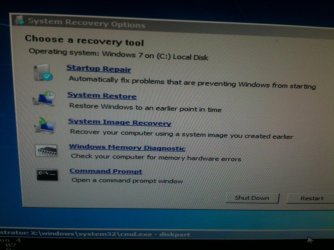
Put the WIn7 disk in the drive, reboot and tap the Boot Menu key, choose DVD drive to boot. Press Any Key when prompted.

After files load, at first screen press Shift + F10 or access http://www.sevenforums.com/tutorials/668-system-recovery-options.html to open a Command Line, type:

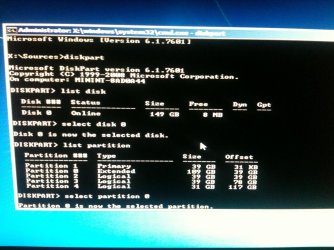
DISKPART
LIST DISK

Post back the list, then for each disk type:

SELECT DISK # (replace the # with the number of each disk)
LIST Partition

Post back the partition list for each disk, then working from the list type:

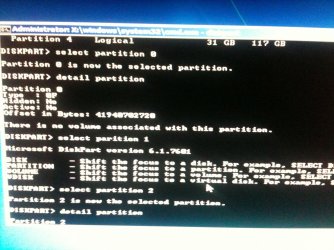
Select Partition # (replace # with each partition number)
Detail Partition

Post back the output for each partition on each disk. From this we can determine where both Win7 and XP are installed, which is booting the system, how to repair Win7 so it starts and then how to add XP to a Dual Boot menu if you still want it.
 
Ok. I am trying out your suggestions. I will reply in few minutes.
 

My Computer My Computer

At a glance

Win 7 Ultimate 32 bit
Computer type
PC/Desktop
Computer Manufacturer/Model Number
Custom built
OS
Win 7 Ultimate 32 bit
Hi,
I get some options when I try to boot from CD. I am attaching the same.
Not sure how this would work since I use a phone for responding.
 

Attachments

  • image.jpg
    image.jpg
    286.6 KB · Views: 0

My Computer My Computer

At a glance

Win 7 Ultimate 32 bit
Computer type
PC/Desktop
Computer Manufacturer/Model Number
Custom built
OS
Win 7 Ultimate 32 bit
Attaching few more as requested.
 

Attachments

  • image.jpg
    image.jpg
    292.4 KB · Views: 0

My Computer My Computer

At a glance

Win 7 Ultimate 32 bit
Computer type
PC/Desktop
Computer Manufacturer/Model Number
Custom built
OS
Win 7 Ultimate 32 bit
Another snap- partition info
 

Attachments

  • image.jpg
    image.jpg
    340.3 KB · Views: 0

My Computer My Computer

At a glance

Win 7 Ultimate 32 bit
Computer type
PC/Desktop
Computer Manufacturer/Model Number
Custom built
OS
Win 7 Ultimate 32 bit
Back
Top