Is it possible to change default OS at boot?

Yet another image.
Please let me know if you need a better snap. As I can't figure them out clearly on my mobile.
The detail partition info for other partitions is same - shows as healthy.
 

Attachments

  • image.jpg
    image.jpg
    308.8 KB · Views: 0

My Computer My Computer

At a glance

Win 7 Ultimate 32 bit
Computer type
PC/Desktop
Computer Manufacturer/Model Number
Custom built
OS
Win 7 Ultimate 32 bit
You did not get the Details for Partition 1 because it was misspelled. Please try again.

It should be marked Active since it is the only Primary Partition so it must be Active in order to boot the OS's. I'm assuming it is XP. Do you know this for sure?

Do you remember where you installed Win7?
 
Hi Gregrocker.
I don't need XP anymore. I want to use windows 7. When I installed win 7 it kept a windows.old file and I didn't lose any program files... So I just created shortcuts to programs and kept them on desktop.
 

My Computer My Computer

At a glance

Win 7 Ultimate 32 bit
Computer type
PC/Desktop
Computer Manufacturer/Model Number
Custom built
OS
Win 7 Ultimate 32 bit
Just a suggestion, go to adminastrative tools--- computer management---- Disk management. Look for the partician with xp on it and format that partician. Unless you have other files there that you dont want to loose as formating will erase everything. At least look at you hard drive particians while you are there and then maybe post some new info here before you do anything...
 

My Computer My Computer

At a glance

Windows 7 Home Premium 64 bitIntel core i7 3770 CPU @ 3.4 GHz4096 X 4banks Asint DDR3 SDram 64 Bit 800 MHzOnboard Intel HD 4000
Computer type
PC/Desktop
Computer Manufacturer/Model Number
Asus CM 6870 US3AB
OS
Windows 7 Home Premium 64 bit
CPU
Intel core i7 3770 CPU @ 3.4 GHz
Motherboard
P8H77M Pro CM6870
Memory
4096 X 4banks Asint DDR3 SDram 64 Bit 800 MHz
Graphics Card(s)
Onboard Intel HD 4000
Hard Drives
Sata3 WD 7200 rpm 500 GB
Antivirus
Windows Security
Browser
IE 11
Oops. Attaching for partition 1
 

Attachments

  • image.jpg
    image.jpg
    286.4 KB · Views: 0

My Computer My Computer

At a glance

Win 7 Ultimate 32 bit
Computer type
PC/Desktop
Computer Manufacturer/Model Number
Custom built
OS
Win 7 Ultimate 32 bit
You did not get the Details for Partition 1 because it was misspelled. Please try again.

It should be marked Active since it is the only Primary Partition so it must be Active in order to boot the OS's. I'm assuming it is XP. Do you know this for sure?

Do you remember where you installed Win7?

Greg, I like the picture, Maybe you can start a new topic Called Floatware not Bloatware..... Ha Ha..
 

My Computer My Computer

At a glance

Windows 7 Home Premium 64 bitIntel core i7 3770 CPU @ 3.4 GHz4096 X 4banks Asint DDR3 SDram 64 Bit 800 MHzOnboard Intel HD 4000
Computer type
PC/Desktop
Computer Manufacturer/Model Number
Asus CM 6870 US3AB
OS
Windows 7 Home Premium 64 bit
CPU
Intel core i7 3770 CPU @ 3.4 GHz
Motherboard
P8H77M Pro CM6870
Memory
4096 X 4banks Asint DDR3 SDram 64 Bit 800 MHz
Graphics Card(s)
Onboard Intel HD 4000
Hard Drives
Sata3 WD 7200 rpm 500 GB
Antivirus
Windows Security
Browser
IE 11
If you don't want XP did you install Win7 over it? From the way you describe it you must have run the Win7 installer from XP which is incorrect. The installer needs to be booted to correctly install to its partition.

Do you remember which partition you installed Win7 upon? You have 1 39 gb Primary and 3 39gb Logical partitions which are each too small to install Win7 comfortably. What I would do is boot the installer and use the Drive Options pictured in Steps 7 and 8 of http://www.sevenforums.com/tutorials/1649-clean-install-windows-7-a.html to delete all partitions, create and format one large partition to install Win7 upon.

Did you back up the files you need before doing this? You cannot use the old Program Files so unless you need to rescue files out of Windows.old I would just start over with a clean slate.
 
Greg,
Win 7 was installed in C drive. I know for sure.
What I don't know is where the bad xp sp3 is. Is it loading from C drive or some other drive.
If its definitely from C drive then I don't mind formatting the entire C drive as long as I don't lose data on other drives.
 

My Computer My Computer

At a glance

Win 7 Ultimate 32 bit
Computer type
PC/Desktop
Computer Manufacturer/Model Number
Custom built
OS
Win 7 Ultimate 32 bit
Your data should always be backed up in case of drive failure. Are you saying you still have data you cannot afford to lose on some partitions? Which partitions exactly of the four you have need to have data preserved?

Are you sure you installed Win7 on the first partition? There are no drive letters now so you need to know this. It is the only Primary one which can boot Win7 as of now but its not booting so perhaps you installed to another?

If you want to try to start up Win7 then boot into the disk to run Startup Repair a few times, report back the results.

There's a chance you overwrote Win7 on C with the bad XP install. If so then what I'd do is reinstall Win7 to C, move your data out of the second partition, delete it in Disk Mgmt and then Extend C into the space to make a reasonable size Win7 partition. You may need to use Partition Wizard to Resize C into the space if the Free Space created by a Deleted Logical partition will not also delete in Disk Mgmt. We can help you do this after you decide what you want to do.
 
Greg,
I initially had 16 GB space in C,
All I did was to load the DVD, and let the system boot. I then installed windows 7. Prior to start of installation I chose C drive.
It then went about its way of installing the OS.
Trouble started when I unchecked the time to display the list of OS.

So if I can't list the OS installed in the machine through BIOS and if I can't do anything to boot options( change the time to display OS at boot to 30 seconds) from command prompt to show the list of OS to boot then the only option is to clean C drive completely right.
 

My Computer My Computer

At a glance

Win 7 Ultimate 32 bit
Computer type
PC/Desktop
Computer Manufacturer/Model Number
Custom built
OS
Win 7 Ultimate 32 bit
Well when I do the detail partition for partition 1 it does show letter C right.
I am very sure it was installed to C drive.

I do have my data backed up but that external drive is not with me, I will be able to lay my hands on that only on sep 29... My friend just borrowed it for a month to use while on a trip. I backed all my data and then foolishly set about changing that boot up time on advanced controls...
(When trouble comes it all comes together)
 

My Computer My Computer

At a glance

Win 7 Ultimate 32 bit
Computer type
PC/Desktop
Computer Manufacturer/Model Number
Custom built
OS
Win 7 Ultimate 32 bit
That's way too small to install WIn7 into. You should delete the first two partitions at least to create and format a new one during reinstall of Win7.

If you have data on the second partition then you can wait until after install and follow the steps I gave you in the last post to move the data off of it, delete it and then extend C into the deleted space. It requires deleting a Logical Partition twice to change it from Free Space to Unallocated space into which your Primary partition C can extend.
 
I thought you said you have a failed install of XP which caused it to stop booting. If it was instead changing the boot timeout that can be possibly resolved by running Startup Repair or System Restore from the http://www.sevenforums.com/tutorials/668-system-recovery-options.html you showed in your first picture.

Did you actualy have a working Dual Boot of XP and WIn7? Wasn't there a second install of XP which you thought might have been done to C to ruin your Win7 boot?

(David feel free to jump in here as I see you watching, am tired and need to go to bed.)
 
I do have my data backed up but that external drive is not with me, I will be able to lay my hands on that only on sep 29... My friend just borrowed it for a month to use while on a trip.

YIKES !
How can you be sure your back up drive will come back to you with your data safely,reliably,securely available ?
Accidents happen... :shock:
 

My Computer My Computer

At a glance

Multi-Boot W7_Pro_x64 W8.1_Pro_x64 W10_Pro_x6...AMD Athlon II x4 6206GB GSkill DDR2 800AMD 4670 GPU + AMD 4200 IGP
Computer type
PC/Desktop
Computer Manufacturer/Model Number
home built
OS
Multi-Boot W7_Pro_x64 W8.1_Pro_x64 W10_Pro_x64 +Linux_VMs +Chromium_VM
CPU
AMD Athlon II x4 620
Motherboard
Gigabyte GA-MA785G-UD3H
Memory
6GB GSkill DDR2 800
Graphics Card(s)
AMD 4670 GPU + AMD 4200 IGP
Sound Card
on board Realtek ALC889A
Monitor(s) Displays
RCA 40" LCD TV, Insignia 32" LCD TV, HP 15" LCD monitor
Screen Resolution
1680 x 1050
Hard Drives
OCZ Vertex 3 120GB,
Samsung F3 1TB (3),
Several others - WD, Seagate, Hitachi, ...
PSU
Corsair 500 W
Case
Rosewill mid tower
Cooling
CM 90mm rifle
Keyboard
Gyration wireless, Logitech wireless, Dell USB wired
Mouse
Gyration wireless, Logitech wireless, V7 USB wired
Internet Speed
Spectrum - 100Mbps D / 10Mbps U
Antivirus
Avast, MBAM3, EMET, WinPatrol
Browser
Pale Moon, Firefox, IE
Other Info
2 multi-boot PC's
Mainly HTPC/Office/Gen purpose (no gaming).
Trendnet USB KVM.
LG DVD burner/Blue Ray Player.
Tray system for removable SATA backup drives.

Not currently OCd, under-volted.
I use Hybrid sleep, rarely re-boot or shutdown.

Hauppauge HD-PVR, Avermedia PCIe TV Tuner, Hauppauge PCI TV Tuner.
Greg,
Thanks for the support. Sorry if I am keeping you up.

This is what happened
XP sp2 was working fine>> I tried installing SP3 >> it failed >> Everytime I not I got 2 options but default was the sp3 installation( it failed and always restarted) >> I installed win 7 >> default choice at boot up was sp3 installation >> I always used the arrows keys and chose win 7 before the 30 sec ticked out.

I unchecked the time to display the OS options at boot and ever since I can't choose win 7.
I tried start up repair and system restor but no luck.
 

My Computer My Computer

At a glance

Win 7 Ultimate 32 bit
Computer type
PC/Desktop
Computer Manufacturer/Model Number
Custom built
OS
Win 7 Ultimate 32 bit
(David feel free to jump in here as I see you watching, am tired and need to go to bed.)

BUSTED :p

Yea, I'm as confused as you...I'll re-read and see if I get a better understanding...
 

My Computer My Computer

At a glance

Multi-Boot W7_Pro_x64 W8.1_Pro_x64 W10_Pro_x6...AMD Athlon II x4 6206GB GSkill DDR2 800AMD 4670 GPU + AMD 4200 IGP
Computer type
PC/Desktop
Computer Manufacturer/Model Number
home built
OS
Multi-Boot W7_Pro_x64 W8.1_Pro_x64 W10_Pro_x64 +Linux_VMs +Chromium_VM
CPU
AMD Athlon II x4 620
Motherboard
Gigabyte GA-MA785G-UD3H
Memory
6GB GSkill DDR2 800
Graphics Card(s)
AMD 4670 GPU + AMD 4200 IGP
Sound Card
on board Realtek ALC889A
Monitor(s) Displays
RCA 40" LCD TV, Insignia 32" LCD TV, HP 15" LCD monitor
Screen Resolution
1680 x 1050
Hard Drives
OCZ Vertex 3 120GB,
Samsung F3 1TB (3),
Several others - WD, Seagate, Hitachi, ...
PSU
Corsair 500 W
Case
Rosewill mid tower
Cooling
CM 90mm rifle
Keyboard
Gyration wireless, Logitech wireless, Dell USB wired
Mouse
Gyration wireless, Logitech wireless, V7 USB wired
Internet Speed
Spectrum - 100Mbps D / 10Mbps U
Antivirus
Avast, MBAM3, EMET, WinPatrol
Browser
Pale Moon, Firefox, IE
Other Info
2 multi-boot PC's
Mainly HTPC/Office/Gen purpose (no gaming).
Trendnet USB KVM.
LG DVD burner/Blue Ray Player.
Tray system for removable SATA backup drives.

Not currently OCd, under-volted.
I use Hybrid sleep, rarely re-boot or shutdown.

Hauppauge HD-PVR, Avermedia PCIe TV Tuner, Hauppauge PCI TV Tuner.
Sorry some typos are there in my text but hope you can get my message..
 

My Computer My Computer

At a glance

Win 7 Ultimate 32 bit
Computer type
PC/Desktop
Computer Manufacturer/Model Number
Custom built
OS
Win 7 Ultimate 32 bit
David, after my OS I have asked my friend to take a back up of my back up..
Even now if I am to lose data... I will think its my destiny...:cry:
 

My Computer My Computer

At a glance

Win 7 Ultimate 32 bit
Computer type
PC/Desktop
Computer Manufacturer/Model Number
Custom built
OS
Win 7 Ultimate 32 bit
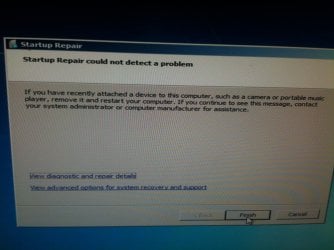
Message from start up repair that says all is fine..
 

Attachments

  • image.jpg
    image.jpg
    292.2 KB · Views: 0

My Computer My Computer

At a glance

Win 7 Ultimate 32 bit
Computer type
PC/Desktop
Computer Manufacturer/Model Number
Custom built
OS
Win 7 Ultimate 32 bit
We have to assume if you had a working Dual Boot that these are installed on separate partitions which still exist. If XP was installed first then it is likely on the first partition and is booting both OS's, while Win7 is on another partition which because it's Logical cannot allow Win7 to be marked Active to repair and boot itself without first cpnverting to Primary.

Did you not pay the slightest attention to where you installed Win7? You just told us you have data you cannot afford to lose. So did you just randomly install Win7 on another partition without concern that it was overwriting data? And if you correctly booted the installer it would have formatted the partition so there would not be any Windows.old folder. You must have run Win7 install from XP to have that.

There are four equal size 39gb partitions. Where did you install Win7?
 
Back
Top