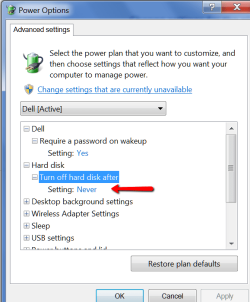
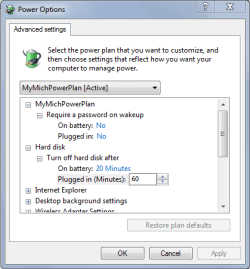
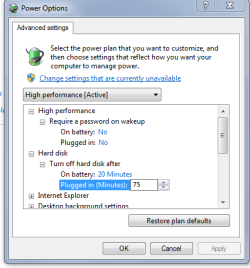
Assuming I am using the correct terminology in my question but knowing that I am possibly talking about something else I will explain. Having done a fresh install of Win7 HomePrem I noticed that when I click on a drive I have to wake it up--it doesn't open immediately and I could here it begin to hum. Prior to my reinstalletion I did not have to do this--clicking on any drive would pop up a window immediately. Then I recalled that I had done this manually and I think it was through the 'Power Options' --> Advanced Settings --> Hard Disk --> Turn off hard disks after... Am I correct in this? That this is how I prevent my disk from going to sleep/turning off? by setting it at 0 or 999 minutes. Assuming not then how do I do so. Assuming yes, then is there a way to do so only for one HD? I have 4 (where my OS sits and 3 others). I do not like to wait every time I want to open a folder in a drive I am not presently using and since this drive mainly happens to be the D: drive and not my E: or F: drive (hardly used) I was hoping I could be specific.
My Computer
At a glance
Windows 7 Home Premium 64Intel Core i5 760 @ 2800MHz12288MBAMD Radeon HD 7800 Series
- Computer type
- PC/Desktop
- Computer Manufacturer/Model Number
- OEM Designed by me :-)
- OS
- Windows 7 Home Premium 64
- CPU
- Intel Core i5 760 @ 2800MHz
- Motherboard
- Asus P7P55D-E LX
- Memory
- 12288MB
- Graphics Card(s)
- AMD Radeon HD 7800 Series
- Sound Card
- ASUS Xonar DG
- Monitor(s) Displays
- ViewSonic VX2453 Series, HDMI 1080p Full HD
- Screen Resolution
- 1920X1080
- Hard Drives
- Samsung SSD 840 EVO 250GB& two others
- PSU
- Tagan BZ Series, TG800-BZ 800W
- Keyboard
- Logitech MK250
- Mouse
- Logitech M310
- Internet Speed
- toppest, mostest :-) <-- bad, but fun English
- Browser
- Firefox, Crrome, IE