Is my copy of Windows 7 Ulitimate genuine? Error 0xC004F063

clubnev

New member
Local time
11:59 PM
Messages
6
Hello,
I purchased a computer from a local shop last summer that has since gone out of business. About a month ago, I started getting the BSOD with multiple errors, most were hardware related. I used a friend's Windows 7 CD but used my license # to reinstall windows, because I was not given a CD. I didn't do a clean install; I clicked "upgrade" so my data would not be wiped out. That solved the BSOD problems.

Now today, I received a message that my version of Windows 7 is not genuine.

I tried to activate it by changing the product key. I rec'd the following message:

Code 0xC004F063
The Software Licensing Service reported that the computer BIOS is missing a required license.

Any advice? Am I screwed? Would updating the BIOS help?
 
Last edited:

My Computer My Computer

At a glance

Windows 7 Ultimate x64
OS
Windows 7 Ultimate x64
Motherboard
AMD
Monitor(s) Displays
Sansung
How sure are you that the Windows product key you got when you originally bought the PC is legit?

How sure are you that the disc you later borrowed from your friend is legit?

You could download an ISO from MyDigitalLife.info, burn it to disc, and install from that disc, but you would still need a valid product key to activate it.
 

My Computer My Computer

At a glance

Windows 7 Home Premium SP1, 64-bitIntel Skylake i5-6600K, not overclocked8 GB HyperX DDR4-2666 (2 x 4 GB)none; graphics are integrated on CPU
Computer type
PC/Desktop
Computer Manufacturer/Model Number
Ignatz Special; 4 speed manual gearbox; factory air conditioning; one of one
OS
Windows 7 Home Premium SP1, 64-bit
CPU
Intel Skylake i5-6600K, not overclocked
Motherboard
AsRock Z170M Extreme 4, micro ATX
Memory
8 GB HyperX DDR4-2666 (2 x 4 GB)
Graphics Card(s)
none; graphics are integrated on CPU
Sound Card
onboard: Realtek ALC1150; external: USB Behringer UF0-202
Monitor(s) Displays
Dell S2340M 23 inch IPS
Screen Resolution
1600 x 900
Hard Drives
System: Crucial MX100 series SSD, 128 GB;
Data: Samsung Spinpoint 103SJ, 1 TB;
Backup: WD Caviar Green WD30EZRX-00D8PB0, 3 TB
PSU
Rosewill SilentNight 500 watt fanless, semi-modular
Case
Antec Solo II
Cooling
Noctua NH-U12S; Noctua F12 intake, Noctua S12A exhaust
Keyboard
Microsoft 200 6JH-00001 USB
Mouse
Dell or Microsoft optical wired; USB
Antivirus
Microsoft Security Essentials and Malwarebytes Premium
Browser
Pale Moon
Other Info
All fans PWM; speeds at idle: CPU circa 500 rpm; intake circa 600 rpm; exhaust circa 600 rpm; CPU temps 27 idle and 47 C load in a warm room (27 C/81 F) when running Intel Extreme Tuning Utility stress test.
Welcome to Windows Seven Forums.

Do you have a product key attached to a Certificate of Authenticity (COA) sticker on your computer?

If so, you can use this tutorial to help you re-install Windows and activate it with your COA product key.

http://www.sevenforums.com/tutorials/174907-clean-install-factory-coa-activation-key.html

If you don't have a product key and the vendor has gone out of business you are faced with buying a genuine copy of Windows.

In that scenario, you could contact Microsoft's anti-piracy team who have been known to legalise your system in return for giving them details of the person who sold you the software in the first place.

You say you used another product key. May we ask where you got it from? Did you try to activate by telephone?
 

My Computer My Computer

At a glance

Windows 7 Ultimate SP1 64-BitIntel Core i7 870 @ 2.93GHz8Gb Dual-Channel DDR3 @ 664MHznVidia GeForce GTX 460 1024MB dedicated RAM
Computer Manufacturer/Model Number
HP Pavilion Elite 495UK
OS
Windows 7 Ultimate SP1 64-Bit
CPU
Intel Core i7 870 @ 2.93GHz
Motherboard
MSI 2A9C (CPU1)
Memory
8Gb Dual-Channel DDR3 @ 664MHz
Graphics Card(s)
nVidia GeForce GTX 460 1024MB dedicated RAM
Sound Card
Realtek HD Audio
Monitor(s) Displays
HP2310i
Screen Resolution
1920 x 1080
Hard Drives
1x1954GB Hitachi HDS22020ALA 330 (RAID), 1x1954GB Hitachi External for backup and storage
PSU
460W
Case
HP Elite
Cooling
Air cooled
Keyboard
Logitech K750 solar-powered keyboard
Mouse
Logitech Wireless M180 mouse
Internet Speed
2Mb
Other Info
Pure Avanti Flow Internet Radio with iPod Dock, 64Gb iPod, HP USB Speakers, Sony MDR-V500 Headphones, Sony Vaio F-Series Laptop
The copy of Windows I used is a multiple user licence copy used for workstations and we occasionally do work for that firm on my computer.

No, I'm not sure my "original license" is legit. But I'm wondering why after all these months, I was just now notified. I made sure I had Genuine Advantage after I bought the computer and ran it. If my Windows wasn't not legit, why did it take Windows so long to catch it? I could have resovled it immediately by cancelling the credit card payment at the time I bought the computer and notified Microsoft while they were still in business.

I have no problem buying a retail copy of a license but I prefer to buy an OEM since I purchased it with a new computer. But what OEM version to buy? I suppose I'm better off paying for the retail version - then I can install it on a new computer if I need a new hard drive without a hassle.

I am not going to go through a clean install. I'd rather spend the $200. I've done several clean installs but right now, I don't have the time.

I might call the anti-piracy #. I have nothing to hide.

Sigh! I'm just getting tired of Microsoft - seriously considering going to Apple the next time I need a new computer. At least everything is in one place from the same Manufacturer and I don't have to worry about if this motherboard is good with that version of software.
 

My Computer My Computer

At a glance

Windows 7 Ultimate x64
OS
Windows 7 Ultimate x64
Motherboard
AMD
Monitor(s) Displays
Sansung
The copy of Windows I used is a multiple user licence copy used for workstations and we occasionally do work for that firm on my computer.

Dont quote me, but i dont think such windows 7 ultimate exist, in that case it wouldnt it be Pro or Enterprise?
 

My Computer My Computer

At a glance

Microsoft Windows 10 Professional / Windows 7...Intel i5-357016GB DDR3AMD Radeon HD 7850 2GB
Computer type
PC/Desktop
OS
Microsoft Windows 10 Professional / Windows 7 Professional
CPU
Intel i5-3570
Motherboard
Lenovo Mahobay
Memory
16GB DDR3
Graphics Card(s)
AMD Radeon HD 7850 2GB
Sound Card
(1) Realtek HD Audio (2) AMD HD Audio
Monitor(s) Displays
LG LS192WS
Screen Resolution
1440 x 900 @ 32bit color
Hard Drives
(1) SUV300S37A/120G (2) ST3500413AS SATA Disk Device AHCI mode enabled.
PSU
Corsair HX620
Case
Thermaltake V4 Black Edition
Cooling
Cooler Master Hyper 212 + Artic Silver 5 on CPU/GPU
Keyboard
Dell SK-8115
Mouse
Razer Copperhead with MAPED mat (awesome!)
Internet Speed
100 Mbps up/down
Browser
Chrome
I have no problem buying a retail copy of a license but I prefer to buy an OEM since I purchased it with a new computer. But what OEM version to buy? I suppose I'm better off paying for the retail version - then I can install it on a new computer if I need a new hard drive without a hassle.

I am not going to go through a clean install. I'd rather spend the $200. I've done several clean installs but right now, I don't have the time.

I'm confused by the above.

You can change hard drives with an OEM version. Changing a motherboard would likely cause a problem.

I'm not sure what you mean by "I'd rather spend the $200"----on what?

In your shoes, I would probably call Microsoft to find out once and for all if you have a valid Product Key.
 

My Computer My Computer

At a glance

Windows 7 Home Premium SP1, 64-bitIntel Skylake i5-6600K, not overclocked8 GB HyperX DDR4-2666 (2 x 4 GB)none; graphics are integrated on CPU
Computer type
PC/Desktop
Computer Manufacturer/Model Number
Ignatz Special; 4 speed manual gearbox; factory air conditioning; one of one
OS
Windows 7 Home Premium SP1, 64-bit
CPU
Intel Skylake i5-6600K, not overclocked
Motherboard
AsRock Z170M Extreme 4, micro ATX
Memory
8 GB HyperX DDR4-2666 (2 x 4 GB)
Graphics Card(s)
none; graphics are integrated on CPU
Sound Card
onboard: Realtek ALC1150; external: USB Behringer UF0-202
Monitor(s) Displays
Dell S2340M 23 inch IPS
Screen Resolution
1600 x 900
Hard Drives
System: Crucial MX100 series SSD, 128 GB;
Data: Samsung Spinpoint 103SJ, 1 TB;
Backup: WD Caviar Green WD30EZRX-00D8PB0, 3 TB
PSU
Rosewill SilentNight 500 watt fanless, semi-modular
Case
Antec Solo II
Cooling
Noctua NH-U12S; Noctua F12 intake, Noctua S12A exhaust
Keyboard
Microsoft 200 6JH-00001 USB
Mouse
Dell or Microsoft optical wired; USB
Antivirus
Microsoft Security Essentials and Malwarebytes Premium
Browser
Pale Moon
Other Info
All fans PWM; speeds at idle: CPU circa 500 rpm; intake circa 600 rpm; exhaust circa 600 rpm; CPU temps 27 idle and 47 C load in a warm room (27 C/81 F) when running Intel Extreme Tuning Utility stress test.
Hello,
I purchased a computer from a local shop last summer that has since gone out of business. About a month ago, I started getting the BSOD with multiple errors, most were hardware related. I used a friend's Windows 7 CD but used my license # to reinstall windows, because I was not given a CD. I didn't do a clean install; I clicked "upgrade" so my data would not be wiped out. That solved the BSOD problems.

Now today, I received a message that my version of Windows 7 is not genuine.

I tried to activate it by changing the product key. I rec'd the following message:

Code 0xC004F063
The Software Licensing Service reported that the computer BIOS is missing a required license.

Any advice? Am I screwed? Would updating the BIOS help?

This isn't the most clearly written page (for a layman like myself), but see:

You receive an error message when you try to activate Windows Vista or Windows 7 on a computer that was obtained from an OEM

It appears that the shop used a volume license, in violation of their license agreement. You couldn't activate it in the retail fashion; it required access to their license server, now unavailable.

As you've done nothing wrong, I hope that Microsoft will help you to recover from this without requiring you to purchase a full retail Ultimate license. It may be as simple as inserting a valid Ultimate key.
 

My Computer My Computer

At a glance

Windows 7 Pro X64 SP1Intel Core I7-3930k16 GB Gskill DDR3-2133eVGA GTX680
Computer Manufacturer/Model Number
homegrown
OS
Windows 7 Pro X64 SP1
CPU
Intel Core I7-3930k
Motherboard
Asus P9X79 Pro
Memory
16 GB Gskill DDR3-2133
Graphics Card(s)
eVGA GTX680
Sound Card
Creative X-Fi Titanium
Monitor(s) Displays
As PA246Q
Screen Resolution
1920 X 1200
Hard Drives
Corsair Force GT, 120 GB
WDC 1.5TB Caviar Black
PSU
PCP&C Silencer 750 Crossfire
Case
Silverstone FT02
Cooling
Noctua NH-D14
Keyboard
cheap Logitech USB
Mouse
Microsoft Intellimouse Explorer (old optical) USB
Internet Speed
6Mb cable
Other Info
Pioneer BDR-205
Samsung SH-203B
Monsoon 5.1 speakers
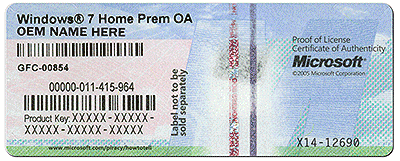
Is the Product Key you're using for reinstall on a COA sticker similar to the one below - which all pre-installed Windows must have attached to the machine to show it is Genuine?

coa-stickers.gif

If so then it is a retail key and should work for Clean Reinstall Windows 7 Factory OEM using a retail installer. The installer you describe using may not be the standard retail installer which is needed. Use the link in the tutorial to download, burn to DVD or write to flash stick the official Win7 installer ISO with SP1, try install again.

If activation fails after pursuiing all options offered, or problems arise again, contact Microsoft Customer Service which will validate the Product Key, then if it is legal open a Tech Support case to help you get it activated correctly. If it is not a valid key they can tell you about the program to help customers who mistakenly purchase bootleg software.
 
Back
Top