Solved Is my PSU Dying?

FerchogtX

New member
Pro User
Local time
3:45 AM
Messages
640
Location
Mexico
Well... I had an interesting evening today.

Mom was using her PC as she normally does (formerly mine), when suddenly, a savage BSOD appeared, it pointed to atikumg (IIRC), so I assumed the drivers were faulty, so, I unisnstalled drivers, ran AMD driver cleanup, ran Ccleaner and upgraded to the latest drivers that VGA can have. No more BSODS, but system tends to hang completely at random times, which is weird.

This PC was working nicely since 2006... until just today, when it's exhbiting this symptoms just suddenly.

I've cleaned the system, removing any dust, replacing thermal paste on even the VGA itself, I need to test if problem persists tomorrow. System runs cool so far... I'm suspecting the PSU is dying somehow (I don't know how, probably a big ray that impacted nearby two days ago, even with the PC off?)

The VGA works, doesn't smell like burned... nor the PSU, all the rest of the components look good, no bad capacitors on the MoBo or such...

I'm leaving more details here if this helps somehow:
- CPU Temp Idle: 30 - 35 C°
- CPU Temp Full Throttle: 50 C°
- VGA Idle: 38 C°
- VGA Stressed/Full Throttle: 55 C°

The VGA is a Radeon HD 4350... not a gaming card, not even a card that draws a lot of power, the PSU is a PiXXo Transformer 800W 80+ Certification. The rest can be found on my System Spec section.

Is the PSU dying or the VGA? This setup worked like a charm 8+ years or so... this just started to happen suddenly. Ah! This tends to happen whenever she browses the web, keeping Firefox and Thunderbird open at the same time while using Winamp to hear some online music, both have hardware acceleration enabled, Firefox has e10s enabled and H264 decoding available. Checked Even Viewer for some extra info, but nothing was there to help me...

Thanks in advance for your help, guys :D
 

My Computer My Computer

Computer type
PC/Desktop
Computer Manufacturer/Model Number
Assembled Desktop PC
OS
Microsoft Windows 7 Home Premium SP1 64-bit Build 7600
CPU
AMD Athlon 64 X2 5200+ Dual Core CPU @ 2.7 Ghz (Brisbane)
Motherboard
PCChips A13G+ v3.0
Memory
2x2 GB DDR2 PC-5300 (667 Mhz) Kingston ValueRAM
Graphics Card(s)
XFX ATI Radeon HD 4350 GPU (512 MB + 512 MB HM)
Sound Card
Realtek High Definition Audio Driver ALC660 @ MCP61S
Monitor(s) Displays
HP S2031 20" LED HD Widescreen Display Monitor
Screen Resolution
1600 x 900 px
Hard Drives
Maxtor Diamond Max 10 (160 GB, 7200 RPM, SATA-II Hard Disk)
Western Digital Scorpion Blue (250 GB, 5400 RPM, SATA-II External Hard Disk - Personal Data)
Toshiba MQ01ABD050 (500 GB, 5400 RPM, SATA-II External Hard Disk - Software & ISOs)
PSU
Pixxo Transformer 850W 80+ Certification PSU
Case
Compaq 5BW353 Case
Cooling
Many solutions, see other info...
Keyboard
Green Leaf (Mitzu) Standard Keyboard
Mouse
Microsoft USB Lasser Pointing Device
Internet Speed
10 MB
Antivirus
Avast Antivirus Free
Browser
Firefox, Chrome, Internet Explorer
Other Info
Windows Experience Index Result: 3.8 of 7.9.

Cooling solutions:
- AVC @ 2000/5000 RPM Copper Heatpipes (For Athlon 64 X2 6000+ CPU used in an Athlon 64 X2 5200+)
- Rear Fan 80 mm @ 2700 RPM for heat extraction
- Manhatan Chipset Cooler @ 4700/7200 RPM (For nVidia Chipset in MoBo)
- Foxconn @ 2500 RPM (Old Pentium III heatsink fan) in XFX ATI Radeon HD 4350
Lightning discharges can damage a PC even if it's shut ed down. On ATX PSU you have the +5 V SB that is always on.
This power in stand by is also present on TV, Micro wave, washing machine, etc and on any remote controlled device.
To protect these equipment s I have surge protectors with a hardware switch. I have one for the computer +printer +monitor +scanner and another to TV +decoder +DVD +router. When not in use, the switch remains off. Also important is to have the ground grounded.
On your computer the MB could be damage not only by the PS but also by the LAN. I've replaced a MB that was damage by a lighting that came through the cable modem.
It's very difficult to find a intermittent problem. Try to install another PSU. If you have a wired LAN connection to a router or modem, try to disable the LAN on BIOS.
 

My Computers My Computers

System One System Two

  • Computer type
    PC/Desktop
    Computer Manufacturer/Model Number
    custom build
    OS
    Windows 7 HP 64
    CPU
    i5 6600K - 800MHz to 4200MHz
    Motherboard
    GA-Z170-HD3P
    Memory
    4+4G GSkill DDR4 3000
    Graphics Card(s)
    IG - Intel 530
    Monitor(s) Displays
    Samsung 226BW
    Screen Resolution
    1680x1050
    Hard Drives
    (1) -1 SM951 – 128GB M.2 AHCI PCIe SSD drive for Windows 7 and Lubuntu
    (2) -1 WD SATA 3 - 1T for Data
    (3) -1 WD SATA 3 - 1T for backup
    PSU
    Thermaltake 450W TR2 gold
    Keyboard
    Old and good Chicony mechanical keyboard
    Mouse
    Logitech mX performance - 9 buttons (had to disable some)
    Internet Speed
    500Mb/s
    Browser
    Firefox 64
    Other Info
    TinyWall firewall
  • Computer type
    Laptop
    System Manufacturer/Model Number
    Asus Q550LF
    OS
    Windows 7 Pro
    CPU
    i7-4500U 800MHz to 3.0GHz
    Motherboard
    Asus Q550LF
    Memory
    (4+4)G DDR3 1600
    Graphics Card(s)
    IG intel 4400 + NVIDIA GeForce GT 745M
    Sound Card
    Realtek
    Monitor(s) Displays
    LG Display LP156WF4-SPH1
    Screen Resolution
    1920 x 1080
    Hard Drives
    BX500 120G SSD for Windows and programs +
    1T HDD for data
    Internet Speed
    500 Mb/s
    Browser
    Firefox
    Other Info
    TinyWall firewall
Thanks a lot for your answer

Weird stuff though... I've made some tests to stress the GPU and the CPU at the same time, but nothing happened, not even a little BSOD... even recreated all the process, opening winap, Thurderbird, browsing with Firefox... no hangs...

It's... weird... The PC is connected to a multicontact bar, that is connected to a surge protector, so it's never all the time on (meaning the 5v+ SB)... when the lightning happened, all was off... probably the LAN cable is a main suspect in this matter.

I'll see if the symptoms persist... I don't know how to feel about this... just yesterday I just saw BSODs, crashes... I resist to believe that changing thermal paste and removing dust did the miracle?

I'm not closing this thread until I see this system really works as spected...

Thanks for the answer... if there are any ideas, feel free to drop them ;)
 

My Computer My Computer

Computer type
PC/Desktop
Computer Manufacturer/Model Number
Assembled Desktop PC
OS
Microsoft Windows 7 Home Premium SP1 64-bit Build 7600
CPU
AMD Athlon 64 X2 5200+ Dual Core CPU @ 2.7 Ghz (Brisbane)
Motherboard
PCChips A13G+ v3.0
Memory
2x2 GB DDR2 PC-5300 (667 Mhz) Kingston ValueRAM
Graphics Card(s)
XFX ATI Radeon HD 4350 GPU (512 MB + 512 MB HM)
Sound Card
Realtek High Definition Audio Driver ALC660 @ MCP61S
Monitor(s) Displays
HP S2031 20" LED HD Widescreen Display Monitor
Screen Resolution
1600 x 900 px
Hard Drives
Maxtor Diamond Max 10 (160 GB, 7200 RPM, SATA-II Hard Disk)
Western Digital Scorpion Blue (250 GB, 5400 RPM, SATA-II External Hard Disk - Personal Data)
Toshiba MQ01ABD050 (500 GB, 5400 RPM, SATA-II External Hard Disk - Software & ISOs)
PSU
Pixxo Transformer 850W 80+ Certification PSU
Case
Compaq 5BW353 Case
Cooling
Many solutions, see other info...
Keyboard
Green Leaf (Mitzu) Standard Keyboard
Mouse
Microsoft USB Lasser Pointing Device
Internet Speed
10 MB
Antivirus
Avast Antivirus Free
Browser
Firefox, Chrome, Internet Explorer
Other Info
Windows Experience Index Result: 3.8 of 7.9.

Cooling solutions:
- AVC @ 2000/5000 RPM Copper Heatpipes (For Athlon 64 X2 6000+ CPU used in an Athlon 64 X2 5200+)
- Rear Fan 80 mm @ 2700 RPM for heat extraction
- Manhatan Chipset Cooler @ 4700/7200 RPM (For nVidia Chipset in MoBo)
- Foxconn @ 2500 RPM (Old Pentium III heatsink fan) in XFX ATI Radeon HD 4350
Hi,
Most people believe hardware acceleration should be disabled where ever possible in browsers.

If you have onboard graphic's have you removed the gpu and tried using it for a little while ?
 

My Computer My Computer

Computer type
PC/Desktop
Computer Manufacturer/Model Number
Custom assembled by me :}
OS
Win-7-Pro64bit 7-H-Prem-64bit
CPU
i7-5930K 2nd i9-9940x both water blocked VRM's too
Motherboard
ASUS SABERTOOTH X99 2nd ASUS x299 Apex
Memory
Trident-z 3200C14 2nd Trident-z 3600C16
Graphics Card(s)
EVGA 1080ti ftw3 2nd Titan Xp both water blocked
Sound Card
Built-in Realtek
Monitor(s) Displays
1-AOC G2460PG 24"G-Sync 144Hz/ 2nd 1-ASUS VG248QE 24" 144Hz
Screen Resolution
1920 x 1080 144Hz
Hard Drives
2-Samsung M.2 Evo & Evo Plus
2-Samsung 850 EVO 500GB SSD's/ 3-2.5 W.D. Black 1tb-&3-1tb/3-3.5 WD Black 1tb hdd's
PSU
EVGA SuperNOVA 1000-P2 2nd 1200-P2
Case
2-Corsair Obsidian Series 450D Black ATX Mid Tower
Cooling
Custom water loops
Keyboard
Logitech G710+/ 2nd Logitech G910
Mouse
2-RedDragon M901 Perdition 16400 dpi Gaming mouse = wired
Internet Speed
Comcast Ping 19ms 89.31mbps download speed 6.12mbps upload
Antivirus
Malwarebytes Pro/ Superantispyware Pro
Browser
FireFox & Pale moon
Other Info
2nd ASUS X299 Apex/Intel i9-9940x with Custom water loop/7H-Prem-x64/Corsair 450D case/Ram Trident-z 3600C16 4x8gb / Samsung970Evo plus 500gb SSD/Dual ssd EZ swap evo/PSU EVGA SuperNova 1200w-P2 80+Platinum/GPU Titan Xp /8-ML-140 on push-pull on 2-280GTX rads
You have a no-name PSU that is at least 10 years old.

Is that correct? If it is, the PSU would be pretty high on my suspect list.

That's a low power system and I'd think a PSU of 400 or 500 watts would be plenty.

Do you show any voltage aberrations when using a monitoring program such as HWInfo?

I'm guessing you don't have any sophisticated tools to check the power supply.

Do you have another PSU you can swap in briefly?
 

My Computer My Computer

Computer type
PC/Desktop
Computer Manufacturer/Model Number
Ignatz Special; 4 speed manual gearbox; factory air conditioning; one of one
OS
Windows 7 Home Premium SP1, 64-bit
CPU
Intel Skylake i5-6600K, not overclocked
Motherboard
AsRock Z170M Extreme 4, micro ATX
Memory
8 GB HyperX DDR4-2666 (2 x 4 GB)
Graphics Card(s)
none; graphics are integrated on CPU
Sound Card
onboard: Realtek ALC1150; external: USB Behringer UF0-202
Monitor(s) Displays
Dell S2340M 23 inch IPS
Screen Resolution
1600 x 900
Hard Drives
System: Crucial MX100 series SSD, 128 GB;
Data: Samsung Spinpoint 103SJ, 1 TB;
Backup: WD Caviar Green WD30EZRX-00D8PB0, 3 TB
PSU
Rosewill SilentNight 500 watt fanless, semi-modular
Case
Antec Solo II
Cooling
Noctua NH-U12S; Noctua F12 intake, Noctua S12A exhaust
Keyboard
Microsoft 200 6JH-00001 USB
Mouse
Dell or Microsoft optical wired; USB
Antivirus
Microsoft Security Essentials and Malwarebytes Premium
Browser
Pale Moon
Other Info
All fans PWM; speeds at idle: CPU circa 500 rpm; intake circa 600 rpm; exhaust circa 600 rpm; CPU temps 27 idle and 47 C load in a warm room (27 C/81 F) when running Intel Extreme Tuning Utility stress test.
My two cents worth try my ditty to check the PSU volts for example.
One word of warning though don't go trying to to do anything with the PSU (dismantling to look) because it can have lethal voltages stored in the large inverter caps even after an extended length of time of power off.
Using HW Info
PART A:
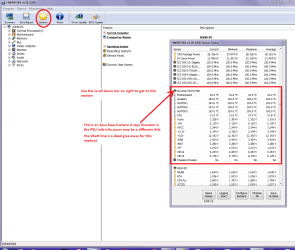
You can test the volts on the PSU with HW Info HWiNFO, HWiNFO32/64 - Download < download the right bit version and close the right hand window select Sensors and scroll down to the power section where you will see what the volts are doing see my pic. In my pic the section (Nuvoton) with VBATT as a dead give away you are in the section for the rail voltages. There are other section titles and one that pops up often is ITE (sometimes the usual one for Gigabyte boards)
Now the voltage on the different rails have to be within 5% =+/- of what is required or the machine will not work properly if at all.
Limits +/-
12v = 11.4 – 12.6v
5v = 4.74 – 5.25v
3.3v = 3.135 – 3.465v
The Power good signal voltage at pin 8 on the 24 pin plug (grey cable) should be the same as the 5v rail reading/s
See this for the rail voltage info
PSUs 101: A Detailed Look Into Power Supplies (Section 2.)
The original right hand window shows the machine running and is handy for that but for looking at the components in some detail close it and use the main left hand side panel
FOR OTHER COMPONENTS
PART B:
Open each small square with + in it on the section the components are in and then click on the individual component/s (it will highlight in blue) - in the right hand side will appear all sorts of details including brands speeds and other essential info that particular device. See pic for example.

Use PART A:
 

Attachments

  • HW INFO DESKTOP PSU.PNG
    HW INFO DESKTOP PSU.PNG
    49.8 KB · Views: 1

My Computer My Computer

Computer type
PC/Desktop
Computer Manufacturer/Model Number
Own build (new) Desk1 / Asus ROG Win 7 / Desk2 1st build
OS
Desk1 7 Home Prem / Desk2 10 Pro / Main lap Asus ROG 10 Pro 2 laptop Toshiba 7 Pro Asus P2520 7 & 10
CPU
Desk1 i5 3750K / Laptop i7 GTX 860M / Desk2 i5 2500
Motherboard
Desk1 Asus P877-V / Desk2 Gigabyte H67 UD3H / Laptop ?
Memory
Desk1 8GB (1866) / Desk2 16GB (1333) / Laptop 8Gb DDR3
Graphics Card(s)
Desk 1& 2NVidia GTX 650 & Laptops on board Intel
Sound Card
Desk 1 & 2 -XONAR DG Realtek High Def audio Laptop
Monitor(s) Displays
Desk 1 Benq HD 2450 / Desk2 Philips 24" / Laptop 17.5"
Screen Resolution
1920x1080 D1 & D2 & Laptop 1
Hard Drives
Desk1 Samsung 120GB 830 SSD
Asus ROG 256GB 850 Pro SSD
Desk2 Samsung 840 256 SSD
Toshiba 120GB EVO
PSU
Desk 1 Corsair HX 1050/ Laptop ? / Desk 2 Corsair HX 650
Case
Desk 1 Cooler HAF XM ? Toshiba laptop / Desk2 Coolermaster
Cooling
Fans on all Desk1 -2 Desk2 - all Coolermasters 5 Laptop ?
Keyboard
Desk 1 MS Sidewinder X6 Desk 2 MS Sidewinder X 4
Mouse
Desk 1&2 - Gigabyte MS 900 gamer - laptop - Logitec wireless
Internet Speed
ADSL2+
Other Info
One other Desktop (tester) and spare Toshba laptop both with SSD's
Running Kaspersky 2016 ISS on all machines config'd identically
Logitec audio stereo systems on each machine (x3)
Canon MG5250MFC
Router/modem TP-Link running WPA2SK
It's... weird... The PC is connected to a multicontact bar, that is connected to a surge protector, so it's never all the time on (meaning the 5v+ SB)... when the lightning happened, all was off... probably the LAN cable is a main suspect in this matter.
None of those items even claim to protect from a surge that might do damage. Furthermore, if a surge was both incoming and outgoing from that computer, then a failure is obvious - not speculated. And yes, a surge can be incoming to everything. But only damages items that also have an outgoing path to earth. IOW damage would be on the outgoing path - not a video controller.

Second, you had numbers in that BSOD. Those provided the most important fact. Why are you suspecting all kind of irrelevant suspects (ie thermal compound that never needs changing, DC voltages, dust) when no facts even point in those directions?

Third, better computer manufacturer provide comprehensive hardware diagnostics for free. Those made available so that strange intermittents can be defined. Obviously you do not even have that best diagnostic tool.

Four, heat is a diagnostic tool - not something to be feared. Best way to find an intermittent is to put a computer in a 100 degree F room and run comprehensive diagnostics. A completely defective part will work fine in 70 degrees F and fail at above 90. That same part may start failing month or years later at 70 degrees. Heat at those near zero temperatures does not harm hardware. But does find defective parts.

But again, no useful answers are possible when you did not even record four critical numbers on that BSOD. Maybe use heat to recreate a problem. And please ignore so many ill informed naysayers who foolishly assume thermal compound must be replaced anytime in 30 years.
 

My Computer My Computer

OS
XP
Did you run the HW Info surges are irrelevant if the problem lies within any of the internal components of the PSU ie especially caps for example which if they become non functional will cause problems and in most cases failures.
 

My Computer My Computer

Computer type
PC/Desktop
Computer Manufacturer/Model Number
Own build (new) Desk1 / Asus ROG Win 7 / Desk2 1st build
OS
Desk1 7 Home Prem / Desk2 10 Pro / Main lap Asus ROG 10 Pro 2 laptop Toshiba 7 Pro Asus P2520 7 & 10
CPU
Desk1 i5 3750K / Laptop i7 GTX 860M / Desk2 i5 2500
Motherboard
Desk1 Asus P877-V / Desk2 Gigabyte H67 UD3H / Laptop ?
Memory
Desk1 8GB (1866) / Desk2 16GB (1333) / Laptop 8Gb DDR3
Graphics Card(s)
Desk 1& 2NVidia GTX 650 & Laptops on board Intel
Sound Card
Desk 1 & 2 -XONAR DG Realtek High Def audio Laptop
Monitor(s) Displays
Desk 1 Benq HD 2450 / Desk2 Philips 24" / Laptop 17.5"
Screen Resolution
1920x1080 D1 & D2 & Laptop 1
Hard Drives
Desk1 Samsung 120GB 830 SSD
Asus ROG 256GB 850 Pro SSD
Desk2 Samsung 840 256 SSD
Toshiba 120GB EVO
PSU
Desk 1 Corsair HX 1050/ Laptop ? / Desk 2 Corsair HX 650
Case
Desk 1 Cooler HAF XM ? Toshiba laptop / Desk2 Coolermaster
Cooling
Fans on all Desk1 -2 Desk2 - all Coolermasters 5 Laptop ?
Keyboard
Desk 1 MS Sidewinder X6 Desk 2 MS Sidewinder X 4
Mouse
Desk 1&2 - Gigabyte MS 900 gamer - laptop - Logitec wireless
Internet Speed
ADSL2+
Other Info
One other Desktop (tester) and spare Toshba laptop both with SSD's
Running Kaspersky 2016 ISS on all machines config'd identically
Logitec audio stereo systems on each machine (x3)
Canon MG5250MFC
Router/modem TP-Link running WPA2SK
When I said I was resisting to believe that only changng the thermal paste and removing dust fixed the problem like magic, I was trying to mean that, unless you have a very OLD thing (kinda... 6 years of no changing thermal compound or cleaning dust), it's like a magical solution taking in mind the syptoms I was experiencing in that PC XD...

This obviously doesn't mean by any chance that not changing thermal compund is a good practice AT ALL... In fact, I have a Cooler Master compound (400 something, I forgot the name) and I like to change thermal paste at least twice a year (ever 6 months if you like) and removing dust, since those two are part of the potential enemies a computer have and CAN lead to big problems.

Going back to HWinfo, I'll get the chance to run it on that PC as soon as possible... I've run AIDA64 and gives similar numbers in 12+ and 5+ rails, but probably it's way better to check with another software to be sure :P

I appreciate all the help you are giving me guys, thansk a lot.

I hope I can get back to you soon :D
 

My Computer My Computer

Computer type
PC/Desktop
Computer Manufacturer/Model Number
Assembled Desktop PC
OS
Microsoft Windows 7 Home Premium SP1 64-bit Build 7600
CPU
AMD Athlon 64 X2 5200+ Dual Core CPU @ 2.7 Ghz (Brisbane)
Motherboard
PCChips A13G+ v3.0
Memory
2x2 GB DDR2 PC-5300 (667 Mhz) Kingston ValueRAM
Graphics Card(s)
XFX ATI Radeon HD 4350 GPU (512 MB + 512 MB HM)
Sound Card
Realtek High Definition Audio Driver ALC660 @ MCP61S
Monitor(s) Displays
HP S2031 20" LED HD Widescreen Display Monitor
Screen Resolution
1600 x 900 px
Hard Drives
Maxtor Diamond Max 10 (160 GB, 7200 RPM, SATA-II Hard Disk)
Western Digital Scorpion Blue (250 GB, 5400 RPM, SATA-II External Hard Disk - Personal Data)
Toshiba MQ01ABD050 (500 GB, 5400 RPM, SATA-II External Hard Disk - Software & ISOs)
PSU
Pixxo Transformer 850W 80+ Certification PSU
Case
Compaq 5BW353 Case
Cooling
Many solutions, see other info...
Keyboard
Green Leaf (Mitzu) Standard Keyboard
Mouse
Microsoft USB Lasser Pointing Device
Internet Speed
10 MB
Antivirus
Avast Antivirus Free
Browser
Firefox, Chrome, Internet Explorer
Other Info
Windows Experience Index Result: 3.8 of 7.9.

Cooling solutions:
- AVC @ 2000/5000 RPM Copper Heatpipes (For Athlon 64 X2 6000+ CPU used in an Athlon 64 X2 5200+)
- Rear Fan 80 mm @ 2700 RPM for heat extraction
- Manhatan Chipset Cooler @ 4700/7200 RPM (For nVidia Chipset in MoBo)
- Foxconn @ 2500 RPM (Old Pentium III heatsink fan) in XFX ATI Radeon HD 4350
Sorry to say, but you are wasting your thermal compound. As air, or any other gas, is a terrible thermal conductor, thermal compound are used to remove all air between the CPU and the heat sink. The thin it is, the better is the heat conduction between CPU and the heat sink. Once installed some fluids of the compound will evaporate and any space between the CPU and the heat sink will be filled with an dry compound (silver oxide). If you don't remove the heat sink, there is no way to air get between them.
As I wrote before, as the power supply is always on to the MB (+5 V SB (Stand By)), the only effective way to protect your computer from discharges is by disconnecting using a hardware switch, that almost all suppressors has.
 

My Computers My Computers

System One System Two

  • Computer type
    PC/Desktop
    Computer Manufacturer/Model Number
    custom build
    OS
    Windows 7 HP 64
    CPU
    i5 6600K - 800MHz to 4200MHz
    Motherboard
    GA-Z170-HD3P
    Memory
    4+4G GSkill DDR4 3000
    Graphics Card(s)
    IG - Intel 530
    Monitor(s) Displays
    Samsung 226BW
    Screen Resolution
    1680x1050
    Hard Drives
    (1) -1 SM951 – 128GB M.2 AHCI PCIe SSD drive for Windows 7 and Lubuntu
    (2) -1 WD SATA 3 - 1T for Data
    (3) -1 WD SATA 3 - 1T for backup
    PSU
    Thermaltake 450W TR2 gold
    Keyboard
    Old and good Chicony mechanical keyboard
    Mouse
    Logitech mX performance - 9 buttons (had to disable some)
    Internet Speed
    500Mb/s
    Browser
    Firefox 64
    Other Info
    TinyWall firewall
  • Computer type
    Laptop
    System Manufacturer/Model Number
    Asus Q550LF
    OS
    Windows 7 Pro
    CPU
    i7-4500U 800MHz to 3.0GHz
    Motherboard
    Asus Q550LF
    Memory
    (4+4)G DDR3 1600
    Graphics Card(s)
    IG intel 4400 + NVIDIA GeForce GT 745M
    Sound Card
    Realtek
    Monitor(s) Displays
    LG Display LP156WF4-SPH1
    Screen Resolution
    1920 x 1080
    Hard Drives
    BX500 120G SSD for Windows and programs +
    1T HDD for data
    Internet Speed
    500 Mb/s
    Browser
    Firefox
    Other Info
    TinyWall firewall
Sorry to say, but you are wasting your thermal compound. As air, or any other gas, is a terrible thermal conductor, thermal compound are used to remove all air between the CPU and the heat sink. The thin it is, the better is the heat conduction between CPU and the heat sink
So true the compound is intended to fill in the microsocopic depressions and scratches left by the manufacturing surface.

My own personal way of applying it is to clean the two surfaces then prepare with the Arctic Silver products here (a cleaner and a preparation solution) Arctic Silver Incorporated - ArctiClean then apply the Arctic Silver compound Arctic Silver Incorporated - Arctic Silver 5 with my index finger covered with a vinyl glove so that the compound is slightly warmed and thinly and evenly spread onto each surface and into the microscopic faults using a circular motion this avoids contaminating the surfaces with anything from a spreader or bare fingers - then apply a rice grain sized spot of Arctic Silver compound in the centre of the CPU surface and assemble the cooling system. The heat generated from the CPU powering up then "bleeds" that spot of compound across the two surfaces.

Have used this method for years and have had no issues. The Arctic Silver stuff may not be the cheapest but I believe it to be the best because of the silver content which is the most efficient metal at conducting thermal energy.
 

My Computer My Computer

Computer type
PC/Desktop
Computer Manufacturer/Model Number
Own build (new) Desk1 / Asus ROG Win 7 / Desk2 1st build
OS
Desk1 7 Home Prem / Desk2 10 Pro / Main lap Asus ROG 10 Pro 2 laptop Toshiba 7 Pro Asus P2520 7 & 10
CPU
Desk1 i5 3750K / Laptop i7 GTX 860M / Desk2 i5 2500
Motherboard
Desk1 Asus P877-V / Desk2 Gigabyte H67 UD3H / Laptop ?
Memory
Desk1 8GB (1866) / Desk2 16GB (1333) / Laptop 8Gb DDR3
Graphics Card(s)
Desk 1& 2NVidia GTX 650 & Laptops on board Intel
Sound Card
Desk 1 & 2 -XONAR DG Realtek High Def audio Laptop
Monitor(s) Displays
Desk 1 Benq HD 2450 / Desk2 Philips 24" / Laptop 17.5"
Screen Resolution
1920x1080 D1 & D2 & Laptop 1
Hard Drives
Desk1 Samsung 120GB 830 SSD
Asus ROG 256GB 850 Pro SSD
Desk2 Samsung 840 256 SSD
Toshiba 120GB EVO
PSU
Desk 1 Corsair HX 1050/ Laptop ? / Desk 2 Corsair HX 650
Case
Desk 1 Cooler HAF XM ? Toshiba laptop / Desk2 Coolermaster
Cooling
Fans on all Desk1 -2 Desk2 - all Coolermasters 5 Laptop ?
Keyboard
Desk 1 MS Sidewinder X6 Desk 2 MS Sidewinder X 4
Mouse
Desk 1&2 - Gigabyte MS 900 gamer - laptop - Logitec wireless
Internet Speed
ADSL2+
Other Info
One other Desktop (tester) and spare Toshba laptop both with SSD's
Running Kaspersky 2016 ISS on all machines config'd identically
Logitec audio stereo systems on each machine (x3)
Canon MG5250MFC
Router/modem TP-Link running WPA2SK
Let's discuss what thermal compound does. Most heat transfers through the lowest thermal resistance - direct 'CPU to heatsink' interface. Some microscopic holes (air) exist. Thermal compound fills microscopic holes and must not interfere with a 'CPU to heatsink' interface. That means using least amount of thermal compound. Less is always better than more.

Thermal compound has higher thermal resistance. But is more conductive than air. Once that compound is inside those holes, then heat transfers through thermal compound - not air. That compound (and its thermal resistance) does not change even decades later.

Meanwhile, if thermal compound leaks out to edges, then it can get on electrical conductors. That can cause electrical problems; intermittent electrical failures. Just another reason why replacing thermal compound is ill advised. And why thermal compound should never spread out to the edges of a CPU or heatsink.

The naive fear dry thermal compound. Wet or dry, that compound still is making the same connection from CPU to heatsink in microscopic holes. Wet or dry makes no difference.

If a heatsink is properly designed and selected using a 'degree C per watt' parameter, then heatsink alone (no thermal compound) will conduct sufficient heat. Adding thermal compound will lower CPU temperatures by single digit degrees. Just another reason why so much 'hype' associated with thermal compound is bogus.

If anyone says something different, then he must include parameters - numbers. No specifications is a first indication that a recommendation has no credibility.

BTW Arctic Silver is no better and may be worse than thermal compounds from heatsink manufacturers. Arctic Silver is only recommended because feelings created by advertising causes consumers to not first learn spec numbers. Best thermal compound comes from other respected manufacturers who make heatsinks, have been doing this stuff for generations, and also make same even for military products. These include names such as Aavid and Wakefield.

So what is the CPU? AMD or Intel?
 

My Computer My Computer

OS
XP
When I get a new heat sink, I polish it till it's reflecting as a mirror. I fist use a 600 water sand paper and then a polishing paste. That insure that all the microsocopic depressions and scratches left by the manufacturing surface are eliminated.
 

My Computers My Computers

System One System Two

  • Computer type
    PC/Desktop
    Computer Manufacturer/Model Number
    custom build
    OS
    Windows 7 HP 64
    CPU
    i5 6600K - 800MHz to 4200MHz
    Motherboard
    GA-Z170-HD3P
    Memory
    4+4G GSkill DDR4 3000
    Graphics Card(s)
    IG - Intel 530
    Monitor(s) Displays
    Samsung 226BW
    Screen Resolution
    1680x1050
    Hard Drives
    (1) -1 SM951 – 128GB M.2 AHCI PCIe SSD drive for Windows 7 and Lubuntu
    (2) -1 WD SATA 3 - 1T for Data
    (3) -1 WD SATA 3 - 1T for backup
    PSU
    Thermaltake 450W TR2 gold
    Keyboard
    Old and good Chicony mechanical keyboard
    Mouse
    Logitech mX performance - 9 buttons (had to disable some)
    Internet Speed
    500Mb/s
    Browser
    Firefox 64
    Other Info
    TinyWall firewall
  • Computer type
    Laptop
    System Manufacturer/Model Number
    Asus Q550LF
    OS
    Windows 7 Pro
    CPU
    i7-4500U 800MHz to 3.0GHz
    Motherboard
    Asus Q550LF
    Memory
    (4+4)G DDR3 1600
    Graphics Card(s)
    IG intel 4400 + NVIDIA GeForce GT 745M
    Sound Card
    Realtek
    Monitor(s) Displays
    LG Display LP156WF4-SPH1
    Screen Resolution
    1920 x 1080
    Hard Drives
    BX500 120G SSD for Windows and programs +
    1T HDD for data
    Internet Speed
    500 Mb/s
    Browser
    Firefox
    Other Info
    TinyWall firewall
Yes they call that lapping but it still will not get the tiniest of imperfections out of any metal surface. On the issue of Arctic Silver it is as good as any other and from numerous discussions on this site about compounds the result is there is no ideal one. There has never been any agreement on this topic since I have been a member and I have read of some truly peculiar ways of applying compound. There are those really expensive metallic compounds that can be used only once but out of my price range I am afraid.

One has to remember that the heat produced by the silicon chip is transferred through a much smaller surface area to the heat spreader and thereby it is down to the transferring properties of that heat spreader to dissipate that heat to the cooler surface. I do have many older CPU's I have taken out that have pure copper heat spreaders but can you imagine for one minute they will revert back to that material when they can produce heat spreaders that have a far less efficient transfer rated material because of the cost??

Again this is a very well worn topic and there will never be any agreement on what is best and what is not.
 

My Computer My Computer

Computer type
PC/Desktop
Computer Manufacturer/Model Number
Own build (new) Desk1 / Asus ROG Win 7 / Desk2 1st build
OS
Desk1 7 Home Prem / Desk2 10 Pro / Main lap Asus ROG 10 Pro 2 laptop Toshiba 7 Pro Asus P2520 7 & 10
CPU
Desk1 i5 3750K / Laptop i7 GTX 860M / Desk2 i5 2500
Motherboard
Desk1 Asus P877-V / Desk2 Gigabyte H67 UD3H / Laptop ?
Memory
Desk1 8GB (1866) / Desk2 16GB (1333) / Laptop 8Gb DDR3
Graphics Card(s)
Desk 1& 2NVidia GTX 650 & Laptops on board Intel
Sound Card
Desk 1 & 2 -XONAR DG Realtek High Def audio Laptop
Monitor(s) Displays
Desk 1 Benq HD 2450 / Desk2 Philips 24" / Laptop 17.5"
Screen Resolution
1920x1080 D1 & D2 & Laptop 1
Hard Drives
Desk1 Samsung 120GB 830 SSD
Asus ROG 256GB 850 Pro SSD
Desk2 Samsung 840 256 SSD
Toshiba 120GB EVO
PSU
Desk 1 Corsair HX 1050/ Laptop ? / Desk 2 Corsair HX 650
Case
Desk 1 Cooler HAF XM ? Toshiba laptop / Desk2 Coolermaster
Cooling
Fans on all Desk1 -2 Desk2 - all Coolermasters 5 Laptop ?
Keyboard
Desk 1 MS Sidewinder X6 Desk 2 MS Sidewinder X 4
Mouse
Desk 1&2 - Gigabyte MS 900 gamer - laptop - Logitec wireless
Internet Speed
ADSL2+
Other Info
One other Desktop (tester) and spare Toshba laptop both with SSD's
Running Kaspersky 2016 ISS on all machines config'd identically
Logitec audio stereo systems on each machine (x3)
Canon MG5250MFC
Router/modem TP-Link running WPA2SK
Lapping, as noted, will not get the tiniest imperfections out. Worse, if you flatten that surface, then thermal resistance across a 'CPU to heatsink' interface will increase. Most all heat transfers at the center of the CPU.

There will never be agreement because so many need subjective (ambiguous) answers. So many know by ignoring all spec numbers. Separate unreliable answers from the informed using one simple rule. The only inforrmed (honest) answers provide perspective - provide numbers. For example the conductivity of that thermal compound must be provided. Thermal resistance is discussed. The heatsink's degree C per watt number is known. Heatsink must have been machined so that thermal compound only results in single digit degree temperature reduction. Without numbers, then most anything can be claimed.

Is it an AMD or Intel CPU?
 

My Computer My Computer

OS
XP
Of course their are many compounds used and many methods used also. Their are all kinds of test done and charts and graphs all over the net.
Thorough the years many of us have tried many compounds and methods.

Myself, I have never found much temp difference in compounds if they are applied properly.
All lapping did for me was get my 4 cores to run temps closer to each other. Which is good.
No I did not keep all the specs on the changes so I could quote them here.

For me and I believe for 99.9% of users this will would as good as any and is what I use.

Arctic Silver® 5

This little tutorial method will work just great.
Just pick what brand of cpu you have and then which exact cpu you are using.

Arctic Silver Incorporated - Route to Product Instructions for Arctic Silver 5

If done correctly and with the proper mounting of a proper working cooler you still have a heat problem, it lies somewhere else.

The system in (My System Specs) get the compound changed about once a year because that is when I flush the cooling system. Can't hurt.

My older system with a AIO liquid cooler I change the compound about ever two years.
But not because it is running with a temp problem. It's more like a what the hell, why not. Can't hurt.

If I found a new compound that worked a lot better than Arctic Silver® 5 I would use it. The hell with the cost.
With 14 fans, 2 radiators and 2 pumps what's another few dollars for a better compound. Compound is about the cheapest thing one can buy to improve cooling.

I also use Arctic Silver 5 on my air cooled video card in my older system.
 

My Computer My Computer

Computer type
PC/Desktop
Computer Manufacturer/Model Number
Home made Desktop
OS
Windows 10 Pro. 64/ version 1709 Windows 7 Pro/64
CPU
Intel i7-6800K @ 4.3
Motherboard
ASUS X-99 Deluxe II
Memory
Corsair Platinum 16 gig @2400
Graphics Card(s)
EVGA GTX 1070 OC
Monitor(s) Displays
Asus 27" LED LCD/VE278Q
Screen Resolution
1920-1080 or 1280-720 HDMI
Hard Drives
INTEL SSD 730-240 Gb Sata 3.0/
PSU
EVGA Platium 1200W
Case
Phanteks Luxe Tempered Glass 8 fans/ one radiator
Cooling
XSPC/ Water Cooled CPU
Keyboard
Das 4 Professional
Mouse
Logitech M705/MX Anywhere 2-S
Internet Speed
100 mbits
Antivirus
Microsoft Security Essentials/ Malwarebytes Premium 3.0/ SAS
Browser
I.E. 11 default/Firefox/ ISP Time Warner Cable/Spectrum
Other Info
LG BluRay Burner/
Sound system-KLipsch-THX/
Icy Dock ssd Hot Swap bays.
Yep Layback as we both know this topic has been a hotly contested issue for many years and frankly is as monotonous as it always has been.

Like you I I have stuck with Arctic Silver using my method with no problems and in fact I have used just about all the brands there are except the melt in metallic one and they have included such things as diamond based and ceramic based compounds and as you and I know a lot of problems arise when people get sloppy when applying compound or simply have no idea of just what to do.

The other thing that comes to mind is of course a lot of the cooling can depend on how well the silicon chip is in contact inside the lid of the CPU (heatsink) and again there have been a lot of those who have tried de -lidding the CPU to renew the compound between the chip and the underside of that heatsink the manufacturer Intel or AMD have installed themselves and I have yet to hear that that method has made any appreciable improvement in the cooling of the CPU.

In fact gain the cooling has more to do with than just the compound such as the type of liquid used in many those liquid systems and the efficiency of the cooling rad in air cooled systems which usually being made of aluminium means that the heat transfer is just not that good. See this chart for silver copper and aluminium for example.
Thermal Conductivity of Metals
 

My Computer My Computer

Computer type
PC/Desktop
Computer Manufacturer/Model Number
Own build (new) Desk1 / Asus ROG Win 7 / Desk2 1st build
OS
Desk1 7 Home Prem / Desk2 10 Pro / Main lap Asus ROG 10 Pro 2 laptop Toshiba 7 Pro Asus P2520 7 & 10
CPU
Desk1 i5 3750K / Laptop i7 GTX 860M / Desk2 i5 2500
Motherboard
Desk1 Asus P877-V / Desk2 Gigabyte H67 UD3H / Laptop ?
Memory
Desk1 8GB (1866) / Desk2 16GB (1333) / Laptop 8Gb DDR3
Graphics Card(s)
Desk 1& 2NVidia GTX 650 & Laptops on board Intel
Sound Card
Desk 1 & 2 -XONAR DG Realtek High Def audio Laptop
Monitor(s) Displays
Desk 1 Benq HD 2450 / Desk2 Philips 24" / Laptop 17.5"
Screen Resolution
1920x1080 D1 & D2 & Laptop 1
Hard Drives
Desk1 Samsung 120GB 830 SSD
Asus ROG 256GB 850 Pro SSD
Desk2 Samsung 840 256 SSD
Toshiba 120GB EVO
PSU
Desk 1 Corsair HX 1050/ Laptop ? / Desk 2 Corsair HX 650
Case
Desk 1 Cooler HAF XM ? Toshiba laptop / Desk2 Coolermaster
Cooling
Fans on all Desk1 -2 Desk2 - all Coolermasters 5 Laptop ?
Keyboard
Desk 1 MS Sidewinder X6 Desk 2 MS Sidewinder X 4
Mouse
Desk 1&2 - Gigabyte MS 900 gamer - laptop - Logitec wireless
Internet Speed
ADSL2+
Other Info
One other Desktop (tester) and spare Toshba laptop both with SSD's
Running Kaspersky 2016 ISS on all machines config'd identically
Logitec audio stereo systems on each machine (x3)
Canon MG5250MFC
Router/modem TP-Link running WPA2SK
Well... checked voltage numbers in HWinfo... everything seems normal... no abnormal numbers or anything according to the program and the examples you give me.

Also, there has been 6 days since the PC was cleaned and changed the thermal compund... nothing, nada... not even a tiny hiccup... I swear to God te weirdest things happen to me XD... I'll continue montoring the computer...

Thanks a lot for all your help, at least, it seems the PSU is not dying :P
 

My Computer My Computer

Computer type
PC/Desktop
Computer Manufacturer/Model Number
Assembled Desktop PC
OS
Microsoft Windows 7 Home Premium SP1 64-bit Build 7600
CPU
AMD Athlon 64 X2 5200+ Dual Core CPU @ 2.7 Ghz (Brisbane)
Motherboard
PCChips A13G+ v3.0
Memory
2x2 GB DDR2 PC-5300 (667 Mhz) Kingston ValueRAM
Graphics Card(s)
XFX ATI Radeon HD 4350 GPU (512 MB + 512 MB HM)
Sound Card
Realtek High Definition Audio Driver ALC660 @ MCP61S
Monitor(s) Displays
HP S2031 20" LED HD Widescreen Display Monitor
Screen Resolution
1600 x 900 px
Hard Drives
Maxtor Diamond Max 10 (160 GB, 7200 RPM, SATA-II Hard Disk)
Western Digital Scorpion Blue (250 GB, 5400 RPM, SATA-II External Hard Disk - Personal Data)
Toshiba MQ01ABD050 (500 GB, 5400 RPM, SATA-II External Hard Disk - Software & ISOs)
PSU
Pixxo Transformer 850W 80+ Certification PSU
Case
Compaq 5BW353 Case
Cooling
Many solutions, see other info...
Keyboard
Green Leaf (Mitzu) Standard Keyboard
Mouse
Microsoft USB Lasser Pointing Device
Internet Speed
10 MB
Antivirus
Avast Antivirus Free
Browser
Firefox, Chrome, Internet Explorer
Other Info
Windows Experience Index Result: 3.8 of 7.9.

Cooling solutions:
- AVC @ 2000/5000 RPM Copper Heatpipes (For Athlon 64 X2 6000+ CPU used in an Athlon 64 X2 5200+)
- Rear Fan 80 mm @ 2700 RPM for heat extraction
- Manhatan Chipset Cooler @ 4700/7200 RPM (For nVidia Chipset in MoBo)
- Foxconn @ 2500 RPM (Old Pentium III heatsink fan) in XFX ATI Radeon HD 4350
Well... checked voltage numbers in HWinfo... everything seems normal... no abnormal numbers or anything according to the program and the examples you give me.
Never short your help of information. What number do you call normal. HWinfo does not typically measure all voltages that can cause your symptoms. HWInfo is also dependent on a voltmeter that is not yet calibrated. All three are why those voltages must be measured with a meter. And why useful replies are only possible when actual numbers are posted.

Your numbers can meet what Icit2lol posted and still be reporting an obvious defect. He also did not list all relevant voltage numbers. Behavior of those voltages on power up is also relevant.
 

My Computer My Computer

OS
XP
Yes I know westom but there is more info in that link with the HW Info stuff and yes I always recheck with a digital meter if I am still suspect of what HW is showing me - I just find it a really quick and useful tool and I think if you go through the components listings there is even more info than your average rocket scientist could understand - I know it is not the be all and end all;).
 

My Computer My Computer

Computer type
PC/Desktop
Computer Manufacturer/Model Number
Own build (new) Desk1 / Asus ROG Win 7 / Desk2 1st build
OS
Desk1 7 Home Prem / Desk2 10 Pro / Main lap Asus ROG 10 Pro 2 laptop Toshiba 7 Pro Asus P2520 7 & 10
CPU
Desk1 i5 3750K / Laptop i7 GTX 860M / Desk2 i5 2500
Motherboard
Desk1 Asus P877-V / Desk2 Gigabyte H67 UD3H / Laptop ?
Memory
Desk1 8GB (1866) / Desk2 16GB (1333) / Laptop 8Gb DDR3
Graphics Card(s)
Desk 1& 2NVidia GTX 650 & Laptops on board Intel
Sound Card
Desk 1 & 2 -XONAR DG Realtek High Def audio Laptop
Monitor(s) Displays
Desk 1 Benq HD 2450 / Desk2 Philips 24" / Laptop 17.5"
Screen Resolution
1920x1080 D1 & D2 & Laptop 1
Hard Drives
Desk1 Samsung 120GB 830 SSD
Asus ROG 256GB 850 Pro SSD
Desk2 Samsung 840 256 SSD
Toshiba 120GB EVO
PSU
Desk 1 Corsair HX 1050/ Laptop ? / Desk 2 Corsair HX 650
Case
Desk 1 Cooler HAF XM ? Toshiba laptop / Desk2 Coolermaster
Cooling
Fans on all Desk1 -2 Desk2 - all Coolermasters 5 Laptop ?
Keyboard
Desk 1 MS Sidewinder X6 Desk 2 MS Sidewinder X 4
Mouse
Desk 1&2 - Gigabyte MS 900 gamer - laptop - Logitec wireless
Internet Speed
ADSL2+
Other Info
One other Desktop (tester) and spare Toshba laptop both with SSD's
Running Kaspersky 2016 ISS on all machines config'd identically
Logitec audio stereo systems on each machine (x3)
Canon MG5250MFC
Router/modem TP-Link running WPA2SK
Back
Top