Is someone sharing Windows 7 with me?

All you need to do is press: Scan

For now, there is no need to press: Fix
It will not work unless a script is provided. Do not worry about it.

When the program is done with the Scan, you get two reports on the Desktop:
FRST and Addition

Double-click FRST to open it.
Press the Ctrl key and the A key to highlite all the text of the report.
With the mouse, right-click the highlited text and select: Copy
Come back here, press: Post Reply
Right-click the upper left corner of the blank area, an select: Paste

Next, double-click Addition to open it.
Do the same thing as above.

Once you get both reports pasted here, click: Submit Reply

That will do it! ;)

Please do not post an image!!!
 

My Computer My Computer

At a glance

Windows 7 Home Premium
Computer type
PC/Desktop
Computer Manufacturer/Model Number
An ol' eMachines
OS
Windows 7 Home Premium
Internet Speed
Fine for me...I'm retired!
I will have to do the whole thing over again as I cannot re-create the reports. The Farbar site will not close; there is no way to get it off of my screen.

I'll follow your instructions after I can figure out how to run another scan. Farbar is stuck on a page without the scan button...

And I thought I was being so slick posting that snipped image! :cool: You aren't able to enlarge it?
 

My Computer My Computer

At a glance

Windows 7 Home Premium 64-bit, service pack 1Intel box core i5 4460Kingston Hyper X Fury BLK 1866 8GB 4x2
Computer type
PC/Desktop
Computer Manufacturer/Model Number
Custom
OS
Windows 7 Home Premium 64-bit, service pack 1
CPU
Intel box core i5 4460
Motherboard
Asus B85MECSM 1150
Memory
Kingston Hyper X Fury BLK 1866 8GB 4x2
Monitor(s) Displays
Samsung 23" wide-screen
Screen Resolution
1920 X 1080
Hard Drives
WD Passport, 1 TB
Case
Win Z583 Mini Tower w/ USB3.0
Keyboard
Microsoft ergo wave
Mouse
Logitech wireless
Antivirus
Bitdefender; Malwarebytes Pro
Browser
IE11
Now I have a Farbar window which reads "No fixlist.txt found. The fixlist.txt should be made and saved in the same directory the tool is located."
-------------------------------------------------------------------------------------------------
OK, next up is a Windows red X message warning me that the download might hurt my computer. I didn't see this alert the first time I ran the scan. Should I continue??
 

My Computer My Computer

At a glance

Windows 7 Home Premium 64-bit, service pack 1Intel box core i5 4460Kingston Hyper X Fury BLK 1866 8GB 4x2
Computer type
PC/Desktop
Computer Manufacturer/Model Number
Custom
OS
Windows 7 Home Premium 64-bit, service pack 1
CPU
Intel box core i5 4460
Motherboard
Asus B85MECSM 1150
Memory
Kingston Hyper X Fury BLK 1866 8GB 4x2
Monitor(s) Displays
Samsung 23" wide-screen
Screen Resolution
1920 X 1080
Hard Drives
WD Passport, 1 TB
Case
Win Z583 Mini Tower w/ USB3.0
Keyboard
Microsoft ergo wave
Mouse
Logitech wireless
Antivirus
Bitdefender; Malwarebytes Pro
Browser
IE11
Voilà, j'ai nettoyé mon ordinateur et maintenant quand je veux mettre la télévision, l'image tiens quelque minute et puis elle décroche . et lle fond d'écran est rouge. Quelqu’un pourrais-t-il me dire la manœuvre à effectuer je vous remercie d'avance
 

My Computer My Computer

At a glance

32931
Computer type
PC/Desktop
Computer Manufacturer/Model Number
cooler master
OS
32
Memory
931
Antivirus
avast
@bonheurprochain,

Je ne parle pas Français.

S'il vous plaît, commencer votre propre sujet.

Merci!
 

My Computer My Computer

At a glance

Windows 7 Home Premium
Computer type
PC/Desktop
Computer Manufacturer/Model Number
An ol' eMachines
OS
Windows 7 Home Premium
Internet Speed
Fine for me...I'm retired!
nottaclue9,

For some things we can use an image, for others, no.

If you ran FRST once, the reports should already be on the Desktop.
The program is safe to run. We do not use 'dubious' programs.

We can also move on from FRST for now, if it does not run well in your system.However, if the reports are already on the Desktop, please provide them.


If not, let's use HitmanPro.Kickstart.
You need a USB pendrive for this. (See post #13, also called a flash drive)
Also, you may want to print these instructions, so they are available to follow, and you may want to read the instructions through to make sure you understand what to do.


Now, load a USB pendrive with HitmanPro.Kickstart as follows...
Note: the contents of the USB flash drive are erased during this process!

Use a clean (non-infected) computer, and download:
HitmanPro.Kickstart - Anti ransomware, politievirus, bundestrojaner, Reveton, BKA, GVU - SurfRight

Under Download (on the right) select the program applicable to the system: 32-bit, or 64-bit.

When HitmanPro opens, click the KickStart icon at the bottom of the screen.

>>Plug in the USB pendrive.

When the USB pendrive is detected, a selection screen is presented.
Select the USB pendrive from the choices, and press: Install Kickstart
A warning that all contents of the selected pendrive will erase is presented.
Press: Yes

As the HitmanPro.Kickstart files are loaded, a progress indicator is shown on the screen.
Once the process is completed a screen is presented with the contents of HitmanPro.Kickstart

Remove the USB flash drive from the clean computer and press: Close


Now, with the problem computer shut down, plug the USB flash drive into a USB port, and turn on the power.

When the computer starts, press the key that brings up the Boot Menu. (On some machines its F12, F10, or F2)

From there, select to boot from the USB drive. (It may say 'Removable Drive' in the options.)
Info: How to Remove Ransomware - Select Real Security

Once you select the USB flash drive to boot from, press: Enter

A Kickstart prompt with USB boot options appears.
Select: 1 (Bypass the Master Boot Record (Default))

The system continues to boot from the hard drive and starts Windows.

If you get a message stating that Windows failed to start, etc., just select: Start Windows Normally

When Windows boots, you either get a logon screen, or the Desktop is started.
If you see a logon screen with your User name, logon with it.

In the next prompt that appears, to start the program without installing to the local hard disk, select the option to do a: One-time scan to check the computer.

To start scanning for malware press: Next

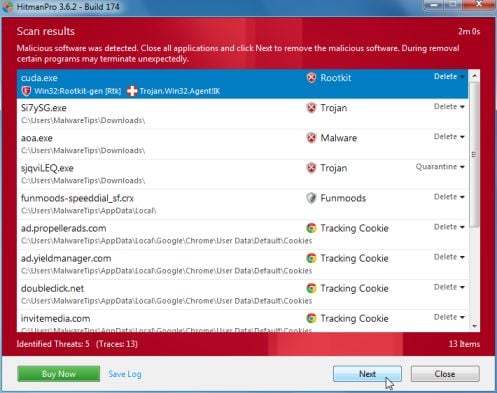
If malware is detected, the program shows what malware is present on the system using a red framed screen as shown below:
hitmanpro-scan-results.jpg

Select Next to quarantine the malware into a secure storage where it can no longer start.


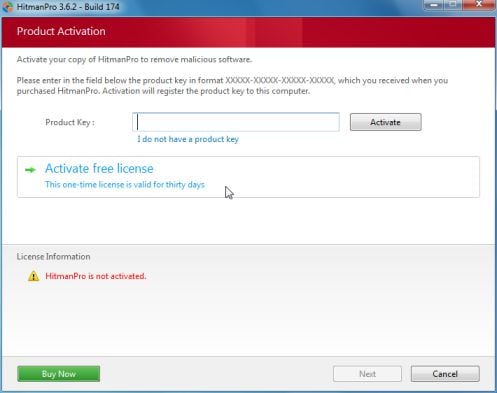
At the next screen, activate the 30-day free license:
hitmanpro-activation.jpg

After a successful activation (30 days), press: Next

A screen indicating that the malware was successfully disabled or removed is presented.
Press: Next


To obtain a report of the scan results, press: Save log
>>Save the Notepad log to the Desktop<<
It has a name such as: HitmanPro_xxxxxxxx_xxxx

Remove the USB pendrive, and press: Reboot
If no malware is found, press: Close

After HitmanPro.Kickstart is done, you should be back into normal Windows.

Please post the HitmanPro log in your reply. <<Important!

 

My Computer My Computer

At a glance

Windows 7 Home Premium
Computer type
PC/Desktop
Computer Manufacturer/Model Number
An ol' eMachines
OS
Windows 7 Home Premium
Internet Speed
Fine for me...I'm retired!
Oh, $#@!. I got the FRST report copied, and then the "Post reply" window told me that there were too many characters in my post, that I had to shorten it.

(I do not have a pendrive, so I opted to try Farbar again. But I couldn't post the report.)
 

My Computer My Computer

At a glance

Windows 7 Home Premium 64-bit, service pack 1Intel box core i5 4460Kingston Hyper X Fury BLK 1866 8GB 4x2
Computer type
PC/Desktop
Computer Manufacturer/Model Number
Custom
OS
Windows 7 Home Premium 64-bit, service pack 1
CPU
Intel box core i5 4460
Motherboard
Asus B85MECSM 1150
Memory
Kingston Hyper X Fury BLK 1866 8GB 4x2
Monitor(s) Displays
Samsung 23" wide-screen
Screen Resolution
1920 X 1080
Hard Drives
WD Passport, 1 TB
Case
Win Z583 Mini Tower w/ USB3.0
Keyboard
Microsoft ergo wave
Mouse
Logitech wireless
Antivirus
Bitdefender; Malwarebytes Pro
Browser
IE11
nottaclue9

Click on Go Advanced button then click on Manage Attachments . Click on Browse . Locate the FRST log click on Ok or Open then click on Upload . Wait until it uploads then close the window and submit your reply .
 

My Computer My Computer

At a glance

Windows 7 Ultimate 32-Bit & Windows 7 Ultimat...Intel Core i7 CPU 950 @ 3.07GHzOCZ 6GB (3 x 2GB) 240-Pin DDR3 SDRAM DDR3 160...ATI Radeon HD 5700 Series
Computer Manufacturer/Model Number
Custom Built
OS
Windows 7 Ultimate 32-Bit & Windows 7 Ultimate 64-Bit
CPU
Intel Core i7 CPU 950 @ 3.07GHz
Motherboard
ASUS P6T DELUXE V2
Memory
OCZ 6GB (3 x 2GB) 240-Pin DDR3 SDRAM DDR3 1600 OCZ3X1600R2
Graphics Card(s)
ATI Radeon HD 5700 Series
Sound Card
OnBoard
Hard Drives
WD6400AACS-00M3B0 (640GB SATA )
PSU
CORSAIR 850w
Case
NZXT LEXA
Cooling
Intel Stock Heatsink Fan
Keyboard
Microsoft Wireless Laser Keyboard 7000
Mouse
Microsoft Wireless Laser Mouse 7000
I don't think it's uploading. How will I know when it's done?


Attachments

My Computer My Computer

At a glance

Windows 7 Home Premium 64-bit, service pack 1Intel box core i5 4460Kingston Hyper X Fury BLK 1866 8GB 4x2
Computer type
PC/Desktop
Computer Manufacturer/Model Number
Custom
OS
Windows 7 Home Premium 64-bit, service pack 1
CPU
Intel box core i5 4460
Motherboard
Asus B85MECSM 1150
Memory
Kingston Hyper X Fury BLK 1866 8GB 4x2
Monitor(s) Displays
Samsung 23" wide-screen
Screen Resolution
1920 X 1080
Hard Drives
WD Passport, 1 TB
Case
Win Z583 Mini Tower w/ USB3.0
Keyboard
Microsoft ergo wave
Mouse
Logitech wireless
Antivirus
Bitdefender; Malwarebytes Pro
Browser
IE11
I have no idea how that appeared, but I'm glad it did. The link kept disappearing when I tried to delete what I'd typed. I am not smart enough to own a computer!!
 

My Computer My Computer

At a glance

Windows 7 Home Premium 64-bit, service pack 1Intel box core i5 4460Kingston Hyper X Fury BLK 1866 8GB 4x2
Computer type
PC/Desktop
Computer Manufacturer/Model Number
Custom
OS
Windows 7 Home Premium 64-bit, service pack 1
CPU
Intel box core i5 4460
Motherboard
Asus B85MECSM 1150
Memory
Kingston Hyper X Fury BLK 1866 8GB 4x2
Monitor(s) Displays
Samsung 23" wide-screen
Screen Resolution
1920 X 1080
Hard Drives
WD Passport, 1 TB
Case
Win Z583 Mini Tower w/ USB3.0
Keyboard
Microsoft ergo wave
Mouse
Logitech wireless
Antivirus
Bitdefender; Malwarebytes Pro
Browser
IE11

My Computer My Computer

At a glance

Windows 7 Ultimate 32-Bit & Windows 7 Ultimat...Intel Core i7 CPU 950 @ 3.07GHzOCZ 6GB (3 x 2GB) 240-Pin DDR3 SDRAM DDR3 160...ATI Radeon HD 5700 Series
Computer Manufacturer/Model Number
Custom Built
OS
Windows 7 Ultimate 32-Bit & Windows 7 Ultimate 64-Bit
CPU
Intel Core i7 CPU 950 @ 3.07GHz
Motherboard
ASUS P6T DELUXE V2
Memory
OCZ 6GB (3 x 2GB) 240-Pin DDR3 SDRAM DDR3 1600 OCZ3X1600R2
Graphics Card(s)
ATI Radeon HD 5700 Series
Sound Card
OnBoard
Hard Drives
WD6400AACS-00M3B0 (640GB SATA )
PSU
CORSAIR 850w
Case
NZXT LEXA
Cooling
Intel Stock Heatsink Fan
Keyboard
Microsoft Wireless Laser Keyboard 7000
Mouse
Microsoft Wireless Laser Mouse 7000

My Computer My Computer

At a glance

Windows 7 Home Premium 64-bit, service pack 1Intel box core i5 4460Kingston Hyper X Fury BLK 1866 8GB 4x2
Computer type
PC/Desktop
Computer Manufacturer/Model Number
Custom
OS
Windows 7 Home Premium 64-bit, service pack 1
CPU
Intel box core i5 4460
Motherboard
Asus B85MECSM 1150
Memory
Kingston Hyper X Fury BLK 1866 8GB 4x2
Monitor(s) Displays
Samsung 23" wide-screen
Screen Resolution
1920 X 1080
Hard Drives
WD Passport, 1 TB
Case
Win Z583 Mini Tower w/ USB3.0
Keyboard
Microsoft ergo wave
Mouse
Logitech wireless
Antivirus
Bitdefender; Malwarebytes Pro
Browser
IE11
nottaclue9

I notice you still have some files left over from the FBI randsom ware virus you had . Lets wait until Cottonball comes on and tells you the next steps .
 

My Computer My Computer

At a glance

Windows 7 Ultimate 32-Bit & Windows 7 Ultimat...Intel Core i7 CPU 950 @ 3.07GHzOCZ 6GB (3 x 2GB) 240-Pin DDR3 SDRAM DDR3 160...ATI Radeon HD 5700 Series
Computer Manufacturer/Model Number
Custom Built
OS
Windows 7 Ultimate 32-Bit & Windows 7 Ultimate 64-Bit
CPU
Intel Core i7 CPU 950 @ 3.07GHz
Motherboard
ASUS P6T DELUXE V2
Memory
OCZ 6GB (3 x 2GB) 240-Pin DDR3 SDRAM DDR3 1600 OCZ3X1600R2
Graphics Card(s)
ATI Radeon HD 5700 Series
Sound Card
OnBoard
Hard Drives
WD6400AACS-00M3B0 (640GB SATA )
PSU
CORSAIR 850w
Case
NZXT LEXA
Cooling
Intel Stock Heatsink Fan
Keyboard
Microsoft Wireless Laser Keyboard 7000
Mouse
Microsoft Wireless Laser Mouse 7000
nottaclue9,

Thanks for the FRST reports.

There are entries showing in them that need removed from your computer.
So, here is what we need to do...

We need to make sure that FRST is on the >>Desktop<<, and not in the Temporary Internet Files Folder where it is now:
Running from C:\Users\xxxx\AppData\Local\Microsoft\Windows\Temporary Internet Files\Content.IE5\JD5UOB86
Otherwise, what we are going to do will not work.


To get FRST on the Desktop, let's delete it, and download a new file, as follows:
Press the Start globe, and in the Search Programs and Files box right above the Start globe, type: FRST
Above it you will see a list with Programs, Documents or Files.
Right-click the FRST icon, and select: Delete
You can also right-click and Delete any Document or File that has FRST in its name.

Now, please download the program once again: Farbar Recovery Scan Tool Download
Select the 32-bit version

When you see the download on the screen, press the drop arrow by Save, and select: Save as...
In the Save as prompt, the blank space right at the top needs to have the Desktop selected.
If there is something else there, click in the space, and use the Backspace key to remove it. Then, type: Desktop
At the bottom of the prompt, press: Save

Now, check the Desktop, and make sure you see FRST there.
If there are any FRST or Addition reports on the Desktop, right-click and: Delete

Double-click FRST to run it once again, and press: Scan

Please post the new FRST.txt that appears on the Desktop.

I will be able to tell if the program is in the right location, and then we will engage in fixing things.
 

My Computer My Computer

At a glance

Windows 7 Home Premium
Computer type
PC/Desktop
Computer Manufacturer/Model Number
An ol' eMachines
OS
Windows 7 Home Premium
Internet Speed
Fine for me...I'm retired!
Life has gotten interesting, so I'll probably wait till the week-end to try this. Just didn't want y'all to think I was being an ingrate; I just need a chunk of time to myself when I can think.
 

My Computer My Computer

At a glance

Windows 7 Home Premium 64-bit, service pack 1Intel box core i5 4460Kingston Hyper X Fury BLK 1866 8GB 4x2
Computer type
PC/Desktop
Computer Manufacturer/Model Number
Custom
OS
Windows 7 Home Premium 64-bit, service pack 1
CPU
Intel box core i5 4460
Motherboard
Asus B85MECSM 1150
Memory
Kingston Hyper X Fury BLK 1866 8GB 4x2
Monitor(s) Displays
Samsung 23" wide-screen
Screen Resolution
1920 X 1080
Hard Drives
WD Passport, 1 TB
Case
Win Z583 Mini Tower w/ USB3.0
Keyboard
Microsoft ergo wave
Mouse
Logitech wireless
Antivirus
Bitdefender; Malwarebytes Pro
Browser
IE11
Whenever you are ready!! ;)

That is fine with us.
 
Last edited:

My Computer My Computer

At a glance

Windows 7 Home Premium
Computer type
PC/Desktop
Computer Manufacturer/Model Number
An ol' eMachines
OS
Windows 7 Home Premium
Internet Speed
Fine for me...I'm retired!
Do you think you can provide the RogueKiller log (RKreport.txt) you provided in Post #18, and instead of an image, copy/paste the text in a reply?

Would like to work with that, and make all this easier for you, if possible.
It would be the easiest thing yo do at this point.
 

My Computer My Computer

At a glance

Windows 7 Home Premium
Computer type
PC/Desktop
Computer Manufacturer/Model Number
An ol' eMachines
OS
Windows 7 Home Premium
Internet Speed
Fine for me...I'm retired!
RogueKiller V8.5.4 [Mar 18 2013] by Tigzy
mail : tigzyRK<at>gmail<dot>com
Feedback : RogueKiller - Geeks to Go Forums
Website : Download RogueKiller (Official website)
Blog : tigzy-RK
Operating System : Windows 7 (6.1.7601 Service Pack 1) 64 bits version
Started in : Normal mode
User : Judy [Admin rights]
Mode : Scan -- Date : 04/26/2013 01:24:43
| ARK || FAK || MBR |
¤¤¤ Bad processes : 0 ¤¤¤
¤¤¤ Registry Entries : 4 ¤¤¤
[RUN][SUSP PATH] HKCU\[...]\Policies\Explorer\Run : aefbfeaead (C:\Users\Judy\AppData\Roaming\ae70f096-0091-4777-bf93-94615e57a0e6ad\aefbfeaead.exe) [-] -> FOUND
[RUN][SUSP PATH] HKUS\S-1-5-21-2438601110-3927464551-1267722977-1000[...]\Policies\Explorer\Run : aefbfeaead (C:\Users\Judy\AppData\Roaming\ae70f096-0091-4777-bf93-94615e57a0e6ad\aefbfeaead.exe) [-] -> FOUND
[HJ DESK] HKLM\[...]\NewStartPanel : {59031a47-3f72-44a7-89c5-5595fe6b30ee} (1) -> FOUND
[HJ DESK] HKLM\[...]\NewStartPanel : {20D04FE0-3AEA-1069-A2D8-08002B30309D} (1) -> FOUND
¤¤¤ Particular Files / Folders: ¤¤¤
[ZeroAccess][FILE] @ : C:\$recycle.bin\S-1-5-21-2438601110-3927464551-1267722977-1000\$e753789c7b028571c64e689ed4db51bd\@ [-] --> FOUND
[ZeroAccess][FOLDER] U : C:\$recycle.bin\S-1-5-18\$e753789c7b028571c64e689ed4db51bd\U --> FOUND
[ZeroAccess][FOLDER] U : C:\$recycle.bin\S-1-5-21-2438601110-3927464551-1267722977-1000\$e753789c7b028571c64e689ed4db51bd\U --> FOUND
[ZeroAccess][FOLDER] L : C:\$recycle.bin\S-1-5-18\$e753789c7b028571c64e689ed4db51bd\L --> FOUND
[ZeroAccess][FOLDER] L : C:\$recycle.bin\S-1-5-21-2438601110-3927464551-1267722977-1000\$e753789c7b028571c64e689ed4db51bd\L --> FOUND
¤¤¤ Driver : [NOT LOADED] ¤¤¤
¤¤¤ Infection : ZeroAccess ¤¤¤
¤¤¤ HOSTS File: ¤¤¤
--> C:\windows\system32\drivers\etc\hosts

¤¤¤ MBR Check: ¤¤¤
+++++ PhysicalDrive0: ST500DM0 02-1BD142 SATA Disk Device +++++
--- User ---
[MBR] 65448ab472fbcfd6f689b590a0e5436e
[BSP] bc8352d5af846e1bd0127f659f7692ae : Empty MBR Code
Partition table:
0 - [XXXXXX] UNKNOWN (0xee) [VISIBLE] Offset (sectors): 1 | Size: 2097151 Mo
User = LL1 ... OK!
User = LL2 ... OK!
+++++ PhysicalDrive1: Lexar USB Flash Drive USB Device +++++
--- User ---
[MBR] 7ff2a1acbc680c812ef961808b542c37
[BSP] 4b8b702b557e3455c4e0f1b634afd5c4 : MBR Code unknown
Partition table:
0 - [XXXXXX] FAT32 (0x0b) [VISIBLE] Offset (sectors): 2192 | Size: 15274 Mo
User = LL1 ... OK!
Error reading LL2 MBR!
Finished : << RKreport[1]_S_04262013_02d0124.txt >>
RKreport[1]_S_04262013_02d0124.txt

I have a feeling this isn't right.
 

My Computer My Computer

At a glance

Windows 7 Home Premium 64-bit, service pack 1Intel box core i5 4460Kingston Hyper X Fury BLK 1866 8GB 4x2
Computer type
PC/Desktop
Computer Manufacturer/Model Number
Custom
OS
Windows 7 Home Premium 64-bit, service pack 1
CPU
Intel box core i5 4460
Motherboard
Asus B85MECSM 1150
Memory
Kingston Hyper X Fury BLK 1866 8GB 4x2
Monitor(s) Displays
Samsung 23" wide-screen
Screen Resolution
1920 X 1080
Hard Drives
WD Passport, 1 TB
Case
Win Z583 Mini Tower w/ USB3.0
Keyboard
Microsoft ergo wave
Mouse
Logitech wireless
Antivirus
Bitdefender; Malwarebytes Pro
Browser
IE11
That's it. :)

Please run RogueKiller once again:

Close all windows and browsers
Right-click RogueKiller and select 'Run as Administrator'
Wait until the Prescan finishes
The Status box shows: PreScan Finished

Press: Scan

When done, on the right, click: Delete
Wait until the Status box shows: Deleting Finished

Click on Report and provide the content of the new Rkreport (Mode: Delete) in your reply.
 

My Computer My Computer

At a glance

Windows 7 Home Premium
Computer type
PC/Desktop
Computer Manufacturer/Model Number
An ol' eMachines
OS
Windows 7 Home Premium
Internet Speed
Fine for me...I'm retired!
So I sat down tonight to try to do the removal procedure when Windows Security Essentials sent me a red pop-up saying that it had detected suspicious items and that my computer needed to be cleaned. So I clicked on the proper button and then restarted as instructed. I then had a red window in the center of my screen (not lower right-hand like the first warning) that listed these three threats:

Trojan.PSW.Win32launch
HacToolWin32/Welevate.A
Adware.Win32.Fraud

Again, I was told I needed to clean my computer. But when I clicked on the button, I got the ribbon notice at the bottom of my screen, telling me that running the program would harm my computer. I didn't know whether to trust anything that had happened, and I didn't feel safe going on line to contact you guys, so I ran a full Malware Bytes scan. It detected two items:

Trojan.agentKB
Trogan.agentKD

Meanwhile, there has been activity I didn't allow on my third credit card in the last two months. I am about to give up, as dealing with this and the fallout from it has taken immense amounts of my time and made me really paranoid. I am ready to drop-kick the HP over my back fence & get a Mac.
 

My Computer My Computer

At a glance

Windows 7 Home Premium 64-bit, service pack 1Intel box core i5 4460Kingston Hyper X Fury BLK 1866 8GB 4x2
Computer type
PC/Desktop
Computer Manufacturer/Model Number
Custom
OS
Windows 7 Home Premium 64-bit, service pack 1
CPU
Intel box core i5 4460
Motherboard
Asus B85MECSM 1150
Memory
Kingston Hyper X Fury BLK 1866 8GB 4x2
Monitor(s) Displays
Samsung 23" wide-screen
Screen Resolution
1920 X 1080
Hard Drives
WD Passport, 1 TB
Case
Win Z583 Mini Tower w/ USB3.0
Keyboard
Microsoft ergo wave
Mouse
Logitech wireless
Antivirus
Bitdefender; Malwarebytes Pro
Browser
IE11
Back
Top