Is temp folder locked down for non UAC applications??

Imrankhan

Enthusiast
Power User
VIP
Local time
11:35 PM
Messages
206
Location
Chennai, India
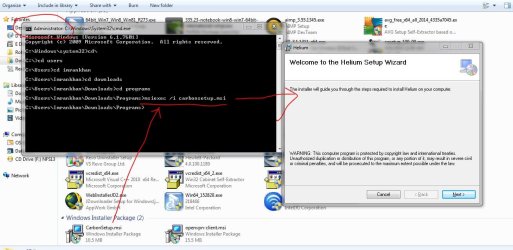
I think windows locked the temp folder from being accessed by any program without admin rights.
When opening a file from an archive with Winrar, it just get extracted in the same folder before it is opened.
admin1.JPG
But goto WinRAR and File properties and then enable Run as Administrator in Compatibility settings. Everything works normal.
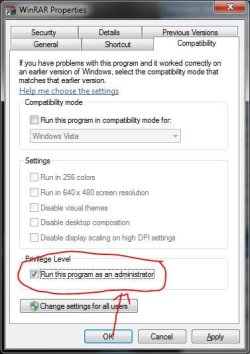
admin2.JPG
The file is extracted in Temp folder before getting opened.
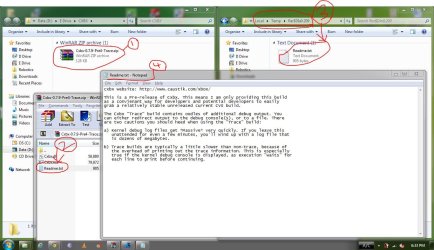
admin3.JPG

And also, MSI installers are shows up error until they are run as administrators through CMD. We know msi installers gets extracted in temp folder and then installs.
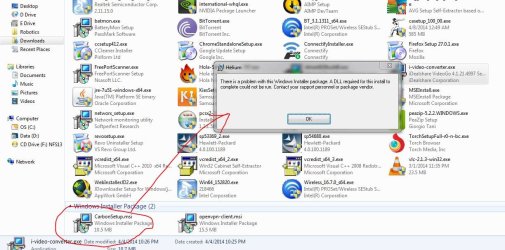
admin4.JPG
admin5.JPG

This has been happening since last one week. So My question is this. Did Windows stopped programs from accessing temp folder without admin rights. Is it time to disable UAC. Will Diasbling UAC affect system security.
 

My Computer My Computer

Computer type
Laptop
Computer Manufacturer/Model Number
Dell XPS L502x
OS
Windows 7 Home Premium 64bit
CPU
Intel Core i7 2670QM
Motherboard
Intel HM67 Mobile Express Chipset
Memory
Samsung 8GB 1333Mhz
Graphics Card(s)
nVidia Geforce 540M GT 2GB
Sound Card
Realtek High Definition Audio
Monitor(s) Displays
15.6" Dell Standard RGB-LED Backlit Display
Screen Resolution
1366x768
Hard Drives
Seagate Momentus 2.5" 750GB HDD 5400rpm
Internet Speed
3.1 Mbits/s
Antivirus
AVG Free, Kaspersky
Browser
Google chrome
UAC does protect folders. Well kind of. It protects the C/windows program files directory.


The types of actions that require elevation to administrator status (and therefore display a UAC elevation prompt) include those that make changes to system-wide settings or to files in %SystemRoot% or %ProgramFiles%. Among the actions that require elevation:

  • Installing and uninstalling applications
  • Installing device drivers
  • Installing ActiveX controls
  • Installing Windows Updates
  • Changing settings for Windows Firewall
  • Changing UAC settings
  • Configuring Windows Update
  • Adding or removing user accounts
  • Changing a user’s account type
  • Configuring Parental Controls
  • Running Task Scheduler
  • Restoring backed-up system files
  • Viewing or changing another user’s folders and files


UAC strips the administrator SID from a user's access token reducing him to a regular restricted ("normal") user. Applications can request elevation via manifests - then the entire process runs with the admin token.
If folders are not writeable with UAC enabled that means that NTFS security is set so that normal users cannot write but administrators can. As a remedy either change the permissions on those folders or run your application elevated (or redesign it so it writes to locations normal users have access to).
If you mean UAC virtualization (redirection of write attempts from system areas into the user profile): here is a good description of the feature from which I have copied the following:

  • Virtualization is only enabled for:
    • 32 bit interactive processes
    • Administrator writeable file/folder and registry keys
  • Virtualization is disabled for:
    • 64 bit processes
    • Non-interactive processes
    • Processes that impersonate
    • Kernel mode callers
    • Executables that have a requestedExecutionLevel


Sources:

http://stackoverflow.com/questions/6372383/get-list-of-folders-protected-by-uac

http://en.wikipedia.org/wiki/User_Account_Control


And my experience.
 

My Computer My Computer

Computer type
PC/Desktop
Computer Manufacturer/Model Number
Custom Built
OS
Windows 10 Pro
CPU
AMD Ryzen 5 2400G Processor with Radeon RX Vega 11 Graphics
Motherboard
ASRock X470 Master SLI/AC AM4 AMD Promontory X470 SATA 6Gb/s
Memory
G.SKILL Ripjaws V Series 16GB (2 x 8GB) 288-Pin DDR4 SDRAM D
Graphics Card(s)
2047MB NVIDIA GeForce GTX 1060 6GB (EVGA)
Sound Card
Motherboard Built in
Monitor(s) Displays
Acer R240HY bidx 23.8-Inch IPS HDMI DVI VGA (1920 x 1080) Wi
Screen Resolution
1920 x 1080
Hard Drives
1TB Sandisk SSD PLUS (Main drive)
500 GB Seagate 7200 RPM (Games)
500 GB Western Digital 7200 RPM (Virtual Machines)
PSU
CORSAIR TX Series TX650M 650W 80+ Gold Modular Power Supply
Case
CORSAIR CARBIDE SPEC-02 Mid-Tower Gaming Case, Red LED Fan
Cooling
220mm, two 120mm, and four 60mm fans
Keyboard
Wired Dell keyboard
Mouse
Wireless Logitech mouse
Internet Speed
250mb down, 30mb up
Antivirus
Panda Cloud Antivirus
Browser
Chrome-ish x64
Other Info
Your awesome for reading this.
The temp folder is user-specific and therefore, it always has full control from its owner, so no, there is no need to elevate to read or write to temp. Take a look on the permissions on it. It might be possible that they've been modified from their defaults, thus giving problems to non-elevated programs.
 

My Computer My Computer

Computer type
Laptop
Computer Manufacturer/Model Number
Toshiba Sattelite A665-S6092
OS
Windows 7 Ultimate x64
CPU
Intel Core i7-740QM
Memory
8 GB DDR3
Graphics Card(s)
NVIDIA GeForce 330GT
Screen Resolution
1366x768
Hard Drives
Samsung 840 SSD 500GB
1TB USB3 external HD
Cooling
Coolermaster Notepal U3 notebook cooling pad
Internet Speed
3mbps ASDL
Antivirus
ClamWin 0.98.7
Browser
Opera 12.17 x86 (main), Firefox 38 (sec), IE11 (last resort)
Back
Top